

We have an honest review policy, but this page contains affiliate links. If you buy through these, we may earn a commission. This helps fund our research at no cost to you.
In this BigCommerce vs Shopify shootout, I walk you through the key pros and cons of both platforms and help you determine which one is right for you. I also highlight some key alternatives to both solutions.
The quick verdict
BigCommerce and Shopify are two of the most powerful ecommerce platforms available. However, Shopify is the better choice for most merchants, thanks to its broader feature set, much larger theme and app ecosystem, and stronger international selling tools. It also has a considerably bigger user base than BigCommerce, and this effectively makes it a safer bet for the long term (while tens of thousands of merchants use BigCommerce, millions use Shopify).
BigCommerce does have some edges over Shopify — in the form of its native multi-storefront capabilities, reduced reliance on apps for core features, and a more flexible approach to headless commerce — but overall, Shopify easily wins this battle.
Getting started with BigCommerce and Shopify
I’ll begin my full comparison with a bit of background about both platforms.
BigCommerce and Shopify: some background
BigCommerce and Shopify are two ‘hosted’ ecommerce solutions that run in a web browser.
This means that:
- you don’t need to install any software to use them
- you don’t need to buy any hosting for them
- you can access and manage your store from anywhere (so long as you have access to the internet).
Significantly, both tools technically let you build an online store without needing to code anything. You pick a template from the range provided, upload your products, set your prices and you are — in theory, at least — good to go.
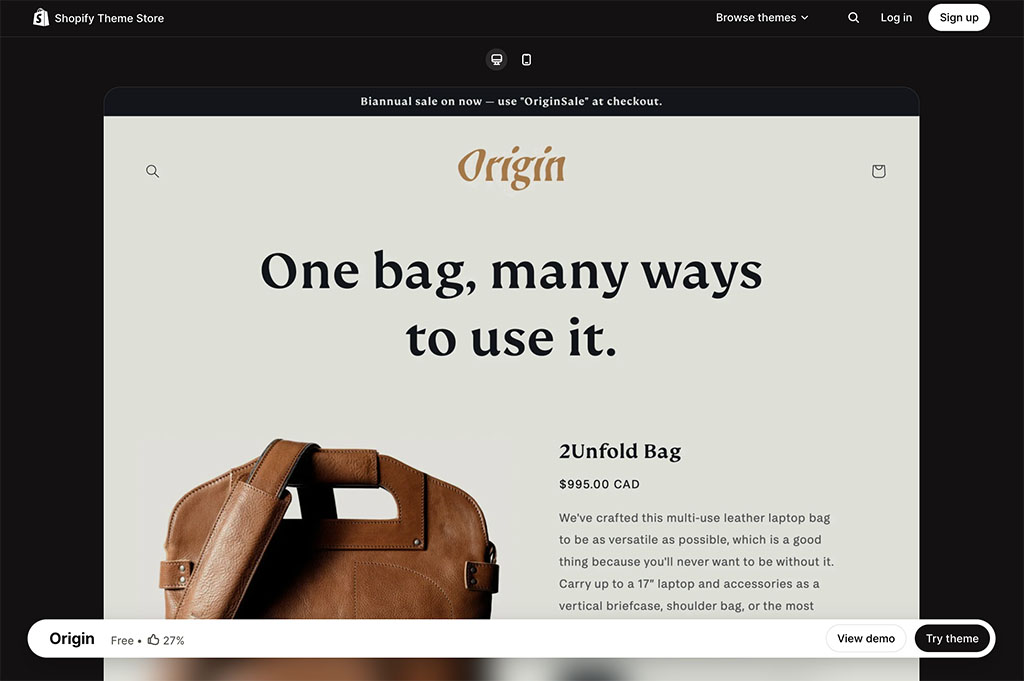
That said, access to your site’s code is provided by both platforms too, so if you want to use code to create a ‘bespoke’ store — or add custom features — this is possible with either.
Of the two platforms, Shopify has by far the bigger user base — over 6.9 million websites are currently powered by the platform (source: Ecommercetrix), while BigCommerce powers around 36,200 (source: BuiltWith.com).
Shopify has been around longer too — while BigCommerce was founded in 2009, Shopify arrived on the scene three years earlier in 2006.
Now let’s move on to discussing BigCommerce and Shopify’s features — starting with a look at the visual side of things.
Templates
BigCommerce and Shopify templates come in two flavors, free and paid. Let’s look at each in turn.
Free templates
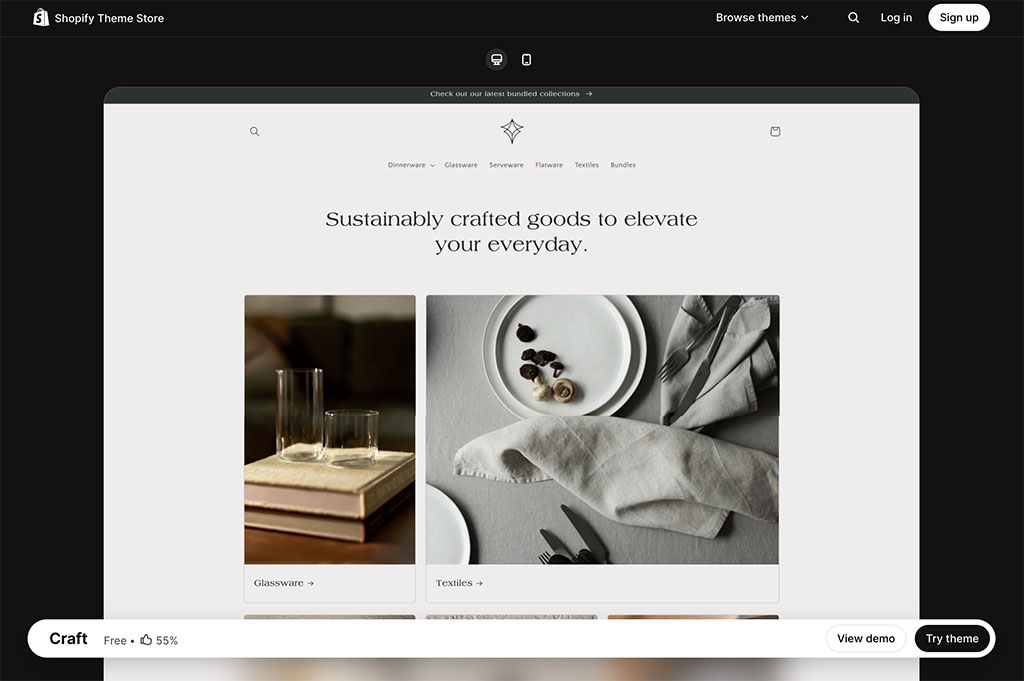
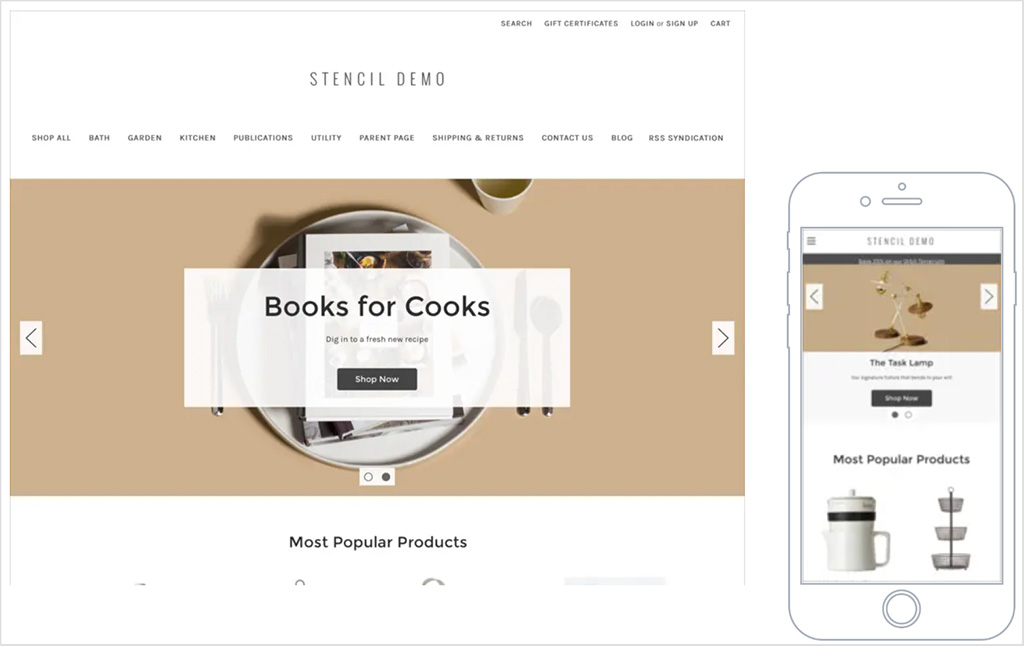
By comparison to some other ecommerce and website building platforms, Shopify and BigCommerce provide quite a small selection of free themes — just 24 and 12 free templates respectively.
When you select a BigCommerce template, you’ll find that there are a few different variations to choose from, so BigCommerce theoretically gives you more choice in the free template department than the above numbers might initially suggest.
However, when comparing both platforms’ themes, I was struck by the fact that the Shopify ones differ from each other in a much more significant way than the BigCommerce ones. Several of the BigCommerce free themes can only be distinguished from each other by the fact that slightly different colors are used in them (see my screenshot below for an example of what I mean here).
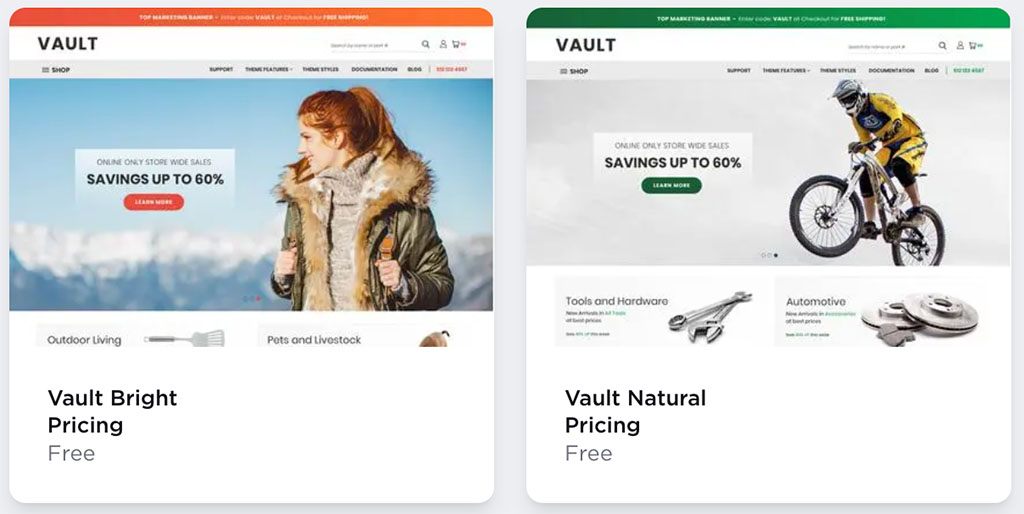
You could in fact argue that so great are the similarities between the free BigCommerce themes that there are only five free themes on offer — not 12!
💡 Take a look at templates:
Ultimately from a design point of view I prefer the aesthetics of the free Shopify themes; they look a bit slicker and are more distinct from each other in appearance, too.
This is a pretty subjective area however — and the themes provided by BigCommerce are definitely professional and contemporary in appearance. In truth, I’d be happy to use either set of free themes as a starting point for an ecommerce project.
Paid templates
In addition to the free templates discussed above, you can also buy a ‘premium’ theme from BigCommerce or Shopify.
- BigCommerce currently provides 219 paid themes, which cost between $99 and $420.
- Shopify currently offers 1,197 paid templates, which range from $100 to $500 in price.
Although the above numbers seem to imply that there is a greater choice of paid themes available from BigCommerce, it’s worth sounding a note of caution here — as with BigCommerce’s free templates, many of its premium themes look rather similar to each other.
This is fairly evident in the BigCommerce template names too. For example, BigCommerce’s. ‘Manifest Jewelry’, ‘Manifest Home’, ‘Manifest Apparel’ and ‘Manifest Build’ themes are all positioned as being separate templates — but in truth they are effectively variants of the same one.
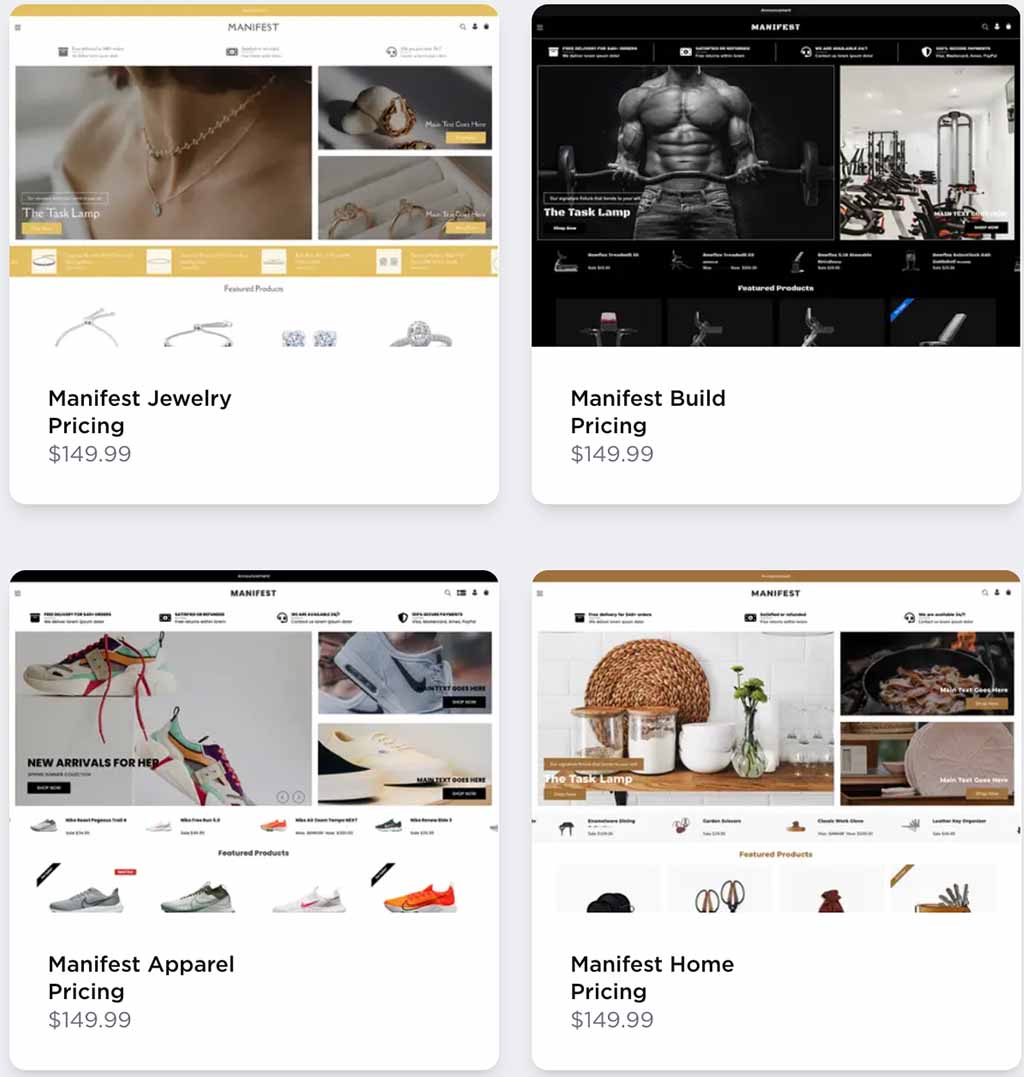
By contrast, the paid-for Shopify themes are considerably more distinct from each other, and some themes come in a selection of variants which are — again — more obviously different from each other than the BigCommerce ones.
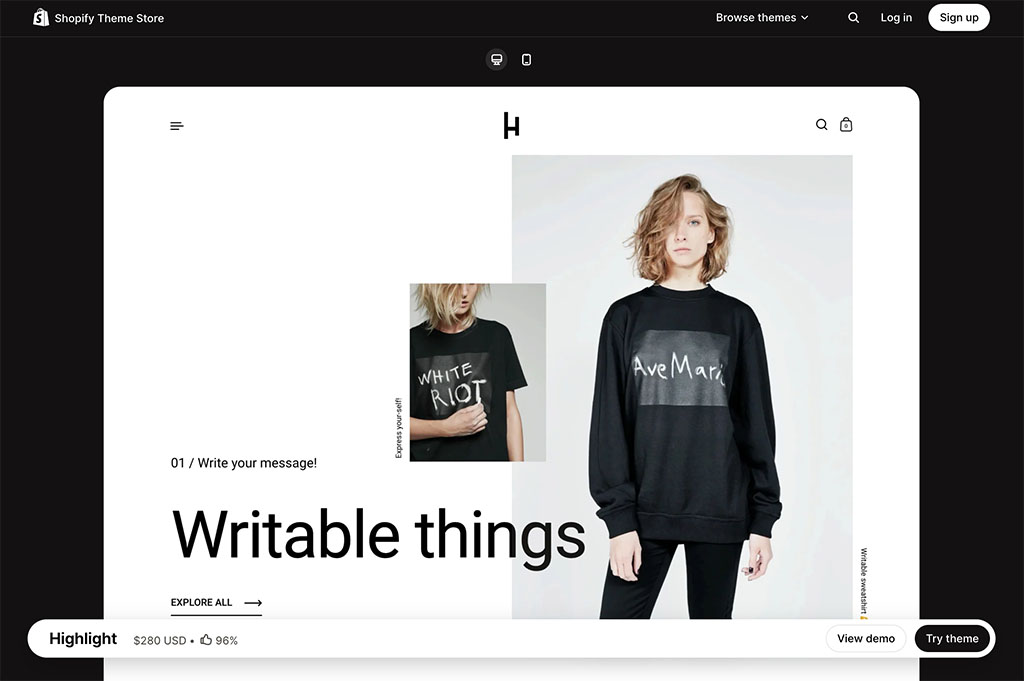
Ultimately for me, the Shopify offering when it comes to ‘out-of-the-box’ templates is stronger than BigCommerce’s — and better value too.
But don’t forget: if you’re not entirely happy with your chosen theme, there’s always the option to customize it. So, let’s take a look at how you can do that.
Customizing themes
When it comes to editing your themes, both BigCommerce and Shopify provide a drag-and-drop interface to help you lay out content on store pages.
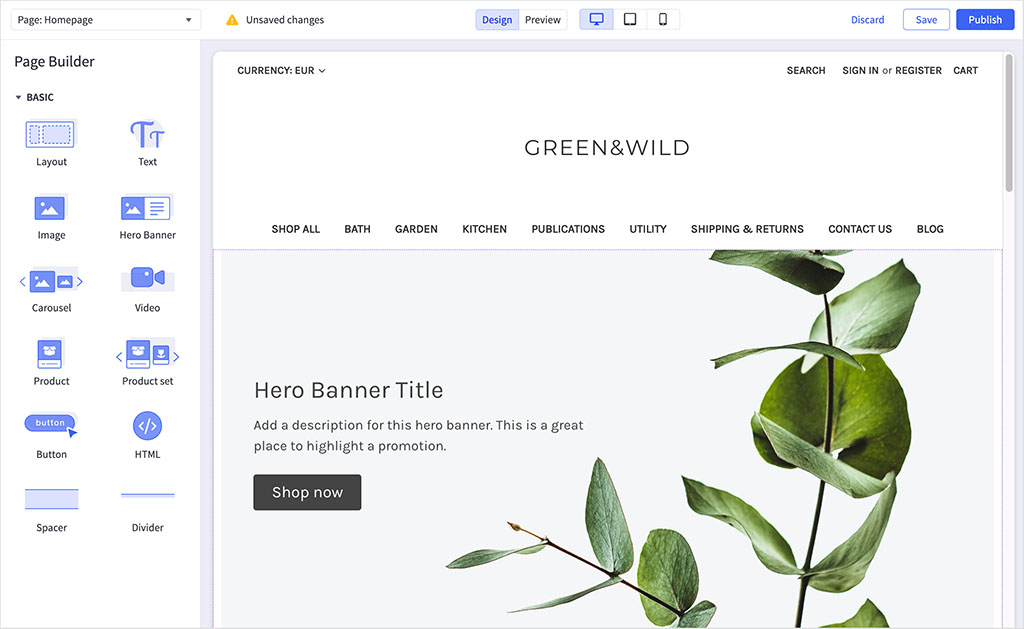
Now, the Shopify and BigCommerce drag-and-drop editors are fairly similar in quality — but Shopify’s lets you work with more types of content blocks. When testing both interfaces, I found that Shopify’s page builder let me add e-newsletter signup forms, contact forms and blog post strips to my content — but BigCommerce’s didn’t.
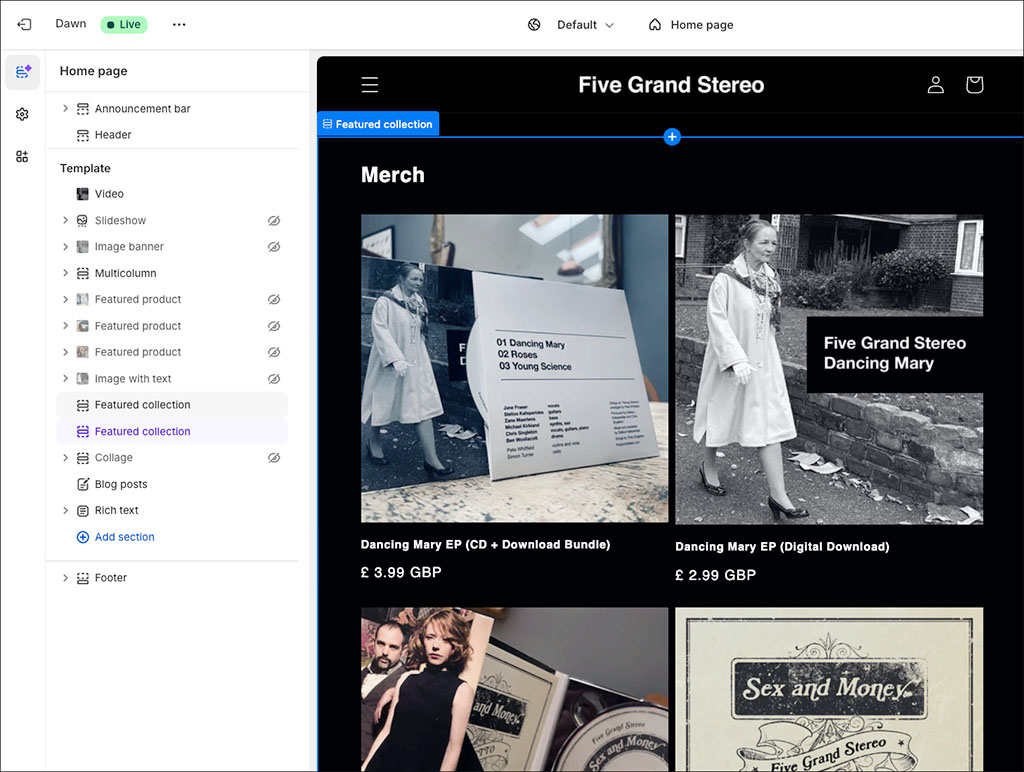
However, the Shopify page builder works in a rather unintuitive way. Instead of letting you drag and drop content into your pages, it lets you drag and drop elements around page templates, which are then applied to pages. Confusingly, the page content itself has to be edited using an old-fashioned WYSIWYG editor!
By contrast, BigCommerce’s drag-and-drop editor lets you edit any type of page content.
Now, one thing that I found much easier to tweak in Shopify themes was typefaces. Shopify comes with a large range of built-in fonts (a mixture of web-safe fonts, Google Fonts and licensed fonts from Monotype) — and you can use any of these in the free templates provided.
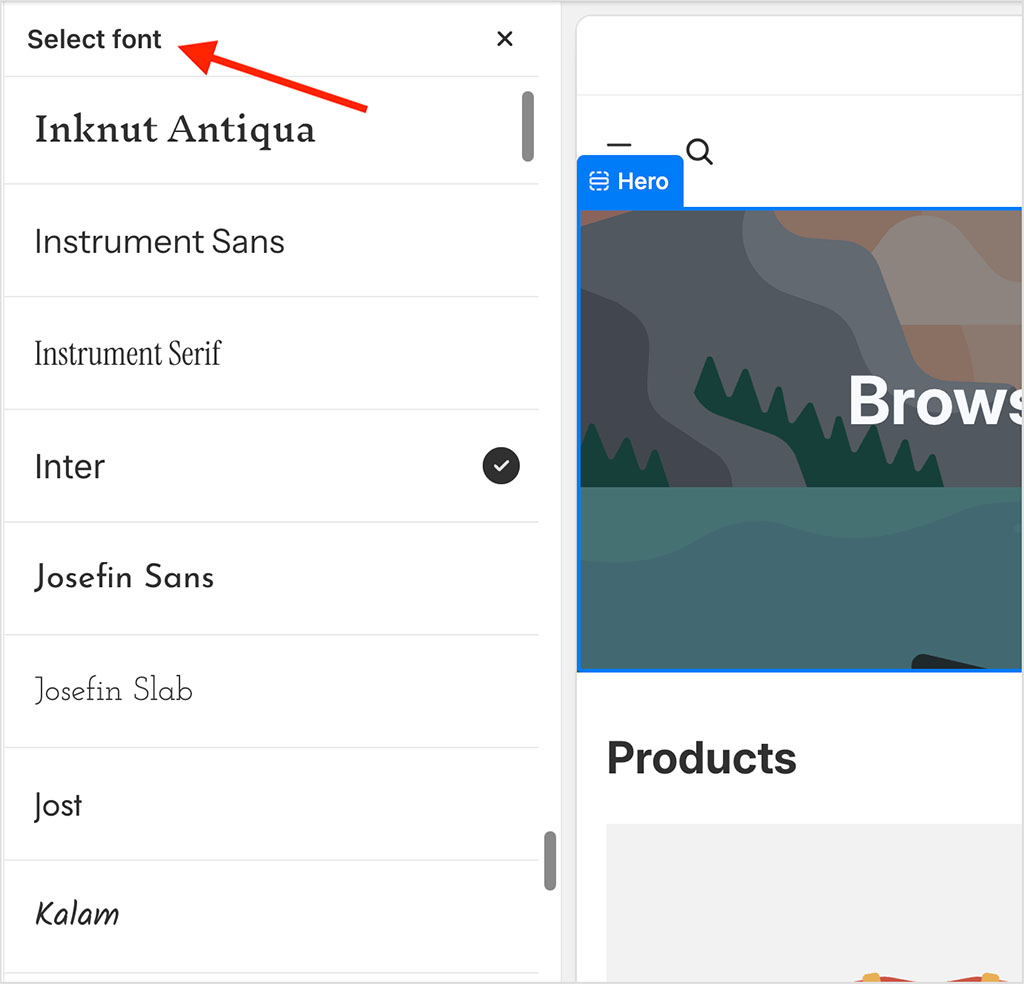
In BigCommerce, by contrast, the range of web fonts included with each of the free themes can be very limited. For example, when trying out the popular ‘Cornerstone Light’ theme, I was frustrated to discover that it includes just three web fonts (see screenshot below).

So, you may find yourself having to manually install other fonts to enhance the look and feel of a template, or to make it meet your brand guidelines. (And when building BigCommerce sites, I’ve found this a very fiddly thing to do.)
Another thing that’s missing in some BigCommerce templates is the ability to show or hide site components easily — this is much easier to do in Shopify.
Finally, both BigCommerce and Shopify let you customize their templates quite extensively, because they give you full access to your site’s HTML / CSS code. This differentiates them from competing platforms like Squarespace and Wix, which don’t.
Interface and ease of use
Shopify and BigCommerce are straightforward to use — both feature a simple, user-friendly content management system (CMS). Their interfaces are relatively similar in appearance and work in a similar way too.
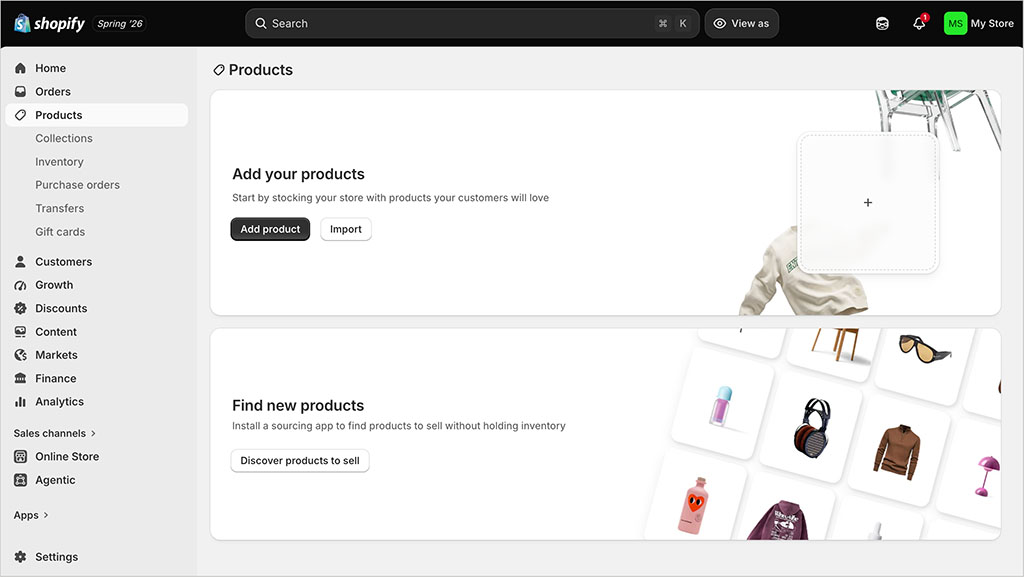
In both platforms you use a menu on the left-hand side to choose what you’d like to do (add some content, view orders, take a look at reports, etc.) and the right-hand side of the screen allows you to view data or upload / edit content accordingly.
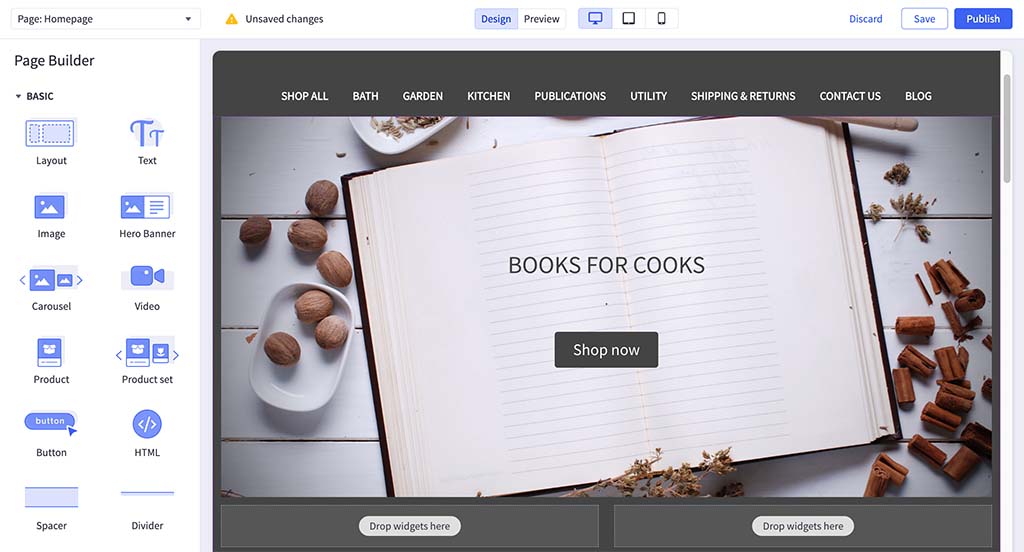
Both content management systems are not terribly dissimilar from those of WordPress and Squarespace — if you’ve used either of those popular content management systems before, you’ll be on familiar ground with either Shopify or BigCommerce.
As discussed earlier, I found Shopify’s drag-and-drop editor a bit confusing to use, because you can only use it to edit templates, not actual pages.
But all in all, both platforms’ content management systems are pretty easy to use — and neither should present too much of a learning curve, especially if you’ve used a CMS before.
While you’re here, check out our store builder finder tool

Our store builder finder tool helps you find the right ecommerce platform for your needs. Simply answer a few questions about your requirements and get a personalized recommendation that’s right for you.
Product management
Importing and exporting products
Both BigCommerce and Shopify let you import product data using a CSV file.
In terms of exporting your data, Shopify allows you to export to CSV format. BigCommerce is more flexible in that it allows you to export to both CSV and XML. So I’d give a slight win to BigCommerce here.
BigCommerce and Shopify aren’t great when it comes to importing or exporting other types of content however — I couldn’t find an obvious or easy way to import or export blog posts and static pages using either platform.
(That said, third-party apps can help in this regard — more on apps shortly).
Product categories
Most online stores use different product categories or ‘catalogs‘ to present products — for example, on a guitar-related store you might expect to find categories containing electric guitars, acoustic guitars, plectrums, straps, amplifiers and so on.
Setting up collections in both Shopify and BigCommerce is straightforward enough, but Shopify’s approach is, in my view, the stronger one. Alongside manually assigning products to collections, Shopify lets you create automated collections that populate themselves based on rules you define. Better still, Shopify now lets you combine automated and manual merchandising within the same collection, giving you much more flexibility than was previously possible.
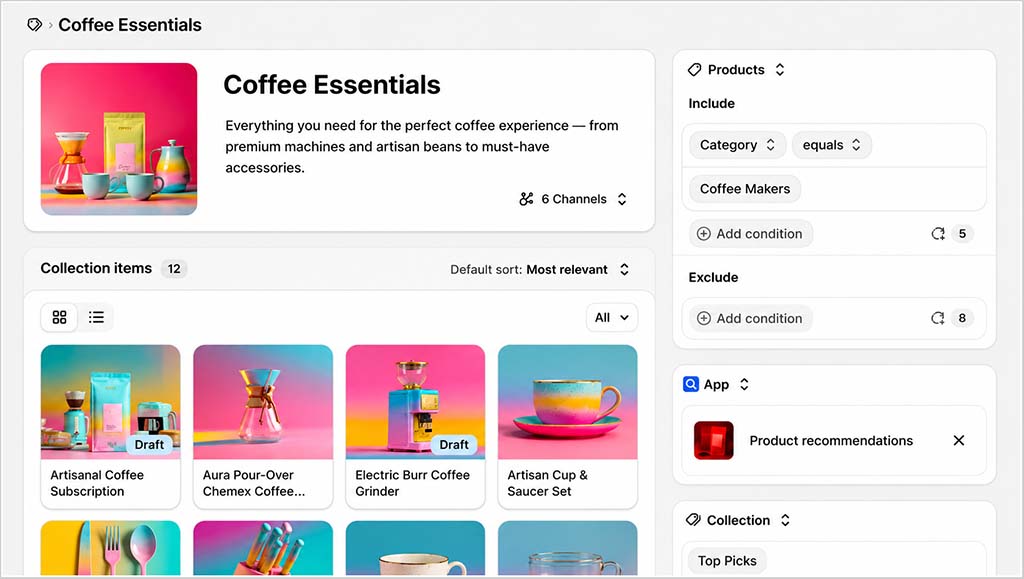
Creating an automated collection simply involves defining one or more conditions based on product attributes such as the title, product type, vendor, tags, price, inventory level or weight.
For example, you could create a collection that automatically includes every product tagged ‘Electric Guitar’, or one that displays all products from a particular brand, under a certain price, or currently in stock. As soon as a product meets your chosen conditions, Shopify adds it to the relevant collection automatically.
The ability to combine automated and manual merchandising is particularly useful too. You might choose to have a collection populated automatically with all your electric guitars, while manually adding a limited-edition model that doesn’t meet your usual criteria, or removing a product you don’t want featured. This gives you much finer control over how your collections are presented without having to alter your automation rules.
Overall, Shopify’s collections system can save a huge amount of time if you’re managing a large product catalogue, because you don’t have to keep manually sorting new products into the correct collections. As long as you apply product tags and other details consistently, Shopify handles most of the organisation for you.
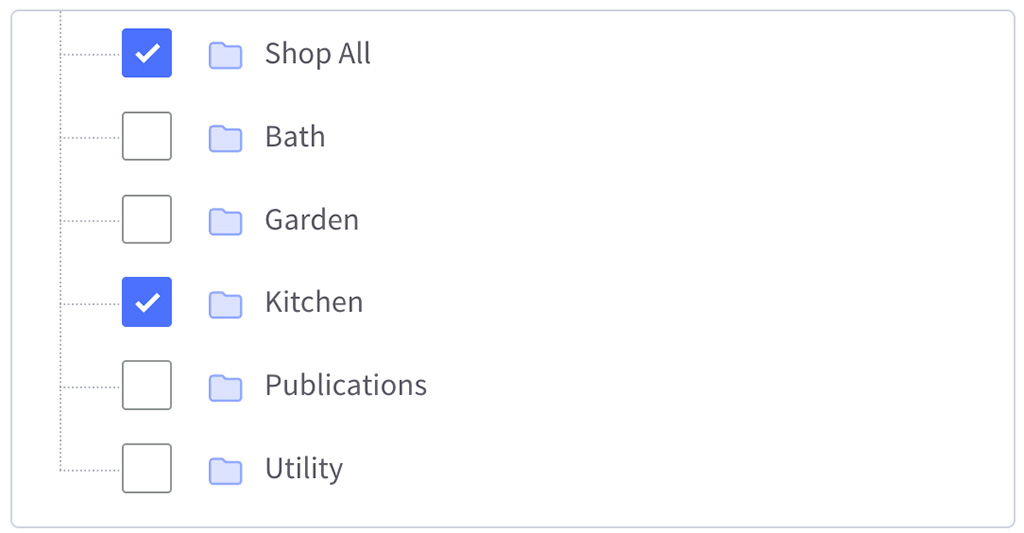
BigCommerce also lets you assign products to categories and includes bulk editing tools to speed up the process. However, I couldn’t find an equivalent feature that automatically populates categories based on rules or lets you combine automated and manual merchandising within the same category, giving the overall edge for product organisation to Shopify.
Product options and variants
In ecommerce, product options are the attributes associated with a product — for example, color, size or material, and a product variant refers to a product that combines specific product options.
So, for example, a large blue suede shoe would be one product variant; a small red leather one would be another, and so on.
With Shopify, you’re limited to offering customers three sets of options per product — for example, color, size or material.
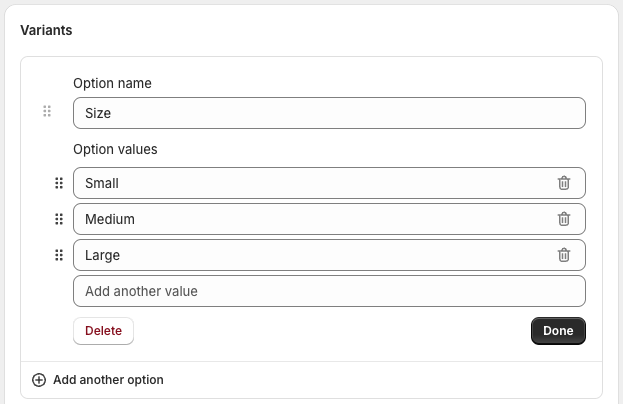
It’s very easy to set these options up in Shopify — but also rather frustrating if you need to sell products that come in more than three versions. A workaround exists in the form of apps that give Shopify merchants access to unlimited product options and variants (‘Infinite Product Options’ being a popular choice), but these come at a cost.
BigCommerce, on the other hand, allows you to create a lot of product options — up to 250 in total. So, if your products come in all shapes, colors and sizes, you will get the flexibility from BigCommerce out-of-the-box.
On the flip side, the product variant limits are much more generous in Shopify. You can work with up to 2,048, while BigCommerce limits you to 600.
So, it’s a case of ‘swings and roundabouts’ here — with BigCommerce arguably winning when it comes to general built-in capabilities, but Shopify proving more flexible in the long run thanks to the availability of apps for the platform that give you access to unlimited product options and variants.
Text fields and file uploads
Some merchants will require their customers to enter custom product data at the point of purchase — for example, a jeweller might ask a customer to enter some text for an inscription on a pendant; an artist might want a dedication for a signed print and so on.
Facilitating this is possible with both BigCommerce and Shopify, but it’s significantly easier to set up custom data capture with BigCommerce — you just add a text field as an option to your product.
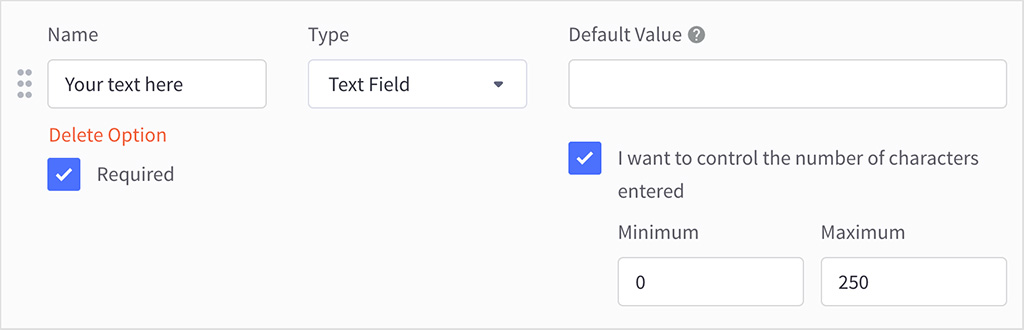
To do this in Shopify, you’ll need to add a piece of code to your template (to extract a ‘line item property’) or spend money on an app to take care of this.
A similar situation exists with file uploads. If you’re selling photography or clothing related products that require the customer to upload an image, you’ll find that this functionality is included out-of-the-box with BigCommerce — but with Shopify, you’ll again have to resort to a bit of coding or a third-party app.
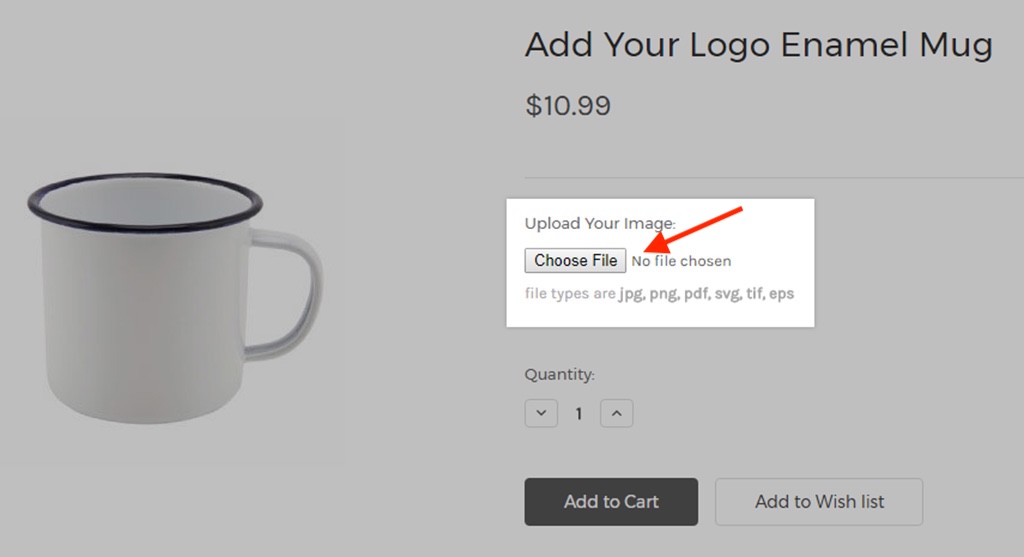
So it’s a definite win for BigCommerce over Shopify here — merchants who need to collect custom data from customers in order to personalize products will find things much more straightforward (and cheaper!) with BigCommerce.
‘Buy Buttons’ in Shopify and BigCommerce
Unlike most competing ecommerce solutions, Shopify and BigCommerce both provide ‘Buy buttons’ that allow you (and others) to sell your products on other websites.
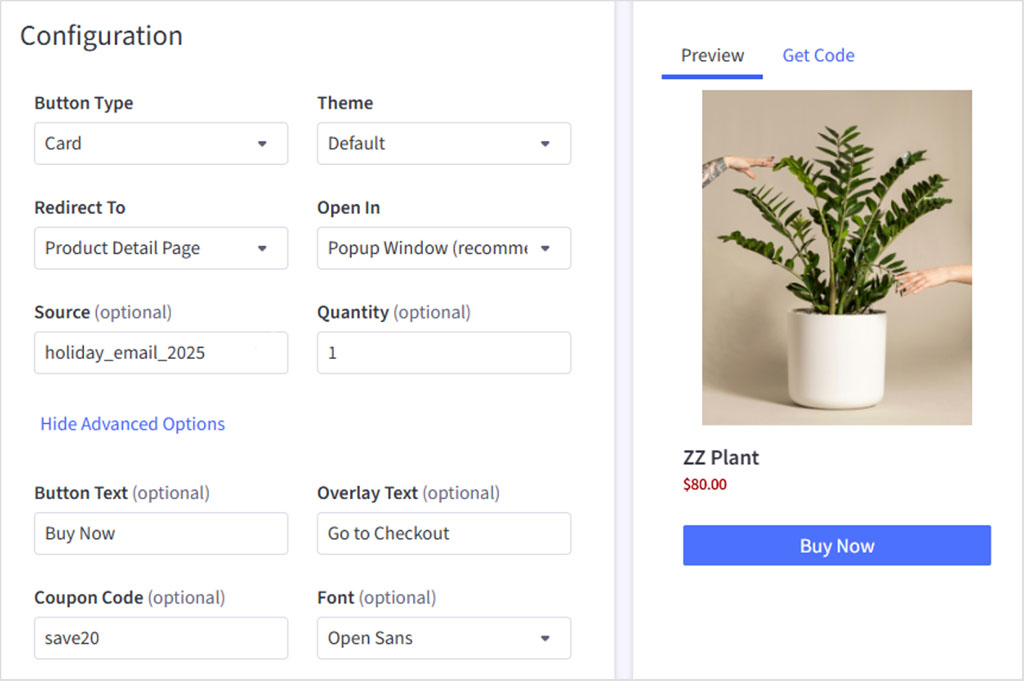
With Shopify, it’s a case of grabbing some code from the buy button ‘sales channel’ which you can then add to another blog, website, social media profile, etc.
In BigCommerce, you have to install the ‘Buy button’ app first, but it’s a similar process after that.
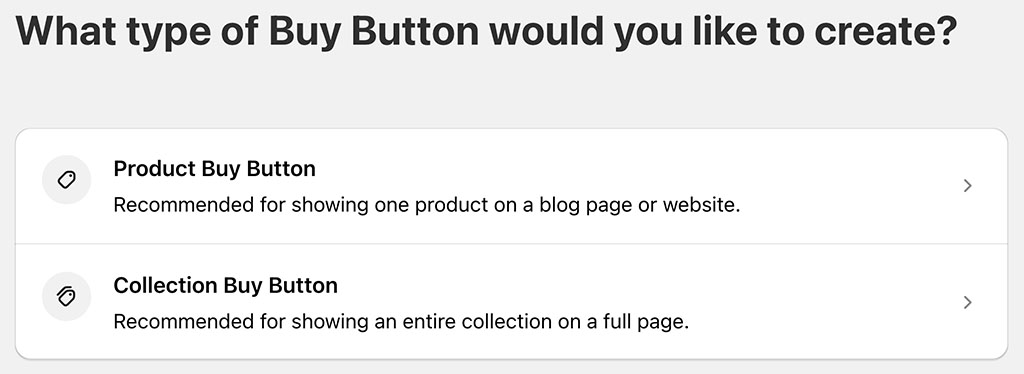
Shopify’s ‘Buy Button’ is slightly better than BigCommerce’s in one key respect, however: not only can you use it to embed individual products, but you can also use it to embed whole catalogs.
But BigCommerce’s ‘Buy Button’ is better for selling in different currencies, however — if you have multi-currency functionality enabled, your product’s price and your checkout will automatically appear in the correct local currency. Shopify’s buy button doesn’t currently do this.
Inventory management
With Shopify, you can house your inventory in up to 10 different locations on its ‘Basic,’ ‘Grow’ and ‘Advanced’ plans (the entry-level ‘Starter’ plan limits you to just two, and ‘Shopify Plus’ lets you use 200).
Your inventory locations in Shopify can be retail outlets, warehouses, pop-up stores or any other place where you store products (you can also define dropshipping suppliers as ‘locations.’).
To ensure that your inventory quantities are always accurate, online orders and in-person sales are assigned to your defined locations. If some of your products are out of stock at one location, but in stock at another one, Shopify will split the order so that it can be fulfilled from multiple locations.
BigCommerce comes with a similar inventory management feature, but the number of locations you can manage is much smaller, with the location limits per plan being as follows:
- Core: up to 4 locations
- Growth: up to 5 locations
- Scale: up to 8 locations
- Performance: negotiable
So when it comes to inventory management, the better-value tool is Shopify.
Shipping options
Both BigCommerce and Shopify allow you to set up a variety of shipping rules and rates, including:
- free shipping rates
- flat rates
- price-based rates
- weight-based rates
- calculated (‘real time’) shipping rates from third-party carriers.
I’d argue that BigCommerce has an edge, however, when it comes to third-party real-time shipping rates — you can access this functionality on any of its plans, whereas with Shopify this is only available by:
- paying monthly for an ‘Advanced Shopify’ or ‘Shopify Plus’ plan;
- paying for a ‘Grow’ plan on an annual basis
- subscribing to a monthly ‘Grow’ plan and paying an additional monthly fee.
However, if you’re based in Australia, Canada, Germany, France, Italy, Spain, the UK or the US and happy to work with a carrier that partners with Shopify (see table below for the available options), you can provide real-time carrier quotations on any Shopify plan, via its ‘Shopify Shipping’ service.
| Fulfillment location | Available shipping carriers for Shopify |
|---|---|
| United States | FedEx, USPS, UPS (not available in Puerto Rico), DHL eCommerce (continental US only), DHL Express (continental US only) |
| Canada | Canada Post, DHL Express, Purolator, UPS |
| Australia | Australia Post |
| United Kingdom | Evri, DPD, Yodel, Royal Mail, DHL Express Europe |
| France | Colissimo, Mondial Relay, Chronopost, DHL Express Europe |
| Italy | Poste Italiane, BRT, DHL Express Europe |
| Spain | Correos, SEUR, DHL Express Europe |
| Germany | DHL Paket. DHL Express Europe |
What’s more, you can avail of generous discounts on shipping costs by doing so. This service — “Shopify Shipping” — is available on all plans and the discounts provided by it can be quite generous (allowing you to save up to 88% on shipping).
Although there’s no direct equivalent for this built-in, discounted shipping service in BigCommerce, third-party solutions exist that give you ways to enhance or automate your shipping offering and offer your customers cheaper shipping rates. These are available from the BigCommerce app store.
Download our free Shopify Startup Kit
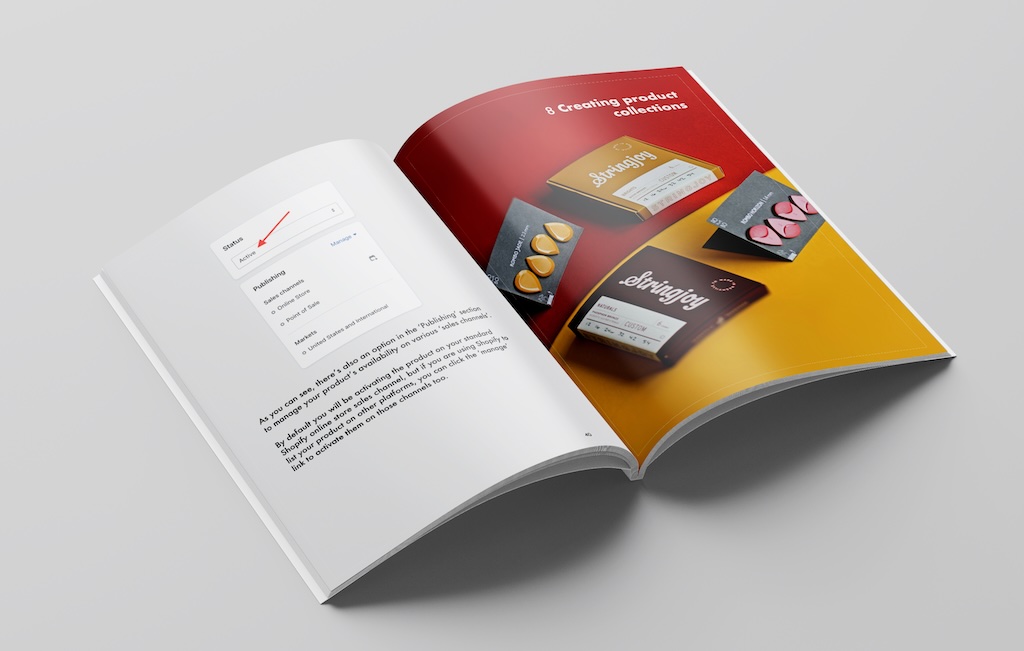

Our free Shopify Startup Kit is a must for anyone thinking of building an online store with Shopify. Containing a comprehensive e-book on starting a Shopify store, video tutorials, PDF cheatsheets and much more, it’s packed full of practical advice on how to get a Shopify business off the ground. It’s available for free to Style Factory readers — but for a limited time only.
Dropshipping in Shopify vs BigCommerce
Dropshipping is a fulfillment method where you don’t keep what you’re selling in stock — instead, you take an order, pass it on to a supplier and they send the goods to the client. Your online store, in effect, becomes a ‘front end’ or ‘middleman’ for somebody else’s business.
Online retailers like this model because it gives them a low-cost way to start a business — you don’t have to spend a lot of money buying or manufacturing goods before you start selling.
Dropshipping is not without its downsides however — profit margins tend to be quite low due to intense competition in the dropshipping marketplace. And it can be hard to find ethical suppliers of goods — lots of dropshipping suppliers ship goods that are manufactured in areas where working conditions are poor.
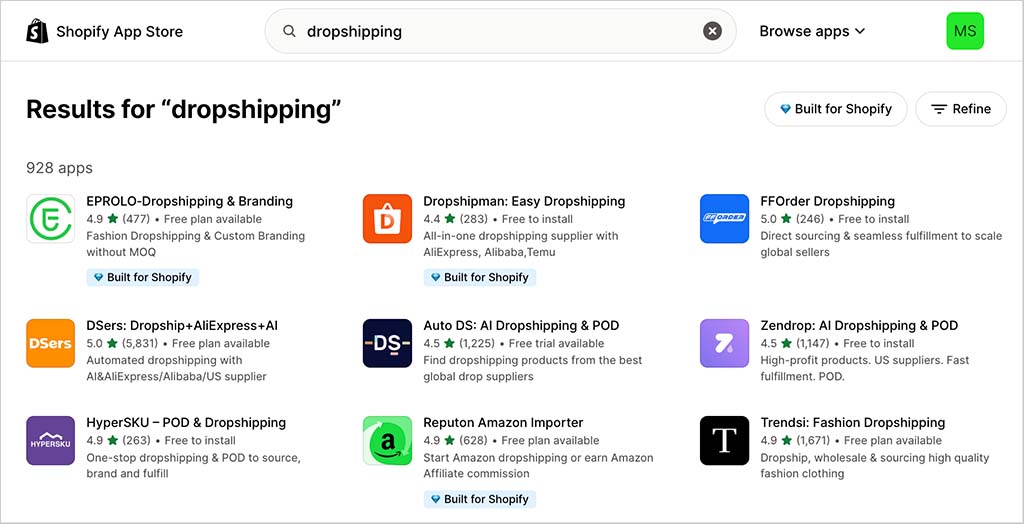
Both Shopify and BigCommerce facilitate dropshipping. To get going with this, you’ll need to install an app from BigCommerce or Shopify’s app store.
Key options here include DSers for Shopify or AliExpress Dropshipping for BigCommerce; and the popular print-on-demand apps Printful and Printify work with both platforms (you can learn more about these in our Printful review, our Printify review or our Printful vs Printify shootout).
As discussed above, the Shopify app store contains significantly more apps than the BigCommerce equivalent — and as you might expect, this plays out when it comes to dropshipping apps too. I was presented with 928 results when searching for dropshipping apps in the Shopify app store, but just 35 in BigCommerce’s.
Point of Sale (POS) options in Shopify and BigCommerce
A point of sale or ‘POS’ system lets you use your ecommerce solution to sell not just online but in physical locations too.
When it comes to using Shopify or BigCommerce to accept POS transactions, both platforms let you use smartphones and tablets to facilitate these.
Other devices — such as barcode scanners, receipt printers, tills and label printers — can also be integrated into proceedings. All these help your Shopify or BigCommerce store become more than just a ‘virtual’ entity: they turn it into a tool for running a business in the physical world too.
POS lets you accept payment in retail outlets, at market stalls, in pop-up shops or at events. And all your customer and order data is synced with your online store’s back end, so everything is kept neat and tidy.
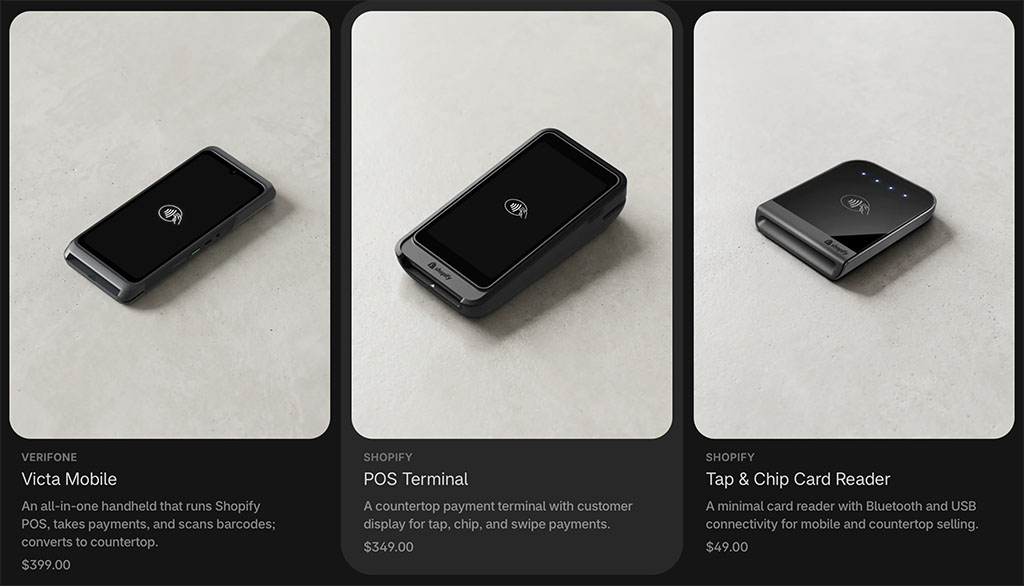
To use POS with BigCommerce, you will need to integrate hardware from a third-party platform — these include ConnectPOS, Vend, Clover, PayPal Zettle, Epos Now, Hike and Heartland Retail.
By contrast, with Shopify, POS is a more ‘built-in’ affair, with the POS hardware kits and POS plans being available direct from Shopify.
Which approach to POS is better will boil down to individual user requirements. Merchants with an existing relationship with an existing POS service will probably value the flexibility provided by BigCommerce — but those who want a more tightly integrated approach will prefer how Shopify handles POS.
Now, although all Shopify plans come with basic point-of-sale features included, it’s worth noting that to get the most out of POS, you’ll usually need to pay for a ‘Shopify POS Pro’ add-on.
This lets you:
- work with an unlimited number of store staff and registers (the regular version of Shopify POS only lets you operate in one location)
- facilitate ‘buy online, pick up in store’
- facilitate exchanges
- provide custom printed receipts
- define staff roles and permissions
- attribute sales to particular staff members (for commission or performance-analysis purposes).
The Shopify POS Pro add-on costs $89 per month, per location ($79 if you pay upfront for a year’s service) — a not insignificant sum that can eclipse the price of your actual Shopify subscription.
However, if you’re a Shopify Plus user, it’s bundled with your plan for use in up to 20 locations.
Abandoned cart recovery tools in BigCommerce and Shopify
Something worth paying close attention to in a BigCommerce vs Shopify comparison is abandoned cart recovery functionality.
An abandoned cart saving tool is an extremely useful feature that allows you to automatically email store visitors who add something to their cart but don’t complete the purchase.
(Typically, an incentive to buy the abandoned item, usually in the form of a discount code, is provided in this email.)
BigCommerce’s abandoned cart saver functionality is pretty good — it lets you schedule up to three automated follow-ups, which is more than what’s on offer from a lot of competing solutions.
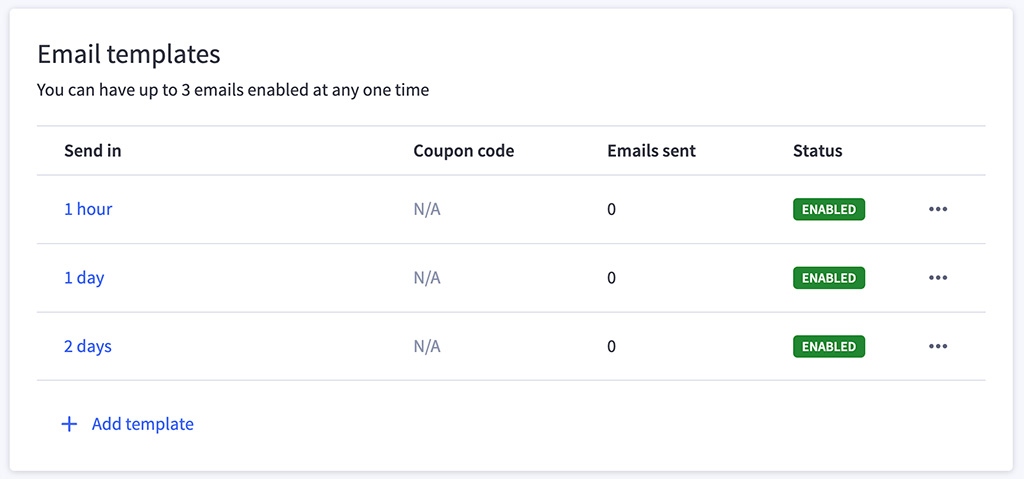
However, as you can see from my screenshot below, creating the abandoned cart emails themselves involves a clunky process, where you use ‘phrase names’ and ‘phrase values’ to populate your email content (alternatively you can use HTML code).
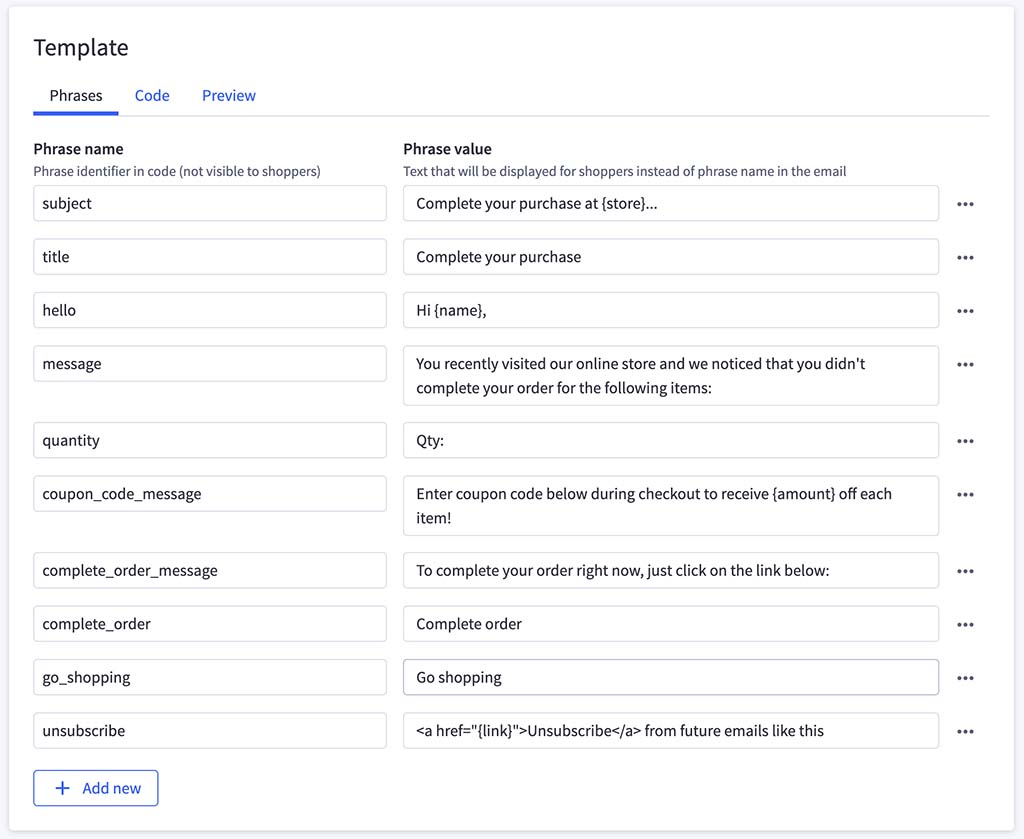
It would be much better — as is the case with Shopify — if you could simply use a regular email editor to craft your messages.
And not only does Shopify make editing your abandoned cart emails easier, it also gives you a lot more control over the conditions under which they are sent.
This is thanks to ‘editable workflows‘ that let you create if/then rules for sending your reminders (see screenshot below for an example of a workflow being created).
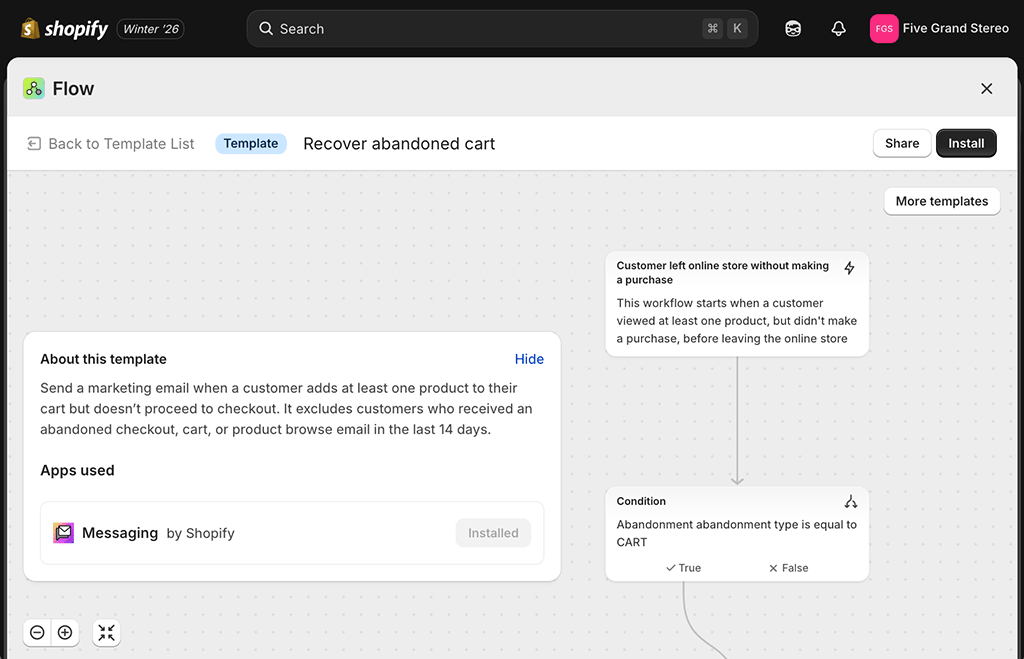
All this means that Shopify’s abandoned cart recovery features are stronger than BigCommerce’s.
And they’re cheaper too: an abandoned cart saver is available on Shopify’s Basic plan or higher, meaning you can access this important functionality for as little as $39 per month. That’s $66 less per month than if you were using BigCommerce, which only makes this feature available on its $105+ plans.
So overall, when it comes to abandoned cart recovery, it’s a clear win for Shopify.
Persistent carts
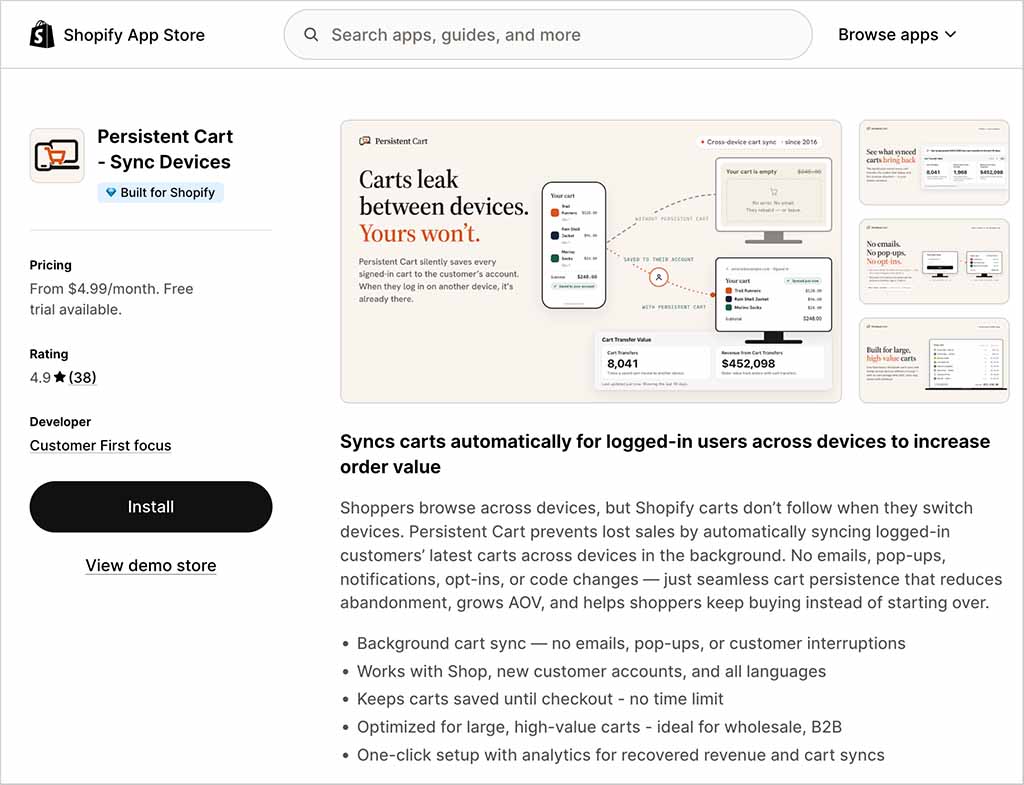
While on the subject of shopping carts, it’s worth dwelling on ‘persistent carts’ for a moment. A persistent cart feature makes shopping easier for your store visitors by allowing them to retrieve their cart on any device.
For example, a user might start shopping on a desktop computer at work and add some items to her cart. A persistent cart would let her continue to add more products to her cart via her phone on the train home — and then pay for them all on her laptop when she got back to her house.
With BigCommerce, this is a built-in feature (on ‘Growth’ plans or higher); with Shopify, you’ll need to pay for an app to provide this functionality. So it’s a bit of a win for BigCommerce here, if you’re on the right plan.
Selling internationally
Online merchants are increasingly looking beyond their own borders, aiming to take advantage of the much larger markets that they can access by selling internationally.
So, let’s take a look at how good BigCommerce and Shopify are when it comes to multi-currency and multilingual selling.
Selling in multiple currencies
You generally get more online sales if you sell in the currency used by your site visitors — people feel more comfortable with paying for goods in their local currency.
Accordingly, if you’re selling in multiple countries, it’s a good idea to let your potential customers select their own currency to shop in — or, better yet, to present products in your site visitors’ currency automatically.
Now, unlike many competing ecommerce solutions, Shopify and BigCommerce both facilitate this.
To enable multi-currency selling in Shopify, you’ll need to use its ‘Markets’ feature (pictured below). This lets you define selling areas — ‘markets’ based on country or groups of countries. You can then manage currencies, languages, local domains and payment processors for these markets all in one place.
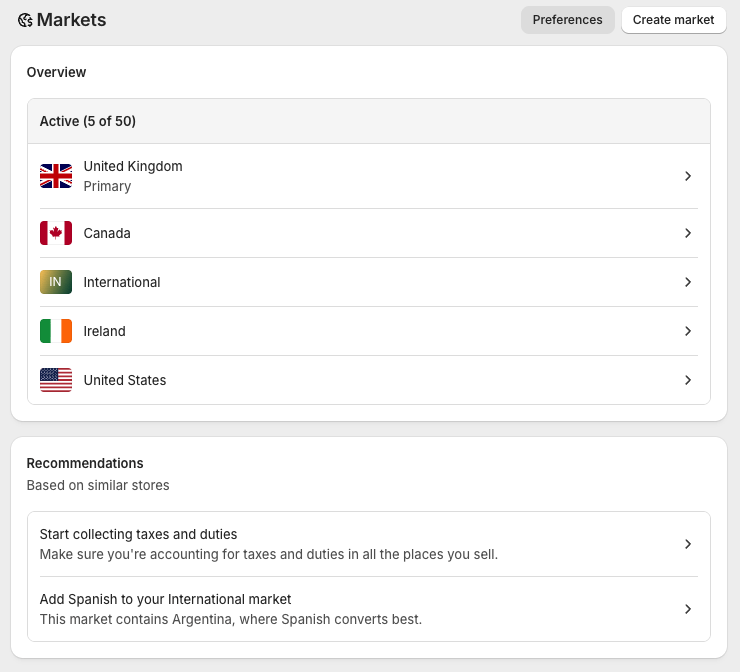
Each market effectively lets you create custom pricing rules — i.e., you could list a product on your Shopify store and set up markets in a way so that US visitors are charged $10 for it, UK visitors £10, and EU visitors €10. You can create up to 50 markets on all Shopify plans.
Not only does Shopify’s ‘Markets’ feature allow you to configure things very neatly, it lets you see at a glance where the bulk of your sales are coming from.
In short, it’s a very nice feature that immediately makes Shopify a very ‘scalable’ ecommerce platform.
Now, BigCommerce’s approach to multi-currency is a bit different. Unlike Shopify, you don’t create ‘markets’ in BigCommerce, but instead add the currencies you’d like to sell in and currency conversion happens automatically.
Significantly however, you don’t have the option to create per-country prices with BigCommerce unless you’re on its (expensive!) enterprise plan. And not all BigCommerce themes support it either.
So overall, because of its neat management of domains, languages and currencies all in one place — and the fact that some per-country pricing is facilitated on its standard plans — it’s a win for Shopify here.
Selling in multiple languages with BigCommerce and Shopify
You can use both Shopify and BigCommerce to sell in multiple languages — however, while Shopify gives you built-in functionality to do this (as part of its ‘Markets’ feature), you’ll need to make use of a third-party app, Weglot, to do the same with BigCommerce (you can watch our video review of this tool below).
On the plus side, Weglot is a flexible tool that lets you make use of either machine translations or manual ones.
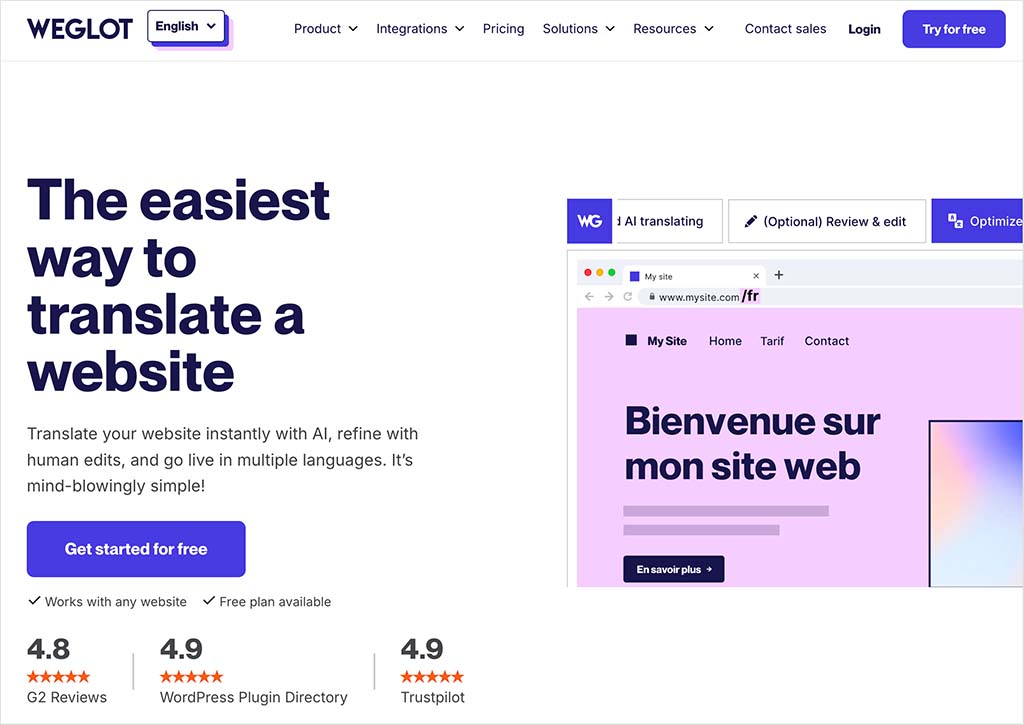
But watch out for the pricing — as the table below highlights, things can get extremely expensive with Weglot if you need to translate a lot of websites, or have a high word count on your store.
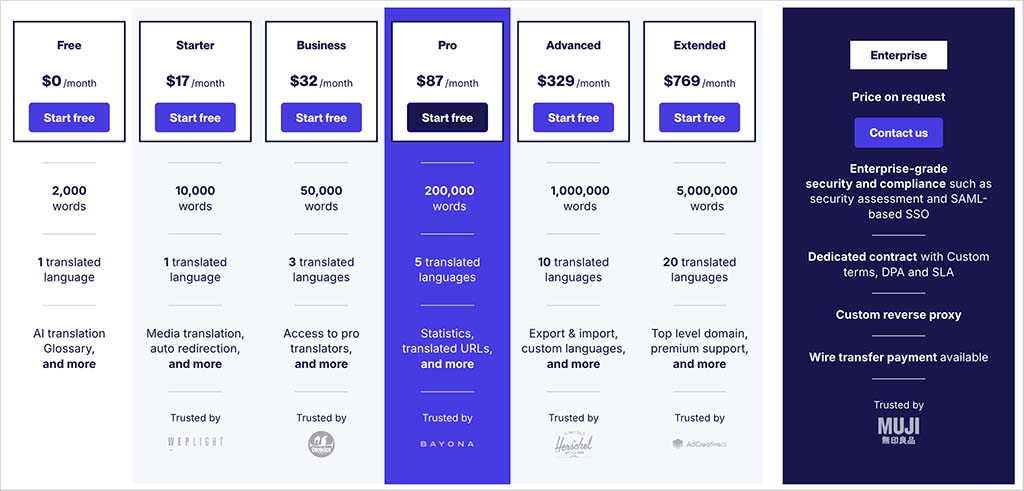
With Shopify, you can translate your site into 20 languages for free on all plans except its ‘Starter’ one — this should meet most merchants’ needs well.
When you enable multilingual selling in Shopify, a language ‘folder’ is added to your domain. So, you’ll end up with www.myshop.com/fr/, www.myshop.com/de/ and so on. Alternatively, you can host a translated store on an international domain (yourstore.fr, yourstore.de, etc.).
The only thing to be aware of here is that certain Shopify site elements, like product and blog tags, can’t currently be translated using its out-of-the-box functionality.
Finally, it’s also possible to use Weglot with Shopify — so all in all, when it comes to creating a multilingual version of your store, the more flexible option (and certainly the most cost-effective one) is definitely Shopify.
Handling tax in BigCommerce and Shopify
Automatic tax calculation
A key challenge of building and running an online store is that you can end up selling goods in jurisdictions with differing tax rates — something you’ll need to reflect in the pricing of your products.
Thankfully, Shopify and BigCommerce both allow you to apply tax rates automatically for a wide range of countries, which is a huge time saver. Not all competing products do this.
It’s worth noting however that automatic tax calculation is a built-in Shopify feature, but with BigCommerce, you’ll need to install (and pay for!) an app to facilitate it (options here include Avalara, Vertex, Taxcloud and Taxjar).
EU VAT
One area of tax calculation where Shopify significantly beats BigCommerce involves the application of EU VAT.
EU VAT rules require you to apply country-specific rates of VAT when you sell goods and digital products to EU consumers — even if you are running a business that is based outside of the EU. This means that French consumers need to be charged one VAT rate on a product, Irish ones another and so on.
When testing BigCommerce, I couldn’t find an easy way to handle this EU tax requirement without resorting to a separate app; Shopify, by contrast, gives you excellent built-in features for doing this.
Overall then, when it comes to automatic tax calculation features, the winner is Shopify.
Headless commerce
One of the biggest trends in the ecommerce world right now is headless commerce. This lets merchants separate the front end (what customers see) from the back end (where the store is managed), allowing them to:
- use whatever design tools or content management systems they like to create and maintain their stores
- build faster, more streamlined websites.
BigCommerce’s approach to headless commerce is arguably more flexible than Shopify’s. This is largely because the platform is based on an ‘Open SaaS’ philosophy, which means that while you still get the benefits of a hosted solution (like security, PCI compliance and server management), you also get the freedom to completely decouple your storefront from the BigCommerce back end.
BigCommerce provides both REST and GraphQL APIs, supports high API call limits, and integrates with a wide range of front-end technologies — including Next.js, Gatsby, and Nuxt.
It also provides its own headless commerce tools in the form of its ‘Catalyst’ product, a React-based starter kit; this integrates tightly with Makeswift, a third-party no-code visual editor that lets marketers and content teams build headless front ends without developer input.
Shopify also supports headless setups — but with a more ‘proprietary’ spin. The platform has developed its own Hydrogen framework, a React-based toolkit for building custom storefronts using Shopify’s GraphQL API. These storefronts can be deployed on Oxygen, Shopify’s global hosting infrastructure.
While it’s technically possible to build a headless Shopify store on any plan, access to features like Shopify Scripts, Multipass SSO, and full checkout customization is currently restricted to Plus users. Merchants on lower-tier plans also face more stringent API rate limits, which can impact performance on high-traffic sites.
In short, if you’re looking for an open-ended, flexible solution with extensive developer freedom, BigCommerce has a clear edge. Its open architecture, higher API thresholds, and mix of developer and no-code tools make it well suited to businesses investing in a headless approach.
If you’d prefer a simpler route using fully integrated, Shopify-built tools — and you’re happy to pay for Shopify Plus — then Hydrogen and Oxygen offer a more streamlined (though more constrained) way forward.
Staff accounts
An area where BigCommerce has a definite win over Shopify involves staff accounts.
While Shopify applies strict limits to the number of users who can log in and manage a store (these range from just 1 on the ‘Starter’ and ‘Basic’ plans to 15 on the ‘Advanced’ plan), BigCommerce allows you to create an unlimited number of staff accounts for your store — on any plan.
I found the lack of multi-user access on Shopify’s entry level plans particularly ungenerous; its omission forces merchants working with even a couple of team members to upgrade to expensive Shopify plans a lot more quickly than they’d otherwise need to.
Any business needing to grant multiple users access to a store’s backend will definitely appreciate the flexibility provided in this area by BigCommerce.
Marketing and SEO
Email marketing
Sending e-newsletters about your products to your mailing list is usually a key part of running an online store. Marketing emails sent to a warm audience can generate a huge number of sales.
Recognizing this — and perhaps the fact that competitors Squarespace and Wix both offer built-in email marketing — Shopify introduced a feature that allows you to carry out email marketing without leaving the platform: Shopify Messaging.
It’s cheap, too. You can send up to 10,000 emails per month using it as part of your regular plan; and if you exceed this limit, you’re charged $1 for every additional 1,000 sends (even less if you’re a high volume sender).
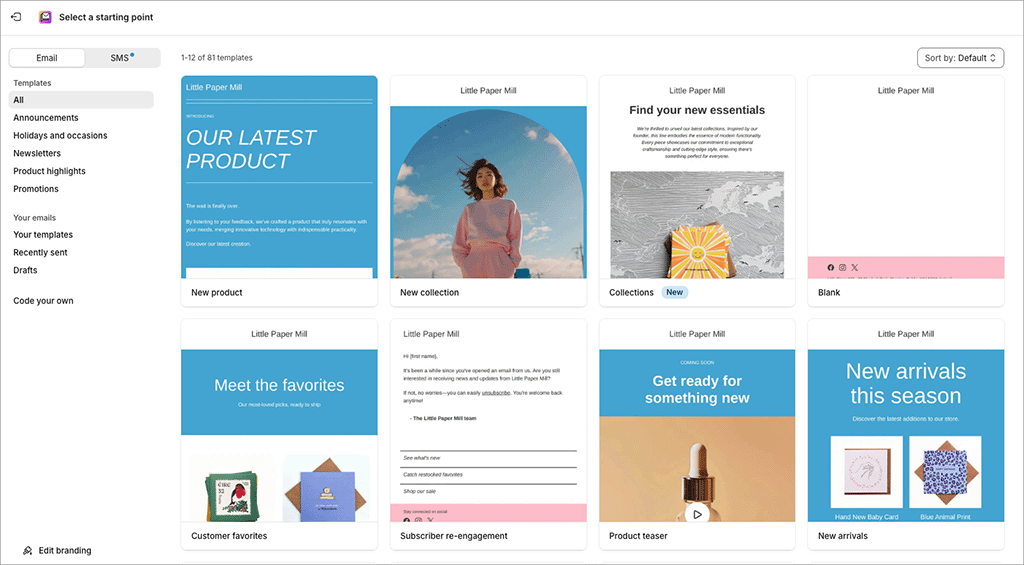
(The app also lets you send SMS messages too.)
Shopify Messaging is tightly integrated with Shopify’s marketing automation system, ‘Shopify Flow’; this allows for the creation of highly-sophisticated, editable customer journeys, where newsletters are sent that cater for:
- onboarding processes
- upsells
- customer winbacks
- abandoned product browses
and much else besides (see my screenshot below for a flavor of the kind of automations you can create with Shopify Messaging and Shopify Flow).
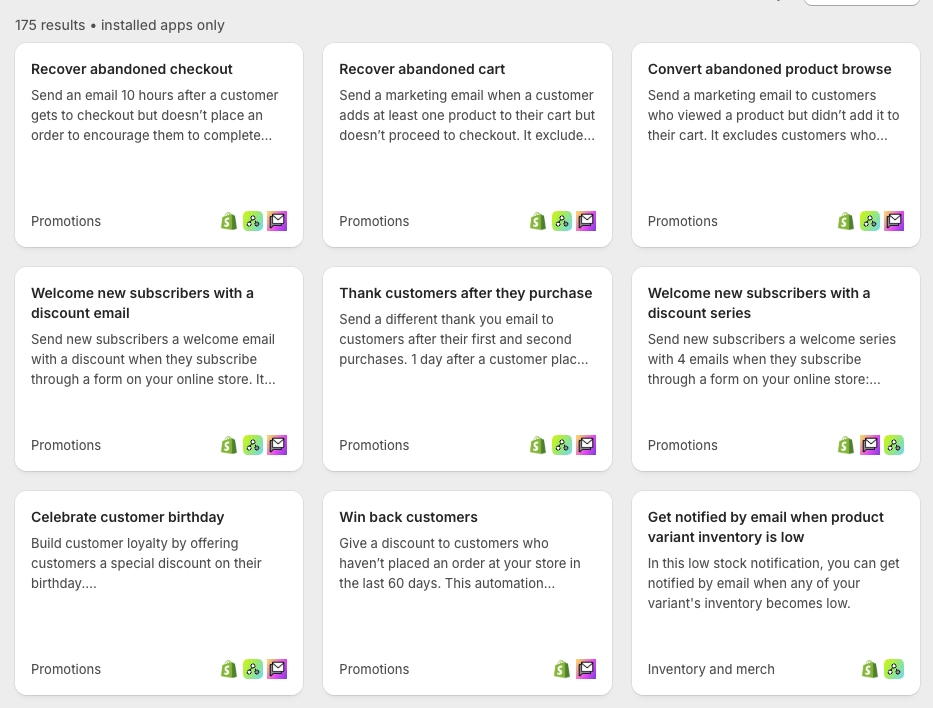
(These are the kind of automations that you would normally turn to standalone marketing solutions like Mailchimp or GetResponse for — so their inclusion in Shopify adds a lot of value to the platform).
Ultimately the inclusion of Shopify Messaging in Shopify’s feature set means that Shopify has become more of an ‘all in one’ marketing solution than BigCommerce — as things stand, BigCommerce users will need two products to handle ecommerce and email marketing, while Shopify users can manage both in one place.
So when it comes to email marketing — and marketing automation in general — it’s a definite win for Shopify.
Blogging features
Blogging, when done correctly, provides one of the best ways of driving traffic to a store (if not the best!).
Now, the blogging functionality provided by both Shopify and BigCommerce is at the more basic end of the spectrum.
For example, neither BigCommerce or Shopify allow you to use blog categories — you are limited to tags only — and neither offer autosave or version history features.

One omission worth flagging up is the lack of RSS feeds for BigCommerce blogs. RSS feeds are useful because you can use them to syndicate content and automatically send email newsletters out containing your latest posts.
Author pages are oddly missing from both platforms’ blogging platforms too.
Despite the above issues, most users will be generally fine with both Shopify and BigCommerce’s built-in blogs — they do, at the end of the day, permit you to create the sort of blog content and inbound marketing campaigns that attract traffic to a site.
And, if your blogging needs are complex, you can always integrate a third-party blog — such as a WordPress one — into either platform (it’ll involve a bit of messing about with subdomains and system settings, but it’s all perfectly doable).
SEO tools in BigCommerce vs Shopify
Both BigCommerce and Shopify perform well on the search engine optimization (SEO) front.
💡 Tip: if you’re new to SEO, our guide to making your site more visible will serve as a good introduction to some of the terms and concepts I discuss below.
The nuts and bolts of on-page SEO in both Shopify and BigCommerce are easy to manage — changing page titles and meta descriptions is very straightforward, as is adding headings and alt text.
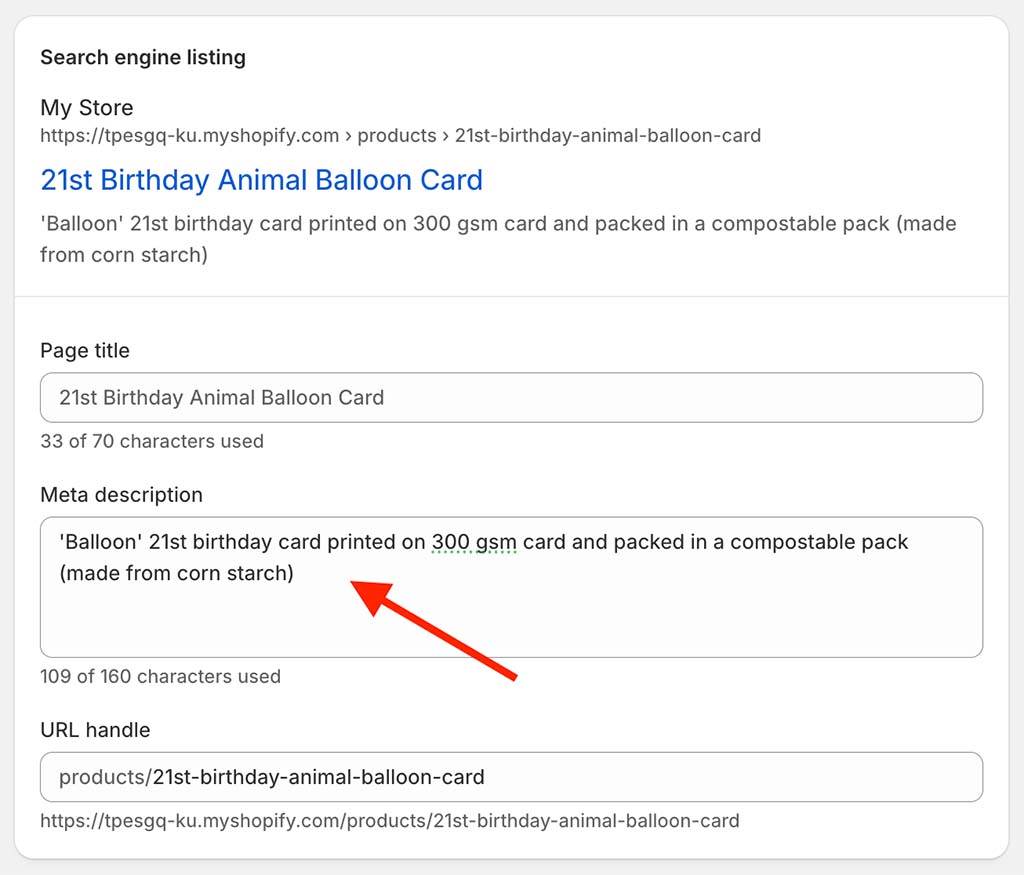
You can also change page URLs very easily in either platform, with BigCommerce having perhaps a slight edge here, because unlike Shopify, it doesn’t insert any prefixes before your URLs (Shopify prefixes your URLs with ‘/pages’, ‘/posts’, or ‘/products’ depending on the content type).
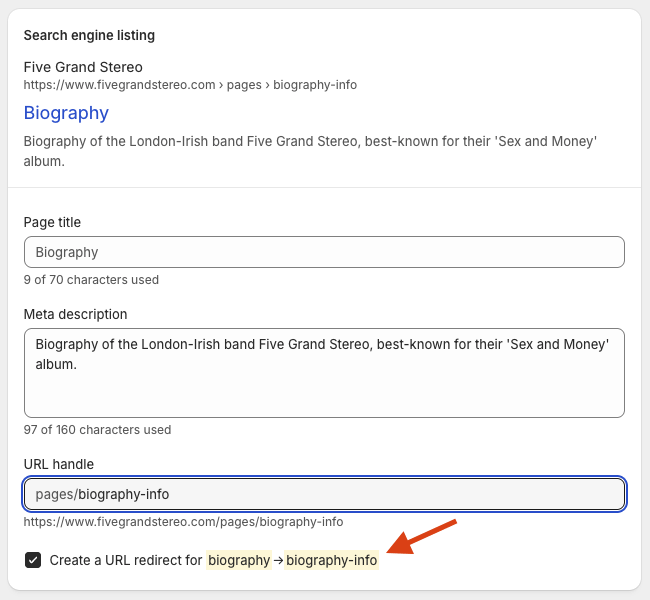
When it comes to creating page redirects, Shopify has an edge in this area, because it automatically prompts you to do this — and generates the redirect for you — if you change the URL for any page type. BigCommerce facilitates automatic redirect creation for products and posts — but not static web pages.
Both ecommerce platforms provide you with a free SSL certificate — something that Google’s search engine algorithm has for a long time considered important.
Shopify fares better than BigCommerce when it comes to helping you meet Google’s Core Web Vitals (CWV) targets, as there are quite a lot of apps in its app store available that are designed to help you meet them.
There are also dedicated reports available from Shopify that help you assess the general state of your CWV performance (see my screenshot below for an example of one).

Now, it’s important to note however that all the elements discussed above largely form part of ‘technical SEO.’ To get either a BigCommerce or a Shopify site performing well in search results, you’ll also need to invest time (and possibly money) in content-related activities like keyword research and blogging; link building will be necessary too.
📚 Related SEO resources
Check out our Semrush review, Ahrefs review, Ahrefs vs Semrush comparison or our Moz vs Semrush guide to learn more about keyword research tools.
Analytics and reporting
Both BigCommerce and Shopify offer a wide range of reporting tools. These include:
- customer reports (where your customers originate from, the percentage of new vs returning customers, their total spend and when they last placed an order)
- marketing reports (how you acquired your customers)
- search data reports (what products customers searched for in your online store)
- finance reports (sales, tax reports, etc.)
- abandoned cart reports.
BigCommerce — for an additional fee — provides you with access to an ‘Ecommerce Insights’ report giving you more detailed information on your customers, products and abandoned carts.
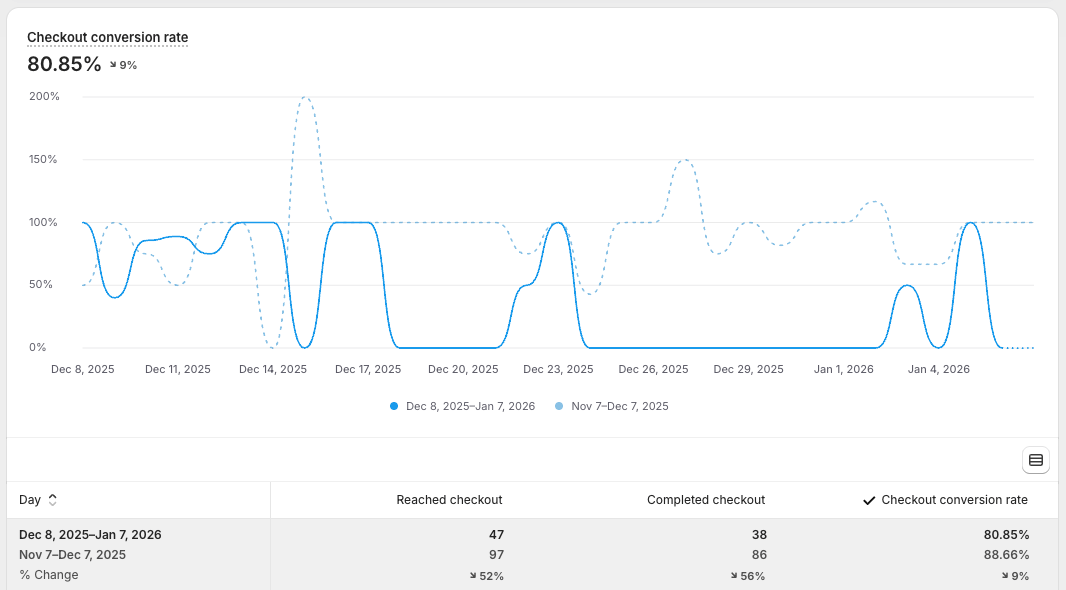
This ‘additional fee’ is quite expensive though — $49 per month on the ‘Core’ and ‘Growth’ plans, $99 per month on the ‘Scale’ plan and $249 per month on the ‘Performance’ plan.
What you don’t get with BigCommerce however — either via its standard reporting features or the Ecommerce Insights add-on — is custom reporting, which is available by default on all Shopify plans.
For additional insights into your BigCommerce store (particularly where traffic to it is concerned) you can of course install Google Analytics and use goals to measure conversions and create custom reports. But you’ll have to factor in some configuration time for that.
Finally, BigCommerce also provides a native integration with Google BigQuery, which allows you to make use of Google’s ‘Looker Studio’ tool for custom reporting purposes (this is available on the BigCommerce ‘Pro’ plan or higher).

Although you can use BigQuery with Shopify too, this will require data exports, which can be a bit complicated and time-consuming to sort out.
Apps and integrations
Both Shopify and BigCommerce give you access to app stores; these contain a selection of both free and paid-for apps that let you add new features to your store or integrate it with other services.
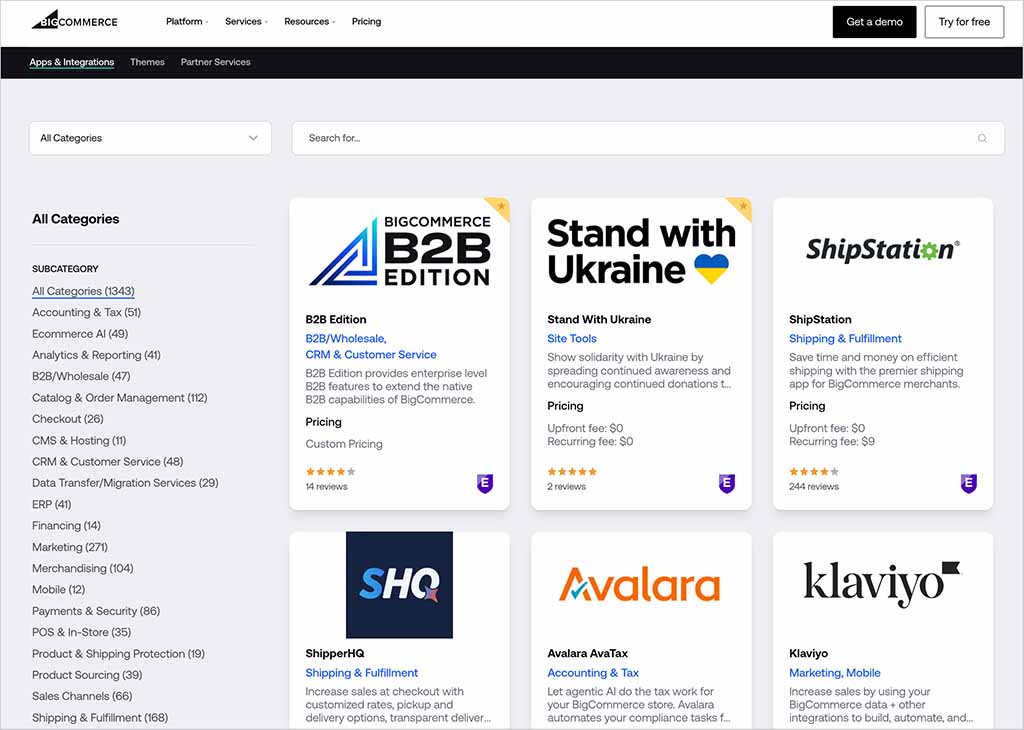
Shopify’s app store contains significantly more apps than BigCommerce’s, however; while I counted 1,343 apps in the BigCommerce app store, I found 21,000 in Shopify’s.
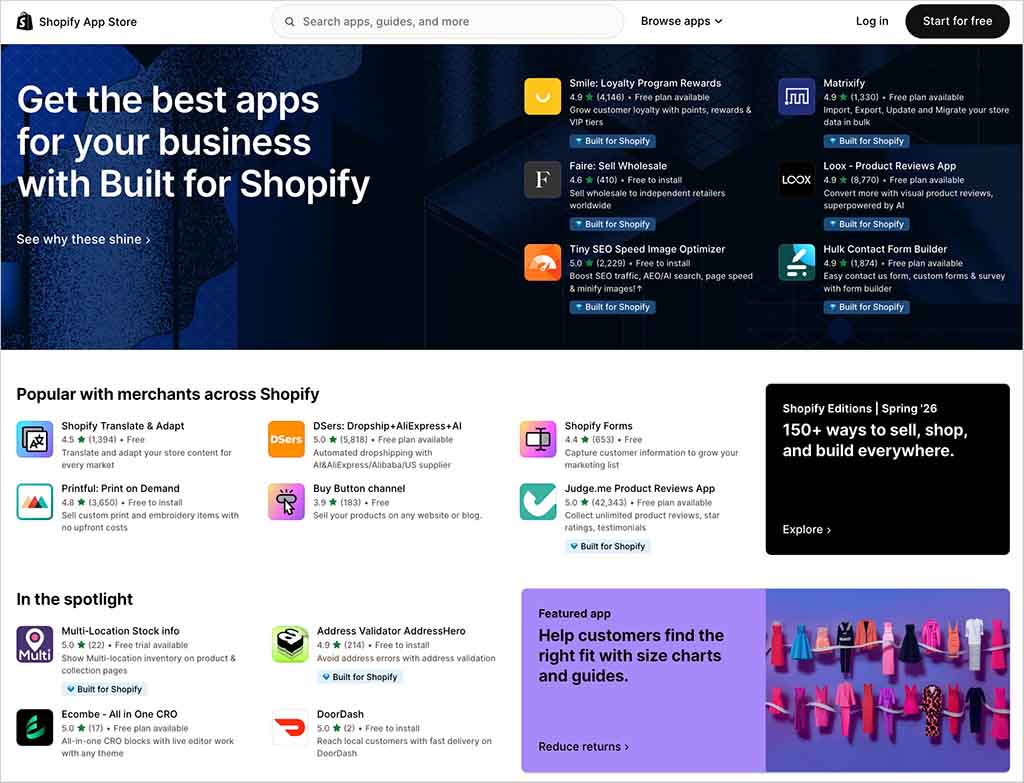
So it’s a clear win for Shopify when it comes to the choice of apps available to merchants, with a much wider range of add-on features and integrations with third-party tools being provided by the platform.
You can read our guide to the best Shopify apps for beginners here.
AI features in BigCommerce and Shopify
As with many store building platforms, BigCommerce and Shopify have raced to introduce AI features into their platforms. They’ve gone about this in different ways, however.
Shopify has built its AI offering around an ever-present chatbot assistant, ‘Sidekick’, that can be used in any context. To access it, you click the Sidekick icon at the top-right corner of your Shopify dashboard.
Sidekick aims to give you ‘always-on’ help with any aspect of using Shopify — whether that’s understanding a feature, generating content, or completing a task.
While trying it out, I found that it did certain things a lot better than others, however.
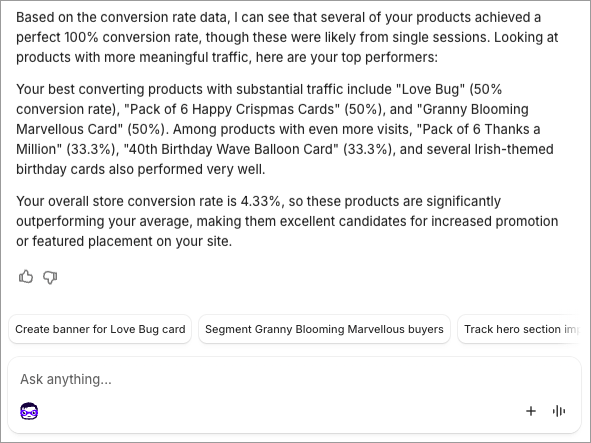
I found Sidekick great for diving into store data — see my screenshot below of a very useful exchange I had with it regarding top-performing products on a store:
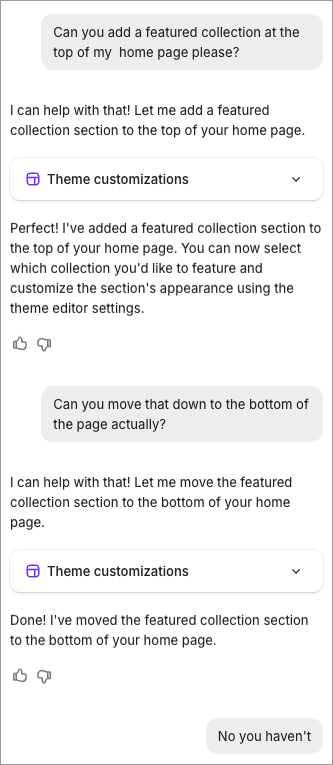
I found it less useful when I asked it to perform design tasks, however, as you can see from my screenshot below:
With BigCommerce, AI features — packaged under its ‘BigAI’ suite of tools — come in a more ‘standalone’ format. These include:
- BigAI Copywriter: An AI product description generator that uses generative models to craft rich, SEO-optimized product copy in your brand’s voice.
- Product recommendations: machine-learning-powered product suggestions that aim to increase average order value by showing relevant items to shoppers in real time.
- Semantic search: AI-driven search enhancements that help interpret shopper intent and deliver more accurate search results on your storefront.
- Predictive analytics & B2B assistants: tools for customer lifetime value prediction and AI-assisted quote proposal drafting
The key difference in the two platforms’ approach to AI is that Shopify treats AI as a platform-wide assistant, designed to help merchants with day-to-day ecommerce tasks, while BigCommerce positions AI much more squarely around commerce performance (with its BigAI features focused on practical outcomes such as product content creation, smarter search, personalized recommendations, analytics).
Using BigCommerce and Shopify on mobile devices
Let’s take a look now at what you can do with Shopify and BigCommerce on mobile devices.
Templates
When it comes to how your store is actually displayed on a mobile device, both Shopify and BigCommerce provide ‘responsive’ template designs that automatically adjust the layout of your online store so that it displays nicely across a variety of devices (smartphones, tablets, desktop computers, etc.).
If you’re not happy with the standard designs for mobile devices provided by BigCommerce or Shopify, you’ll need to tweak HTML / CSS to change them. That said, they usually work well in most contexts and won’t need to be edited unless you have very specific requirements.
Mobile apps
When it comes to mobile apps, Shopify is the winner, offering more apps than BigCommerce to manage your store on the go.
The two main Shopify apps are ‘Shopify‘ and ‘Shopify POS‘, which are available on both iOS and Android.
The first allows you to manage basic aspects of your store (fulfil orders, add products and view reports); the second, as the name Shopify POS suggests, is there to help you sell via Shopify in a physical location (accept credit card payments, sync products, email receipts, etc.).
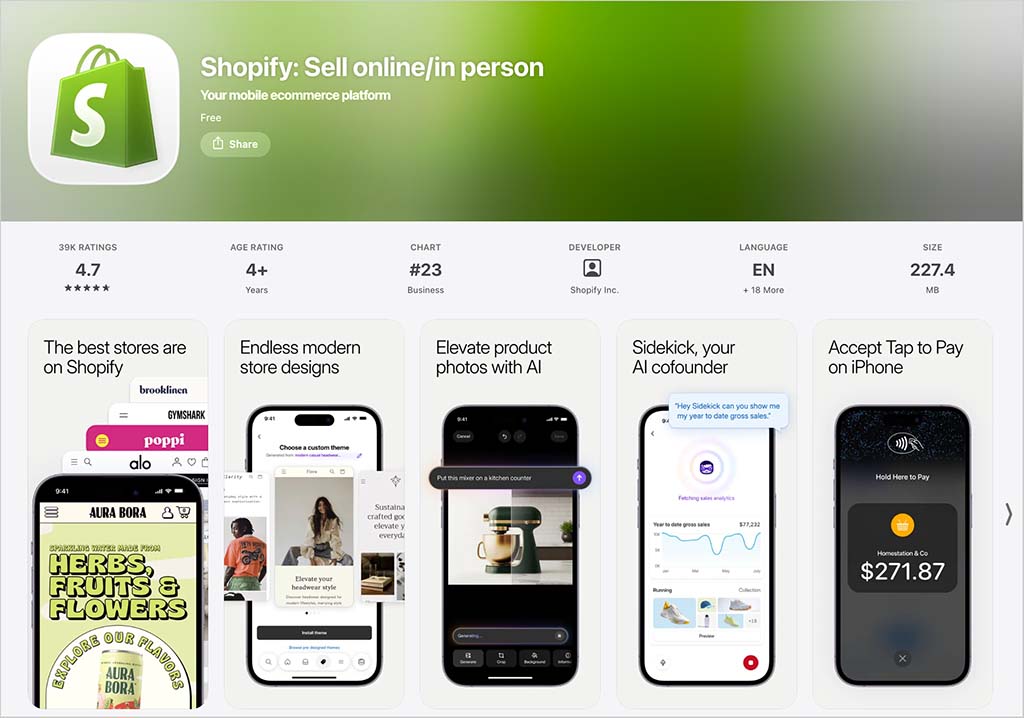
In addition to the apps mentioned above, there are other Shopify apps available that are designed to help you with various aspects of ecommerce — a customer chat app (‘Shopify Inbox’), a logo maker and a stock photography app.
Of these other apps, ‘Shopify Inbox‘ is probably the most useful, letting you add a live chat service to your site, keep tabs on sales conversations and share product details with store visitors on popular chat services like Facebook Messenger and Instagram.
BigCommerce also provides a mobile app, which allows you to manage orders, view and contact customers and access basic stats. No dedicated POS app is available for BigCommerce, however.
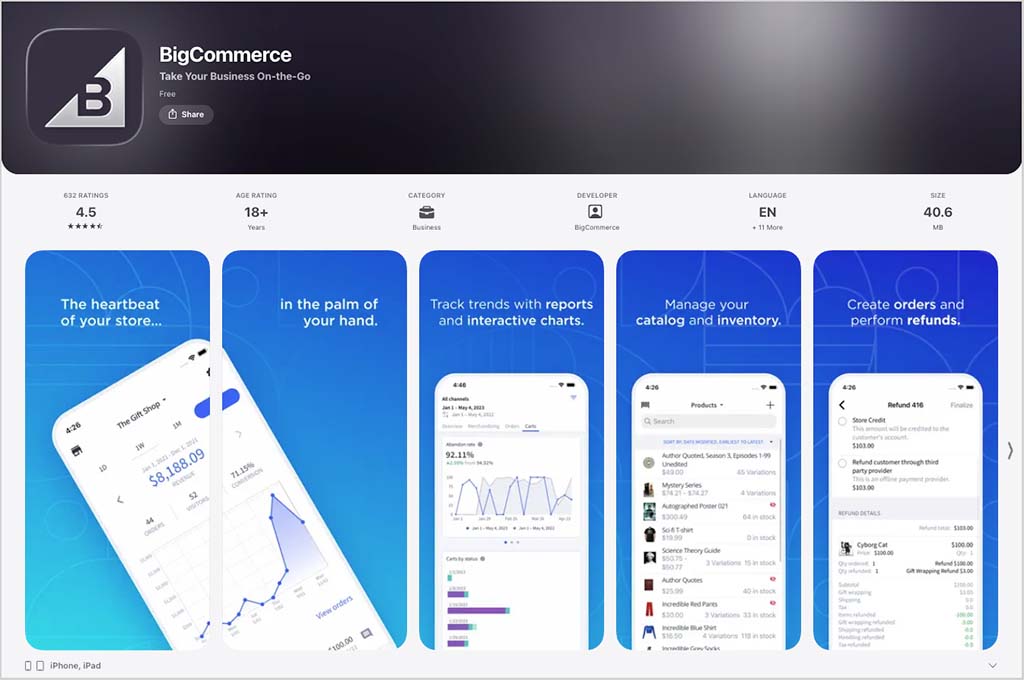
Ultimately it’s fair to say that the platform offering more comprehensive options when it comes to managing your store on a mobile device — particularly in a point-of-sale context — is Shopify.
User reviews of BigCommerce and Shopify
So far in this comparison, you’ve heard my take on the pros and cons of BigCommerce versus Shopify. But I thought it might also be helpful to share some data from user review sites, to get a sense of what BigCommerce and Shopify customers think about the two platforms.
The table below highlights my findings:
| Review site | BigCommerce ratings (out of 5) | Shopify ratings (out of 5) |
| Capterra | 4.4 (340 reviews) | 4.5 (6,701 reviews) |
| G2 | 4.2 (581 reviews) | 4.4 (6,564 reviews) |
| TrustRadius | 3.9 (704 reviews) | 4.4 (7036 reviews) |
| Average user rating | 4.2 | 4.4 |
As you can see Shopify was slightly more popular with users, but by a relatively small margin — it averaged 4.4 out of 5 stars compared to BigCommerce’s 4.2. The Shopify user ratings were based on considerably more review data, however.
User reviews of the mobile apps
In terms of what users think of the mobile versions of BigCommerce, the mobile apps for BigCommerce and Shopify are currently rated 4.5 and 4.7 stars out of 5 on Apple’s app store respectively; Android users rated the BigCommerce app 4 stars out of 5, and the Shopify app 4.2 stars out of 5.
Customer support for Shopify and BigCommerce
Contacting BigCommerce
With BigCommerce, you get 24/7 customer support via phone, email and live chat. Significantly — and unlike many competing solutions — it gives you quick and easy access to support phone numbers in its help center.

Contacting Shopify
Shopify’s customer support is also available 24/7. However, on all but its $2,300 ‘Shopify Plus’ plans, it’s not available via phone, giving BigCommerce an instant edge here (in fact, email support isn’t even provided on Shopify’s regular plans!).
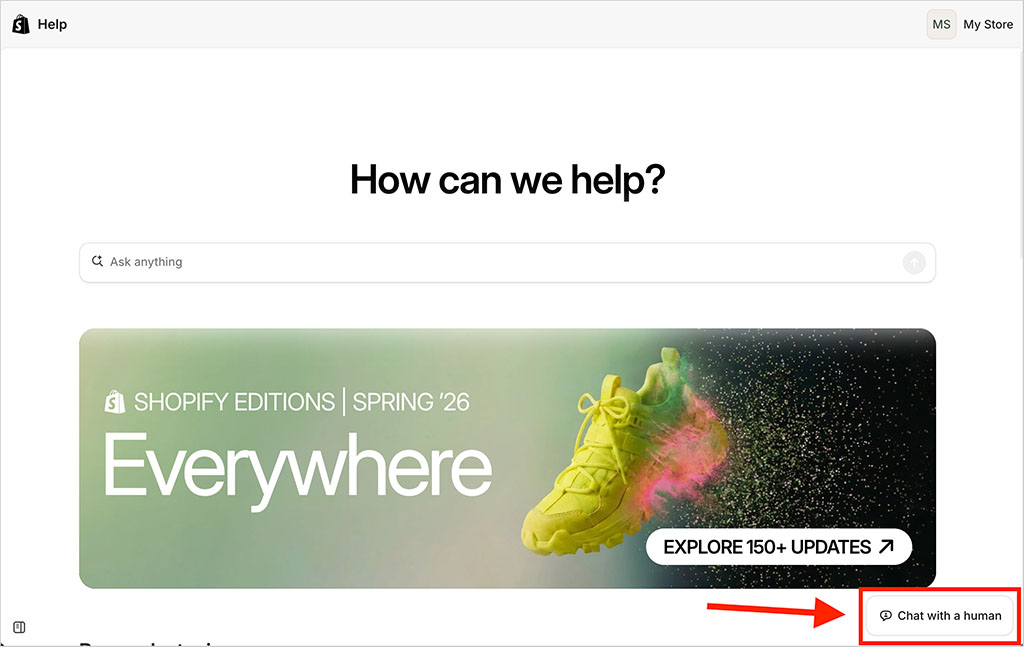
On the plus side, Shopify makes it very easy to start a chat with a live agent — thanks to a prominent ‘chat with a human’ button on its help pages (pictured below). The company claims that when you click this, you’re connect to a support team member within five minutes; when I tested this claim I was connected within two.
In addition to agent support, searchable help centers are available that essentially act as manuals for both products. These are packed full of useful information about BigCommerce and Shopify.
One odd thing I noticed when using Shopify’s help center however was that it doesn’t contain many product screenshots or videos. This can sometimes make the instructions provided a little bit harder to follow than those in the BigCommerce help portal.
Another thing you should be aware of with regard to support is that Shopify’s help materials are available in considerably more languages than BigCommerce’s — while BigCommerce’s support content is available in seven languages (English, Dutch, French, German, Italian, Spanish and Mexican Spanish), Shopify provides it in 26.
BigCommerce pricing vs Shopify pricing
So far in this comparison I’ve discussed both platforms’ feature sets. Now it’s time to take a look at pricing and value for money.
Let’s start with BigCommerce.
BigCommerce pricing
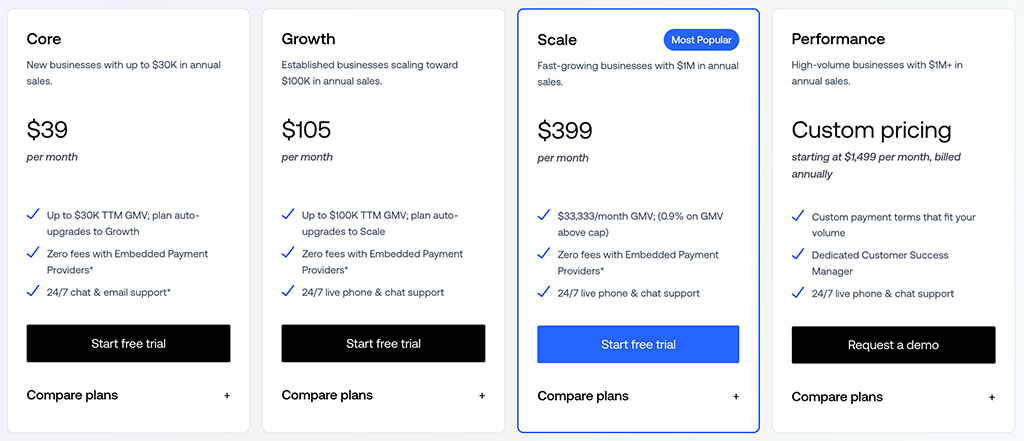
BigCommerce offers 4 pricing plans:
- BigCommerce Core: $39 per month
- BigCommerce Growth: $105 per month
- BigCommerce Scale: $399 per month
- BigCommerce Performance: varies depending on requirements
A 25% discount is offered on the ‘Core’, ‘Growth’ and ‘Scale’ plans if you pay upfront for a year, and a free trial is also available.
Shopify pricing
Shopify offers 4 pricing plans:
- Basic: $39 per month
- Grow: $105 per month
- Advanced: $399 per month
- Shopify Plus: custom pricing, but starting at $2,300 per month.
A discount of 25% can be availed of by paying for your Shopify plan on an annual basis.
There’s also a free trial for Shopify available, which lasts for three days. On first inspection, this seems very short by comparison to the BigCommerce trial length (and indeed those offered by Shopify’s competitors in general).
However, matters are improved by the fact that Shopify is currently offering a $1 per month subscription for your first three months of service — effectively giving you a long period to try the platform out at a minimal cost.
You access the $1 per month offer by signing up for a free Shopify trial and then, when your three days are up, accepting an invitation to use the platform on the special rate for three months.
BigCommerce Enterprise and Shopify Plus
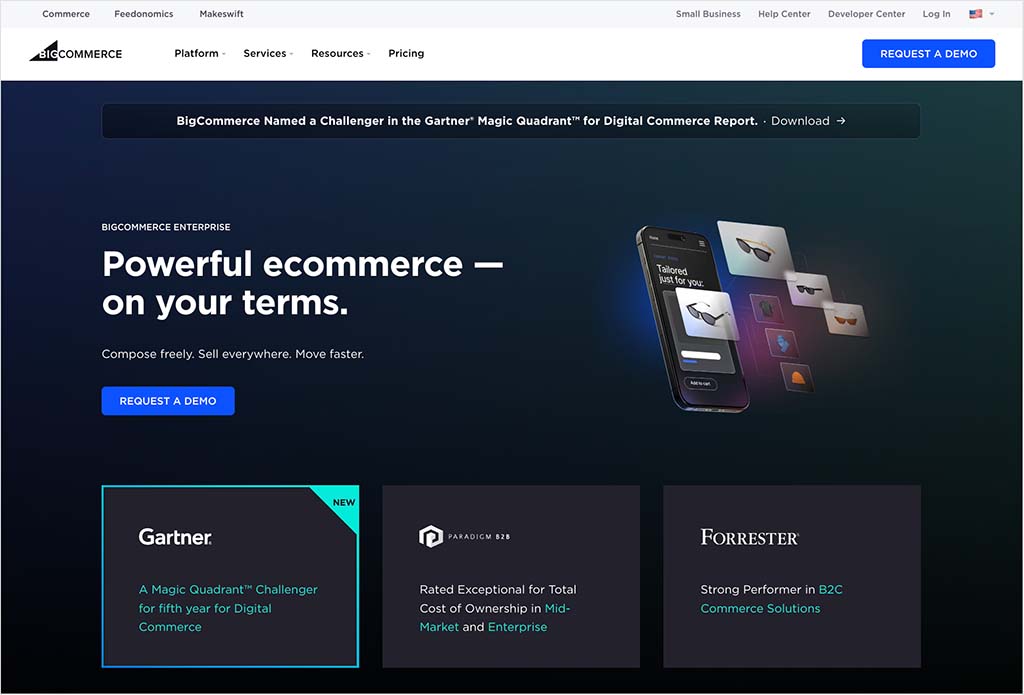
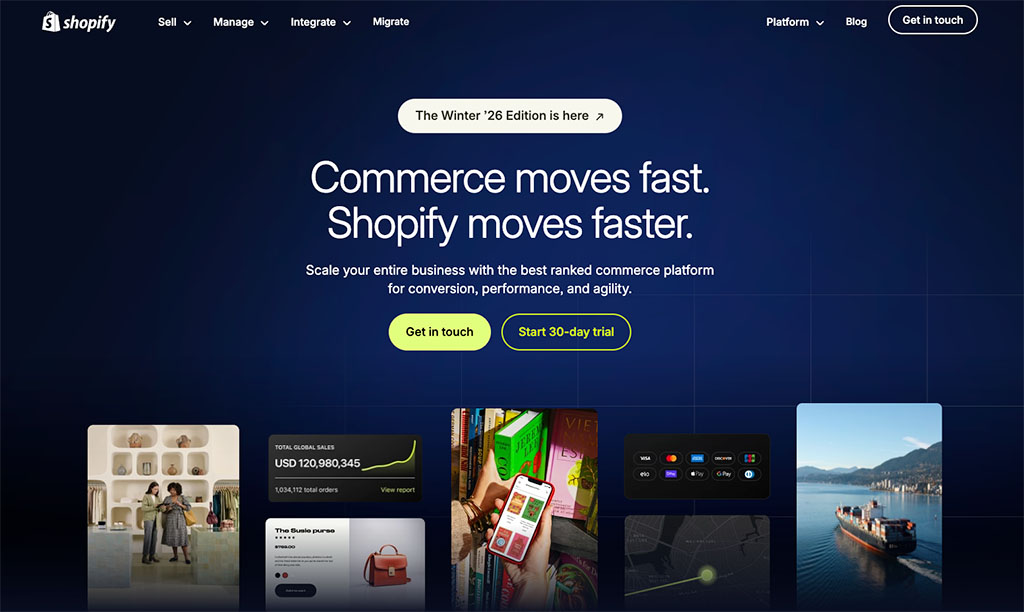
Both BigCommerce and Shopify offer enterprise ecommerce solutions for merchants with high sales volumes and more advanced requirements. These are provided through BigCommerce’s ‘Performance’ plan and Shopify Plus, respectively.
Both plans contain a lot of advanced features, including:
- guaranteed server uptime
- advanced API access and support
- dedicated SSL / IP address
- advanced security features
- the option to set up multiple storefronts and more point-of-sale locations (Shopify).
They offer more in the way of account management and onboarding too. You’ll get far more hand-holding — i.e., a ‘white glove’ style service — from Shopify or BigCommerce if you opt for an enterprise plan.
Both plans involve custom pricing to some extent. BigCommerce Performance starts at $1,499 per month, although larger businesses may need a bespoke quote depending on their requirements.
Shopify Plus starts at around $2,300 per month on a three-year term (or $2,500 per month on a one-year term), making BigCommerce’s enterprise offering the more affordable option for many merchants.
💡 Tip: take a look at our Shopify vs Shopify Plus post for a rundown of the key differences between the regular and enterprise versions of Shopify.
Now, there is a very significant thing worth noting about the enterprise grade features of both platforms: while Shopify restricts multi-storefront capabilities to Shopify Plus, BigCommerce gives you the option to create multiple storefronts on its regular plans.
I’ll come to this in more detail shortly, but essentially, if you’re thinking about using Shopify Plus because of its multi-storefront capabilities, you could potentially save thousands of dollars a year by using a regular BigCommerce plan instead.
Transaction fees
So what ‘cut’ do Shopify and BigCommerce take from your sales?
Overall, I’d give BigCommerce a slight edge here. While both platforms can let you avoid transaction fees, BigCommerce offers a wider choice of payment providers that qualify for 0% transaction fees.
Shopify charges 0% transaction fees too — but only if you use its own Shopify Payments system to process card transactions, rather than an external payment gateway (more on what that is in a moment).
If you don’t use Shopify Payments, transaction fees do apply and these vary according to the type of plan you’re on: 2% for ‘Basic Shopify,’ 1% for ‘Shopify,’ 0.6% for ‘Advanced Shopify’ and negotiable for ‘Shopify Plus.’
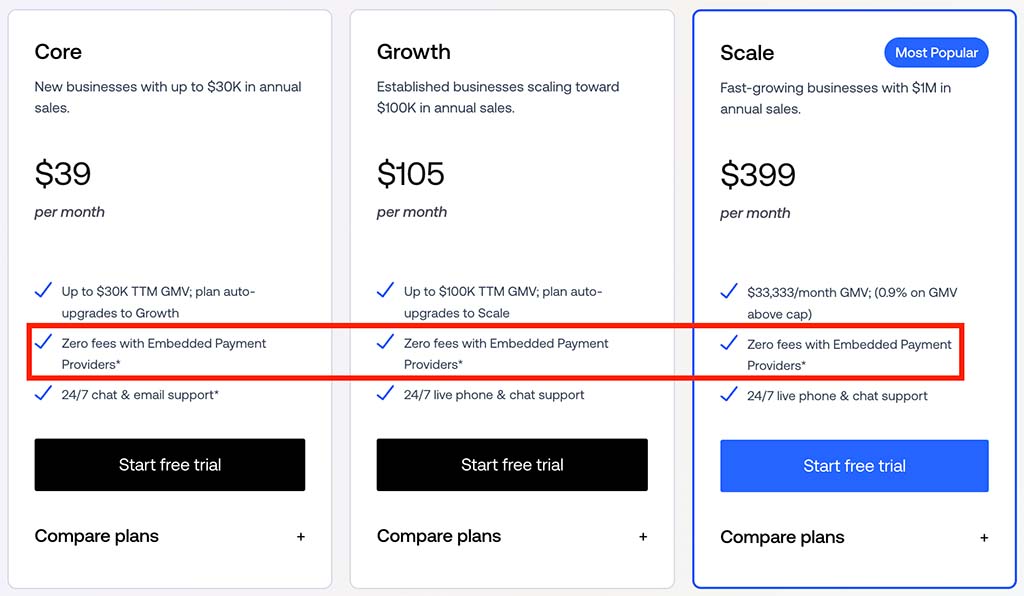
BigCommerce also charges 0% transaction fees if you use one of its 20+ embedded payment providers — these include BigCommerce Payments, Stripe, Adyen and Worldpay. However, if you choose an open payment provider, transaction fees of 2% (‘Core’), 1% (‘Growth’) or 0.6% (‘Scale’) apply.
The key thing worth noting about Shopify Payments is that it can only be used in certain territories — these include many EU countries, major English-speaking markets, Switzerland, Hong Kong and Japan. If you don’t live in one of these, you’ll have to use an external payment gateway and you’ll have to pay transaction fees.
And speaking of payment gateways…
Payment gateways
A payment gateway is a piece of software that processes credit card payments on your online store. Shopify and BigCommerce both allow you to connect an extensive range of payment gateways to your store; the number available varies by country, but you’ll find that both platforms support the major ones (Stripe, PayPal, Worldpay, 2Checkout, etc.)
Shopify supports over twice as many of them, however: I counted over 100 to BigCommerce’s 47.

Normally speaking, connecting a third-party payment gateway can be a slightly fiddly process involving form filling, a contract and monthly fees — so users who are not in the mood for that sort of thing might prefer to use one of the built-in options provided by both BigCommerce and Shopify.
As discussed above, with Shopify this means using its ‘Shopify Payments’ option; with BigCommerce, the out-of-the-box option is ‘BigCommerce Payments.’
Credit card processing fees
In addition to transaction fees, there are credit card fees to consider. These are the fees charged by the company providing the software to process your customers’ card payments.
If you decide to make use of a third-party payment gateway, these will be whatever your chosen provider’s rates are. But as discussed above, both Shopify and BigCommerce provide their own payment processors that can reduce these fees.
US users of Shopify’s payment processor, Shopify Payments, can expect to pay between 2.5% — 2.9% + 30c per transaction, depending on plan (with the rates in other countries often being considerably lower).
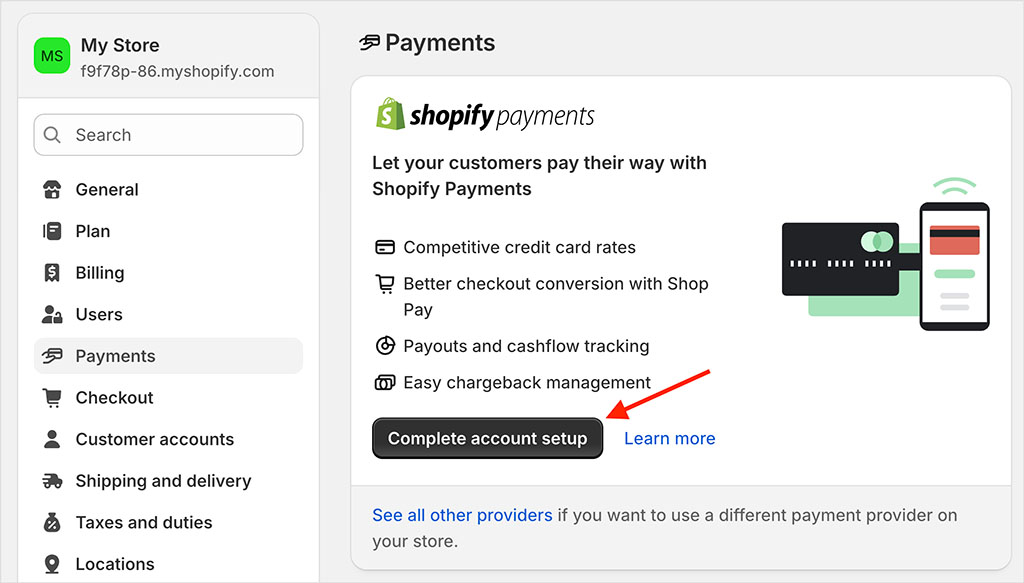
US users of BigCommerce Payments can expect to pay between 2.39% and 2.89% + 30¢ per transaction, depending on plan.
Maximum annual sales limits
An important thing to watch out for in a BigCommerce vs Shopify discussion is sales limits.
With BigCommerce, your sales are limited to $30,000 on the ‘Core plan, $100,000 on the ‘Growth’ plan and $400,000 on the ‘Scale’ plan. Sales limits are described as ‘custom’ if you’re on BigCommerce ‘Performance’ (i.e., they are negotiable). All these limits are calculated on a trailing 12-month basis.
No such limits exist at all on Shopify plans, so it’s a pricing win here for Shopify.
Multiple storefronts: a key win for BigCommerce
As touched on briefly above, a fundamental difference between Shopify and BigCommerce pricing involves the number of stores you can create on each plan.
With BigCommerce, you get the option to build 3, 5 and 8 stores on its ‘Core,’ ‘Growth and ‘Scale’ plans respectively. (Add-on fees apply to do so, but these are reasonable.)
These additional storefronts can be extremely useful for merchants who operate under multiple brands or who serve multiple segments (B2C, B2B, retail wholesale, etc.), but don’t have the budget for an enterprise-grade multi-store setup.
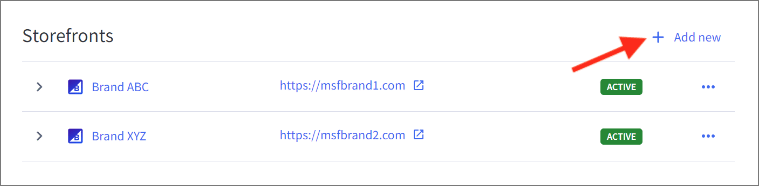
With Shopify, you’ll need to be on a $2,300+ Shopify Plus plan to manage more than one store, so if you need a solution that lets you build lots of storefronts, BigCommerce offers a lot more value than Shopify. In fact, I’d argue that the availability of multi-storefront functionality on its regular plans is one of the key advantages BigCommerce has over its rival.
BigCommerce vs Shopify: the verdict
Ultimately, BigCommerce and Shopify are two of the best-specced ecommerce platforms on the market and you should be able to build a professional store with either of them. However, for me, Shopify ultimately wins this contest.
It’s simply a more developed solution — offering a much wider template selection, stronger international selling features, built-in marketing automation tools, and a considerably larger app ecosystem. On top of that, it’s simply a safer bet for your business, as its user base is comprised of millions of store owners, while BigCommerce, comparatively speaking, has a very small number of customers.
BigCommerce does have a couple of edges over Shopify, however. First, there’s the fact that it lets you build multiple stores on its regular plans (albeit for an extra fee per store). You’ll need to be on a $2,300+ Shopify plan to do the same.
And second, with BigCommerce there’s less of a reliance on apps to provide functionality — features like digital downloads, product review functionality and the option to let customers provide custom data at checkout don’t involve the addition of apps (and the additional costs associated with these).
Finally, BigCommerce’s more open, API-first approach to headless commerce may be appealing to enterprise-level businesses that want greater flexibility and control over their front end architecture.
But ultimately, these advantages don’t represent enough to warrant choosing BigCommerce over Shopify — Shopify is the more powerful, safer option overall.
Below you’ll find a full pros and cons summary for each tool, and links to free trials for both platforms are below:
If you have any comments about either platform, do leave a comment!
BigCommerce vs Shopify — pros and cons summary
Key reasons for using BigCommerce over Shopify
- While Shopify only lets you build multiple stores with one account on its expensive enterprise ‘Shopify Plus’ offering, BigCommerce lets you do this on all of its plans (albeit for an extra fee per storefront).
- 0% transaction fees available with a wide choice of payment providers
- You can use a lot more product options with BigCommerce: 250 to Shopify’s 3 (note however that there are Shopify apps that remove product option limits entirely).
- You can easily include custom fields and file uploads as product options on a BigCommerce store — this is not the case in Shopify, which forces you to rely on coding or app installations to add this functionality.
- Because of its ‘Open SaaS’ approach, BigCommerce’s approach to headless commerce is arguably more flexible.
- There’s a native integration for BigQuery available from BigCommerce — but not for Shopify.
- BigCommerce’s ‘Buy Button’ works in multiple currencies; Shopify’s doesn’t.
- Third-party real-time carrier quotes are available on all BigCommerce plans; in Shopify you’ll need to be on an annual plan or purchase an add-on to get this functionality.
- Credit card fees are slightly lower (if in the US and using BigCommerce Payments).
- BigCommerce works with more POS systems (and BigCommerce POS can work out cheaper, depending on the setup used).
- All BigCommerce plans allow you to have an unlimited number of staff accounts.
- Phone support is available on all plans.
Key reasons for using Shopify over BigCommerce
- It has a much bigger user base, meaning that it’s technically the ‘safer’ option of the two.
- The Shopify template offering is stronger.
- You can make use of a much wider range of typefaces in the Shopify free templates.
- Shopify provides an automatic abandoned cart recovery tool at a significantly lower price point than BigCommerce (and a more sophisticated one too).
- Shopify includes built-in functionality for creating multilingual versions of your store.
- A very affordable email marketing tool is bundled with Shopify (and depending on how many email addresses are on your list, this can even be used for free).
- The Shopify ‘Buy Button’ lets you embed entire product catalogs — BigCommerce’s only lets you embed individual products.
- Shopify supports a much wider range of dropshipping apps and integrations.
- The Shopify mobile app offering is stronger.
- Shopify’s approach to product categorization is better than BigCommerce’s — you can create collections which automatically populate and update themselves based on criteria you supply.
- There are significantly more third-party apps available for Shopify than for BigCommerce.
- Catering for multiple tax rates automatically is easier in Shopify, as this functionality is provided as standard (i.e., no third-party app is required).
- Adhering to EU tax rules is much easier with Shopify, because it can calculate the relevant tax rates automatically for you.
- Point of Sale is more tightly integrated with Shopify than BigCommerce.
- Shopify’s blogging tool comes with an RSS feed — BigCommerce’s doesn’t.
- Customer support comes in a lot more languages.
- Unlike BigCommerce, you don’t need to worry about sales limits.
For an even more in-depth appraisal of the features of these ecommerce solutions, you can check out our BigCommerce review and our Shopify review.
Side-by-side feature comparison
| Feature | BigCommerce | Shopify |
| Standard plan pricing | $39 to $399 | $39 to $399 |
| Option to add extra stores on regular plans | Yes | No |
| Transaction fees | 0% with embedded payment providers | 0% but only if using Shopify Payments |
| Sales limits | Yes | No |
| Templates | 12 free, 219 paid | 24 free, 1,197 paid |
| Interface quality | Good | Excellent |
| Product option limit | 250 | 3 (without paid-for app) |
| Multi-currency selling | Good | Excellent |
| Multilingual selling | Requires app | Built-in |
| Apps | 1,300+ | 21,000+ |
| Email marketing | No | Yes |
Alternatives to BigCommerce and Shopify
When it comes to building an online store, there are quite a few alternatives to BigCommerce and Shopify available, with Wix and Squarespace probably being the best-known competitors.
These are more ‘general’ site builders than BigCommerce and Shopify however; so their ecommerce features are not quite as advanced. However, they tend to be a better option if you’re building a brochure or portfolio site but want to occasionally sell products on the side. For more details, check out our Wix vs Squarespace comparison,our Wix vs Shopify comparison and our Shopify vs Squarespace comparison.
You might also find our guide to Squarespace pricing helpful.
Another option is Jimdo, but again that is a more ‘general-purpose’ website builder, with a fairly limited set of ecommerce features.
If you are on a really low budget, Big Cartel is worth a look (due to its entirely free plan for merchants with just a couple of products). We have a full review of the Big Cartel platform available here.
Used in conjunction with a tool like WooCommerce or Ecwid, WordPress can be a great solution for ecommerce — and it’s a hugely flexible design tool. However, unless you have the right technical skills, you will usually need a WordPress developer to set it up and maintain it.
📚 Related resources: BigCommerce vs WooCommerce | Shopify vs WooCommerce
With its stunning templates and innovative approach to design layout, Webflow can work out well for merchants in need of a very ‘bespoke’ design — but you’ll need coding skills to get the most out of it.
Finally, online marketplaces like Amazon, Etsy and eBay can also work well for new ecommerce businesses. Our Shopify vs Amazon, Shopify vs Etsy and eBay vs Shopify comparisons go through some of the pros and cons of using these to sell your products.
More BigCommerce and Shopify resources from Style Factory
Update details
This article was updated on August 20, 2026. The following updates were made:
- Pricing information was edited to reflect the removal of the Shopify Starter plan.

Comments (91)