

We have an honest review policy, but this page contains affiliate links. If you buy through these, we may earn a commission. This helps fund our research at no cost to you.
In this Adobe Commerce (Magento) vs Shopify comparison, I take a deep dive into the key pros and cons of two widely used ecommerce platforms. Which one is the better fit for your business needs?
Quick verdict
For large enterprises with complex requirements — like multi-store setups, deep backend integrations or custom checkout processes — Adobe Commerce can be an excellent fit. Its traditional deployment options give you extensive control over hosting, customization and security. However, that power comes at a price: higher development costs, ongoing maintenance and a much steeper technical learning curve.
So for most businesses, Shopify is the far more practical choice. It’s much easier and quicker to set up a store with the platform (and maintain it, too). Shopify also makes international expansion simple, with built-in multilingual and multi-currency tools, and its 21,000+ apps allow you to extend functionality without involving a developer.
In short, Adobe Commerce is a good fit for enterprises with big budgets and highly bespoke needs, while Shopify is the better option for the vast majority of ecommerce merchants — particularly those focused on speed, ease of use and straightforward scalability.
Getting started with Shopify or Adobe Commerce
I’ll start my full comparison with a look at the different flavors of the two platforms.
The different versions of Adobe Commerce and Shopify
Before examining the differences between Adobe Commerce and Shopify in depth, it’s worth getting an understanding of the various flavors that both platforms come in. Let’s take a look at these now.
Adobe Commerce
There are four versions of Adobe Commerce to consider:
- Magento Open Source — free, open-source software that you install on your own server or hosting service.
- Adobe Commerce on-premises — the paid, enterprise version of the platform, installed on infrastructure managed by you or your hosting provider. It gives you more ecommerce functionality than Magento Open Source, while leaving you responsible for hosting, infrastructure and maintenance.
- Adobe Commerce on Cloud — a Platform-as-a-Service (PaaS) version of Adobe Commerce hosted on dedicated cloud infrastructure. Adobe manages the underlying cloud platform, while merchants retain considerable control over their application and are responsible for areas including custom code, configuration, patches and upgrades.
- Adobe Commerce as a Cloud Service — Adobe’s newer Software-as-a-Service (SaaS) version of Commerce. Here, Adobe manages the core application, infrastructure and updates for you. It’s a versionless platform with automatic feature and security updates, but gives you less direct control over the underlying application code than the other versions.
These versions of Adobe Commerce are available at very different price points.
Magento Open Source is free to download and use, although you’ll need to pay for hosting, development and maintenance.
Adobe doesn’t publish standard pricing for its paid Commerce products, but industry estimates suggest that Adobe Commerce on-premises starts at around $22,000 per year, while Adobe Commerce on Cloud starts at around $40,000 per year. Costs can rise considerably from there, with some estimates putting annual licensing costs for larger merchants at $125,000+ for Adobe Commerce on-premises and $190,000+ for Adobe Commerce on Cloud.
The exact amount you’ll pay depends on your business and the Adobe Commerce product you’re using. Adobe’s licensing documentation confirms that pricing levels can be based on factors including Gross Merchandise Value (GMV), Average Order Value (AOV) and order limits.
Shopify
There are basically two versions of Shopify available. First there’s its standard version, aimed at small businesses. This costs between $39 and $399 per month, depending on the plan you opt for (see my screenshot below).
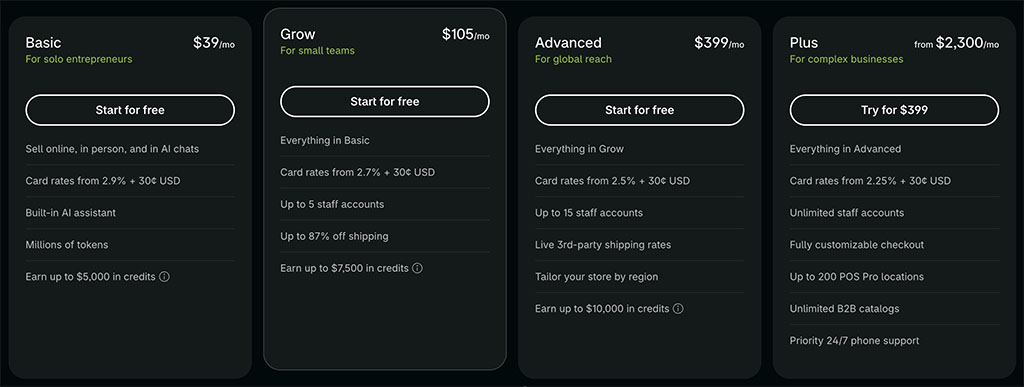
There’s also an enterprise version called Shopify Plus. Pricing for this is negotiable, but typically in the region of $2,300 per month.
Unlike Adobe Commerce, no version of Shopify involves open-source code, and all plans are ‘hosted’ — meaning that the software can only be run on Shopify’s servers.
As the core selling features of all four versions of Adobe Commerce are similar, in this comparison I’ll generally be using the phrase ‘Adobe Commerce’ to cover all four. However where necessary I’ll reference individual versions of the software.
I’ll start with a look at the key reasons to use Adobe Commerce over Shopify, before walking you through the areas where Shopify comes out on top.
Download our free Shopify Startup Kit


Our free Shopify Startup Kit is a must for anyone thinking of building an online store with Shopify. Containing a comprehensive e-book on starting a Shopify store, video tutorials, PDF cheatsheets and much more, it’s packed full of practical advice on how to get a Shopify business off the ground. It’s available for free to Style Factory readers — but for a limited time only.
Key reasons to use Adobe Commerce over Shopify
1. Adobe Commerce offers more flexibility
One of Adobe Commerce’s biggest selling points is the high degree of control it can give merchants over how their stores work.
With Magento Open Source, Adobe Commerce on-premises and Adobe Commerce on Cloud, developers have extensive access to the underlying code and can create highly customized ecommerce experiences. This can be particularly useful for businesses with complex product catalogs, unusual checkout requirements or highly bespoke integrations.
However, this level of flexibility comes at a cost — it requires significant technical expertise and ongoing development work, making it better suited for use by companies with dedicated IT teams.
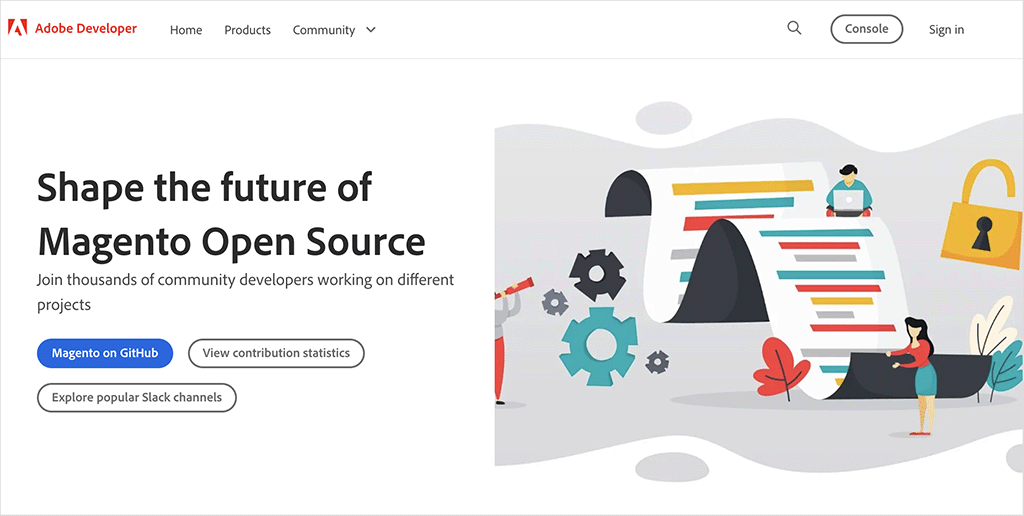
It’s important to note that the newer Adobe Commerce as a Cloud Service works differently. Because it’s a fully managed SaaS product, you can’t modify its core application code directly. Instead, Adobe lets developers extend the platform using APIs, Adobe Developer App Builder, SDKs, webhooks and other extensibility tools.
Shopify also operates on a SaaS model, and consequently gives you less access to its underlying platform than the traditional versions of Adobe Commerce do. However, it provides a wide range of tools for customizing storefronts and adding bespoke functionality.
That said, Shopify’s ‘Checkout Extensibility’ functionality — a recent addition to Shopify’s feature set — now allows Shopify Plus users to customize elements of the checkout process using approved extensions and APIs. But it still doesn’t provide the same level of control as Adobe Commerce.
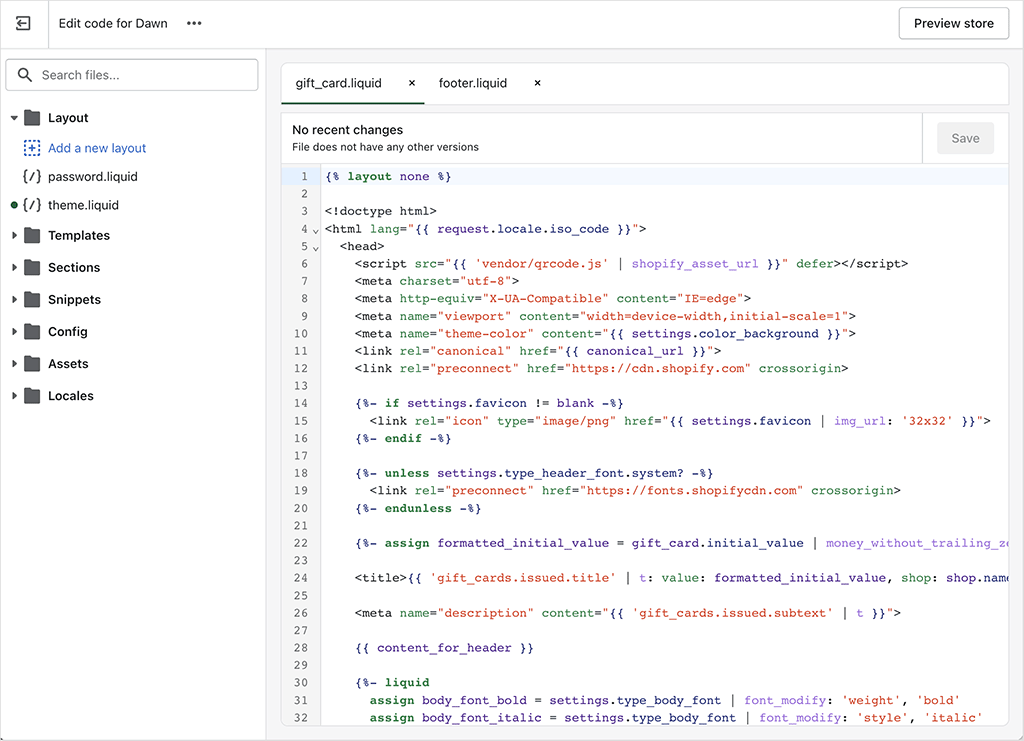
Another key difference is how templates can be customized in both platforms. Shopify uses a proprietary templating language called ‘Liquid’, which allows merchants to edit themes, but using predefined rules. While Liquid is more accessible than raw coding, it imposes more constraints than Adobe Commerce’s fully customizable PHP framework.
So while Shopify provides store owners with a nice balance between customization and simplicity, Adobe Commerce is the better option for businesses that require absolute creative and functional freedom.
2. Adobe Commerce gives large businesses more infrastructure control
Adobe Commerce is designed to handle large, complex ecommerce operations, including stores with high traffic levels, large product catalogs and multiple international storefronts.
One advantage it offers larger businesses is a greater degree of control over their ecommerce infrastructure. With an on-premises Adobe Commerce deployment, businesses can choose and configure their own hosting environment — something that can be particularly useful for enterprises with highly specific database, server or infrastructure requirements.
Adobe Commerce on Cloud takes a different approach, providing scalable cloud infrastructure while still giving development teams considerable control over their application and environment. Its scalable architecture can increase computing capacity and add additional web server nodes to deal with increased demand.
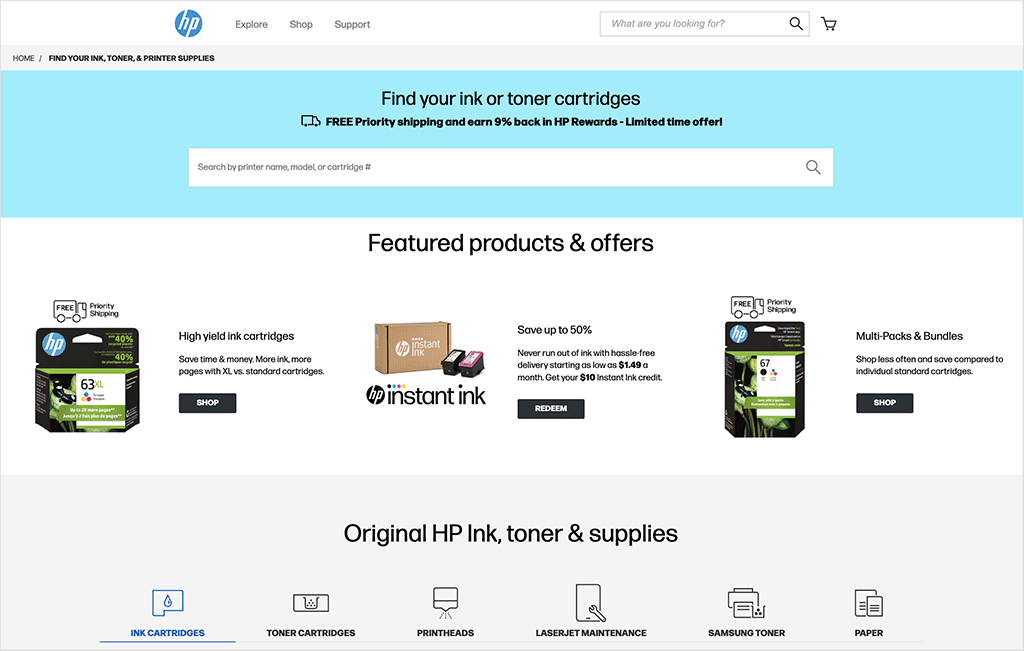
The newer Adobe Commerce as a Cloud Service is more similar to Shopify in this respect. It’s a fully managed SaaS platform, with Adobe automatically scaling resources to cope with peaks in traffic, orders and catalog activity.
Shopify is highly scalable too. Because Shopify manages the underlying infrastructure for you, merchants don’t have to provision additional servers or configure their hosting setup as traffic grows. This makes handling large traffic spikes considerably simpler from a merchant’s point of view.
The trade-off is control. Even with Shopify Plus, you don’t get direct access to the underlying servers or database, so businesses with highly specialized infrastructure requirements have fewer options for configuring the underlying technology.
Shopify Plus also applies API rate limits, although higher limits are available to Plus merchants and increases can be requested from Shopify.
So for most businesses, both platforms provide plenty of scalability. Adobe Commerce’s key advantage here is the additional infrastructure control available with its traditional deployments — something that may matter to particularly large businesses with complex technical requirements.
3. Adobe Commerce handles multi-store management better
Adobe Commerce is particularly strong when it comes to managing multiple online stores under different brands, regions or pricing structures.
Its multi-site and multi-store functionality lets businesses run multiple websites and storefronts — each potentially featuring different domains, languages, currencies, product catalogs and pricing — from a single Adobe Commerce installation and admin interface.
Adobe Commerce organizes these using a Website → Store → Store View hierarchy. A ‘Website’ can have its own domain, customers, pricing and payment settings; individual ‘Stores’ can have different product catalogs; and ‘Store Views’ are typically used to provide different language versions of a store. Settings can be inherited across these levels or customized individually as required.
This makes it a powerful solution for companies that need centralized control over multiple stores while maintaining significant regional or brand-specific variations.
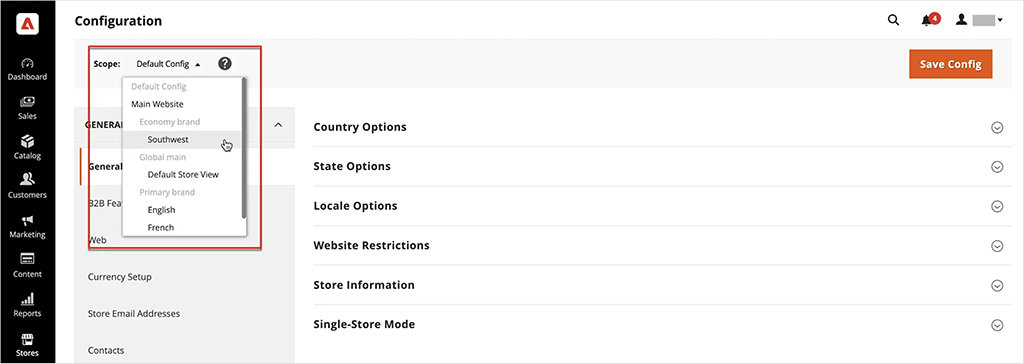
Shopify takes a somewhat different approach. On its standard plans, each online store generally requires its own Shopify subscription. You can associate multiple stores with the same Shopify login and group them within an organization, but they remain separate stores with their own settings and configurations.
(Third-party apps can be used to synchronize products, inventory and other data across Shopify stores, but these can add costs and complexity.)
Shopify Plus provides considerably more multi-store functionality. A Plus subscription includes a main store plus capacity for multiple expansion stores, making it easier to operate separate stores for different countries, brands or business units. However, these expansion stores are still individual Shopify stores, rather than storefronts running from a single ecommerce installation in the way Adobe Commerce’s multi-store system works.
So while both platforms can support sophisticated multi-store setups, Adobe Commerce provides a particularly centralized approach to managing multiple websites and storefronts from one Commerce installation.
4. Adobe Commerce offers greater payment processing flexibility
Adobe Commerce gives merchants more control over payment processing than Shopify, supporting around 300 third-party payment gateways without imposing any additional transaction fees (i.e., users only pay the standard fees charged by their chosen payment provider). This makes it an attractive option for businesses that process a high volume of transactions or need access to specific regional payment providers.
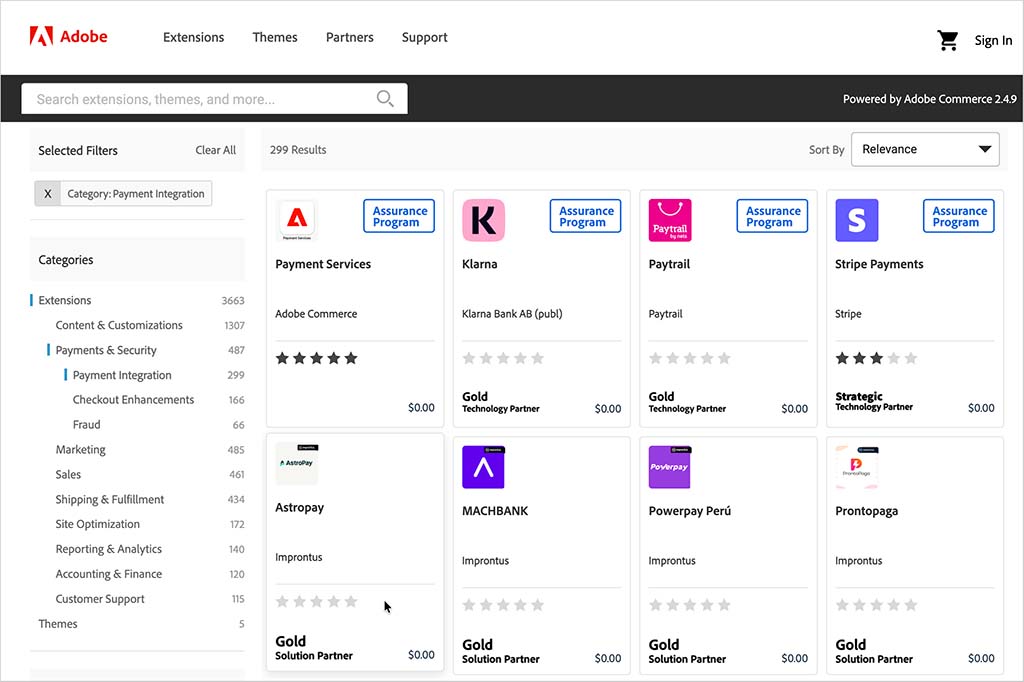
Shopify, by contrast, supports about 100 third-party payment gateways and charges transaction fees of 0.6% to 2% (depending on plan) if you use one of them.
The only way to avoid transaction fees with Shopify is by using its built-in payment gateway, ‘Shopify Payments’ — but this is only available in 40 countries.
While Shopify Payments simplifies processing and eliminates extra costs, merchants outside of supported regions (or those who want to use alternative payment processors) may find these fees unwelcome.
Ultimately, for businesses that need maximum payment flexibility, Adobe Commerce’s larger selection of gateways and its lack of transaction fees give it a significant edge over Shopify.
5. Adobe Commerce allows full checkout customization
The traditional versions of Adobe Commerce give merchants extensive control over the checkout experience, making the platform particularly suitable for businesses that require custom payment flows, advanced verification steps or highly specific checkout modifications.
Developers can customize checkout layouts, add custom fields, modify payment logic and integrate third-party services into the selling process.
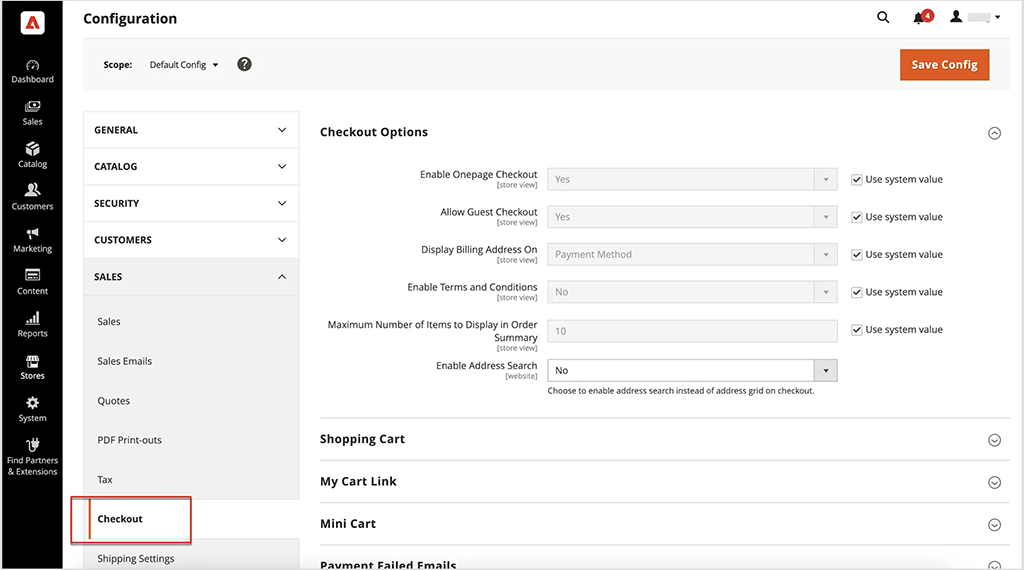
The newer Adobe Commerce as a Cloud Service works differently. Because merchants can’t modify its core application code directly, checkout customizations have to be implemented using Adobe’s supported extensibility tools, APIs and services.
Shopify also takes a controlled approach to checkout customization. All merchants can customize the branding of their checkout and use compatible apps to add functionality, but the deepest checkout customization options are reserved for Shopify Plus users.
Through Shopify’s Checkout Extensibility framework, Plus merchants can add custom functionality and user-interface elements to the information, shipping and payment pages of the checkout using apps and extensions. However, these customizations have to work within Shopify’s supported framework rather than through direct modification of the underlying checkout code.
Now despite these limitations, I should mention that Shopify’s checkout is widely regarded as one of the most optimized in the industry. It features a one-page checkout designed for speed and simplicity and its infrastructure is capable of handling up to 40,000 checkouts per minute — a level of scalability well-suited for businesses experiencing high-volume traffic.
(So arguably, modifying a Shopify checkout extensively is not always necessarily the best thing to do in any event.)
However for businesses that need full control over their checkout process, Adobe Commerce is unquestionably the more flexible option.
6. Adobe Commerce provides more control over SEO
Adobe Commerce provides extensive control over SEO settings, making it a particularly strong option for businesses that need to make deep technical SEO customizations.
One advantage is URL flexibility. Adobe Commerce lets merchants customize product, category and CMS page URLs and create URL rewrites, without forcing product and category pages into predefined subdirectories. Shopify by contrast enforces a more rigid URL structure, requiring merchants to use ‘/collections/’ and ‘/products/’ in their URLs — this may limit certain SEO strategies a bit.
Adobe Commerce also allows for unrestricted metadata editing, enabling businesses to modify titles, descriptions and alt text at the product and category level. Shopify offers basic metadata control but caps title tags at 70 characters, which can lead to truncation in search results and potentially lower click-through rates.
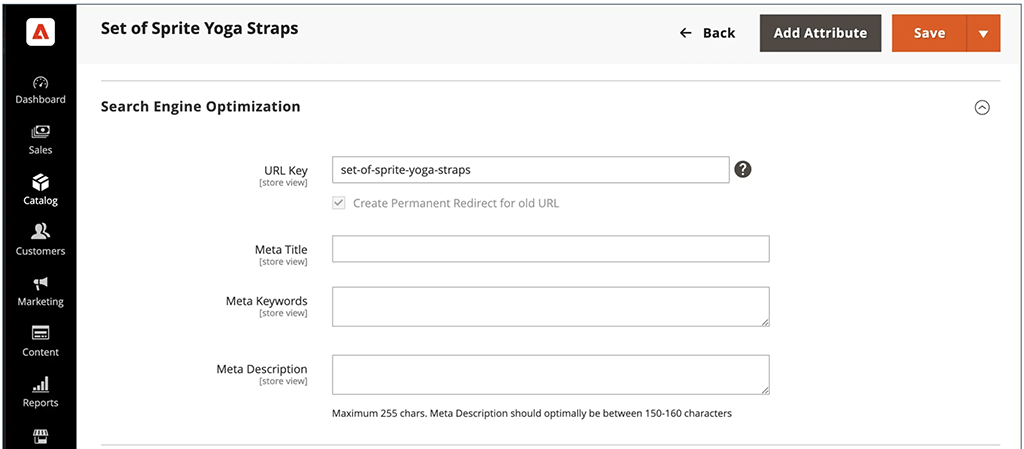
Another advantage of Adobe Commerce is the control it provides over structured data. Schema.org markup is automatically added to product templates, and developers can customize the structured data used by a store. Shopify themes also include structured data, but making significant changes to it typically involves editing theme code or using a third-party app.
Adobe Commerce also gives merchants considerable control over canonical tags and redirects. Its SEO settings let you configure canonical URLs for products and categories, while its URL rewrite system can be used to create redirects for products, categories and CMS pages. Shopify handles much of this automatically and includes built-in URL redirect functionality, but gives merchants less direct control over canonical URLs through the admin.
And finally, Adobe Commerce gives you more control over technical SEO — much like WordPress, it gives merchants full control over hosting, speed optimizations and page structure. Shopify, by contrast, provides a simpler, pre-configured SEO setup that is more user-friendly but less adaptable.
7. Adobe Commerce can give you more control over hosting and performance optimization
Because Magento Open Source and Adobe Commerce on-premises can be self-hosted, they allow businesses to choose their own hosting provider and configure their server environment according to their precise requirements.
Adobe Commerce merchants can fine-tune server response times, implement advanced caching strategies and scale their infrastructure, ensuring optimal speed and reliability. This flexibility is ideal for high-traffic businesses or those requiring custom server setups.
(Adobe Commerce on Cloud works differently, because Adobe provides the underlying cloud infrastructure. However, it still gives development teams considerable control over their application environment and performance configuration.)
Shopify, by contrast, provides fully managed hosting, eliminating the need for server maintenance but also restricting choices around performance optimizations. While Shopify’s infrastructure is built for reliability, and automatically scales during traffic spikes, merchants cannot adjust server configurations, implement custom caching strategies, or fine-tune backend performance.

Magento Open Source and Adobe Commerce on-premises merchants can choose from a wide range of hosting providers, giving them considerable control over performance, scalability and server configuration.
Self-hosted Adobe Commerce deployments also let businesses configure their own content delivery network (CDN). Shopify, by contrast, includes a CDN as part of its hosted service and manages its configuration for you.
Similarly, server-side optimizations such as database tuning and PHP configuration can be controlled on self-hosted Adobe Commerce deployments, while Shopify manages these elements internally.
So while Shopify’s managed infrastructure offers a simpler, hands-off approach, businesses with specialized hosting or server requirements may prefer the additional infrastructure control available with the self-hosted versions of Adobe Commerce.
(As mentioned earlier, this additional control can also be useful when implementing certain technical SEO optimizations.)
8. Adobe Commerce offers superior flexibility for managing large, complex product catalogs
Adobe Commerce is designed to handle large and complex product catalogs, making it a strong choice for businesses managing large numbers of SKUs or products with particularly complicated configurations.
Its ‘configurable products’ feature lets merchants create products with multiple attributes — such as size, color and material — with each resulting variation treated as a separate product with its own SKU, inventory and other settings.
Adobe Commerce also supports ‘customizable options,’ which can be used to offer additional customer choices without creating a separate SKU for every possible configuration.
This level of flexibility can be particularly beneficial for businesses selling products such as fashion, furniture or industrial equipment, where customers may need to choose from lots of different product configurations.
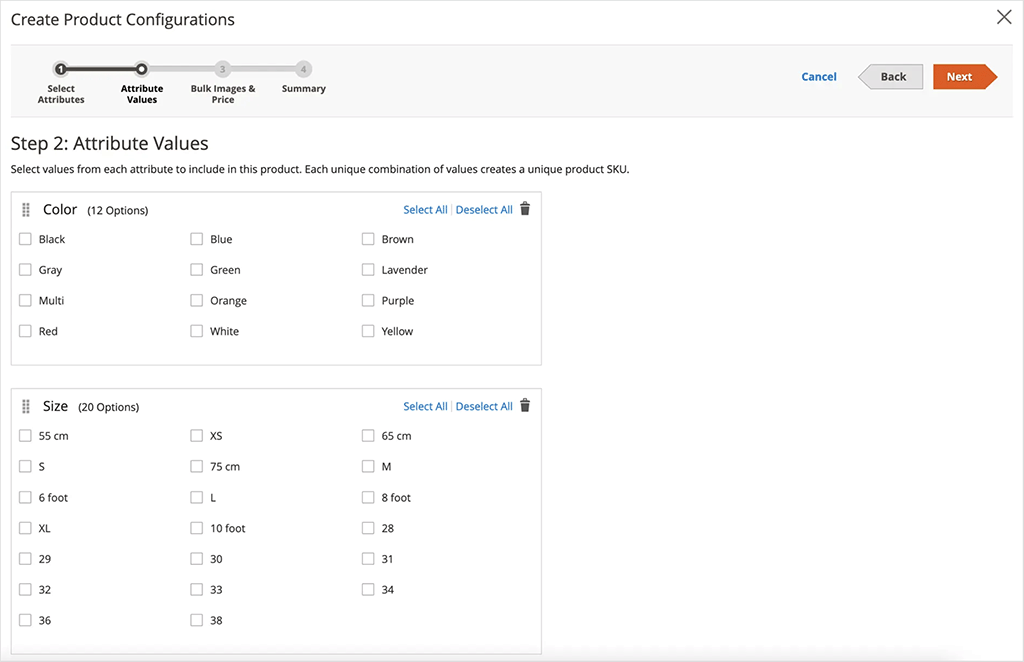
Shopify has become considerably more flexible in this area, however. It now lets merchants create up to 2,048 variants per product, a substantial increase over its previous 100-variant limit.
Shopify still limits each product to three options (for example, size, color and material), however. Merchants that need more than three can use third-party apps or custom theme code to collect additional product choices.
Another constraint involves very large Shopify catalogs. Once a store contains 500,000 or more variants, Shopify applies a daily limit of 10,000 new variants added through apps or CSV imports. Shopify Plus stores are exempt from this restriction.
Adobe Commerce doesn’t impose Shopify’s three-option product limit, and its configurable product and attribute system provides considerably more flexibility for building complex product structures.
So while Shopify’s increased 2,048-variant allowance means that its native product configuration tools are now sufficient for considerably more merchants, Adobe Commerce remains the more flexible option for businesses with particularly complex product catalogs and configuration requirements.
9. Adobe Commerce provides greater control over automation and workflows
Adobe Commerce offers considerable flexibility when it comes to ecommerce automation.
Its traditional deployments allow for custom scripting, advanced API integrations and tailored automation workflows, enabling businesses to fine-tune processes like inventory synchronization, pricing adjustments and multi-supplier coordination.
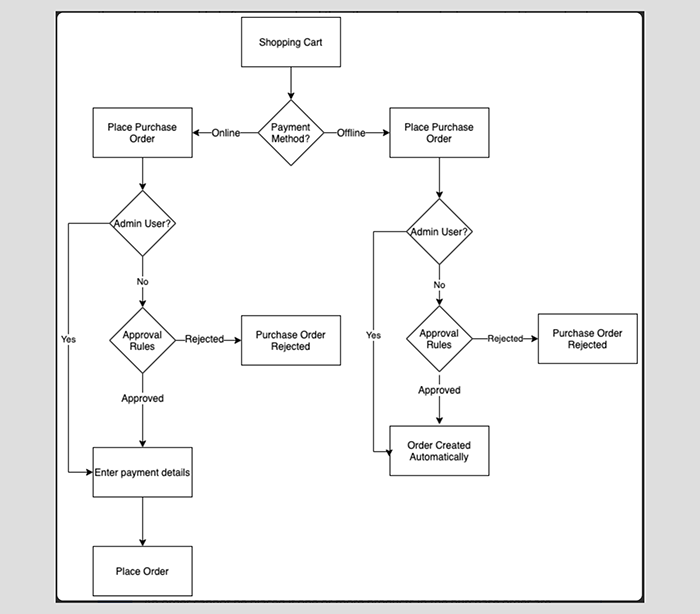
Shopify provides automation through its Shopify Flow system, which is available on its Basic, Grow, Advanced and Plus plans. Flow enables merchants to create rule-based triggers for common tasks, such as sending low-stock alerts, tagging high-value customers or automating order routing.
However, businesses that need particularly advanced or bespoke automation may encounter more constraints with Shopify’s managed platform. Some API functionality and limits vary by plan, with Shopify Plus providing additional API capacity.
Additionally, Shopify’s API rate limits, while fairly generous, can restrict the number of automated processes performed in a short period — for example, those involving bulk product updates or high-volume data syncing.
10. Adobe Commerce offers greater control for businesses in regulated industries
Businesses working in certain industries — such as pharmaceuticals, financial services and government procurement — must adhere to strict compliance requirements involving data security, reporting and payment processing.
And some versions of Adobe Commerce give businesses extensive control over how their compliance requirements are implemented. This flexibility can make the platform an attractive choice for organizations that need considerable control over how customer data is stored, processed and secured.
For example, businesses using a self-hosted Adobe Commerce deployment can choose their hosting provider and data-hosting location; implement custom encryption and authentication measures; and modify checkout, payment and backend processes to meet financial or industry-specific requirements. These capabilities can be particularly valuable for companies handling sensitive customer data, high-value transactions or government contracts.
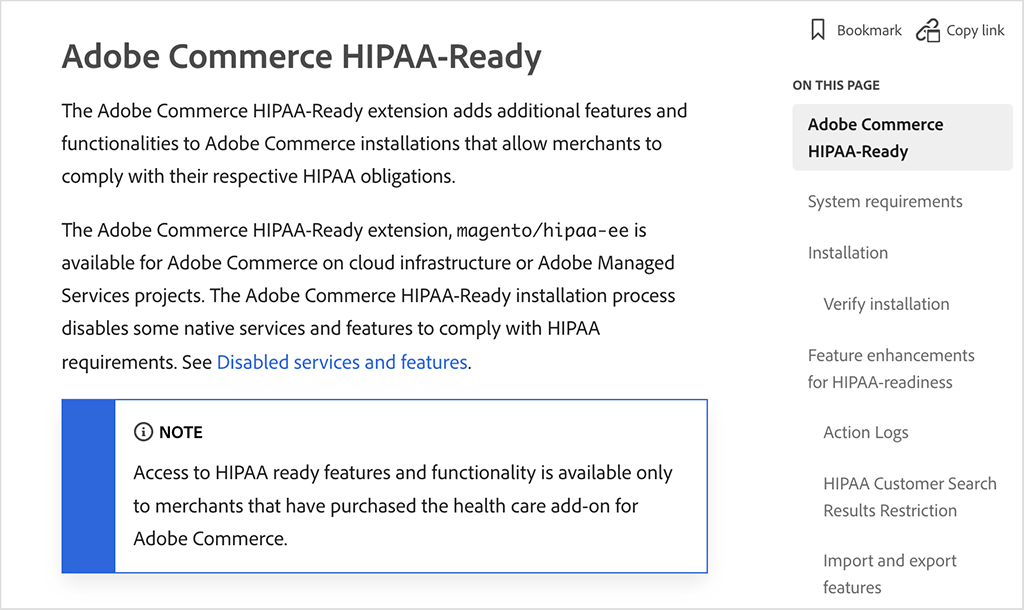
Adobe also provides specific compliance capabilities for regulated industries. Its offerings include HIPAA-ready functionality for organizations handling protected health information, while Adobe Commerce supports widely used security and compliance standards including PCI DSS.
Shopify, as a Software-as-a-Service (SaaS) platform, controls the underlying infrastructure used by merchants, meaning that they have to operate largely within Shopify’s built-in security framework.
Shopify provides a strong range of security and compliance features, including PCI DSS compliance, SSL encryption and fraud analysis, and it handles many security updates and infrastructure requirements automatically. However, merchants can’t modify the underlying server infrastructure or security architecture at the same level as they can with a self-hosted Adobe Commerce deployment.
For businesses with standard ecommerce compliance needs, Shopify’s managed approach is likely to be sufficient — and can make meeting some security requirements considerably simpler. But businesses operating under particularly specialized regulatory requirements may value the additional infrastructure and configuration control available with some Adobe Commerce deployments.
So those are my thoughts on the advantages of using Adobe Commerce over Shopify — if you want to try out the platform you can do so here.
Now I’m going to explore the reasons why you might want to use Shopify.
Key reasons to use Shopify over Adobe Commerce
1. Shopify is significantly easier to use and faster to set up
Starting an online store can be daunting for non-technical entrepreneurs, but Shopify streamlines the process with its intuitive drag-and-drop interface and its large range of pre-designed, easy-to-edit templates.
This streamlined setup enables you to launch your store in as little as a few hours and without having to write any code whatsoever.
By contrast, a traditional Adobe Commerce setup typically requires configuring servers, managing databases and performing theme modifications via coding. This leads to a much more technical process and a steeper learning curve.
As a result, launching an Adobe Commerce store can take weeks or even months, significantly delaying your time-to-market.
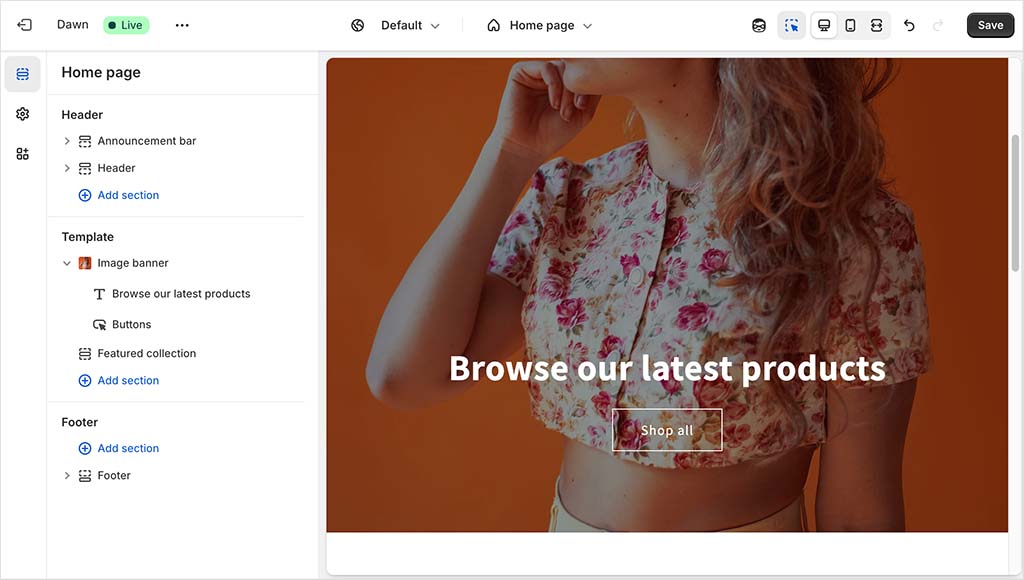
(For the record, Adobe Commerce states that most stores take around six months to be fully deployed. Shopify claims that even enterprise-level stores using the ‘Shopify Plus’ version of the platform can be launched in under 90 days — half the time of an Adobe Commerce go-live.)
Furthermore, Shopify’s intuitive content management system ensures that day-to-day tasks, like adding products or managing inventory, are all extremely straightforward to perform. Adobe Commerce’s steep learning curve can make these routine tasks much more time-consuming, potentially diverting focus from other critical business activities.
Ultimately, Shopify’s user-friendliness represents one of the biggest reasons to use it over Adobe Commerce.
2. Shopify handles hosting for you
Managing the technical infrastructure of an online store can end up being a significant burden for small to medium-sized businesses.
Shopify alleviates this challenge by providing a fully hosted solution, meaning that web hosting, security and software updates are all managed for you by the company.
This approach ensures your store remains fast, secure and up-to-date without any extra effort on your part; and a guaranteed 99.99% server uptime means your store stays fully accessible to customers around the clock.

By contrast, some versions of Adobe Commerce require considerably more involvement in hosting and infrastructure management. With Magento Open Source and Adobe Commerce on-premises, you need to arrange your own hosting and take responsibility for tasks such as installing security patches and performing software updates.
Adobe’s cloud-based offerings reduce this burden considerably. Adobe Commerce on Cloud includes cloud infrastructure as part of the service, while the newer Adobe Commerce as a Cloud Service is fully managed by Adobe, with infrastructure, updates and scaling handled for you.
So while Adobe now provides options that remove much of the infrastructure burden associated with its traditional deployments, Shopify provides this fully managed approach across its entire platform.
Of the two platforms, the one that most reduces risk and ongoing maintenance costs for businesses is definitely Shopify.
3. Shopify is usually a lot cheaper
Shopify provides a transparent, fixed-cost pricing model, making it easier for businesses to budget.
Its core plans are priced as follows:
- $29 per month for the ‘Basic’ plan
- $79 per month for the ‘Grow’ plan
- $299 per month for the ‘Advanced’ plan.
Each of these plans includes themes, hosting, security, and a comprehensive suite of ecommerce features.
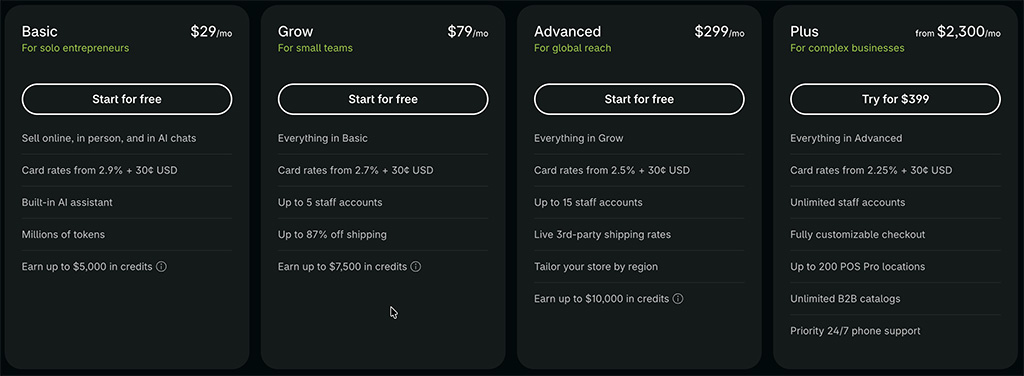
You can explore the key features of all Shopify plans through its free trial.
The most basic version of Adobe Commerce — ‘Magento Open Source’ — is free to download, but the associated costs can add up quickly. Expenses such as hosting fees and development costs for setup and ongoing maintenance must also be factored into your budget.
And using the paid-for versions of Adobe Commerce can be extremely expensive. Adobe doesn’t publish standard pricing for these, but industry estimates suggest starting costs of around $22,000 per year for Adobe Commerce on-premises and $40,000 per year for Adobe Commerce on Cloud.
And as I mentioned earlier, Adobe Commerce on Cloud’s pricing is based on Gross Merchandise Value — sales price of goods x number of goods sold. This means that if you’re a high-volume seller, the fees for Adobe Commerce on Cloud can really mount up.
In fact, a recent study shows that Shopify’s total cost of ownership (TCO) — which considers both the upfront expenses and the ongoing costs of maintaining and operating a platform — is approximately 29% lower than Adobe Commerce’s.
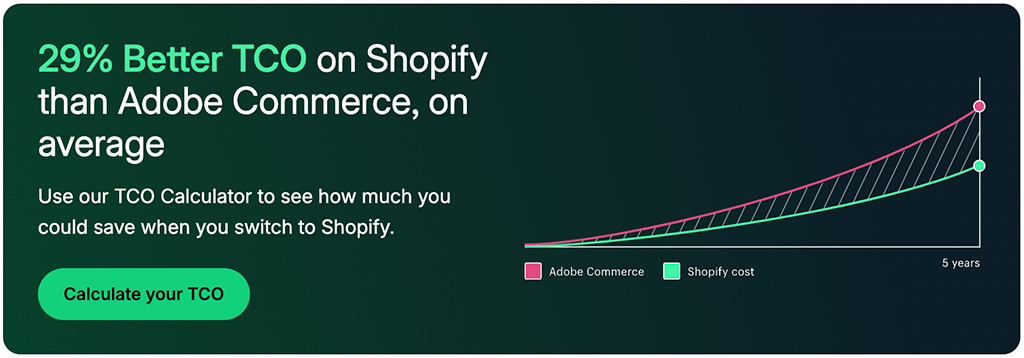
👉 You can get a full breakdown of Shopify costs and fees in our in-depth Shopify pricing guide.
4. Shopify provides more apps and integrations than Adobe Commerce
Expanding your online store’s capabilities is often essential for growth, and Shopify offers a significant advantage here in the form of its well-stocked app store. This contains a selection of over 21,000 apps which cover everything from marketing automation and inventory management to customer support, analytics and AI-driven personalization.
(Significantly, these are all vetted from a security and compatibility point of view by Shopify before they are added to the Shopify app store.)
Designed for ease of use, most Shopify apps can be installed in just a few clicks — and using them typically requires little to no technical expertise. Whether you’re looking to launch a loyalty program, streamline fulfillment, or integrate with social media and marketplaces like Amazon and eBay, Shopify’s App Store offers an accessible, plug-and-play solution.
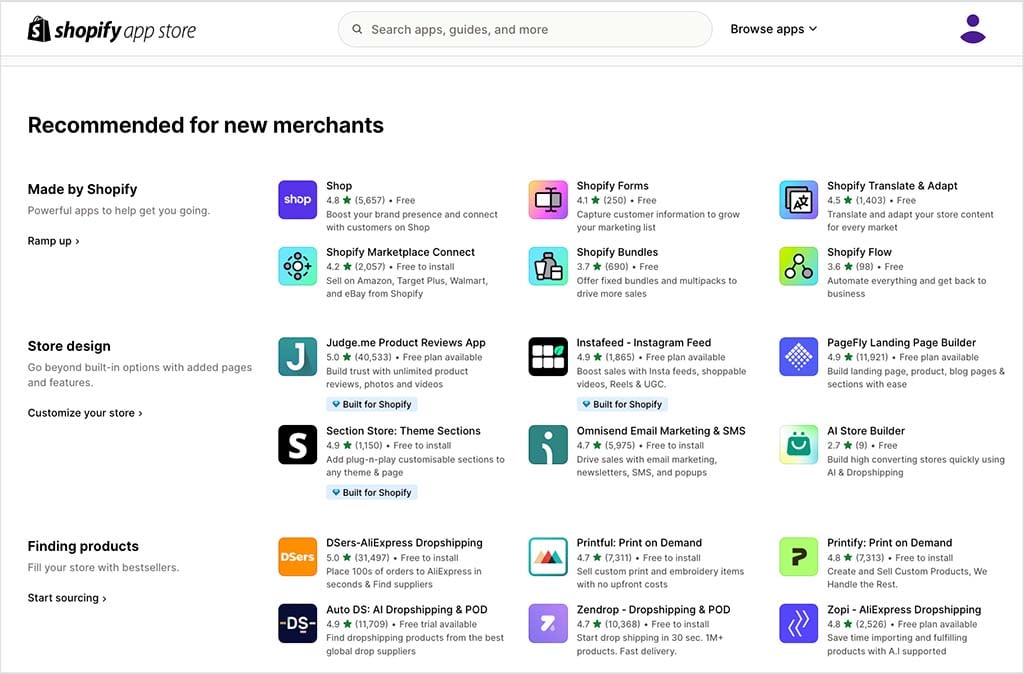
By contrast, Adobe Commerce’s extensions marketplace features around 3,668 extensions, giving Shopify nearly a 6-to-1 advantage in terms of app availability.
And although Adobe Commerce’s extensions provide deep customization opportunities, many require manual installation, developer intervention and additional configurations. This complexity can make expanding store functionality more time-consuming and costly than doing so with Shopify, especially for non-technical merchants (who may have to resort to developer support to use certain apps).
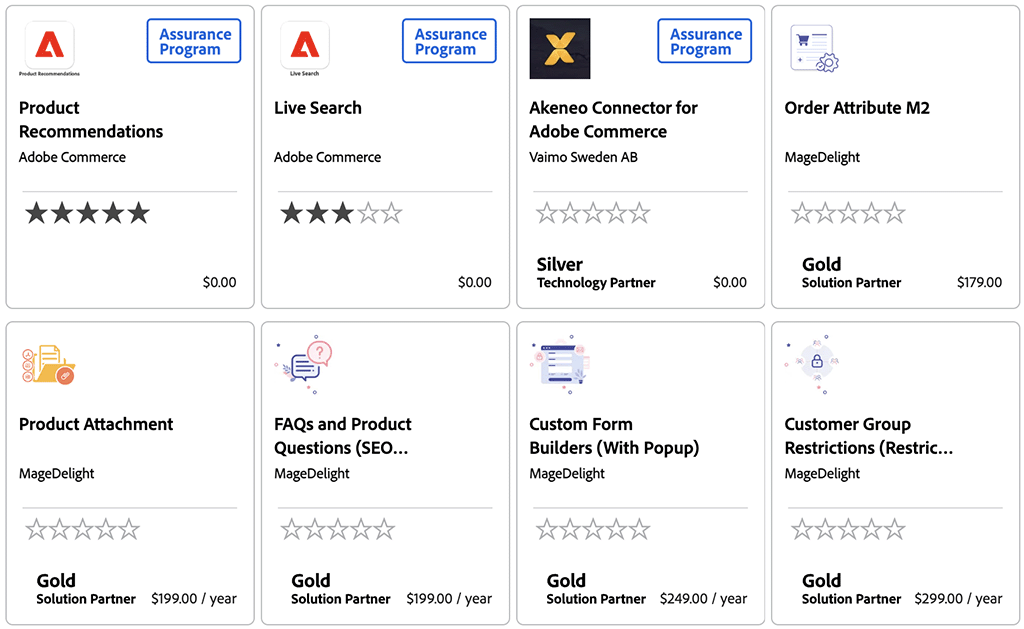
So for businesses seeking a streamlined, user-friendly way to enhance their store’s functionality, thanks to its app store, Shopify wins.
5. Shopify offers 24/7 support on all plans
Shopify provides round-the-clock customer support via live chat on all plans (with phone support available on its enterprise ‘Shopify Plus’ offering too).
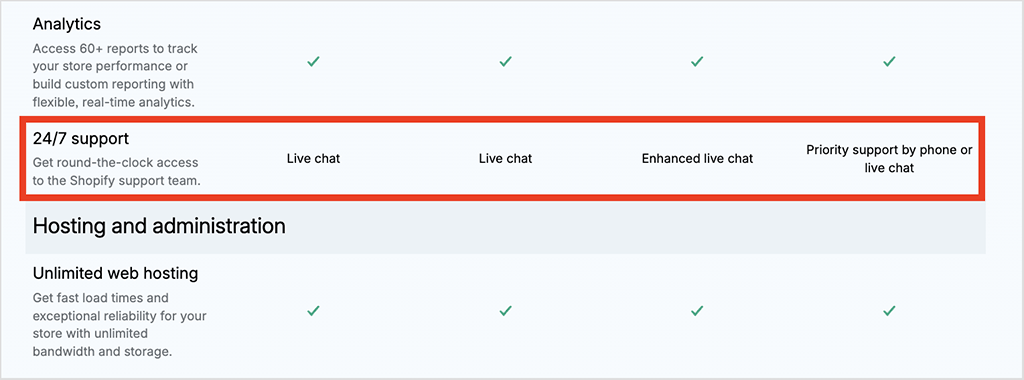
With Adobe Commerce however, accessing customer support is not so straightforward.
If you’re using the entirely free version of Adobe Commerce — Magento Open Source — there is no official customer support, meaning users must rely on community forums, documentation and third-party developers for troubleshooting.
For those using the paid versions of Adobe Commerce, official support is included, however. Even then, response times and service levels depend on specific support packages.
Ultimately for businesses that want instant, reliable help without extra costs, Shopify’s 24/7 support structure — particularly its always-available chat assistance — gives it a clear edge over Adobe Commerce.
6. Shopify provides built-in security and PCI compliance
Security is a top priority in ecommerce, as a single data breach can result in financial losses and damage customer trust.
Helpfully, Shopify simplifies security by offering built-in protection across all stores, ensuring merchants don’t have to manage it themselves.
All Shopify stores are PCI DSS Level 1 compliant, meaning they meet the highest standards for securely processing credit card transactions.
(PCI — Payment Card Industry — compliance is a set of security standards required for businesses that handle credit card payments; these are designed to protect sensitive customer data from fraud and breaches.)
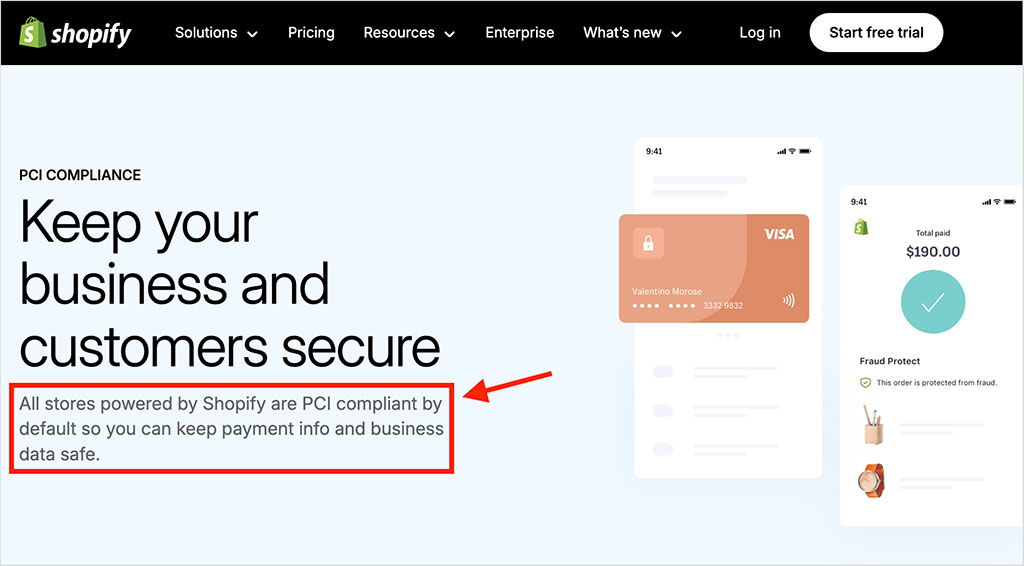
Shopify also provides free SSL certificates for every store, encrypting customer data and keeping transactions secure. Additionally, its fraud detection tools help merchants identify and prevent suspicious transactions, reducing chargebacks and protecting revenue.
But if you’re using a self-hosted version of Adobe Commerce, ensuring site security rests entirely with the individual store owner. Merchants must manually install SSL certificates, maintain PCI compliance and apply security patches to keep their store protected. Failure to do so can leave an Adobe Commerce store vulnerable to cyberattacks, data breaches and compliance violations.
And for businesses without dedicated security expertise, this ‘self-managed’ security setup can be complex, time-consuming or expensive to sort out.
7. Shopify evolves continuously and rolls out new features automatically
One of the key benefits of Shopify is that it continuously evolves, rolling out new features, integrations and performance updates automatically. Store owners don’t need to worry about manually upgrading their software — everything happens seamlessly in the background, ensuring merchants always have access to the latest tools.
For example, in the most recent round of ‘Shopify Editions’ upgrades, over 150 updates were introduced across various areas, including AI-powered tools, expanded sales functionality and backend improvements.
Traditional versions of Adobe Commerce, by contrast, follow a more conventional software update model. While the platform regularly releases improved features, the updates necessary to access them generally have to be implemented by merchants or their developers — including when using Adobe Commerce on Cloud. (The newer Adobe Commerce as a Cloud Service is an exception, with Adobe handling feature and security updates automatically.)
This often requires developer assistance, leading (once again!) to additional costs. And as I discussed earlier, failing to keep Adobe Commerce updated can result in compatibility issues with extensions and potential security vulnerabilities.
8. Shopify provides powerful built-in point-of-sale features
A point-of-sale (POS) system lets merchants sell in physical locations (retail stores, marketplaces etc.) while keeping inventory synced with their online store.
Shopify includes a built-in POS system on all its main plans. This lets merchants process sales using a wide range of hardware including smartphones, tablets, card readers, barcode scanners, and tills — with everything managed from a single Shopify dashboard.
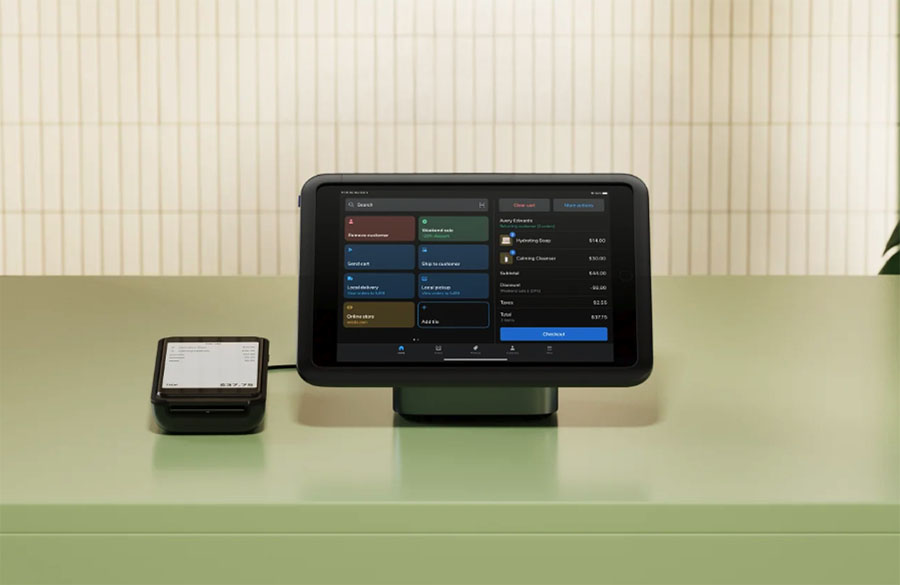
The bundled ‘Casual in-person selling’ functionality facilitates basic in-person transactions, while Shopify POS Pro ($89/month per location, or $79/month when billed annually) unlocks more advanced features, including:
- buy online, pick up in-store (BOPIS)
- local delivery
- exchanges and in-store returns
- custom receipts
- purchase order creation
- automatic discounts applied at checkout
- low stock warnings.
(Shopify Plus users can use ‘POS Pro’ in up to 20 locations as part of their subscription.)
By contrast, Adobe Commerce does not offer a built-in POS system — instead, merchants must rely on one of 100+ third-party extensions (e.g., Square, PayPal, Zettle etc.).
While this provides flexibility for businesses with existing POS setups, it adds extra costs, more setup time and potential compatibility issues.
💡 Tip: You can learn more about Shopify POS in our Shopify POS pricing guide.
9. Shopify makes dropshipping and print-on-demand easier than Adobe Commerce
If you’re aiming to start a dropshipping or print-on-demand (POD) business, Shopify is by far the better choice of the two platforms. It gives you access to over 1,150 dropshipping apps and more than 1,000 print-on-demand ones — a large selection of tools with which to try the dropshipping or POD model out.
These apps allow merchants to display a huge range of products on their stores that can be manufactured or fulfilled automatically by third-party companies (AliExpress, Spocket, Zendrop, Modalyst, Printful, Printify etc.)
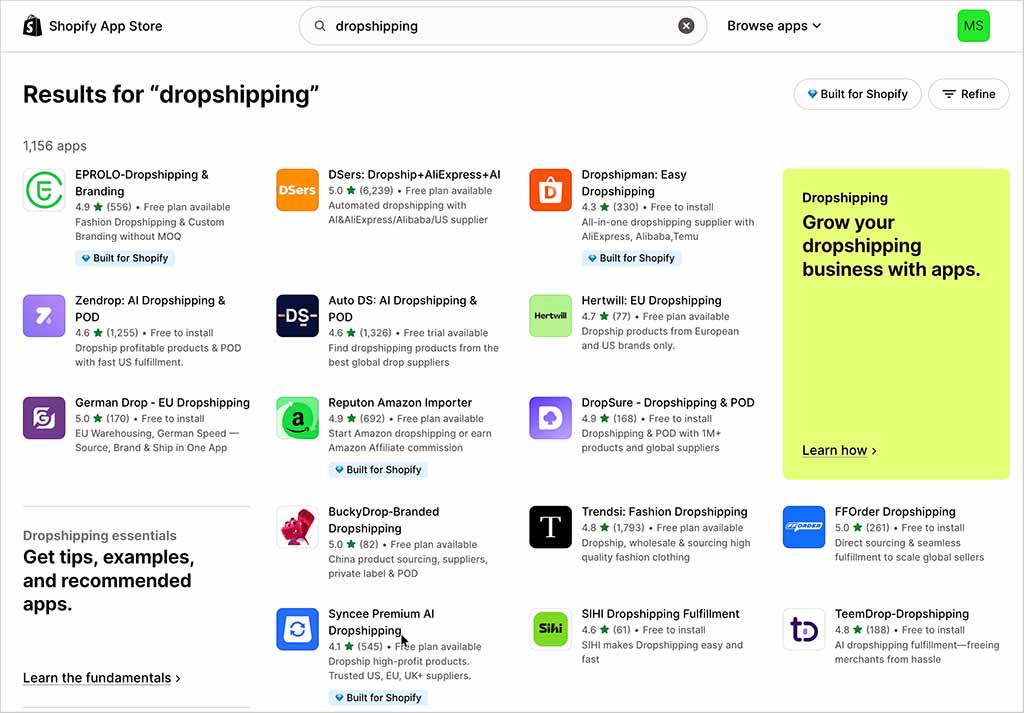
By contrast, Adobe Commerce only integrates with a few dropshipping and print-on-demand platforms (and significantly, these don’t include big hitters AliExpress or Printify). Furthermore, setting up these integrations requires considerable technical effort — you will have to spend time manually configuring supplier relationships, and troubleshooting inventory syncing issues.
Ultimately, if you’re looking for a quick, hassle-free entry into dropshipping or print-on-demand, Shopify is the clear winner.
10. Shopify makes it easier to sell on other platforms
Shopify makes it incredibly easy to expand beyond your own ecommerce store and sell on other platforms — for example, Amazon, eBay, Walmart, Facebook, Instagram, TikTok and Google Shopping.
In short, it lets you sell products on multiple marketplaces and platforms easily from a single dashboard, using native integrations.
Adobe Commerce, on the other hand, doesn’t include built-in marketplace integrations. To sell on channels like Amazon or eBay, you’ll need to install third-party extensions like ‘M2E Pro’ or ‘Webkul Multi-Channel Connector’.
While these extensions offer more customization options, they require additional configuration and maintenance, making the process far more cumbersome than Shopify’s approach.
So if your goal is to maximize exposure (and revenue) by selling across multiple sales channels, Shopify is usually the better choice.

11. It’s easier to sell internationally with Shopify
Expanding into international markets can be complicated, but Shopify simplifies global selling with built-in multi-currency, localization and regional pricing tools. Its ‘Markets’ feature, an all-in-one cross-border commerce solution, allows merchants to:
- automatically display prices in local currencies, with real-time exchange rate updates
- offer region-specific pricing and tax settings without using multiple storefronts
- translate stores into up to 20 languages (or up to 30 on Shopify Plus).
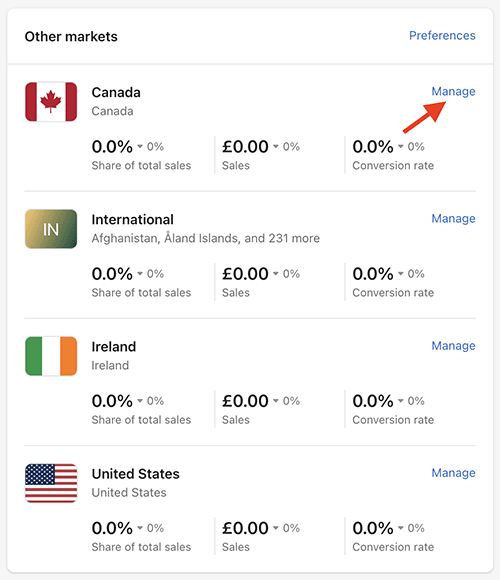
Adobe Commerce, by contrast, requires significantly more manual effort to achieve similar results.
While it supports multi-currency transactions, merchants must manually configure exchange rates or integrate their store with a third-party service to keep them updated.
For multilingual support, Adobe Commerce provides a localization framework, but translations are not automatic. Merchants must manually input translated content for each store view or rely on third-party extensions to automate translations.
By contrast, Shopify’s bundled translation features allow merchants to quickly and automatically translate content across their storefronts. (Its ‘Translate & Adapt’ app facilitates two automatic translations; paid-for apps can be used if you need more.)
Additionally, Adobe Commerce’s approach to international selling is based on multi-store functionality, which requires merchants to create separate storefronts for different countries, each with its own pricing, tax rules and content.
With Shopify, you just operate one store, which is automatically shown in the relevant language / currency based on a user’s location.
User reviews
Before wrapping up, it’s worth taking a look at how users of Adobe Commerce and Shopify rate the two platforms.
I’ve put together ratings from three well-known software review sites — G2, TrustRadius and Capterra — in the table below.
| Review site | Adobe Commerce | Shopify |
| G2 | 4.0/5 (597 reviews) | 4.4/5 (4,966 reviews) |
| TrustRadius | 8.1/10 (291 reviews) | 8.7/10 (720 reviews) |
| Capterra | 4.3/5 (662 reviews) | 4.5/5 (6,715 reviews) |
| Average score | 4.1/5 | 4.4/5 |
As the figures above show, both platforms receive strong ratings overall, but Shopify scores higher across all three review sites.
Adobe Commerce vs Shopify: the verdict
Both Adobe Commerce and Shopify are powerful ecommerce platforms, but they cater to rather different types of businesses and users — and ultimately, making the decision between them is going to boil down to your technical expertise, budget and business needs.
If you’re running a large enterprise with complex requirements — think multi-store management, advanced backend automation or extremely bespoke checkout experiences — Adobe Commerce offers a level of flexibility that Shopify can’t quite match. Its traditional deployments give you extensive control over hosting, development and security, making it a strong option for businesses that need highly tailored solutions.
But that flexibility can come with higher development costs, ongoing maintenance and a much steeper technical learning curve. Adobe’s newer Adobe Commerce as a Cloud Service offering reduces this infrastructure burden considerably, providing a fully managed, automatically updated SaaS version of the platform.
So for many businesses, Shopify is going to be the much more practical choice. It’s significantly easier to use, and provides a quick setup process that can lead to a store going live in days rather than (as is often the case with Adobe Commerce projects) weeks or months.
Shopify also simplifies international selling with built-in multilingual and multi-currency tools — merchants can translate their store into up to 20 languages (or 30 on Shopify Plus) and configure region-specific pricing from a single store. While Adobe Commerce supports global expansion, achieving the same level of localization can involve a more complex multi-store setup and additional configuration.
Finally, Shopify’s large app ecosystem (containing over 21,000 apps) makes it easy to extend your store’s functionality without needing a developer.
Ultimately, if you’re a large-scale enterprise with highly specific needs, a big budget and a development team, Adobe Commerce offers a huge amount of flexibility. Most other types of ecommerce businesses — and especially those involving dropshipping or print on demand — will usually be better off with Shopify.
You’ll find links to the Adobe Commerce download and the Shopify free trial below.
If you have any queries or thoughts of your own on either tool, do leave them in the comments.
Key alternatives to Adobe Commerce and Shopify
While Adobe Commerce and Shopify are two of the most popular ecommerce platforms, there are plenty of alternatives available (you’ll find detailed information about many of these in our Shopify alternatives guide).
For a self-hosted, open-source option, WooCommerce — a WordPress plugin — is a solid choice. It offers lots of flexibility but, like Adobe Commerce, requires you to deal with your own hosting, security and software updates. You can learn more about this platform in our WooCommerce vs Shopify and WooCommerce vs BigCommerce comparisons.
BigCommerce is a good hosted alternative to Adobe Commerce and Shopify. Like Adobe Commerce, BigCommerce comes with excellent multi-storefront functionality, and it also competes well with Shopify in terms of general ecommerce features. Check out our BigCommerce review and our BigCommerce vs Shopify comparison to learn more about this platform.
For businesses prioritizing POS features, Square is also worth a look. It’s especially good for retailers and food service businesses needing seamless online and in-person sales. Check out our Square vs Shopify shootout for more details on this solution.
If you need a WordPress-compatible ecommerce plugin, Ecwid is a great option. Unlike WooCommerce, it’s not open-source — and accordingly offers better customer support and an easier setup. Check out our comprehensive Ecwid review and our Ecwid vs Shopify comparison to see if it’s a good fit for you.
Lastly, if you’re looking for a general website builder that includes ecommerce, Wix and Squarespace are also well worth a look.
Both offer intuitive design tools and built-in selling features, making them ideal for small businesses, creatives and solopreneurs. While they don’t match Shopify or Adobe Commerce in scalability, they provide a versatile, user-friendly approach to website creation and online selling. Our in-depth Wix review, Squarespace review and Wix vs Shopify vs Squarespace comparison cover them in more detail.
Update details
This article was updated in September 2026. The following updates were made:
- Adobe Commerce product and deployment options were updated, including information about Adobe Commerce as a Cloud Service.
- Shopify and Adobe Commerce pricing information was updated.
- Shopify plan, POS, international selling and app marketplace details were updated.
- Information on hosting, security, PCI compliance, scalability and software updates was revised.
- Product catalog, payment, checkout, SEO and multi-store features were updated.
- A user reviews section was added.
- The overall comparison and verdict were updated to reflect the latest versions of both platforms.

No comments