

We have an honest review policy, but this page contains affiliate links. If you buy through these, we may earn a commission. This helps fund our research at no cost to you.
SEO PowerSuite vs Semrush: Which tool is the best fit for your SEO needs? In this post, I discuss the key advantages each platform offers over the other in a straightforward, easy-to-understand way.
Quick verdict
Semrush is the hands-down winner in an SEO PowerSuite vs Semrush shootout.
While SEO PowerSuite scores points on price — and will suit solo users who want unlimited rank tracking and uncapped site audits — it struggles badly in areas that matter most for modern SEO. Its keyword research tools are weak, it lacks AI visibility tracking features, and its workflows are clunky. Using it involves installing four separate apps locally, and depending on your computer, these can be quite sluggish to use.
Semrush, on the other hand, is a fast, all-in-one, cloud-based platform with vastly superior keyword data, stronger backlink tools, clearer reporting, and advanced AI visibility tracking. It’s more expensive, but for anyone serious about growth, competitive research, or future-proofing their SEO strategy, it’s the much better option of the two platforms.
Getting started with SEO PowerSuite or Semrush
I’ll start my full comparison with a quick overview of both platforms.
SEO PowerSuite and Semrush: a quick overview
SEO PowerSuite and Semrush are both tools designed to help you improve your website’s visibility in search engines — through features like keyword research, rank tracking, backlink analysis and technical site audits.
However, their approaches to letting you do this, and their feature sets, differ significantly.
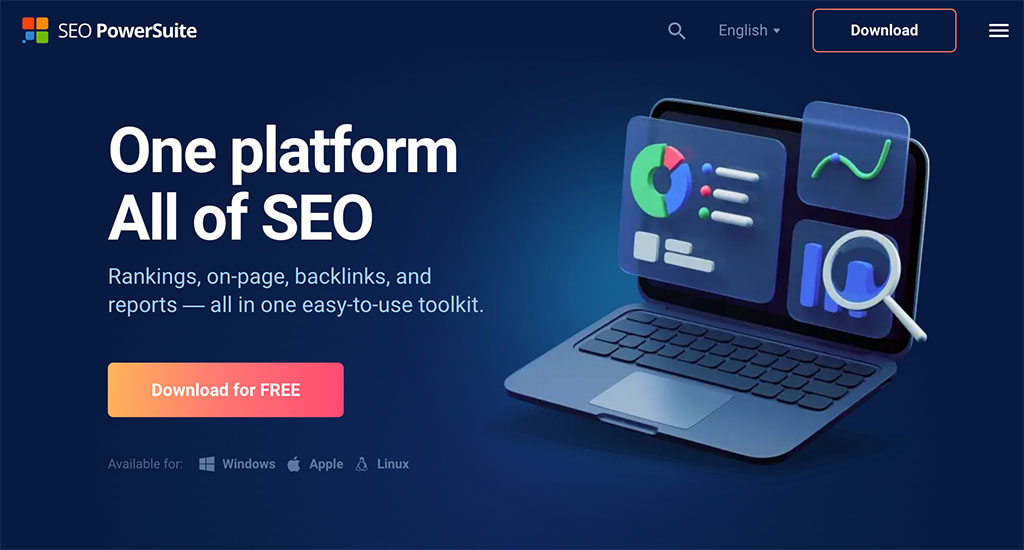
SEO PowerSuite includes four distinct modules — Website Auditor, Rank Tracker, SEO SpyGlass and Link Assistant — each dedicated to a specific aspect of SEO. Although they function as part of one overall software suite, each tool is a standalone application that must be downloaded and accessed locally on your computer.
The platform is compatible with Windows, macOS and Linux operating systems.
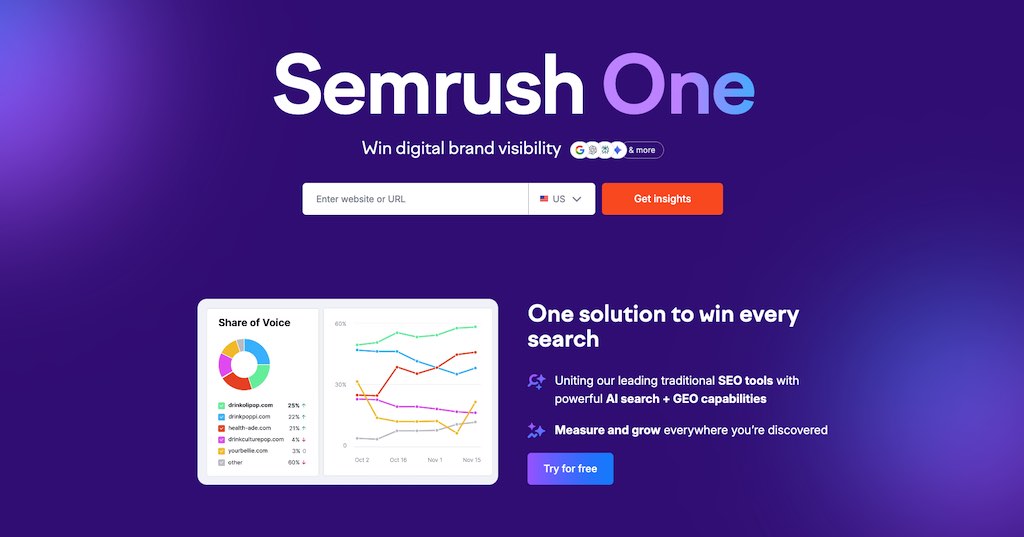
Semrush, by contrast, operates entirely in the cloud and offers 55+ tools, all accessible in a web browser from any device.
Now, while SEO remains its core focus, Semrush has steadily expanded its feature set to reflect how search and digital marketing have evolved. As a result, it now includes tools for content marketing, social media management, paid advertising, AI visibility monitoring and AI prompt tracking. This makes Semrush more of a comprehensive digital marketing platform than SEO PowerSuite, which remains primarily focused on traditional SEO workflows.
Now, let’s look at both platforms’ key features — beginning with domain analysis.
Domain analysis
Domain analysis involves gaining a broad view of a website’s overall search performance, accessing metrics that reveal existing strengths — and areas for improvement.
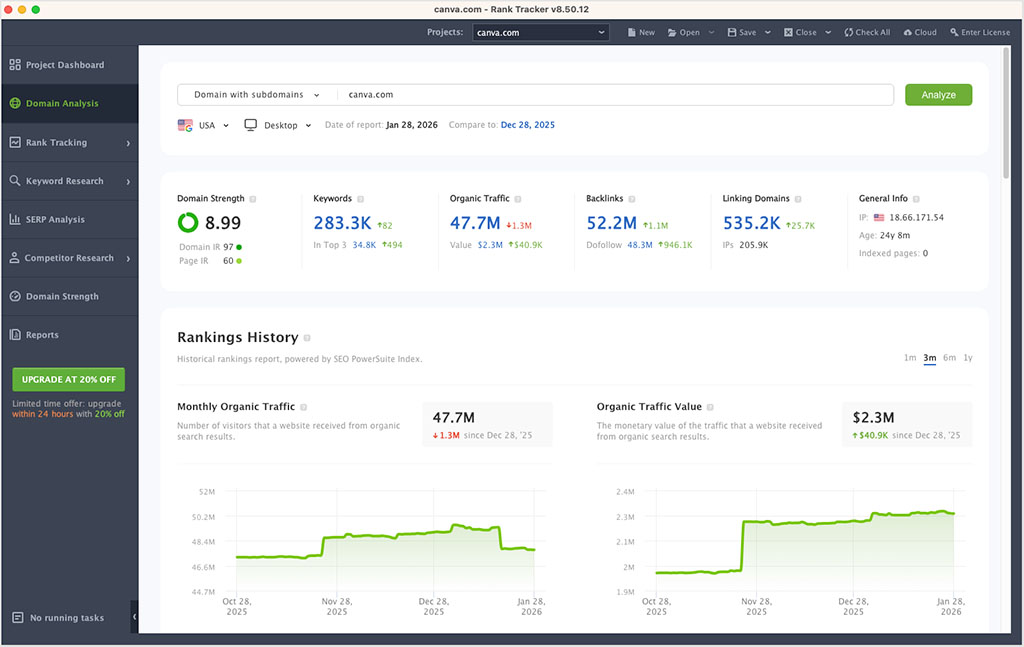
Typically, you conduct domain analysis on your own site to identify key SEO improvements you could make, or on a competitor’s to find ways to emulate their success.
In SEO PowerSuite, domain analysis is available in its ‘Rank Tracker’ module, while in Semrush, you’ll find it under a ‘Competitive Analysis’ menu.
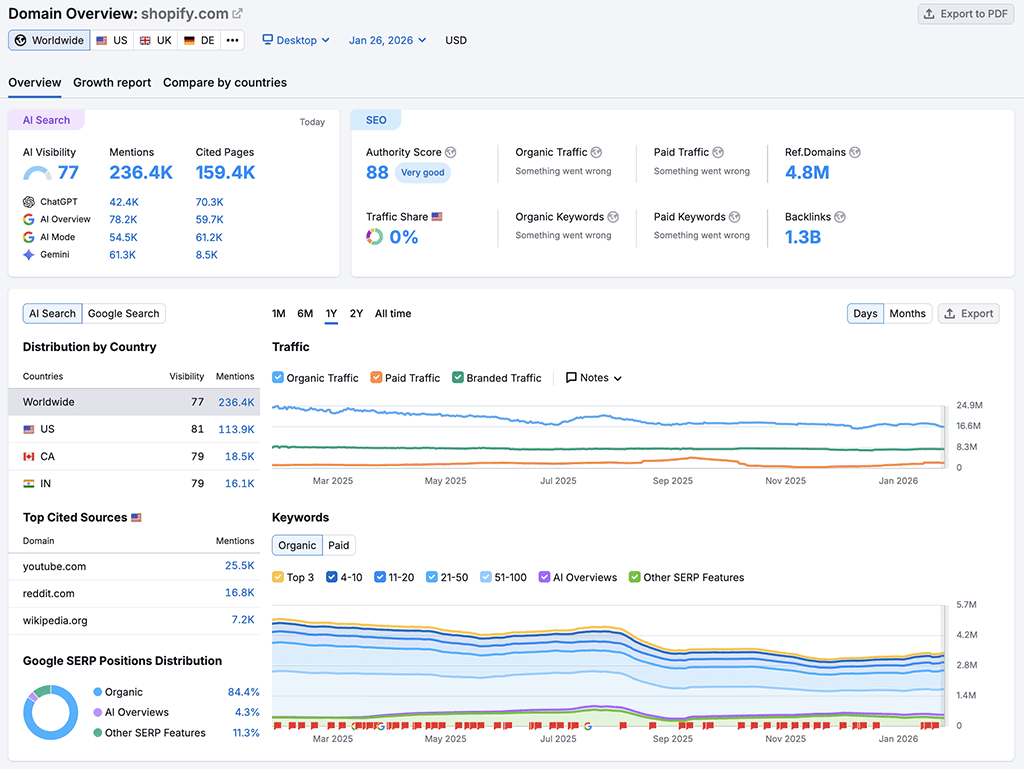
When you enter a domain into either tool, you’ll see the following key metrics from both platforms:
- A ‘domain strength‘ rating (SEO PowerSuite) or ‘domain authority‘ score (Semrush) that give you a quick indication of how well a website is likely to perform in search results.
- An estimate of the number of organic traffic visits to the website per month.
- The total number of individual backlinks pointing to the website (along with the number of domains that link to the site).
- The total number of keywords the website ranks for.
- A list of key competing domains.
With regard to domain authority scores, both platforms base these primarily on backlinks and site traffic estimates, but SEO PowerSuite also factors in social media popularity when evaluating them, and Semrush incorporates a ‘spam score’ into proceedings.
However, traditional SEO metrics now tell only part of the story.
As search engines increasingly surface answers directly — via AI summaries, conversational interfaces and zero-click results — understanding how visible a domain is within AI-generated responses has become very important.
To address this shift, Semrush has introduced AI visibility metrics that reveal whether a brand is being mentioned or cited inside AI-generated answers produced by ChatGPT, Google’s AI Overviews, Google AI Mode and Gemini.
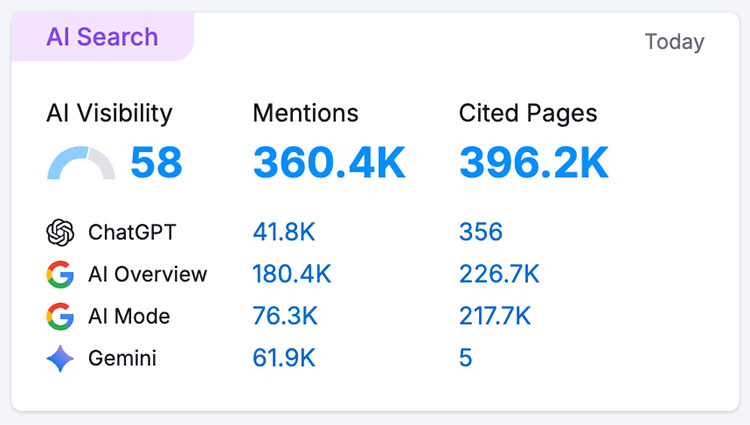
This allows you to evaluate how discoverable a domain is within conversational and AI-driven search environments, not just how well it performs in traditional search listings.
There’s nothing comparable available from SEO Powersuite here.
In addition to organic and AI-driven visibility data, Semrush also provides valuable insight into how domains acquire traffic through paid search. While SEO PowerSuite only lets you view a site’s organic traffic statistics, Semrush also gives you estimates for paid traffic, along with detailed data on paid keywords, advertising competitors and the ratio of branded vs non-branded traffic that a site attracts.
This broader perspective makes it much easier to understand how a domain’s overall visibility is being built by both organic and paid channels — something that SEO PowerSuite’s domain analysis tools don’t currently support.
Another highly useful piece of information available in Semrush but not in SEO PowerSuite is its search intent data. This provides insights into the motivations of users who visit a site, by categorizing its ranking keywords relating to their search intent: ‘informational,’ ‘navigational,’ ‘commercial,’ and ‘transactional.’
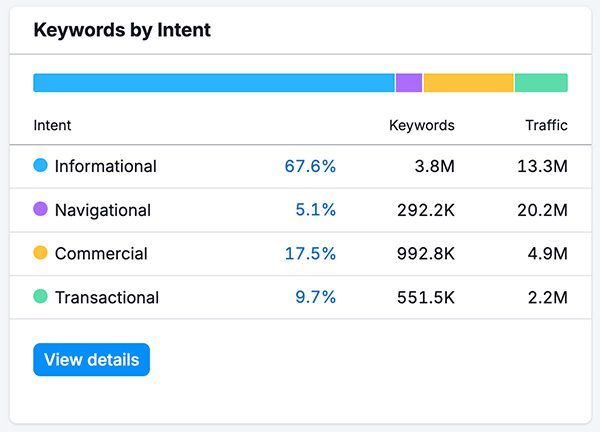
This data is invaluable in domain analysis, as it helps you understand not only the volume of a domain’s traffic but the nature of that traffic too. Specifically, it lets you know whether your visitors:
- want to find a specific answer to a question (via ‘informational’ queries)
- want to investigate brands or services (‘commercial’)
- want to find a particular page or website (‘navigational’)
- want to make a purchase (‘transactional’)
Semrush is also better for conducting global domain analysis research. With a simple option to select ‘worldwide’ available at the top of the domain analysis screen, you can instantly view a domain’s overall global performance. But in SEO PowerSuite, you can only view domain stats for one country at a time.
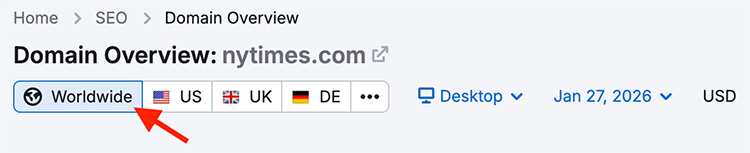
Additionally, Semrush’s ‘compare by countries’ report further enhances geographic research, by allowing you to assess a domain’s metrics across up to five countries simultaneously. This is invaluable for identifying trends, spotting regional strengths or weaknesses and adapting content strategies to align with the unique demands of individual markets.
SEO PowerSuite, with its per-country-only metrics, may be limiting for businesses that require a more comprehensive, multi-market view.
So overall, Semrush is definitely the more powerful tool for conducting domain analysis with.
Now, let’s look at rank tracking features.
Rank tracking
Rank tracking, or ‘position tracking,’ is essential in SEO — it allows businesses to monitor ranking keywords and adjust strategies to improve or maintain their visibility in search results.
Both SEO PowerSuite and Semrush provide good rank-tracking features that allow users to monitor keyword positions across different search engines and locations. SEO PowerSuite supports tracking across Google, Bing, Yahoo and Yandex, while Semrush supports tracking across Google, Bing, and Baidu.
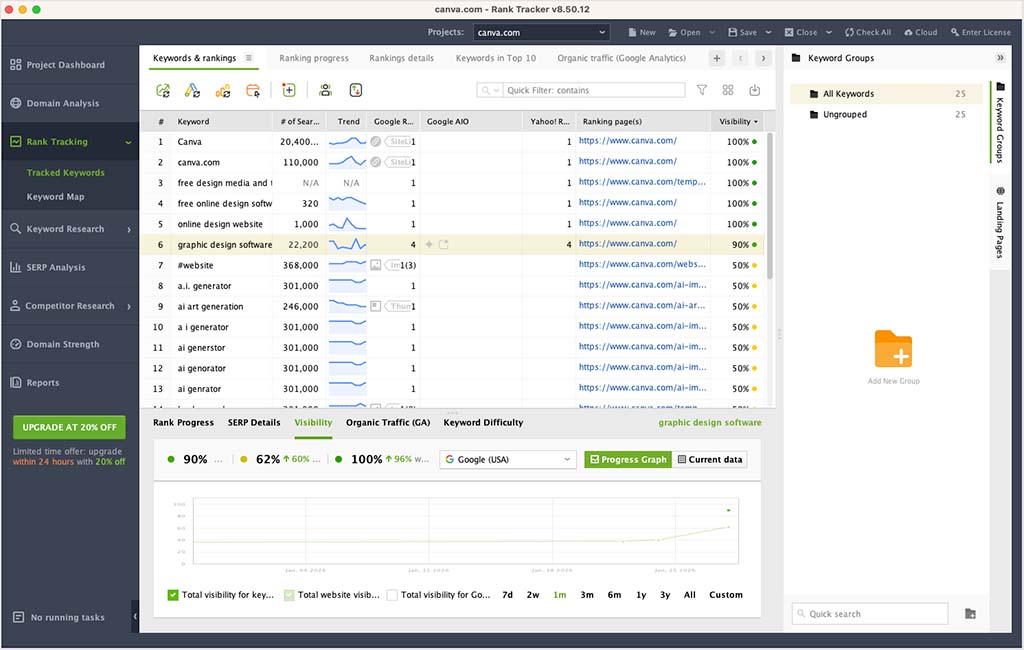
Both platforms support tracking at a country-specific level, letting users see how a website is performing in different regions — this is useful for businesses targeting regional markets.
Additionally, both platforms offer insights into individual keywords and average rankings for groups of keywords. Historical data and visual trend analysis are also provided by both, making it easy to spot ranking patterns over time and adapt strategies accordingly.
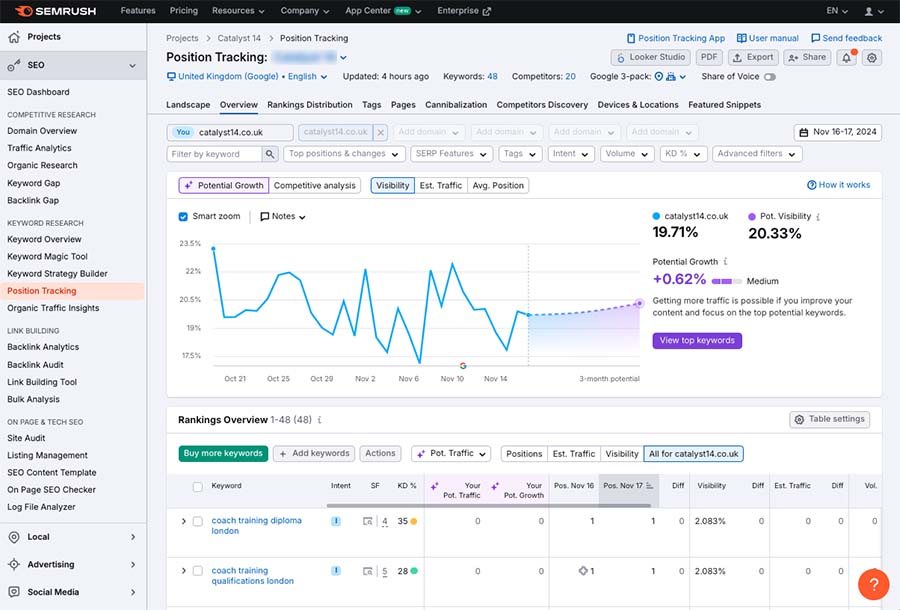
There are a couple of areas where each tool outperforms the other in the rank tracking department, however.
Both tools now support keyword tracking within Google’s AI Overviews, which is a welcome update given how prominent these summaries have become in modern search results.
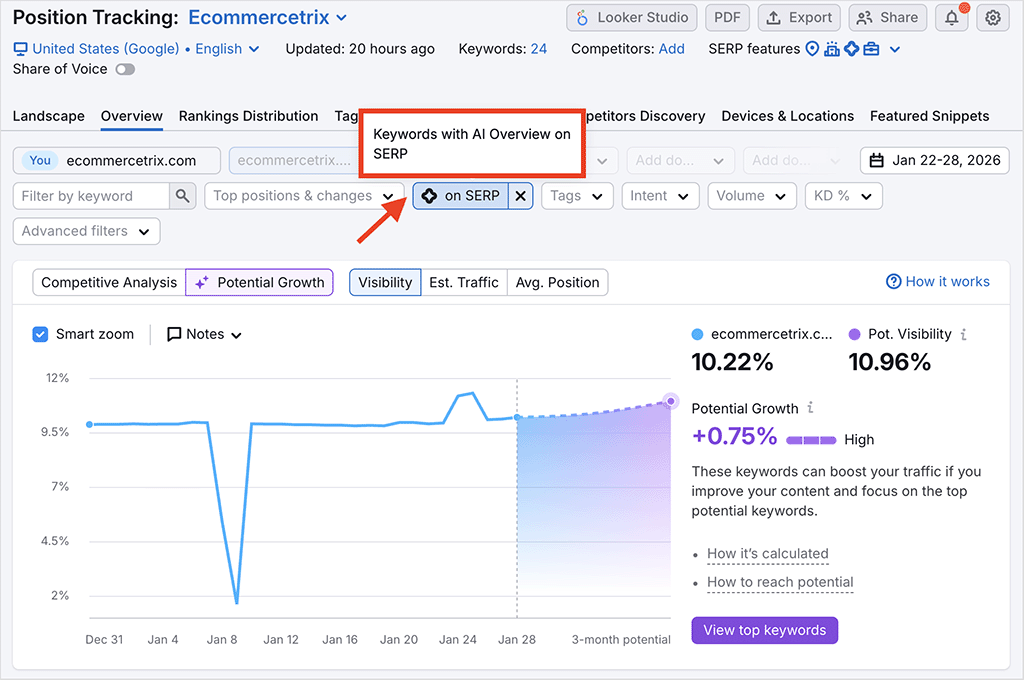
However, Semrush goes further here by also offering AI prompt tracking. This lets you monitor how your brand and content appear inside conversational AI platforms like ChatGPT and Google AI Mode.
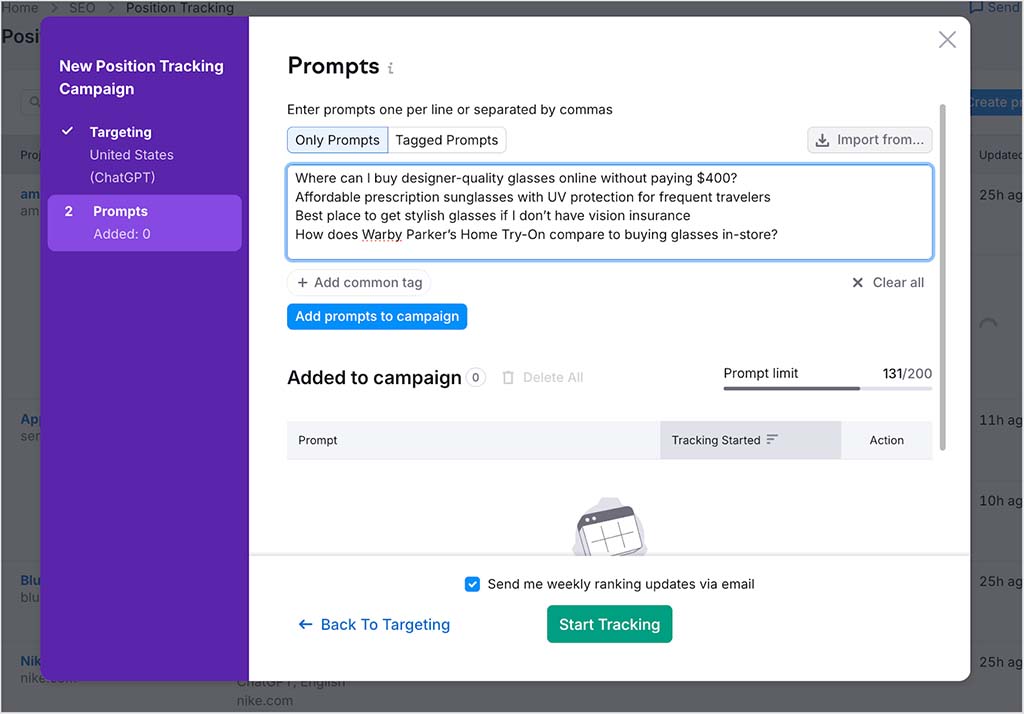
Semrush also wins when it comes to the overall process involved with position tracking. In SEO PowerSuite, you have to set up and schedule dedicated rank-tracking reports, rather than simply adding keywords to a tracking list.
More significantly, because SEO PowerSuite is a locally installed piece of software, it uses your computer’s resources to do the necessary position checking and tracking (rather than relying on its own servers and other hardware, as Semrush does). For context, when I was testing SEO PowerSuite’s rank tracking feature on an M1 Mac, my computer froze quite a bit (and that’s despite an M1 Mac being a reasonably fast machine).
SEO PowerSuite does offer one important advantage over Semrush in the rank tracking department, though: unlimited keyword tracking.
Unlike Semrush, which caps keyword tracking at 500 to 5,000 keywords depending on plan, SEO PowerSuite users can track an unlimited number of keywords without facing additional costs.
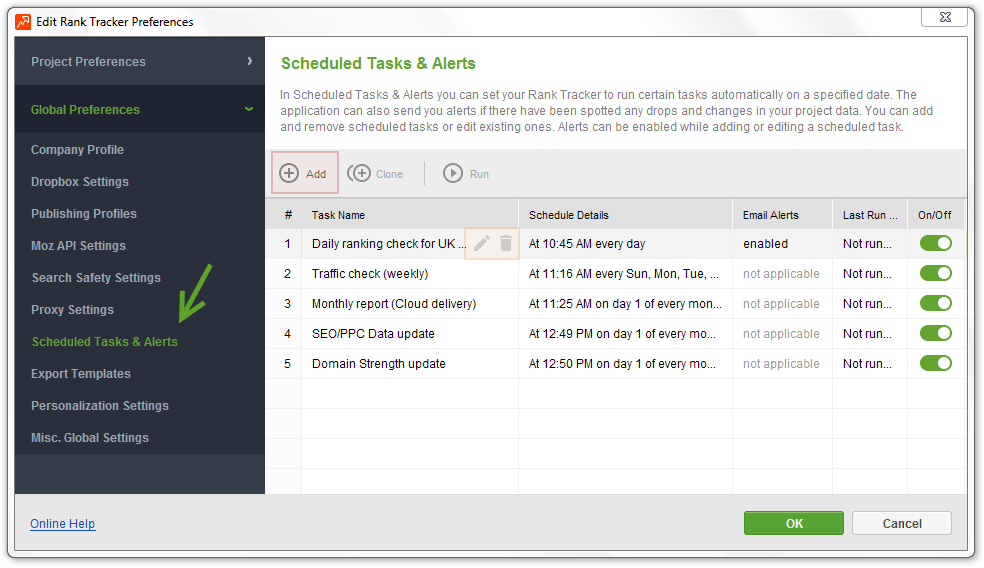
Overall, when it comes to rank tracking, I’d say that SEO PowerSuite wins when it comes to sheer tracking capacity, while Semrush gets a thumbs up for providing a smoother workflow, clearer reporting and more detailed ranking insights — particularly where modern AI-driven search results are concerned.
Now, let’s move on to keyword research.
Keyword research tools
Keyword research lets you identify the terms people are searching for, assess how hard they will be to rank for, and access suggestions for alternative target phrases that you might not have considered.
So how good are SEO PowerSuite and Semrush at providing this sort of data?
Keyword research in SEO PowerSuite
When testing SEO PowerSuite, it quickly became apparent to me the platform’s offering on keyword research is, by comparison to Semrush — and, in fact, all the other SEO tools we’ve reviewed — really rather poor.
With competing SEO platforms, keyword research typically involves entering a phrase and getting an instant overview of key data on it — search volume, keyword difficulty score, and suggestions for other keywords that you could potentially rank highly for.
You don’t really get any of this from SEO PowerSuite: it doesn’t seem to have a traditional keyword database that you can interrogate like this.
Instead, based on keywords you enter, it shows you:
- search volumes sourced from Google Ads’ Keyword Planner (which you will only see if you link an active Google Ads account to SEO PowerSuite, and are paying for adverts)
- keyword suggestions based on ‘autocomplete’ data from various search engines
- question terms from Google’s ‘people also ask’ section
- ‘related searches’ queries keyword data
- misspelt versions of your keyword that you could consider targeting.
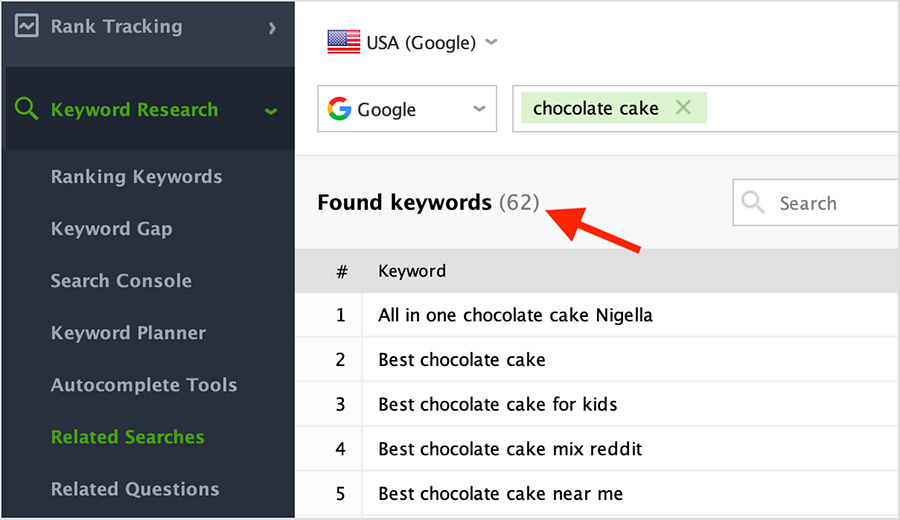
And rather than there being a single ‘keyword overview’ option, you have to use separate tools within SEO PowerSuite — and click all over the place! — to get your hands on any of the above information (see my screenshot below to get a sense of what I mean here).

In truth, this all feels like keyword research before SEO tools were invented — where you had to nose around Google for ages in order to get keywords ideas. It’s not really comparable to the kind of comprehensive keyword data that you get from industry-standard SEO tools like Semrush or Ahrefs.
Also, the wait time to receive any keyword research metrics from SEO PowerSuite was at least one minute per tool used — which made for a very lengthy research process!
And during this rather frustrating experience, I typically received just 30-200 keyword suggestions from each tool for my queries, which — as we’ll see shortly — is a tiny fraction of the amount of suggestions you can get from Semrush.
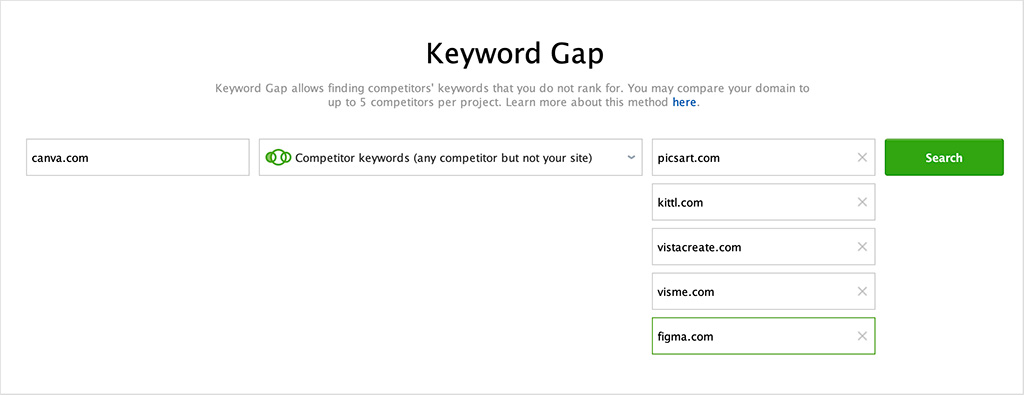
Another keyword research feature you get in SEO PowerSuite is its ‘Keyword Gap’ tool. This helps you identify which keywords your competitors are ranking for that you’re not: you enter your domain and those of your competitors, and the tool outputs all the ‘gap’ keywords that it can find.
It’s worth noting that SEO PowerSuite lets you compare your site against up to five competing ones. This gives it a slight win in this area over Semrush, which lets you compare your domain against four others.
But ultimately, the keyword research tools available from SEO PowerSuite aren’t great. They don’t really give you much data, are confusing to use, and extremely slow. I could not see us at Style Factory ever relying on them for SEO.
But how does Semrush shape up in this area?
Keyword research in Semrush
By comparison to SEO PowerSuite, Semrush offers a far more integrated and comprehensive approach to keyword research: its ‘keyword overview’ tool lets you input any keyword and instantly access a complete set of data, all in one place.
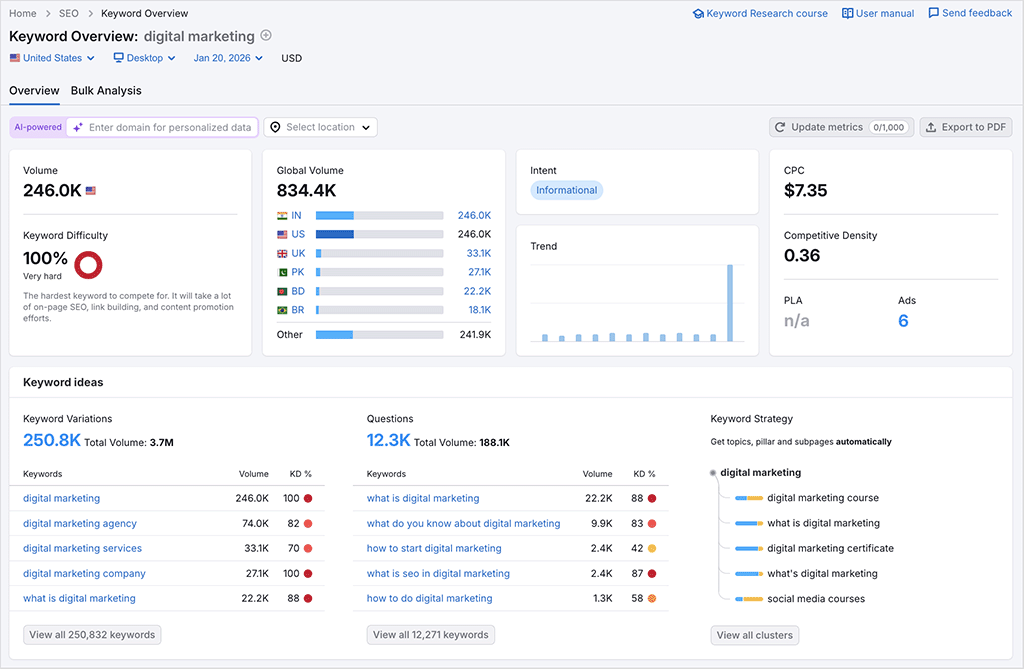
In addition to providing key metrics like search volume and keyword difficulty, Semrush’s keyword overview also highlights keyword variations and questions involving your keyword.
And crucially, unlike SEO PowerSuite, all this data is in the same report.
Another advantage of Semrush is how it presents its keyword difficulty score (see my screenshot below).
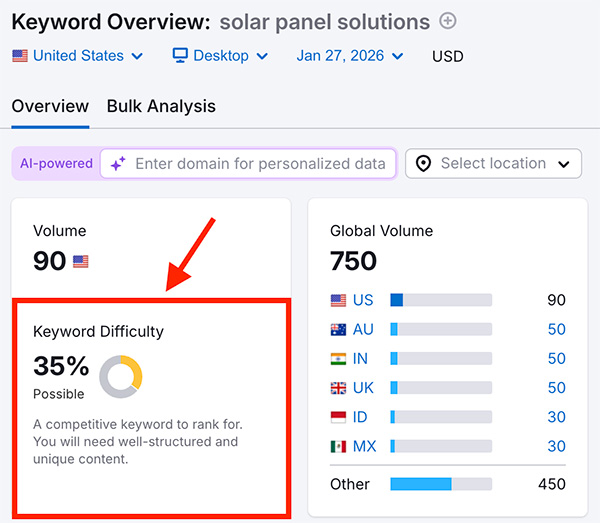
Unlike SEO PowerSuite, Semrush displays a keyword’s difficulty score front and center in its keyword overview, making it easy to quickly assess how hard it will be to rank for that keyword.
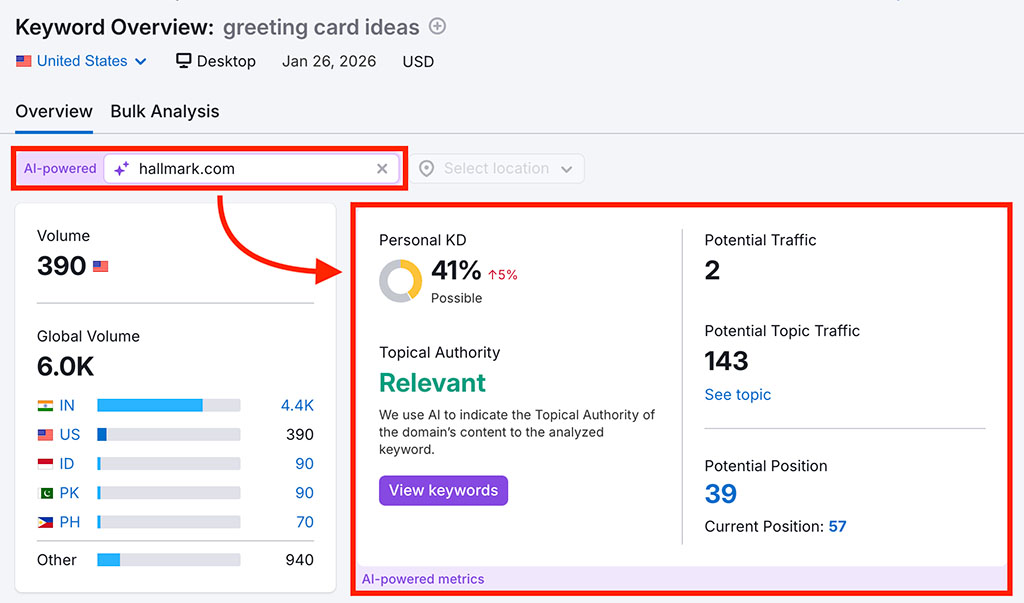
Semrush even lets you view ‘personalized’ difficulty scores — these are based on how topically relevant your site is to the keywords you’re researching. You simply enter your domain alongside your target keyword, and Semrush uses AI to work this personalized score out.
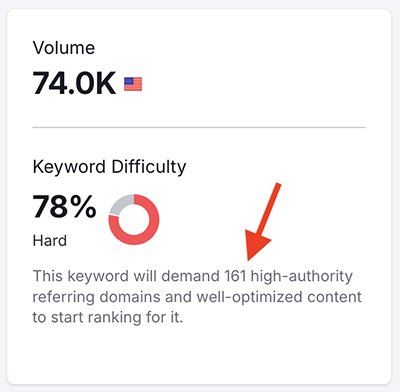
Additionally, Semrush shows you how many backlinks it will likely take to rank for your target keyword, offering a valuable insight into the level of effort required to perform well in search results for a particular phrase.
As for getting keyword suggestions in Semrush, its ‘Keyword Magic’ tool generates a vast array of keyword suggestions based on a seed keyword. You can filter these suggestions by difficulty, search volume, CPC, search intent and more.
I ran some phrases through this tool and compared its output with the suggestions I received by using SEO PowerSuite’s various keyword tools; as you can see from the table below, the number of suggestions available from Semrush was of a completely different order of magnitude to what I was able to get (with much difficulty!) from SEO PowerSuite.
| Seed keyword | SEO PowerSuite | Semrush |
| Amazon | 3,248 | 8m |
| Shopify | 1,854 | 363k |
| Squarespace | 1,755 | 135k |
| Webflow | 2,352 | 30k |
| Wix | 3,100 | 214k |
The win for Semrush here shouldn’t be that surprising, as its keyword database is one of the largest in the industry — it provides users with access to over 27 billion keywords.
And in truth, you could argue that SEO PowerSuite doesn’t really have a keyword database (or at least one you can perform traditional keyword research with). The best you’ll get from it is Google Ads Keyword Planner data — but as mentioned above, you can only access this if you have an active Google Ads account and are running paid ads with it.
Topic clustering is another valuable keyword research feature you’ll find in Semrush, but not in SEO PowerSuite.
Semrush’s ‘Keyword Strategy Builder’ tool suggests ‘pillar’ pages that you should create based on the keywords you enter, along with relevant sub-pages for them (see screenshot below). Designing content in this way helps you build up topical authority for your site, something that can boost your rankings significantly.
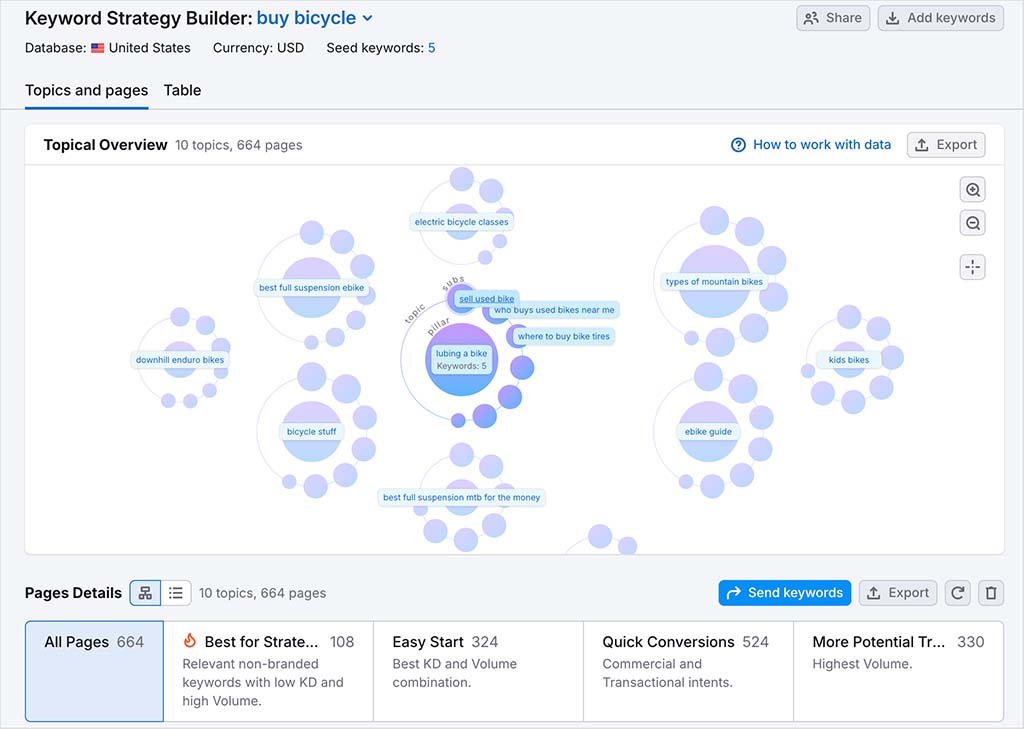
There’s nothing remotely like this available in SEO PowerSuite.
So, all in all, it’s fair to say that Semrush absolutely crushes SEO PowerSuite when it comes to keyword research — there’s really no comparison!
Backlink research features
How well a site performs in search results can depend heavily on the number of backlinks — external sites linking to it — that it has. Generally speaking, the more high-quality backlinks pointing to your content, the better that content will perform in search.
With that in mind, let’s dive into how each tool helps you access data on these backlinks.
Backlink database size
Both SEO PowerSuite and Semrush let you enter a domain and view a list of all the external links that each tool finds pointing to it. This data originates from both tools’ backlink databases.
(With SEO PowerSuite — and in keeping with its modular approach — you have to install its ‘SEO SpyGlass’ module locally to query this database and conduct backlink research. In Semrush, it’s simply a case of clicking its ‘Backlink Analytics’ tab.)

And both SEO PowerSuite and Semrush are transparent about the size of their backlink databases.
At time of writing, SEO PowerSuite reports a backlink database with 6.5 trillion external links, supported by a daily crawl capacity of 6 billion pages.
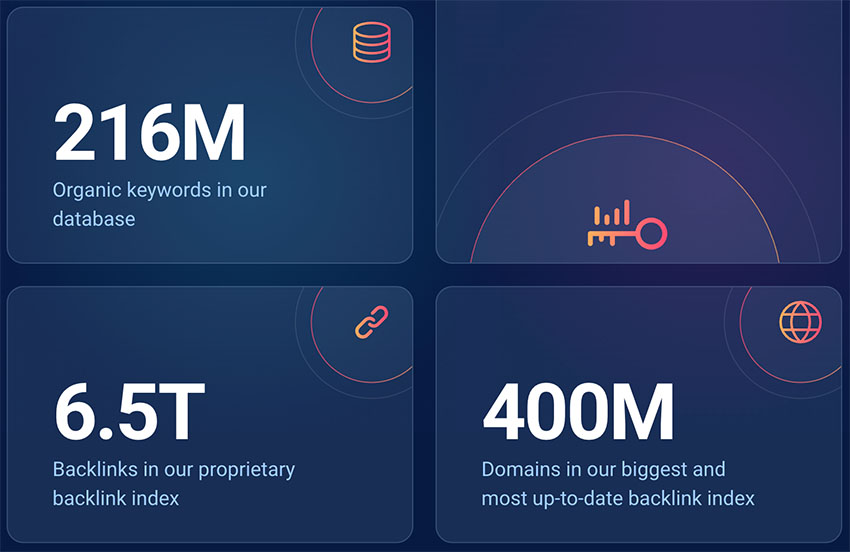
Semrush boasts a much larger backlink database — one containing 43 trillion links, with a daily crawl volume of 10 billion URLs.
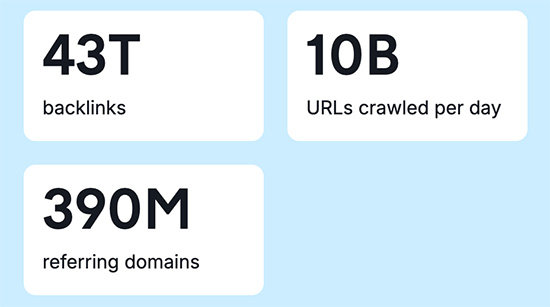
Given these figures, Semrush should in theory consistently surface more backlinks than SEO PowerSuite.
But to see if this held true in practice, I ran the URLs of several business apps that we regularly cover in our reviews through both Semrush and SEO PowerSuite. My goal was to see how many referring domains each tool could identify to each website inspected.
Here’s what my comparison revealed:
| Website | SEO PowerSuite | Semrush |
| Amazon | 4.4m | 4.4m |
| BigCommerce | 187k | 247k |
| Canva | 535k | 581k |
| Etsy | 1.5m | 1.2m |
| Jimdo | 1.4m | 629k |
| GoDaddy | 5.6m | 10.6m |
| Shopify | 3.3m | 4.8m |
| Squarespace | 3.2m | 382k |
| Webflow | 261k | 262k |
| Wix | 2.9m | 3.5m |
The test results were actually closer than I’d anticipated: Semrush uncovered more referring domains than SEO PowerSuite in 7 out of 10 cases (I was expecting a hands-down win for Semrush, to be honest).
However, what stood out the most when I conducted this experiment was the stark difference in speed between the two platforms when returning my data.
With Semrush, it took just 90 seconds to run those 10 domains through its backlink tool, with results delivered instantly nearly every time. SEO PowerSuite, on the other hand, needed around 25 minutes to pull the same data — which equated to more than 2 minutes of waiting for each backlink report.
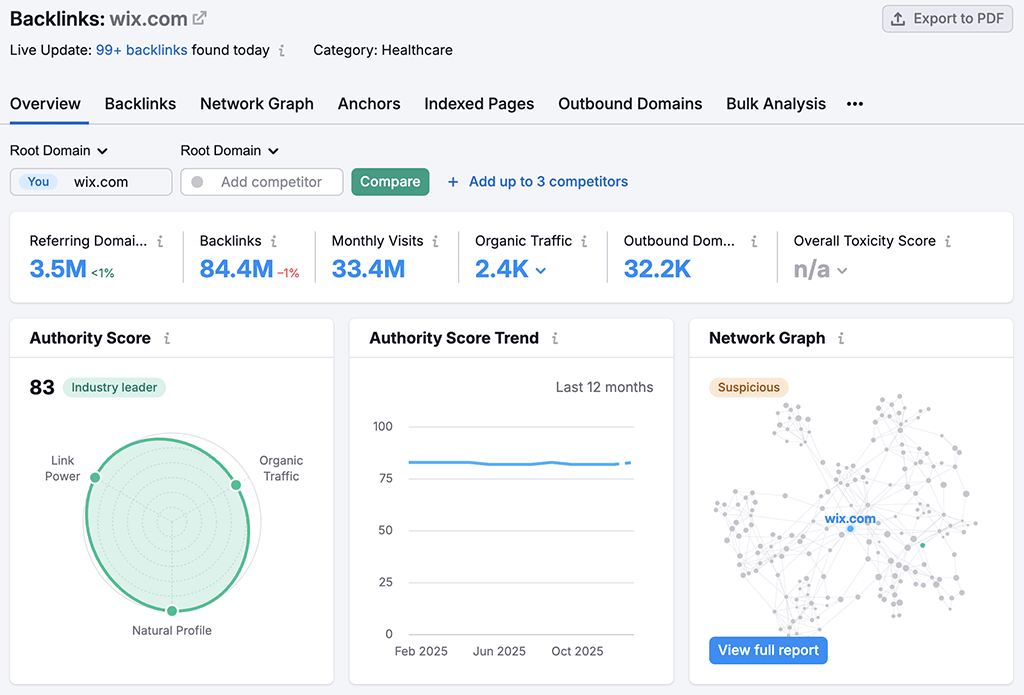
Given the small scale of my testing, I’m cautious about drawing definitive conclusions from these results. But overall, the evidence suggests that Semrush’s larger database, combined with its notably faster data retrieval, is likely to provide more comprehensive and accessible data.
Don’t miss out on our free SEO toolkit
For a limited time only we’re offering our readers some excellent free SEO tools and resources. Sign up now to immediately receive:
- our downloadable cheatsheet containing the 20 key steps to ranking highly in search results
- extended free trials and discounts for leading SEO tools
- our downloadable cheatsheet on how to grow organic traffic to a blog
- 2 in-depth guides to SEO
- ongoing free tips and advice on SEO and growing your business
Backlink reports
When it comes to backlink reporting, both SEO PowerSuite and Semrush provide all the essential information you’d expect about the backlinks and referring domains pointing to a domain.
In both tools, you’ll find the following backlink-related metrics:
- the number of backlinks to a site
- the number of referring domains
- the number of referring IPs
- anchor text used
- new vs lost domains
- the distribution of backlinks across TLDs (Top Level Domains)
- backlinks by country
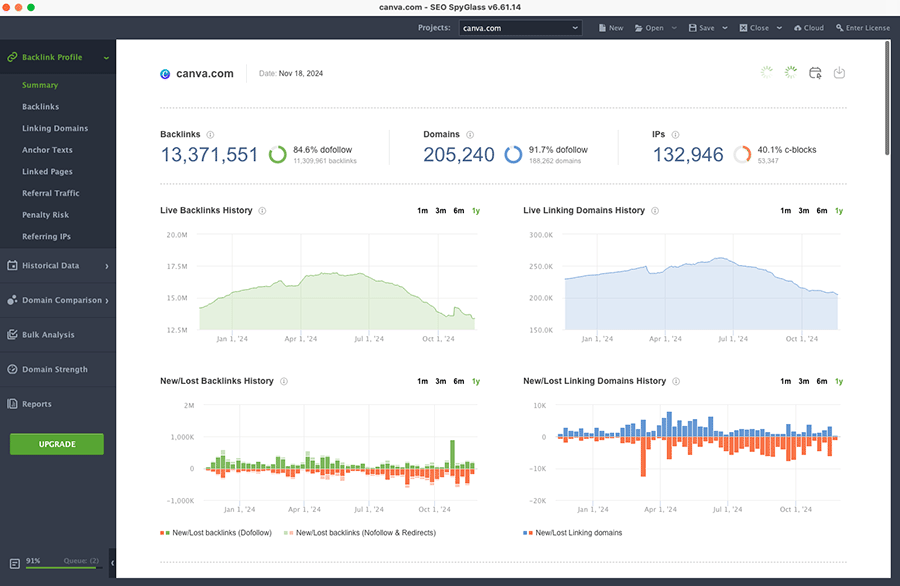
Semrush, however, goes a step further by providing data on outbound domains and link type (showing you, for example, when a link is tagged by a site owner as sponsored or user-generated content).
Both platforms also highlight authority scores for the domains that link to your website, which is crucial for understanding the potential impact of potential backlinks from them on your SEO performance. However, they employ different metrics for this purpose.
SEO PowerSuite uses its ‘InLink Rank’ metric, which is based chiefly on how many links are currently pointing to a domain (and their quality).
Semrush, on the other hand, surfaces an ‘Authority Score,’ which incorporates additional factors beyond link quality — like traffic levels and domain age — to offer a broader view of a site’s general quality.
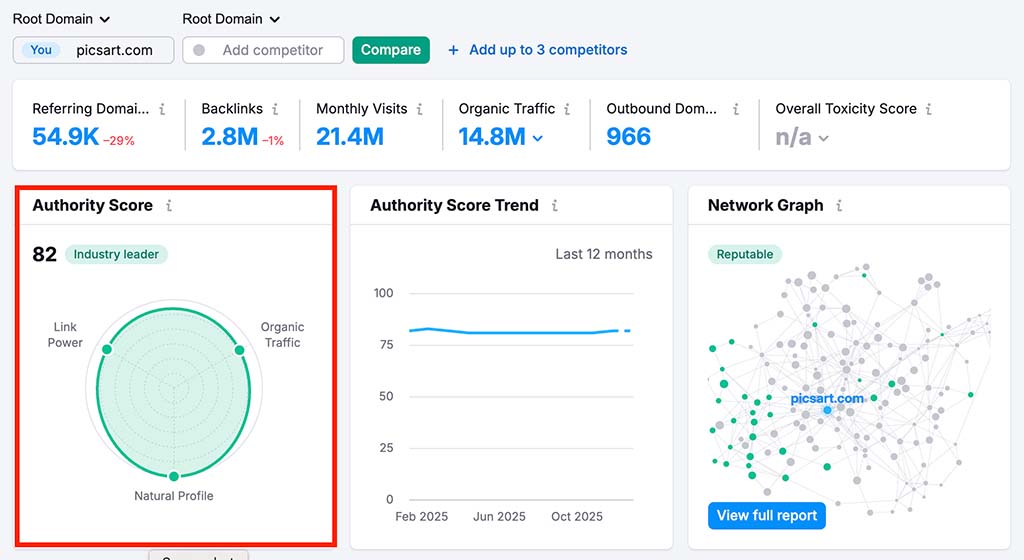
While both metrics are valuable, I feel Semrush’s ‘Authority Score’ has a slight edge due to its wider scope. By incorporating additional factors beyond backlinks — such as organic traffic and domain longevity — it offers a more holistic assessment of a site’s credibility and influence.
Semrush’s approach to filtering backlink reports is also much more powerful than SEO PowerSuite’s.
While SEO PowerSuite primarily lets you filter by basic link types (such as dofollow, nofollow, text links, homepage links, and image links), Semrush offers a far more extensive set of options.
In Semrush, you can quickly filter backlinks by attributes like link placement (e.g., footer, content), referring page platform, language, and even mobile-friendly pages. Additionally, it provides segmentation options for specific link attributes, including sponsored and UGC links, and allows filtering based on the number of links per referring domain. All this makes it easier to analyze backlink profiles at a granular level.

You can add some filters to the default options in SEO PowerSuite — these allow you to refine your results using attributes like anchor text, backlink page status and cache date.
However, SEO Powersuite’s filtering tool feels clunky and requires considerable manual effort to use. This is because in order to filter backlink data, you have to use Boolean operators like ‘DOES NOT CONTAIN,’ ‘AND’ and ‘OR.’ This makes the process rather cumbersome and less intuitive than the streamlined, user-friendly filtering experience you get in Semrush.
Backlink building
Link building — the process of acquiring links from other sites — is essential for any SEO strategy, as search engines generally give preferential treatment to sites with a lot of high-quality links pointing to them.
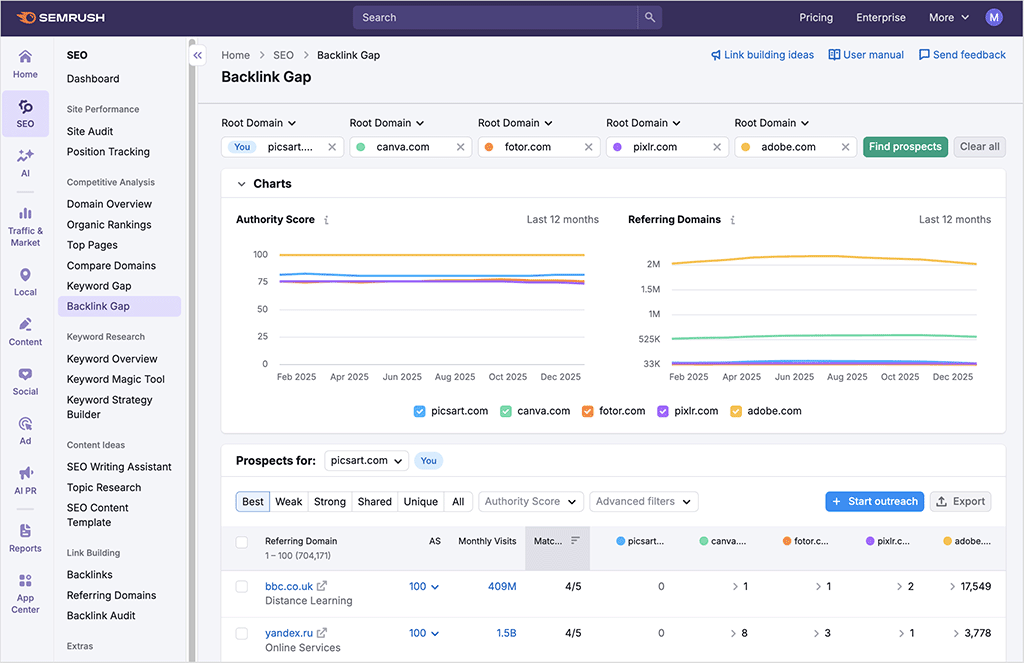
Both SEO PowerSuite and Semrush offer tools to identify backlinks that your key competitors have but you don’t. In SEO PowerSuite, this functionality is provided by the ‘Link Intersection’ tool in its ‘SEO SpyGlass’ module, while in Semrush, it’s available from its ‘Backlink Gap’ tool.
Both tools work in a similar way: you enter your own domain alongside competing ones, and the tool identifies websites that link to your competitors but not to you. This data allows you to target high-authority sites already linking to similar content.
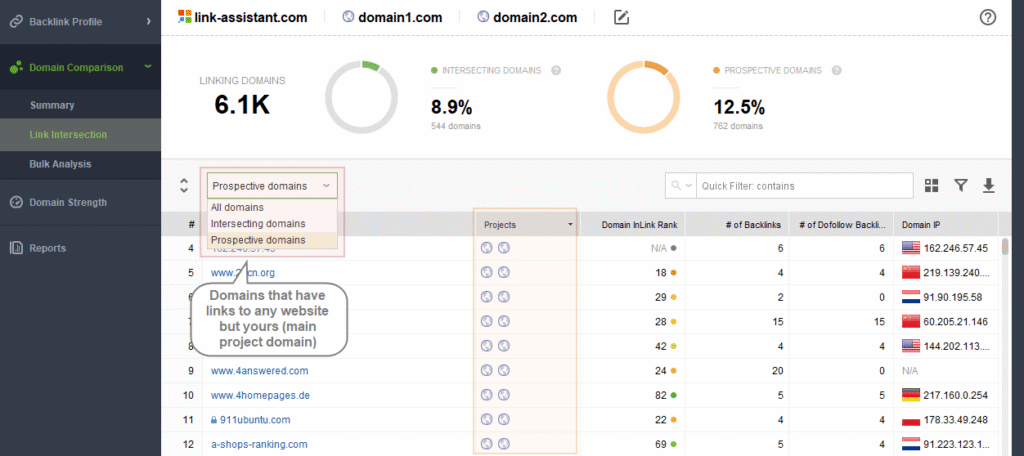
However, SEO PowerSuite’s Link Intersection tool has a bit of an edge over Semrush’s, because it lets you compare your site with those of between 6 to 11 competitors (depending on plan), while Semrush’s limits you to comparing your site against just four competing domains.
That said, Semrush’s ‘Backlink Gap’ tool makes up for its limit on competitor comparisons with a much richer level of detail in its reports. For each linking domain, Semrush provides:
- Monthly visit estimates — these help gauge the popularity and traffic potential of each link source, giving a sense of how impactful a backlink from that domain might actually be.
- ‘Matches’ data — this shows how many of your competitors each domain links to, making it easy to spot high-value sites that consistently link to multiple competitors.
- Advanced filtering options — filters for link strength, uniqueness and authority.
SEO PowerSuite’s ‘Link Intersection’ tool offers a simpler data view, focusing primarily on metrics like the number of backlinks and dofollow links from each domain, and its ‘InLink Rank’ score (SEO PowerSuite’s version of a page authority score). But it doesn’t let you see traffic estimates for the surfaced websites, or offer much in the way of filtering options.
In addition to link intersection tools, both platforms provide features specifically designed to help you with the link building process itself, which typically involves ‘outreach’ to other website owners.
In SEO PowerSuite, outreach is handled through its ‘LinkAssistant’ module, which guides you through a structured, step-by-step process to secure quality backlinks.
You begin by setting up a project based on your website URL; this then serves as a base for finding link opportunities tailored to your niche. The tool offers several ways to find prospects, including guest posting, competitor backlink analysis, brand mentions, directory listings and even custom keyword searches. Each prospect surfaced is rated by factors like ‘InLink Rank’, domain age, IP diversity, and backlink strength, helping you zero in on the highest-quality links.
‘LinkAssistant’ also lets you manage outreach from within the platform: you can connect your email account to SEO PowerSuite, use pre-written or custom templates, and monitor communications with potential link partners. In effect, this gives you a basic CRM to manage your outreach with.
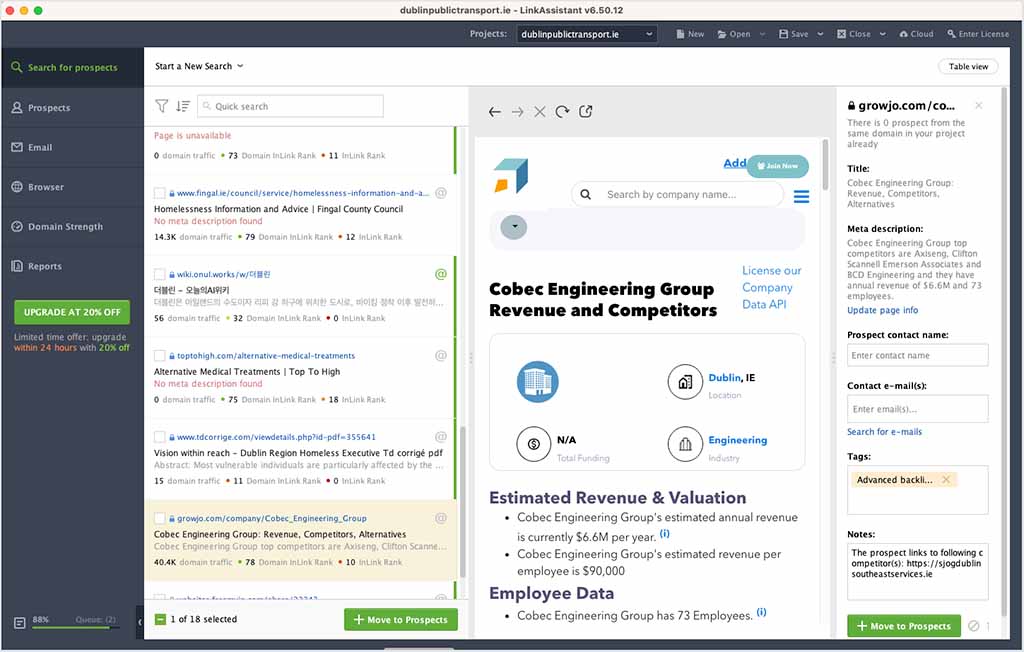
Once backlinks are secured, you can track them to ensure they stay active and effective. That said, it’s worth bearing in mind that you can only export data from the tool on SEO PowerSuite’s ‘Enterprise’ plan — if you’re on any other plan, you’ll always be restricted to viewing this data within the ‘Link Assistant’ tool itself.
Like SEO PowerSuite, Semrush also gives you a CRM-style tool to keep tabs on your link building efforts. After analyzing your domain, competitors, and target keywords, Semrush generates a list of domain prospects worth approaching, and you can connect your email to the platform and perform outreach without leaving it.
However, the experience involved when using Semrush for this purpose is closer to working with a fully-fledged CRM. This is because Semrush’s tool puts your prospects into an interactive pipeline, allowing you to move each one through various stages of outreach, and track progress in real time.
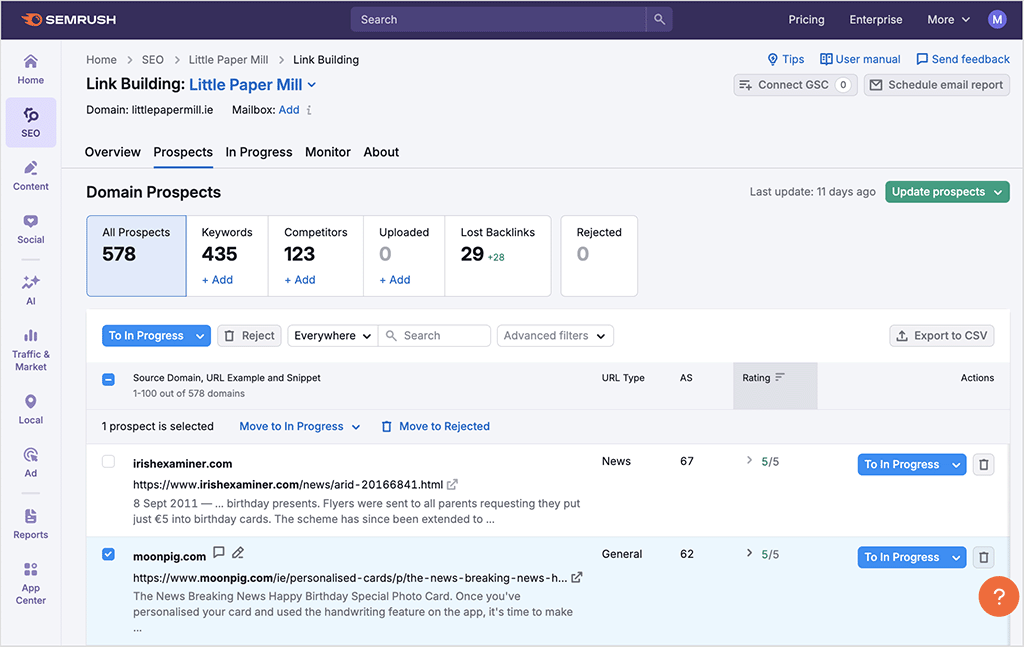
Both platforms have their merits when it comes to link building, but ultimately, if you’re looking for an all-in-one link management tool that combines depth with usability, the better option is Semrush.
Getting an extended free trial of Semrush
The standard free trial of Semrush lasts seven days — however, for a limited time, the company has made an extended trial available that’s double the length of the regular one. This gives you a much larger window to try out the product’s key features and access all the data provided by it.
Website audits
Both SEO PowerSuite and Semrush offer comprehensive site auditing tools that help you assess your site’s health from both a technical SEO and on-page SEO perspective.
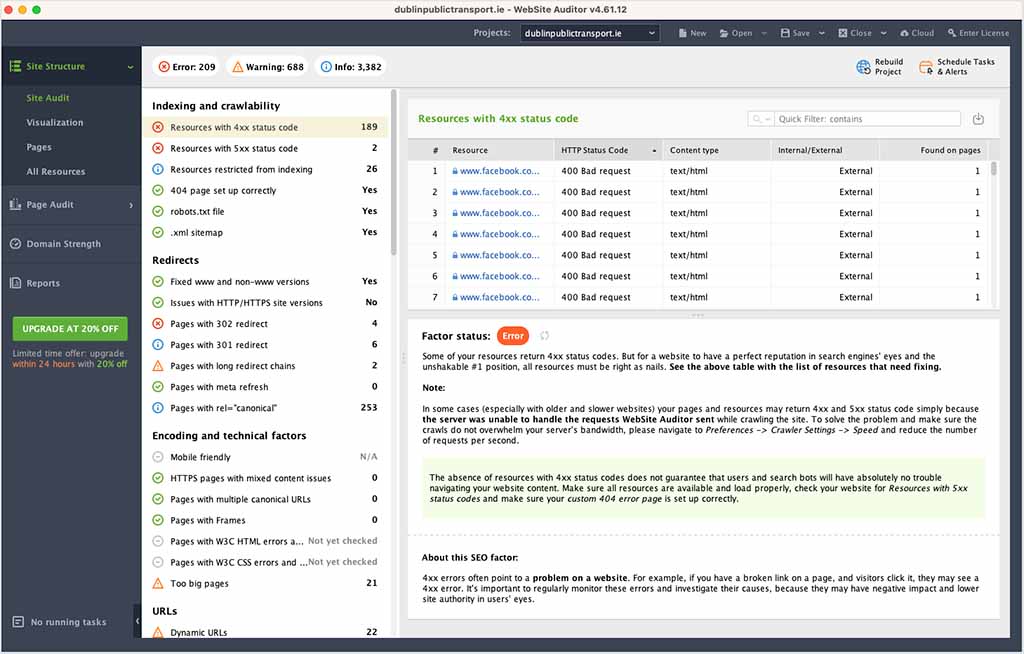
In SEO PowerSuite, site auditing is handled through its ‘Website Auditor’ module, which performs a deep crawl of your website to uncover technical issues that might be impacting your search performance.
Similarly, Semrush’s Site Audit tool scans your site for over 140 different SEO issues, covering everything from duplicate content and broken links to more advanced elements like Core Web Vitals scores and hreflang attributes.
During a site audit, both tools will flag common technical SEO problems, including:
- slow-loading content
- duplicate content
- SSL errors
- crawl errors
- missing headers and meta descriptions
- broken links
- redirect errors
When I ran audits on the same site using both tools, they flagged similar problems, like duplicate content and redirects. SEO PowerSuite, however, uncovered more total issues — 209 compared to 92 in Semrush. This is because Semrush highlights only key actionable issues, while SEO PowerSuite displays everything, including minor or non-critical errors.
When it comes to usability, Semrush’s site audit interface is definitely the more appealing of the two. It offers an easy-to-navigate dashboard that gives a quick overview of key metrics like an overall site health score, errors, and warnings. Thanks to its use of vibrant color coding, Semrush users can quickly zone in on aspects of their websites that need attention — the color red denotes critical issues, yellow denotes warnings, and green denotes healthy aspects of the site.
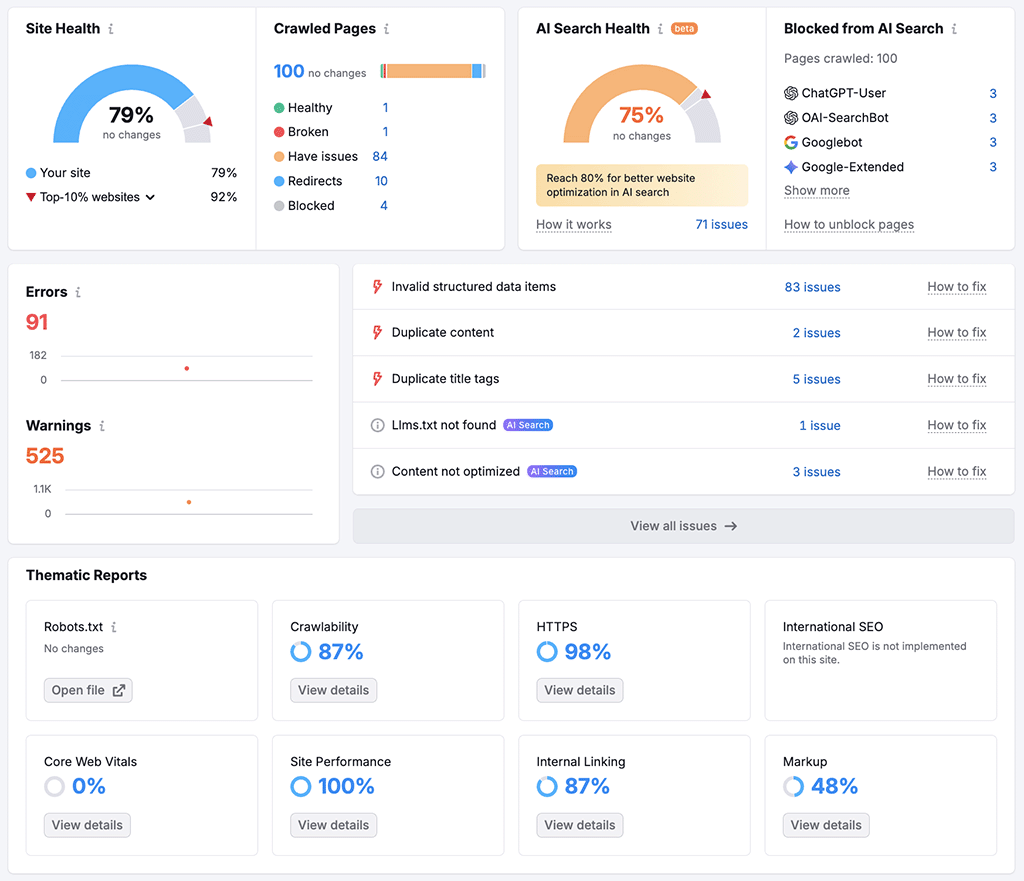
The thematic reports in Semrush are also well-organized, highlighting crawlability, HTTPS status, site performance, and other important areas, with a detailed breakdown of each issue provided. For example, you can instantly see the number of issues related to duplicate title tags, missing meta descriptions, and internal linking, and get direct access to detailed guidance on how to fix them.
Semrush has recently expanded its site auditing feature set to include an ‘AI search health’ metric. This assesses how well a site is structured for visibility inside AI-generated search results — highlighting issues that could prevent your content from being surfaced or cited by tools like Google’s AI Overviews and conversational LLM platforms.
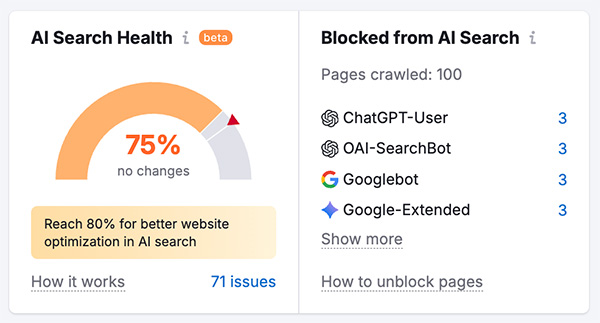
This adds an additional layer of technical insight that goes beyond traditional SEO diagnostics, helping you future-proof your site as search becomes increasingly AI-driven. SEO Powersuite doesn’t currently offer anything comparable on this front.
Now, SEO PowerSuite offers a more technical layout for its audits, focusing on the specifics of each issue and delivering fewer visual enhancements.
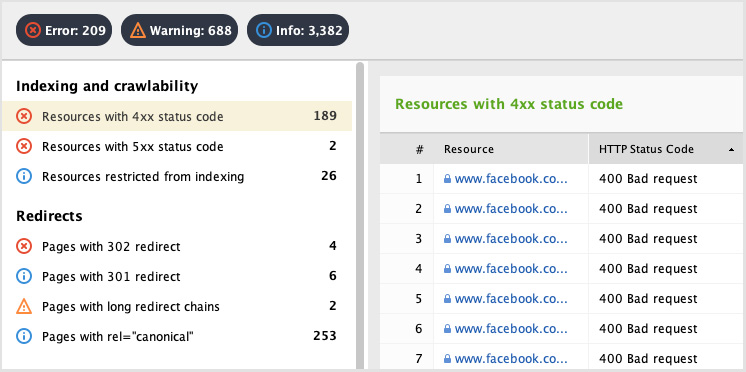
While it surfaces an extensive list of SEO issues, the interface provided for dealing with them is rather basic and offers less immediate visual guidance. There’s also no overall health score provided.
Both tools provide contextual help on how to fix the problems they identify — but Semrush’s is more user-friendly. It provides more detailed, actionable tips on resolving each issue identified, and unlike SEO PowerSuite, gives you links to handy articles on the Google or Semrush help sites containing more in-depth advice.
That said, SEO PowerSuite’s site audit tool does have a few edges over Semrush’s.
First, SEO PowerSuite offers unlimited site crawling, meaning you can do as much technical auditing as you like with the tool. Semrush by contrast caps audits at 20,000 pages on its Starter and Pro+ plans, and at 100,000 on its Advanced plan. This may make SEO PowerSuite the better choice for owners of multiple large websites, or those that need frequent, extensive audits.
Additionally, SEO PowerSuite lets you generate sitemaps and robots.txt files directly from within its audit tool — a nice-to-have feature that Semrush lacks, and one that can save you time and effort.
Interface and ease of use
When it comes to interface and ease of use, I found Semrush considerably easier to use than SEO PowerSuite.
This is mainly because SEO PowerSuite involves installing and managing four separate applications — Website Auditor, Rank Tracker, SEO SpyGlass and Link Assistant.
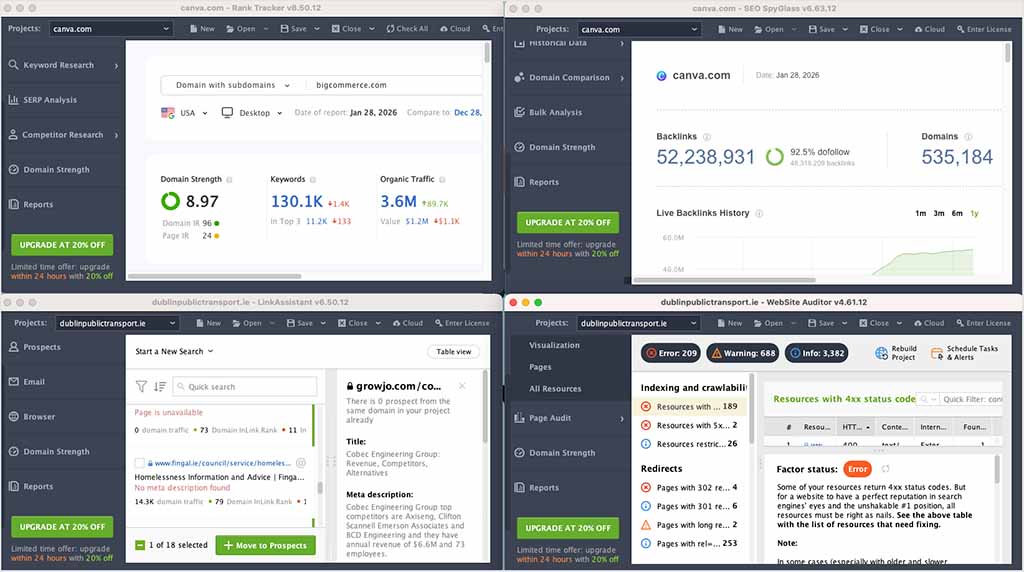
This modular setup gives users clear, specialized tools for each SEO task, which can be helpful when you want to focus on particular areas of SEO independently. But the trade-off is a more fragmented workflow. When testing the software, I found myself having to constantly switch between multiple applications — something that quickly felt time-consuming and cumbersome.
By contrast, Semrush provides a unified, cloud-based platform where all tools are accessible within a single interface. This integrated setup makes it easy to switch quickly between tasks, and results in a much smoother workflow.
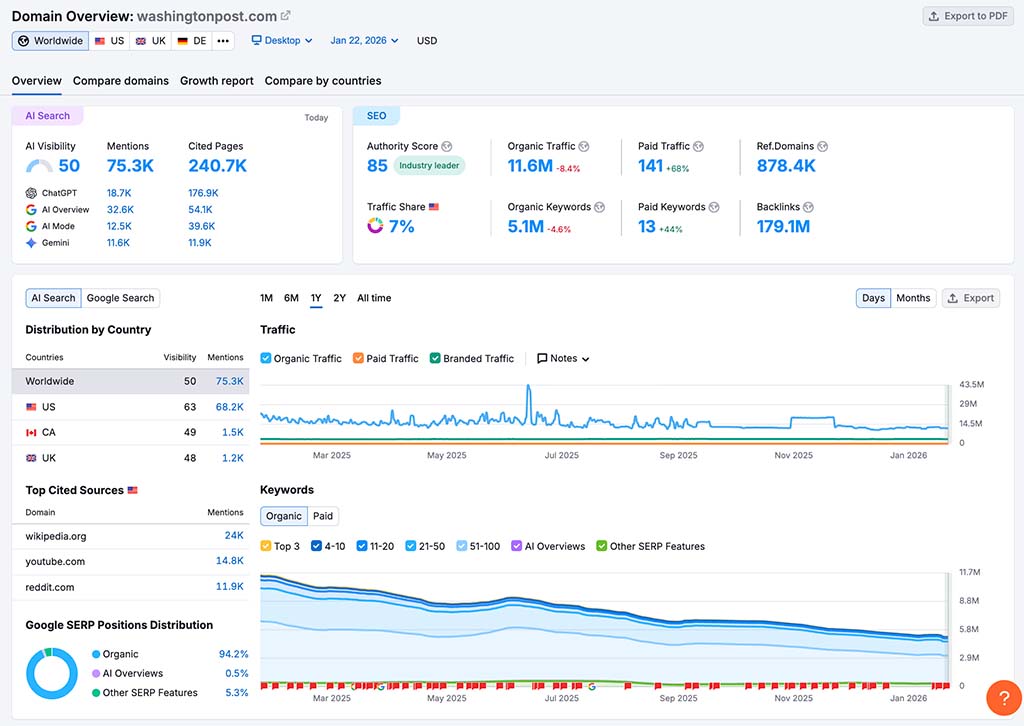
In terms of performance, Semrush benefits from its cloud-based design, which relies on remote servers for data processing rather than — as is the case with SEO PowerSuite — your own computer’s resources. This setup makes its data retrieval significantly faster than SEO PowerSuite’s, especially where deep site audits and backlink analysis are concerned.
(As I mentioned earlier, with SEO PowerSuite, even running a quick keyword query can take a significant amount of time.)
For users with high-performance computers, all this may be manageable, but on less powerful machines, SEO PowerSuite’s resource demands can slow things down significantly, and may even lead to occasional crashes.
So in the interface and ease of use stakes, it’s a hands-down win for Semrush.
Features you’ll find in Semrush but not in SEO PowerSuite
In addition to the shared features of Semrush and SEO PowerSuite that we’ve looked at so far, Semrush gives you a wide range of tools that go far beyond SEO — features that allow you to manage and improve your entire digital presence.
Key features of Semrush that you won’t find in SEO PowerSuite include:
- A content marketing toolkit — topic research tools and writing assistants that help you speed up the content creation process (available on the Pro+ plan or higher).
- Social media management features — post scheduling and analytics for social media platforms including Facebook, Twitter, Instagram, LinkedIn and Pinterest.
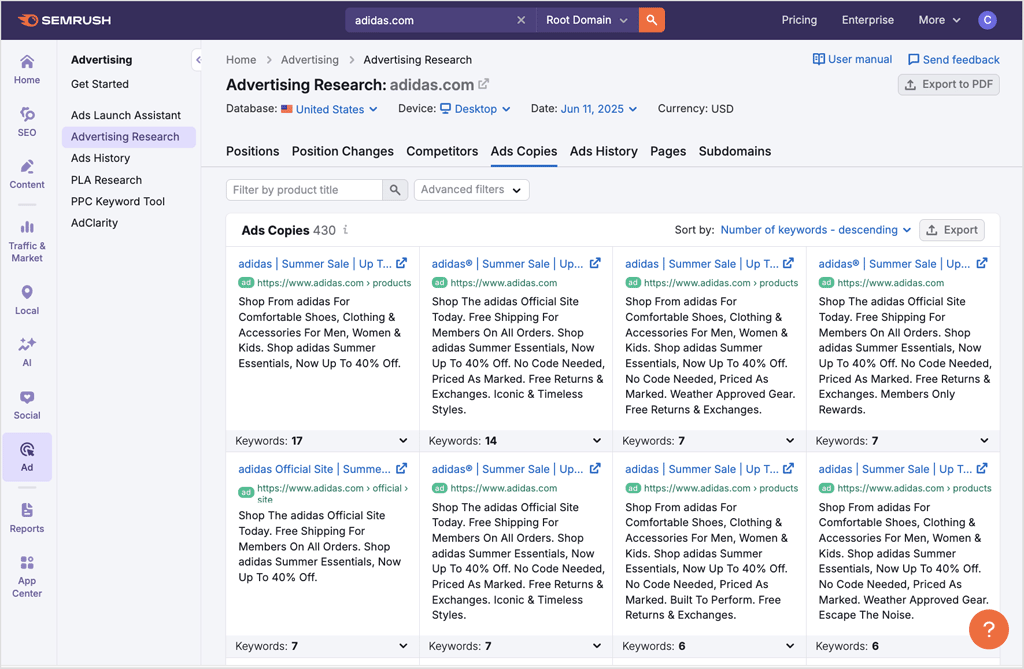
- PPC and display advertising research tools — insights into competitors’ paid search campaigns, including keywords, budget estimates and ad creative (available via the ‘Advertising’ toolkit).
- AI brand performance data — insights into how your brand appears inside AI-generated answers, covering mentions, sentiment, share of voice and key perception drivers.
- Traffic analytics — a competitor analysis tool that lets you access data on your competitors’ traffic and audience behavior (available via Semrush’s ‘Traffic & Market’ toolkit).
I found the quality of these extra tools to be extremely good; each one I tested provided meaningful insights that went beyond surface-level data.
Pricing
When it comes to pricing, SEO PowerSuite and Semrush cater to different ends of the market: SEO PowerSuite offers a more focused set of SEO tools at a relatively low price point, while Semrush provides a much broader suite of features at a considerably higher one.
SEO PowerSuite pricing
SEO PowerSuite’s current pricing plans are as follows:
- Free Forever — $0
- Professional — $29.10 per month
- Enterprise — $49.95 per month
- Max — $74.95 per month
It’s important to note that SEO PowerSuite’s paid plans all involve an annual commitment — the platform doesn’t offer monthly, pay-as-you-go options. Discounts of 20% to 34% are available if you opt for a 2-year or 3-year plan, however.
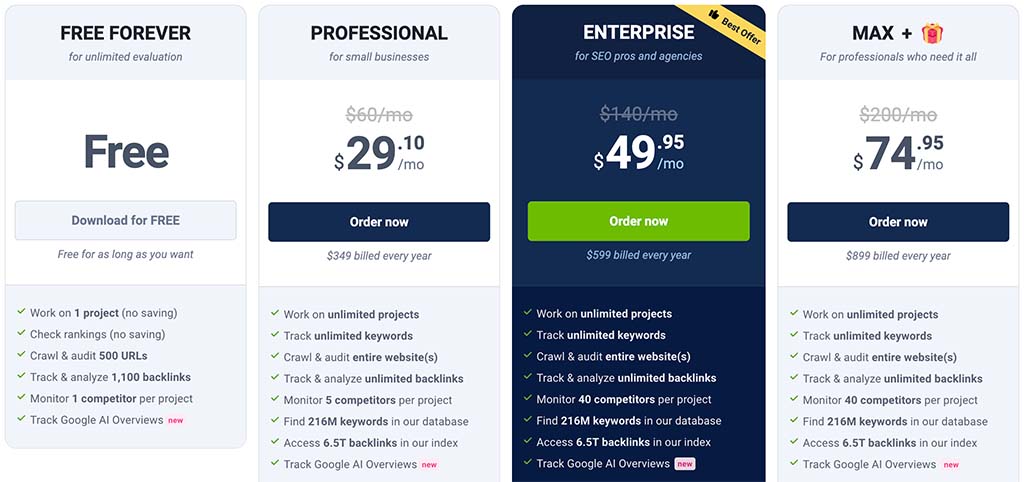
The free plan is quite limited in scope, serving more as a way to try the platform out than anything else. It offers access to basic versions of SEO PowerSuite’s main tools, but it lacks project-saving functionality — meaning you’ll need to start from scratch each time you open the software.
The main differences between SEO PowerSuite’s two paid plans are as follows:
- Rank tracking competitor limits are set at 5 competitors per project on the cheaper paid plan, but increase to 40 competitors per project on Enterprise and Enterprise Max.
- White-label reporting, report templates and automated report scheduling are only available on the Enterprise and Enterprise Max plans.
- Advanced export options (including CSV, SQL and HTML exports) are only included on the Enterprise and Enterprise Max plans.
- Enterprise Max includes a bundle of extras that aren’t listed on the standard Enterprise plan — including personalized live onboarding, a dedicated customer success manager, early access to beta features, and bonuses like Awario Starter (first year), an SEO Udemy course, and an “Ask-an-SEO” monthly question.
If you prefer, you can buy individual licenses (Professional or Enterprise) for each of SEO PowerSuite’s four main tools — Rank Tracker, Website Auditor, SEO SpyGlass and Link Assistant.
Semrush pricing
Semrush offers four main pricing plans:
- Starter: $199 per month
- Pro+: $299 per month
- Advanced: $549 per month
- Custom: negotiable pricing depending on your needs.
You can save up to 17% by opting for annual billing, and there’s a free trial available as well (tip: for a limited time, a special extended trial version is available here).
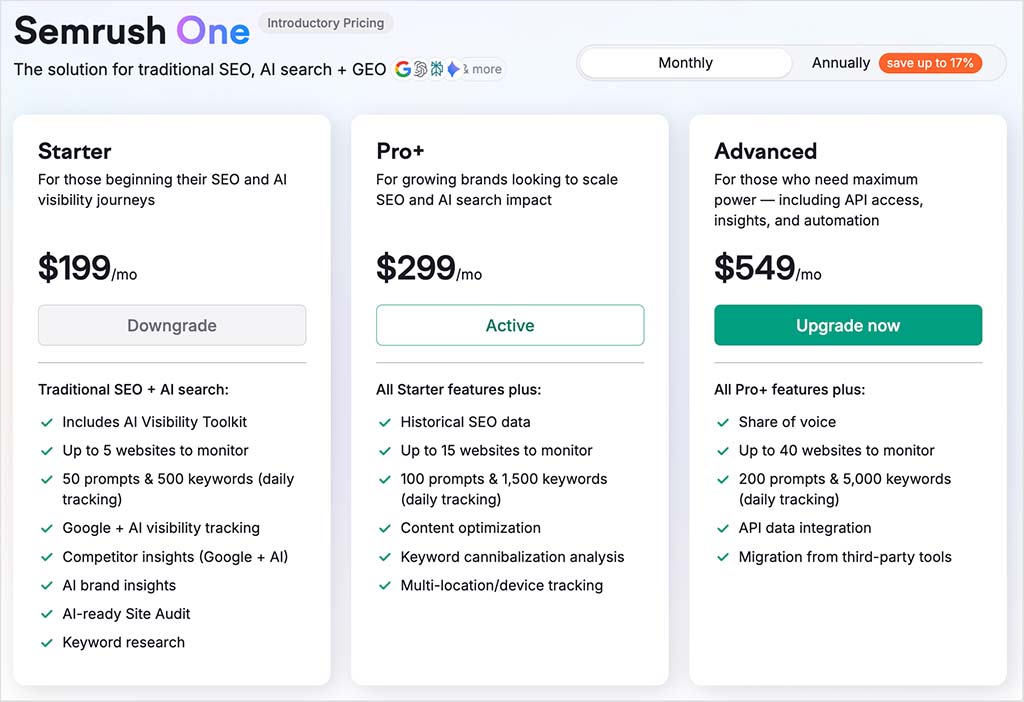
Semrush’s pricing plans involve significantly more tiered access to the platform’s key features, with some of the main plan-based limits as follows:
- Project limits — you can manage up to 5 projects (tracked websites) with the Starter plan; 15 with Pro+; and 40 with Advanced.
- Domain analysis reports — you can generate up to 3,000 reports per day in Starter; 5,000 in Pro+; and 10,000 in Advanced.
- Tracked keywords — you can monitor up to 500 keywords in Starter; 1,500 in Pro+; and 5,000 in Advanced.
- Crawl limits — you can conduct site audits involving up to 100,000 pages in Starter; 300,000 in Pro+; and 1,000,000 in Advanced.
- Historical data — this is only available on the Pro+ and Advanced plans.
📚 Related resource
Teamwork and Collaboration in SEO PowerSuite and Semrush
A key downside of both SEO PowerSuite and Semrush is that all their plans only come with one seat.
Semrush makes it straightforward to add extra users however, for a fee of between $45 and $100 per additional user per month, depending on plan. So long as you can afford to buy these extra seats, Semrush offers team-friendly features that make collaboration straightforward — these allow team members to assign specific tasks within projects, set permissions and share data easily.
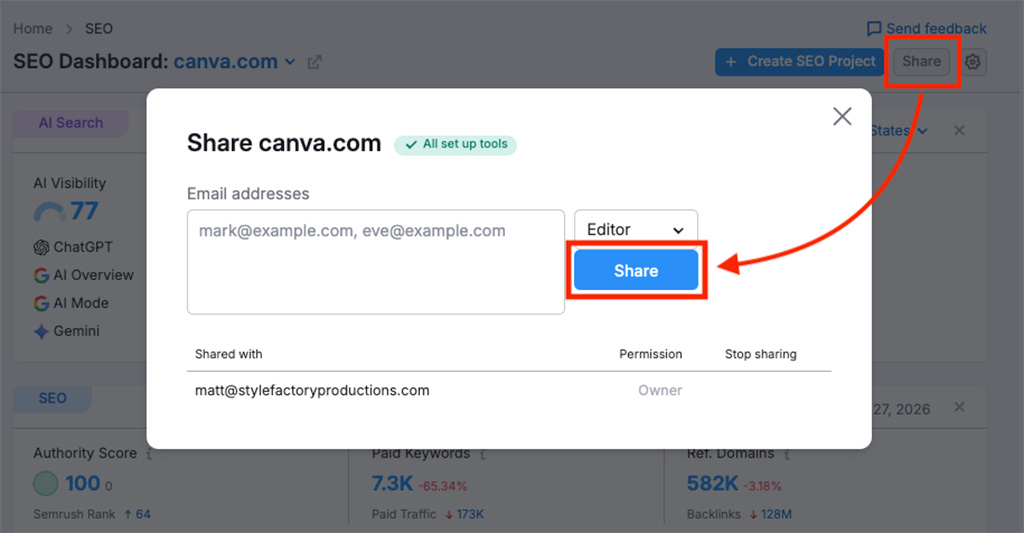
Additionally, features like shared project views, team activity tracking and commenting enable users to communicate directly within the platform, keeping everyone aligned on project goals.
By contrast, SEO PowerSuite is not really optimized for team-based work, and requires some fairly significant logistical workarounds to use it in a team environment.
First off, you can’t buy extra seats for an SEO PowerSuite account. Instead, each team member must purchase their own full-priced license.
And to work on projects simultaneously, team members have to set up and manage a separate cloud storage service called SEO PowerSuite Cloud.
All this makes SEO PowerSuite a more cumbersome solution for teamwork than Semrush. In truth, the product is much more suitable for solo users than it is for multiple users — so ultimately, when it comes to teamwork and collaboration, it’s a very easy win for Semrush.
Customer support
Given the complexity of SEO tools like SEO PowerSuite and Semrush, the availability of customer support is an important consideration.
Semrush has a definite advantage in terms of available support channels, because it provides support via live chat, email and phone.
SEO PowerSuite, by contrast, only offers email and live chat support.
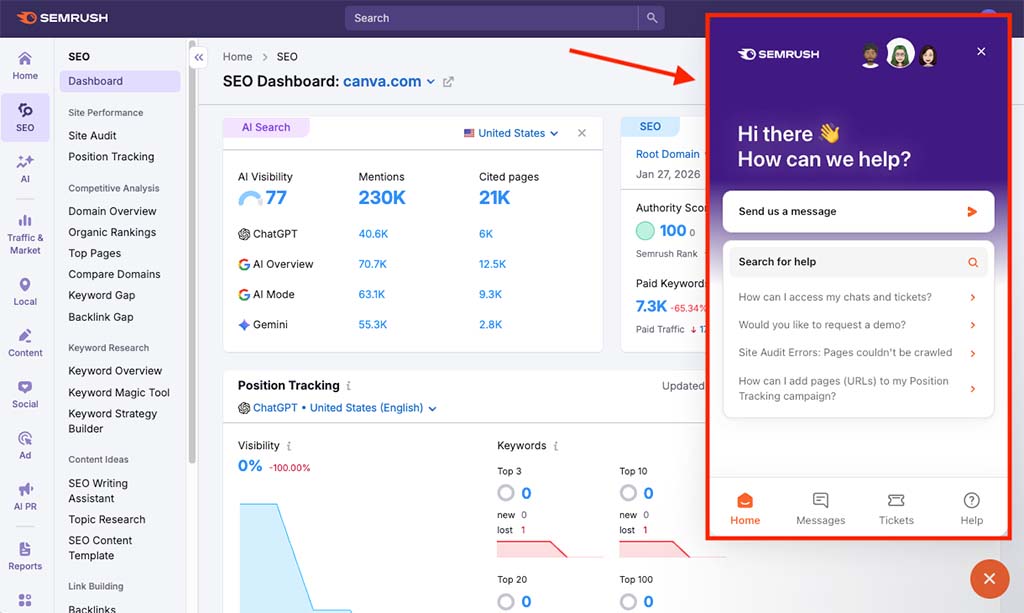
Accessing in-person support is also simpler in Semrush — its interface features an easy-to-spot support icon at the bottom right corner of the screen which, when clicked, gives you access to the platform’s main support options.
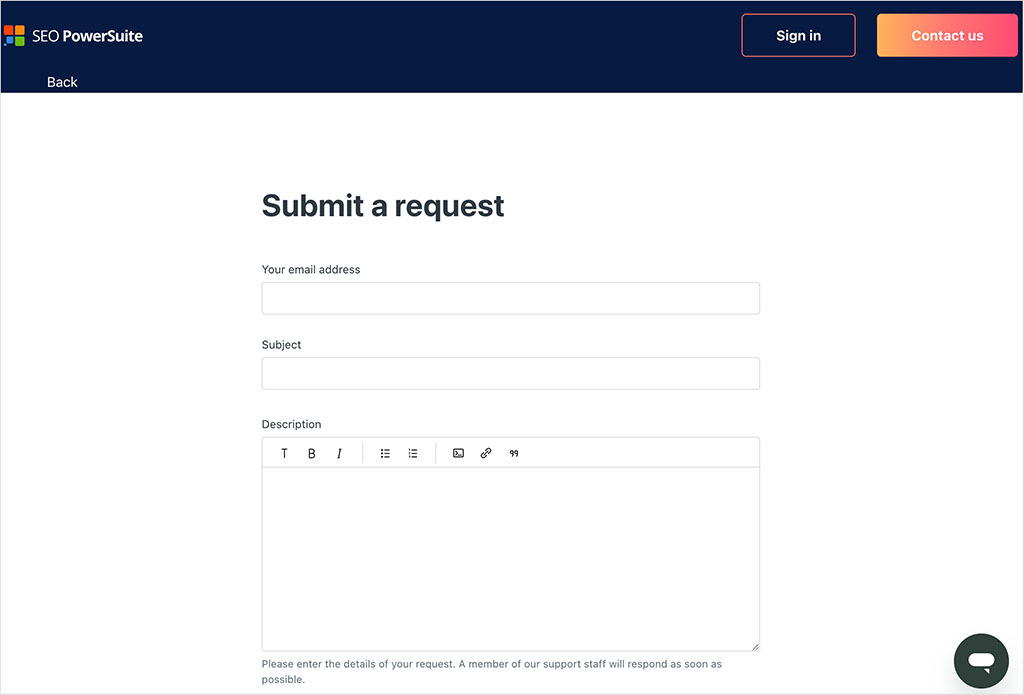
Within SEO PowerSuite’s interface, by contrast, the only support option you get is emailing a project to its support team. And accessing live chat involves a rather long-winded process — you’ve got to navigate from the desktop app to the platform’s help center in your browser, log in to your account and then follow the live chat or email support options.
In addition to in-person support, both platforms also provide comprehensive help centers. However, while SEO PowerSuite’s help materials are only available in English, Semrush offers its guides and articles in 14 different languages.
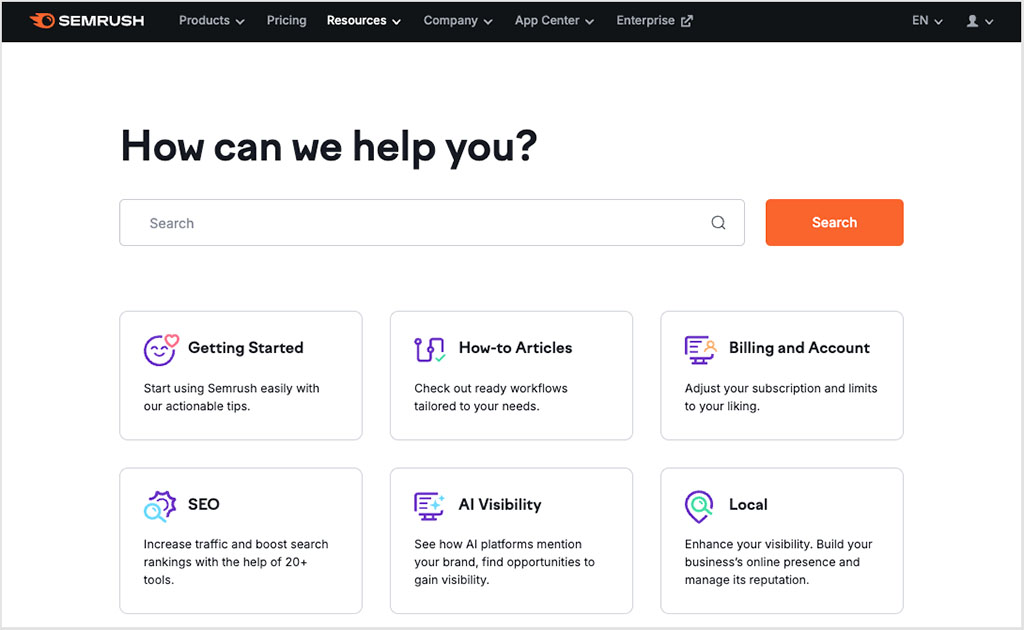
So overall, I think it’s fair to say that the more convenient and versatile option for customer support is Semrush.
User reviews
So far, you’ve heard my own take on SEO PowerSuite vs Semrush — but it’s also useful to look at how everyday users rate both platforms. The figures below are drawn from two well-known software review sites, G2 and TrustRadius (data correct at the time of writing — January 2026).
On G2, both tools are tied, with SEO PowerSuite and Semrush each scoring 4.5 out of 5. However, Semrush’s rating is based on a far larger volume of feedback, with 3,371 reviews compared to SEO PowerSuite’s 558.
On TrustRadius, SEO PowerSuite holds a slight edge, scoring 9 out of 10 from 41 reviews, versus Semrush’s 8.6 out of 10 from a much larger sample of 769 reviews.
Overall, both platforms are well regarded, but Semrush’s scores reflect much broader user adoption.
SEO PowerSuite vs Semrush: the verdict
So, which tool is better — SEO PowerSuite or Semrush?
SEO PowerSuite has its merits, particularly when it comes to cost — it’s much cheaper than Semrush. Its site auditing and backlink analysis features are solid and its ‘no limits’ approach to rank tracking and site auditing will appeal to users who want to monitor large numbers of keywords or crawl very big sites without worrying about usage caps.
However, for keyword research, SEO PowerSuite simply can’t compete with Semrush — or, in truth, with most modern SEO platforms. It lacks the depth of data and predictive metrics needed to properly assess ranking difficulty, search intent and traffic potential, making it much harder to build a reliable content and growth strategy with it.
And annoyingly, SEO PowerSuite’s tools are split across four separate applications, resulting in unnecessarily clunky workflows. To me, using the platform feels a bit like having to use four different versions of Photoshop on a single project — one for resizing images, another for adjusting colors, a third for applying filters, and a fourth for exporting your design.
By contrast, Semrush delivers a fully unified, cloud-based platform that brings together SEO, content marketing, competitor research, AI visibility tracking and advertising intelligence in one coherent interface.
Its vast keyword database, powerful competitive analysis tools, advanced backlink features and growing suite of AI visibility tracking tools make it a genuinely modern SEO and digital marketing solution. And while it comes at a higher price point than SEO PowerSuite, the depth, freshness and usability of its data more than justify the extra cost.
If you’re looking for a budget-friendly tool and can work around its numerous (!) limitations, SEO PowerSuite might suit your needs. But for anyone serious about scaling their SEO efforts and staying competitive in an increasingly AI-driven search landscape, Semrush is the more compelling and future-proof choice.
I hope you’ve found this SEO PowerSuite vs Semrush comparison useful! As always, I’d suggest that you try both products out yourself — you’ll find links to the free versions of SEO PowerSuite and Semrush below.
I’ll leave you with a summary of the key pros and cons of both platforms, and if you have any queries at all about either, please feel free to leave a comment.
Pros and cons summary
Key reasons to use SEO PowerSuite over Semrush
- It lets you track an unlimited number of keywords, while Semrush enforces keyword tracking limits.
- It allows you to audit more pages per month than Semrush.
- Its keyword gap tool lets you compare your site’s rankings against those of up to five competitors, while Semrush limits you to comparing your site against four.
- Its link intersection tool lets you compare your link profile against those of more competitors (up to 11, while Semrush’s cap here is four).
- It’s a lot cheaper than Semrush.
Key reasons to use Semrush over SEO PowerSuite
- Semrush is much easier to use.
- It gives you access to a proper (and extremely large) keyword database that lets you perform really detailed keyword research. It’s debatable as to whether you can really use SEO PowerSuite at all as a keyword research tool.
- Semrush’s backlink database is significantly larger than SEO PowerSuite’s and its backlink analysis features are more advanced.
- It’s cloud-based and can be used on any computer via a web browser — SEO PowerSuite has to be installed locally.
- It gives you a multitude of metrics that are simply not available from SEO PowerSuite — these cover search intent data, personalized keyword difficulty scores, search volumes, AI brand visibility and more.
- It delivers results almost instantly, while SEO PowerSuite can be noticeably slower, particularly for large audits and backlink research.
- Unlike SEO PowerSuite, Semrush provides a huge amount of PPC data, allowing for in-depth paid advertising research.
- It provides you with a wide range of content creation and analysis tools (depending on plan).
- It’s much better for collaboration and team-based SEO projects.
Alternatives to SEO PowerSuite and Semrush
There is no shortage of alternatives to SEO PowerSuite and Semrush to consider.
Some of the key alternatives include:
- Ahrefs
- Moz
- SE Ranking
- Similarweb
- SpyFu
- Growthbar
- Ubersuggest
- Raven Tools
For a deep dive into Ahrefs, check out our full Ahrefs Review, or explore how it stacks up against Semrush in our Ahrefs vs Semrush comparison.
We’ve also got a three-way ‘Ahrefs vs Moz vs Semrush’ comparison here.
For those curious about Moz, our ‘Moz vs Semrush’ and our ‘Moz vs Ahrefs’ comparisons give a full breakdown of the key pros and cons of this tool when compared with its two main rivals.
Similarly for SE Ranking and SpyFu, our ‘Semrush vs SE Ranking’ and ‘SpyFu vs Semrush’ comparisons shed light on how these tools perform in key SEO areas when compared to Semrush.
To learn more about Similarweb, you can check out our comprehensive ‘Similarweb Review’ here, or see how it stacks up against Semrush in our ‘Similarweb vs Semrush’ comparison.
And finally, for users exploring lighter or more affordable SEO tools, you might want to have a read of our ‘GrowthBar Review,’ our Ubersuggest review, our ‘Ubersuggest vs Semrush’ post and our ‘Raven Tools vs Semrush’ comparison.
📚 Related resource: SEO PowerSuite review
Update details
This article was updated on January 28, 2026. The following updates were made:
- A new ‘Quick Verdict’ section was added.
- Product screenshots were updated.
- A user reviews section was added.
- Pricing information was updated to reflect both platforms’ current plans and feature limits.
- AI visibility and brand performance data were added to the domain analysis and rank tracking sections.
- The site audit section was updated to reference Semrush’s AI search health metrics.
- The interface, pros and final verdict sections were revised for clarity and accuracy.

Comments (1)