

We have an honest review policy, but this page contains affiliate links. If you buy through these, we may earn a commission. This helps fund our research at no cost to you.
In this Moz review, I look at the pros and cons of a leading SEO solution. Is it right for your SEO project, or should you opt for a competing platform?
I’ll start with a quick overview of the key advantages and disadvantages of using Moz, and then follow this up with a deep dive into its features.
The key advantages and disadvantages of using Moz
| Advantages of using Moz | Disadvantages of using Moz |
| ☑️ More affordable than key competitors | ❎ Relatively small keyword database |
| ☑️ Bigger backlink database than key competitors | ❎ Ungenerous keyword research limits |
| ☑️ Strong AI visibility and research tools | ❎ No site traffic estimates provided |
| ☑️ Relatively gentle learning curve | ❎ No broken outbound link identification |
| ☑️ Excellent site auditing features | ❎ Search volumes not provided on global basis |
| ☑️ Cheap access to its API available | ❎ No phone support |
Let’s start our full review with a look into the background behind Moz.
Moz: the background
Founded by Rand Fishkin and Gillian Muessig in 2004, Moz started life as ‘SEOmoz’ — a blog and an online community where some of the world’s first SEO experts and enthusiasts shared their research and ideas.
Over the years, however, this community site developed into a piece of software called ‘Moz Pro,’ which, alongside Ahrefs and Semrush, became an industry-standard SEO tool.
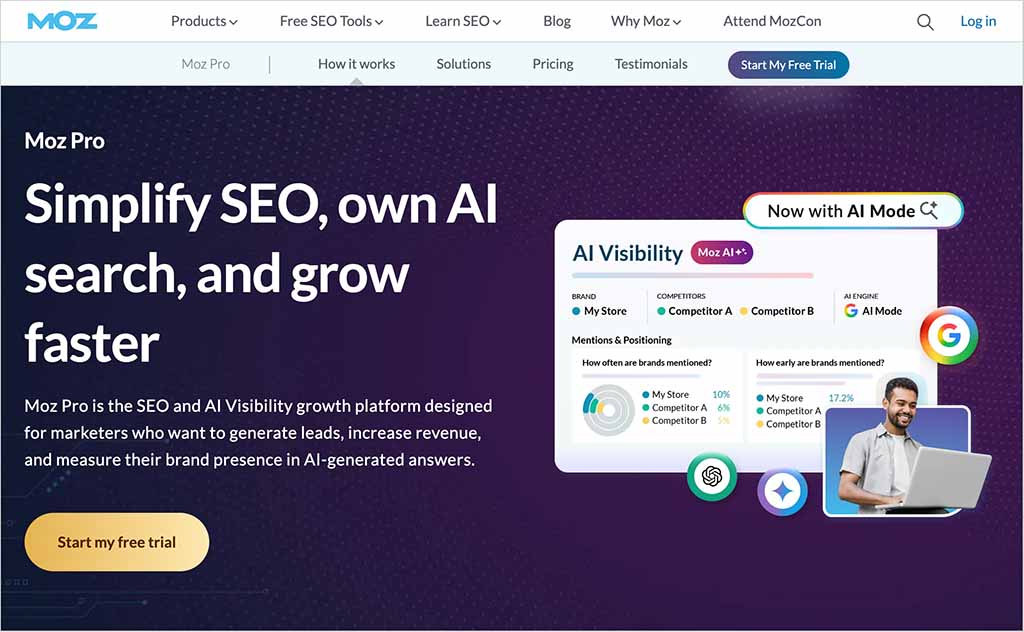
The platform now gives you a wide range of SEO and AI search features that aim to help you improve your visibility in traditional and AI-generated search results. It lets you:
- evaluate the overall SEO strength of websites
- find the right keywords for your project
- track the position of your content in search
- check your website for technical issues
- analyze the quality of links pointing to your site
- improve your page content
- track your brand’s visibility in AI-generated search results.
In what follows, I’m going to assess how good Moz is at all that.
Let’s begin with something called domain analysis.
Domain analysis
A lot of SEO campaigns start with domain analysis. This is where you get a general overview of how a website is performing from an SEO point of view.
You typically perform domain analysis on your own site — to identify where key SEO improvements can be made — or on a competitor’s, to see how difficult it will be to outrank them in search results.

Conducting domain analysis is very straightforward in Moz. You simply enter a domain name into its ‘Domain Overview’ tool and key metrics about it are immediately returned.
Key ones include:
- A ‘domain authority’ score — this gives you an at-a-glance indication of how well the website being inspected is likely to perform in search results. This is calculated on the number and quality of links that point to a website.
- The top keywords that the domain ranks for.
- The total number of external links — ‘backlinks’ — pointing to the domain (the more of these the better from an SEO point of view — each one counts as a ‘vote’ in Google’s eyes for your content).
- Anchor text commonly used in external links to the website (anchor text is the clickable text in a hyperlink — the words used in it can influence keyword rankings).
- A list of key competing domains.
In truth, what you get from Moz here is pretty consistent with the domain analysis metrics provided by competing SEO solutions. But there are a couple of extra pieces of data that you get from Moz that are worth highlighting — and a couple of important things that are missing from its Domain Overview tool.
I’ll look at both in turn, starting with the extras.
Brand visibility metrics and domain search themes
Moz’s brand authority score
For a long time, Google rankings were heavily influenced by content quality and the number of high-quality links pointing to a page. But in recent years, brand strength and reputation have become increasingly important considerations in SEO — with Google placing a growing emphasis on signals that help it identify authoritative, trustworthy sources.
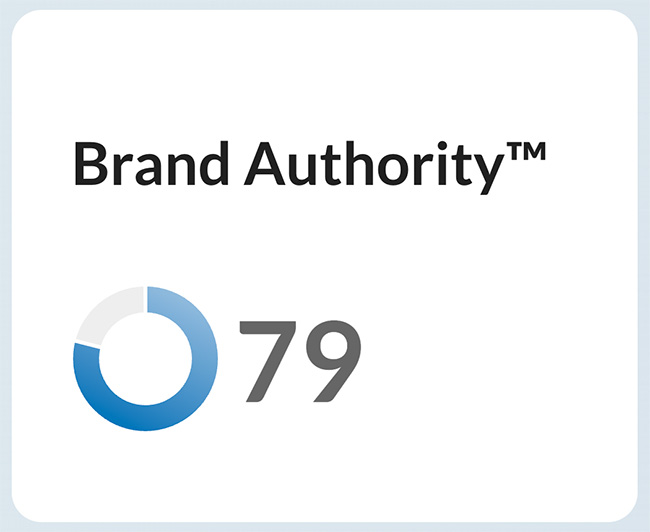
Reflecting this, Moz has introduced a new metric — its ‘Brand Authority’ score — that lets you keep tabs on the strength of a website’s brand.
(This is based on data from the US, UK, Canada and Australia.)
When you enter a domain into Moz’s ‘Domain Overview’ tool, Moz assigns it a brand authority score of between 1 and 100. The higher the score, the more general awareness of the brand — and, according to Moz, the greater the chance of its website being able to perform well in search results.
The domain analysis report also provides a ‘Brand Authority’ map, comparing the authority of a website’s brand with those of key competitors. This chart shows competing brands on a matrix focused on ‘Brand Authority’ and ‘Domain Authority’ (see my screenshot below).
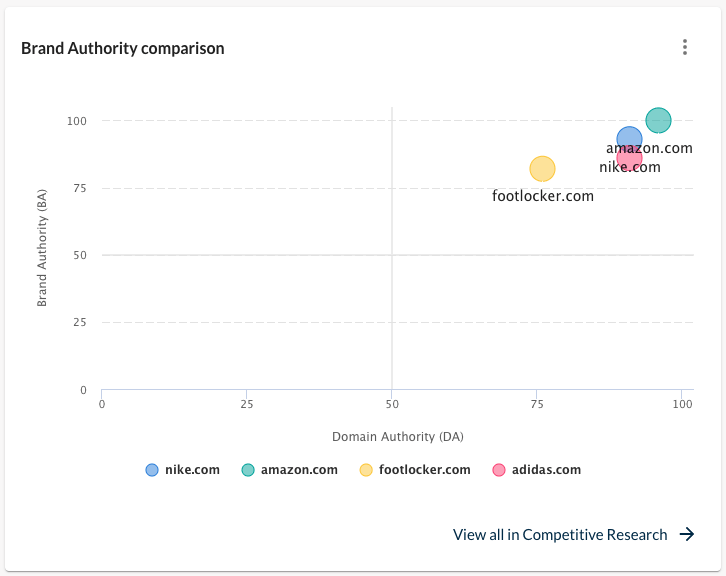
This is one of Moz’s more distinctive proprietary metrics, and provides a useful extra layer of context when comparing the strength of competing brands.
📚 Related resource:
Beating the Helpful Content Update with branded search
Domain search themes
Another metric that you’ll find in Moz but not in competing tools is ‘domain search theme’ information. When you inspect a domain in Moz, it will surface an overall theme for it. This is derived from the most frequently searched keywords associated with the site.
In the case of our site, Style Factory, Moz thinks the domain theme is ‘digital marketing tools’ — a pretty accurate summation.
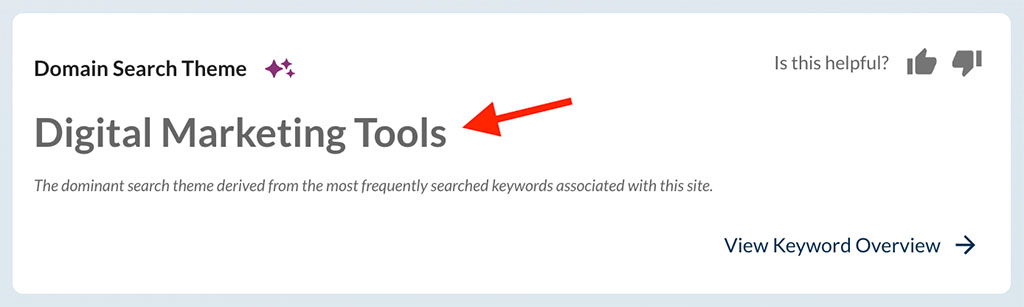
This information is useful because it tells you as an online business owner what the dominant topic of your website is — something which, if you have a large blog packed with hundreds of posts, you might not actually have paused to consider or evaluate.
And because Google increasingly doesn’t like site owners going madly off-topic, having a firm idea of your core theme is important — it allows you to create the most relevant content possible, and shore up your site’s topical authority.
Getting an at-a-glance idea of the domain search theme used by a site that you don’t own is helpful too. If you’re approaching a domain owner with a guest post request, for example, it lets you know immediately what sort of content you should be pitching.
And understanding the dominant theme of a competing website can help you get a sense of the primary content type that is driving its success — which can in turn inform the content strategy for your own website.
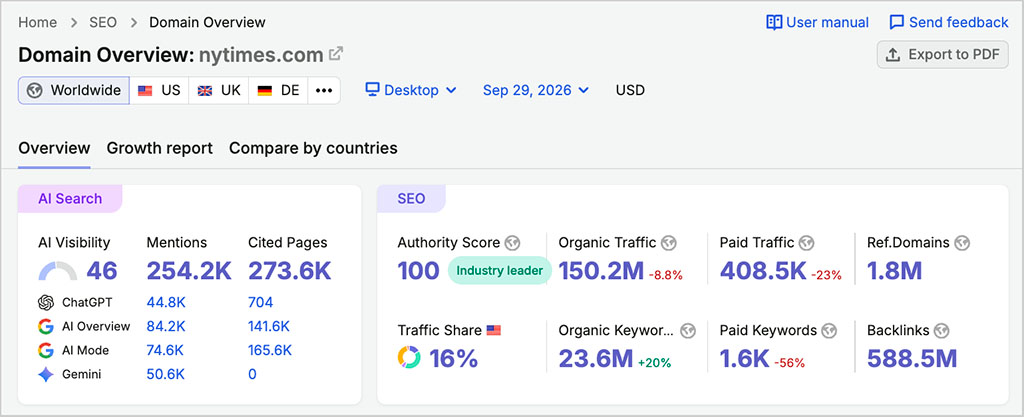
One increasingly notable omission from Moz’s Domain Overview, however, is AI visibility data. Moz now provides dedicated AI visibility tools elsewhere in the platform — which I’ll discuss in more depth shortly — letting you track things like brand mentions, citations, sentiment and prompt performance. But none of this information is surfaced in Domain Overview itself.
This is a little disappointing, because some competing tools now bring traditional SEO and AI visibility data together in their main domain reports. Semrush, for example, includes headline AI metrics such as visibility scores, mentions and citation data alongside its standard domain analysis information.
Site traffic estimates — a key omission?
Another key domain analysis feature that you’ll find in competing tools but not in Moz is traffic estimates. Ahrefs, Ubersuggest, Semrush and SE Ranking all provide you with traffic estimate data and graphs — but there’s no sign of either in Moz.
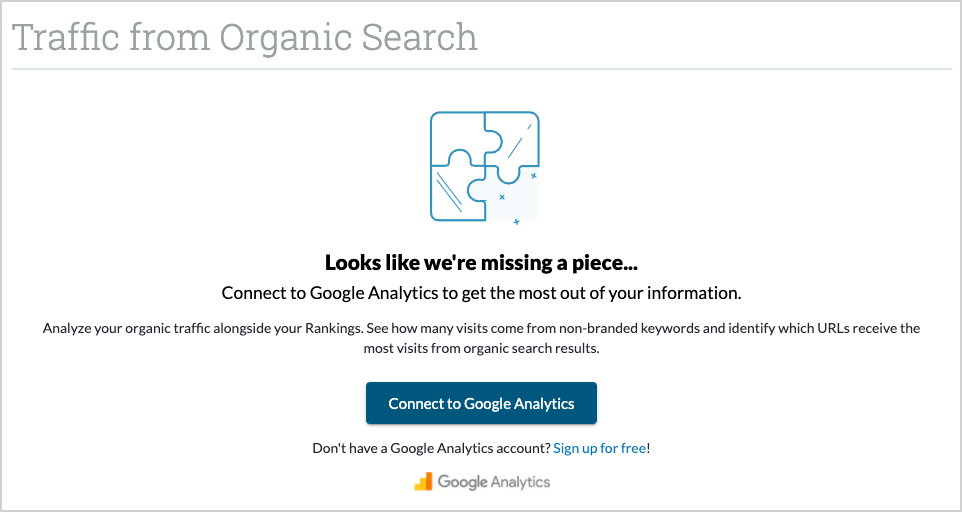
The only way to see traffic data in Moz is by connecting a Google Analytics account to your account — that’s fine if you want to keep tabs on your own site’s traffic, but not much use if you don’t have access to the Google Analytics account for a domain you’re investigating.
To be fair, I’ve found that a lot of the traffic estimates provided by Moz’s competitors aren’t madly accurate. But even so, they give you an idea of how popular a site is, and valuable context that is unfortunately missing from Moz.
AI visibility tracking
One of the biggest changes to Moz in recent months has been the addition of a much more substantial set of AI visibility tools.
These are available on Moz’s ‘Standard,’ ‘Medium’ and ‘Large’ plans, and are designed to help you understand how prominently your brand appears in responses generated by ChatGPT, Google AI Mode, Gemini and Perplexity.
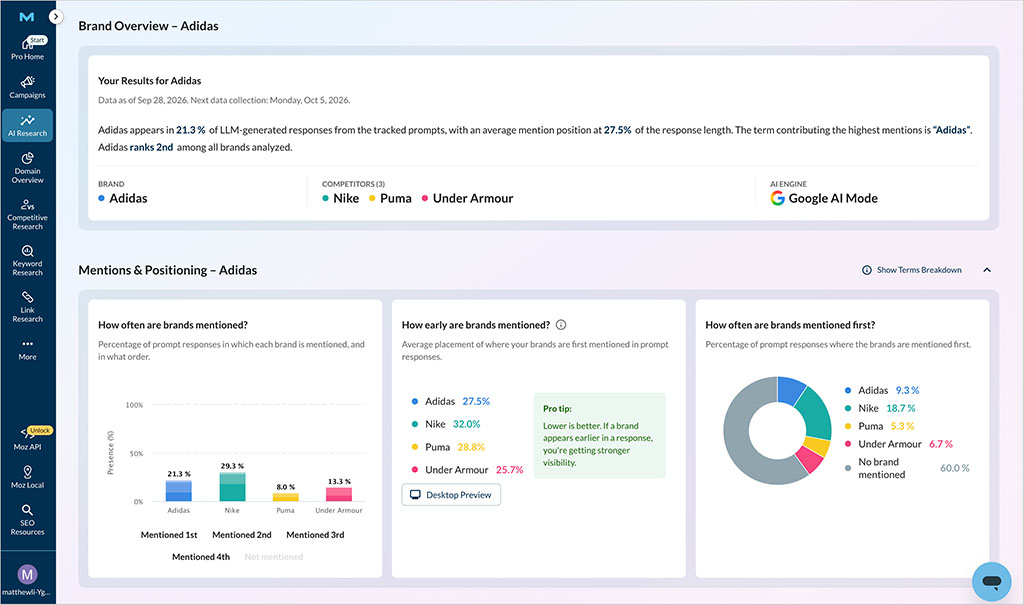
Moz’s main AI Visibility dashboard lets you track things like:
- how often your brand is mentioned in AI-generated responses
- how early your brand appears in those responses
- how often your brand is mentioned first
- how your visibility compares with competing brands
- the sentiment associated with your brand
- the websites and pages being cited by AI tools.
One of the more interesting features here is Moz’s ability to show you how early your brand tends to be mentioned in AI-generated responses.
This adds a useful extra layer of context to a simple mention count. A brand that appears frequently but only near the end of responses may be less prominent than one that is consistently mentioned first or near the top.
Moz also shows you how often your brand is mentioned first, making it easier to assess not just whether AI platforms know about your business, but how prominently they tend to feature it.
Moz also analyzes the sentiment associated with your brand in AI responses, helping you see whether it is generally being discussed in positive, neutral or negative terms.
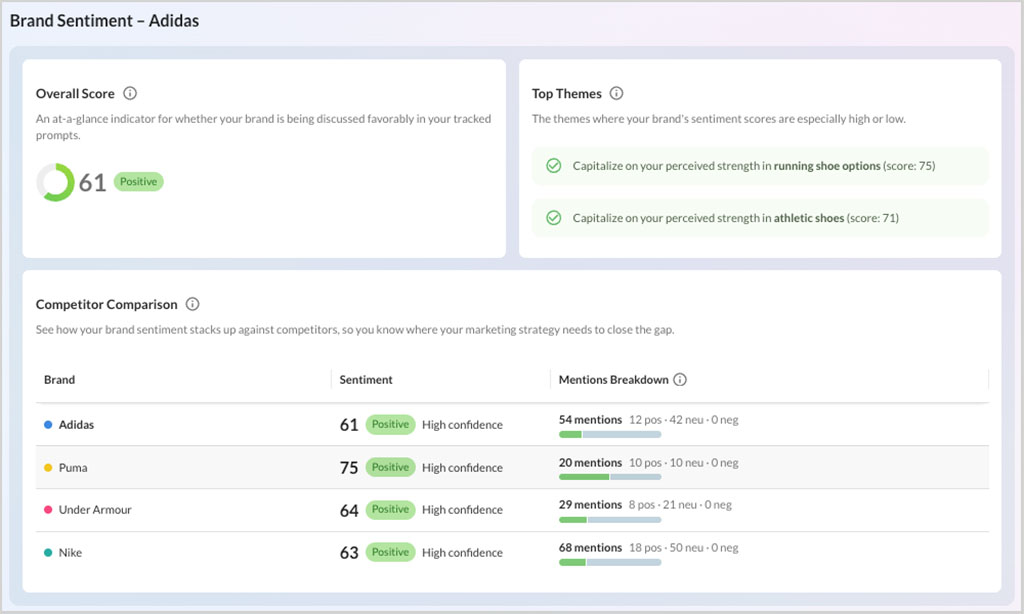
And you can compare your results with competing brands, giving you a clearer idea of your relative visibility across the main AI platforms.
Moz’s Prompt Suggestions tool lets you generate relevant prompts around a topic and add selected ones to your AI Visibility dashboard for ongoing tracking.
This is useful for keeping tabs on the specific questions and topics that matter most to your business, rather than relying only on broad visibility scores.
Moz also provides dedicated citation reporting, showing you which domains and pages are being referenced in responses to your tracked prompts.
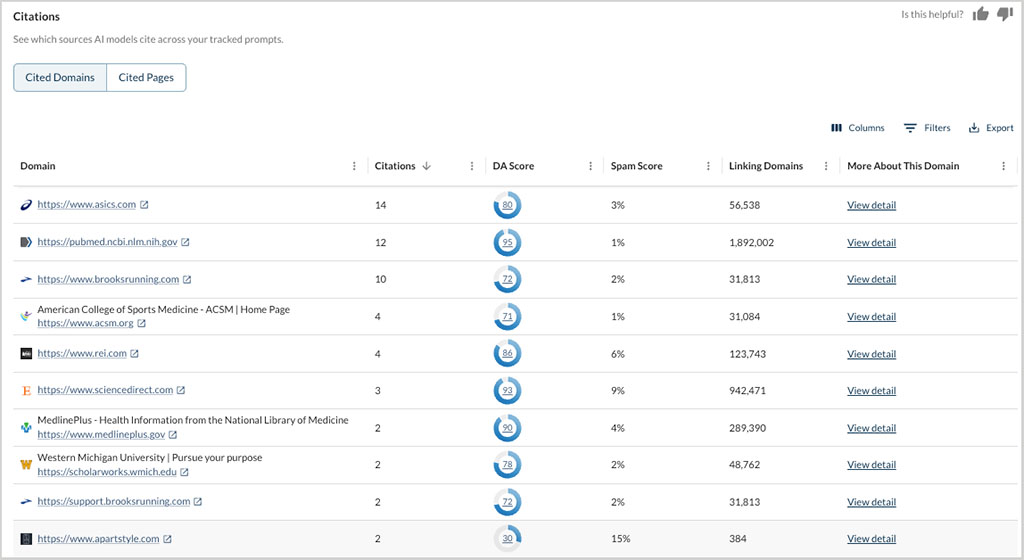
I particularly like the way Moz adds ‘Domain Authority’ and ‘Spam Score’ data to these citation reports. This gives you an immediate sense of the quality and trustworthiness of the sources that AI tools are relying on — making it easier to spot influential sites, identify content gaps and uncover potential outreach or digital PR opportunities.
The amount of AI visibility tracking you get depends on your Moz Pro plan. The ‘Standard,’ ‘Medium’ and ‘Large’ plans include 1, 2 and 4 AI Visibility projects respectively, with allowances of 50, 100 and 200 tracked prompts.
This makes Moz particularly good value if you need to monitor more than one brand or website. Most competing AI visibility tools give you just one project as standard, whereas Moz increases the number as you move up its plans — giving ‘Medium’ and ‘Large’ plan users considerably more scope to track multiple sites, brands or client accounts without paying for separate AI visibility subscriptions.
Additional Moz AI Visibility projects cost $20 each, while an extra 100 tracked prompts costs $50.
Overall, Moz has caught up considerably on the AI visibility front. Its tools cover the main bases well, and the combination of mention tracking, mention position, sentiment, citations, competitor analysis and multi-project allowances makes this one of the stronger areas of the platform.
📚 Related resource: How to improve your brand’s visibility in AI search
Keyword research features
When it comes to keyword research, tools like Moz are typically used for two main purposes:
- to get a ‘keyword overview‘ (data about a particular search query — how many people are searching for it, how difficult it will be to rank for it etc.)
- to get a list of keyword suggestions (keywords that are related to a phrase you enter, and which might be easier to rank for).
Let’s see how Moz fares when it comes to providing both.
Keyword overviews in Moz
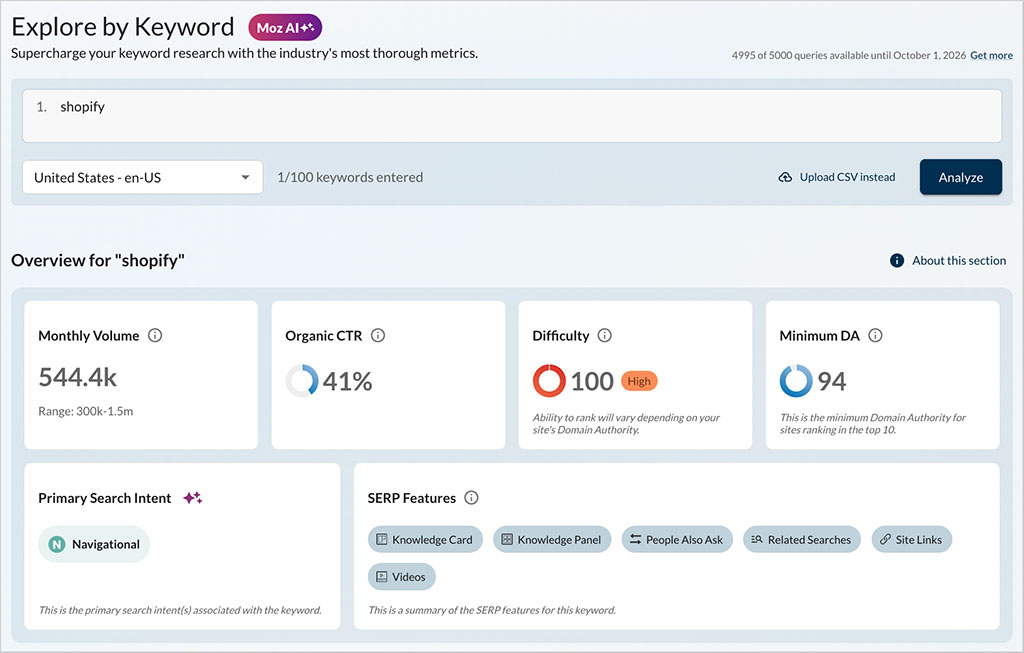
Moz’s keyword overview tool — its ‘Explore by Keyword’ feature — works well, and gives you a lot of actionable data. When you enter a phrase into it, you’ll see:
- how many people are searching for that phrase each month
- the percentage of people that click through to organic results for that phrase
- how hard it will be to rank for it (this information being provided via a 1-100 difficulty score)
- the minimum domain authority score of the sites currently ranking in the top ten
- the intent behind the search (navigational, commercial, transactional or informational)
- SERP features (whether the keyword typically generates people also ask links, star ratings, featured snippets etc.)
- Moz’s top keyword suggestions, topics and questions related to that phrase
- the top ten pages currently ranking for the phrase.
I tried a bunch of phrases out using the keyword overview feature and got comprehensive, clear data for each one. The only thing I felt was obviously missing was the option to see keyword data at a global level: Moz lets you access keyword overviews by country, but doesn’t show you any global search volumes.
Keyword suggestions in Moz
Now, before I dive into the specifics of Moz’s keyword suggestion features, it’s worth pointing out something important here: by comparison to those of its competitors, Moz’s keyword database is pretty small. It contains 1.25 billion keywords; although this sounds like a lot, competing tools give you access to significantly more (as you can see from the data in my table below).
| SEO Tool | Keyword Database Size |
|---|---|
| Ahrefs | 28.7 billion |
| Moz | 1.25 billion |
| SE Ranking | 5.5 billion |
| Semrush | 28.9 billion |
And in my tests of Moz, the smaller database size did seem to result in fewer keyword suggestions being surfaced. When I asked Moz, Ahrefs and Semrush for keyword suggestions related to some of the products we write about on our site, Ahrefs and Semrush gave me access to millions of suggestions, while Moz gave me thousands.
And when I applied filters to the suggestions provided by Moz, I got particularly slim pickings. For example, when I entered ‘Shopify’ as a target keyword in Moz, and then specified that I only wanted to see suggestions that also included the phrase ‘how to,’ Moz returned just 32 suggestions.
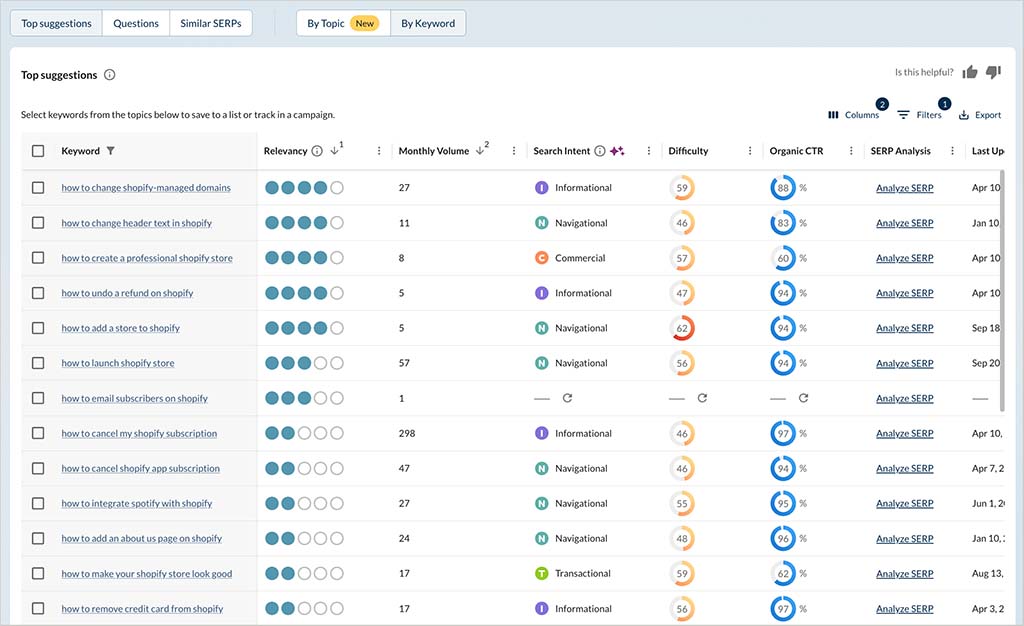
For context, Ahrefs returned 14,637 for the same query, and Semrush provided 55,250.
A really important thing worth noting about Moz’s keyword suggestion tool is that regardless of the number of suggestions it surfaces, you can only view or export 1,000 of them. This isn’t very many by comparison to competing tools — depending on the plan involved, Ahrefs and Semrush let you access or export tens of thousands of them.
On the plus side, Moz now gives you some useful topic clustering functionality. Its new ‘By Topic’ view groups related keyword suggestions together and presents them visually in a ‘Topics Tree Map,’ with clusters categorized by search intent.
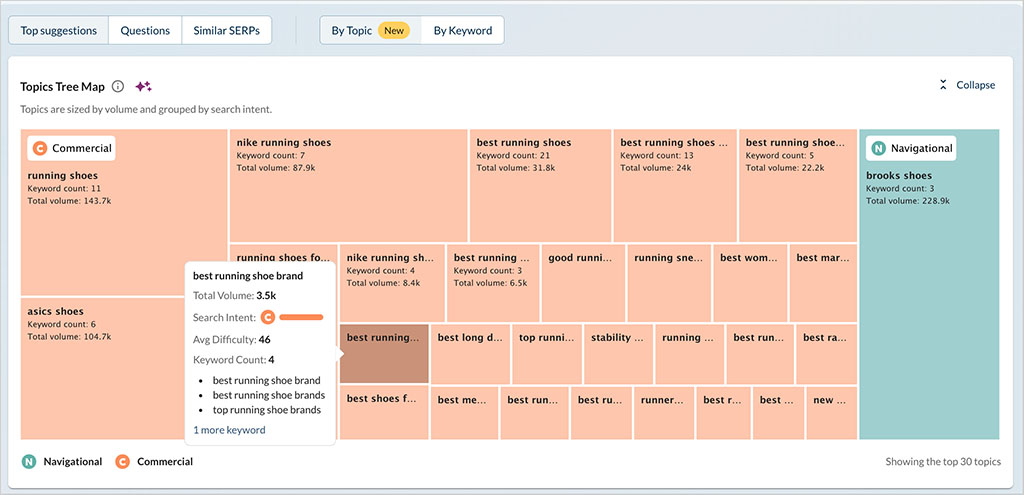
You can then drill into individual topics to see the keywords they contain and select relevant ones for further action. These can be added to a Moz campaign, saved to a keyword list or used to create an AI Content Brief.
This is a useful addition, and makes Moz’s keyword research tools more useful for content planning than they used to be.
(Semrush’s equivalent feature goes a bit further, however, by turning seed keywords into a more structured content plan involving topics, pillar pages and supporting subpages.)
There are some other positives too: search intent data accompanies each keyword suggestion, and the presentation of the data is clear and clutter-free, making it easier to spot the juiciest keywords — there’s no sense of overwhelm.
But overall, Moz’s relatively small keyword database does seem to translate into fewer keyword suggestions — which won’t suit all users, especially those working in niches that involve a lot of ‘less obvious’ phrases.
Keyword gap analysis
Keyword gap analysis is where you identify important keywords that your competitors rank highly for — but you don’t.
In Moz, you use the appropriately named ‘keyword gap’ tool to do this (which you’ll find in the ‘Competitive Research’ section of the platform). It lets you enter your domain and compare its backlinks against those of up to three competing ones.
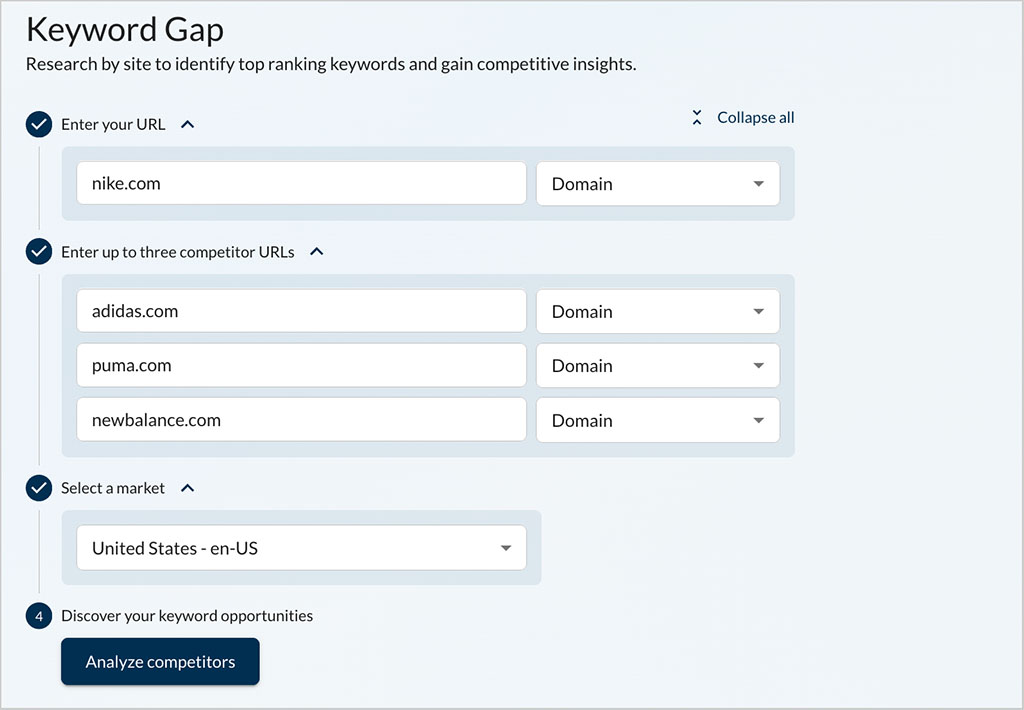
This, it has to be said, is a smaller number of sites than either Ahrefs or Semrush, which let you compare a domain against 10 and four others respectively.
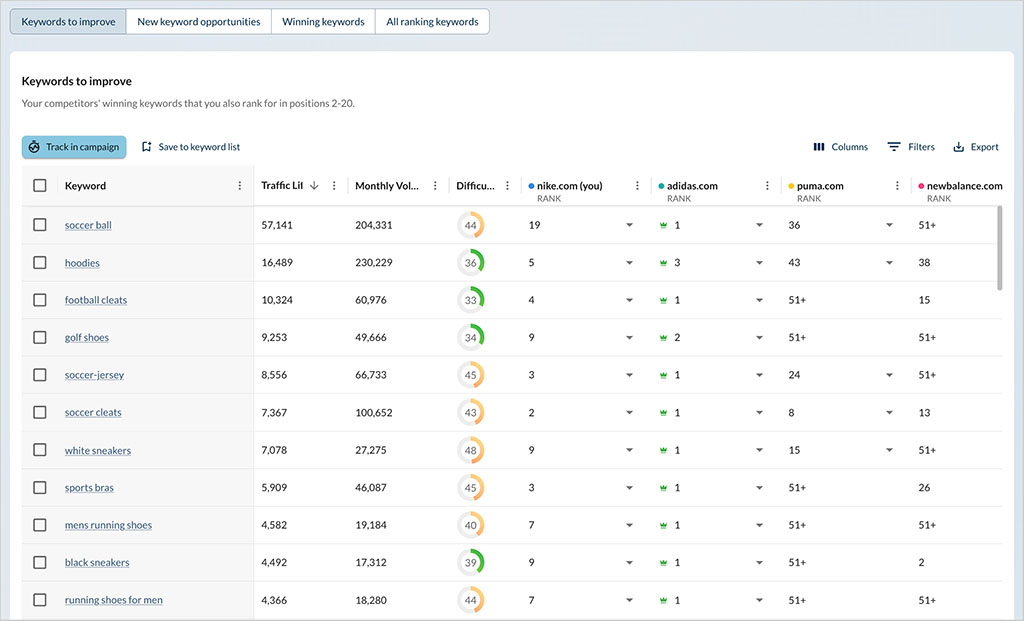
That said, the tool is solid and gives you a lot of actionable data. When you see the results outputted by it, you can ask Moz to show you:
- keywords to improve (your competitors’ winning keywords that you also rank for in positions 2-20.)
- new keyword opportunities (keywords your competitors rank for, but you don’t)
- winning keywords (keywords for which you rank higher than your competitors)
- all ranking keywords (all ranking keywords data for your site and any competitors you’ve entered)
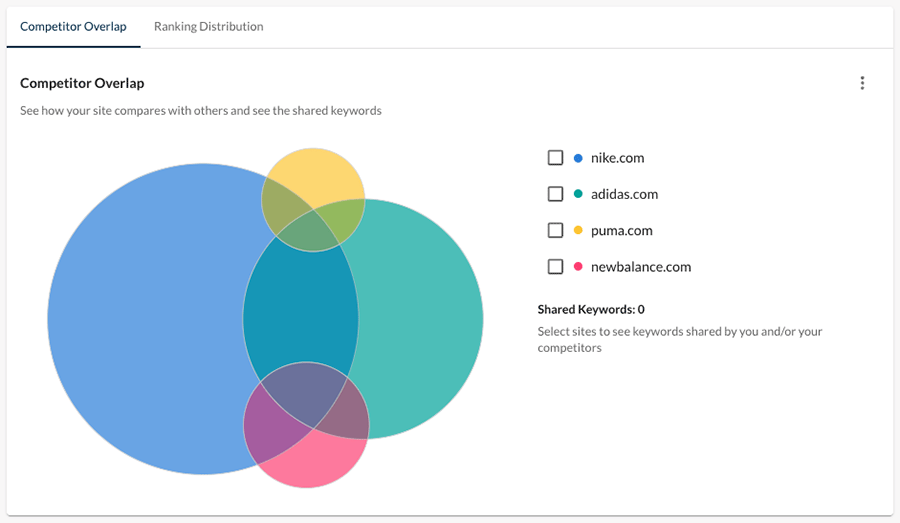
You can view Moz’s keyword gap data in a Venn diagram format too (see screenshot below):
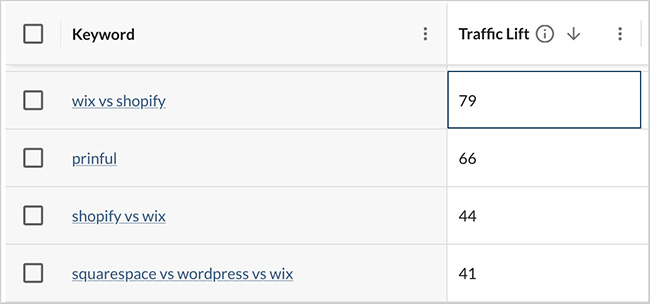
An aspect of the keyword gap results that I particularly like is the ‘traffic lift’ metric. This is a calculation of the amount of extra traffic you could expect to see were you to overtake your competitor for a given keyword. Knowing this is useful because it helps you prioritize which rankings to focus on first.
Rank tracking
‘Rank tracking’ — also known as ‘position tracking’ — is the process of monitoring how your website (or that of a competitor) performs in search engines for particular keywords over time.
It’s mainly used to highlight dips in your site’s performance for particular keywords — meaning that when you suffer a drop in rankings, you can take action to improve the situation (by enhancing or refreshing the affected content, or building more backlinks to it).
In Moz, there are actually two rank tracking options: the regular rank tracking tool and an ‘on-demand’ tracker.
Moz’s regular rank tracking tool works in a similar way to those of competing tools — in that you have to use up a ‘campaign’ slot to make use of it. SEO tools typically give you a certain number of these, with the number available varying by plan — you use them to define which sites you want to track.
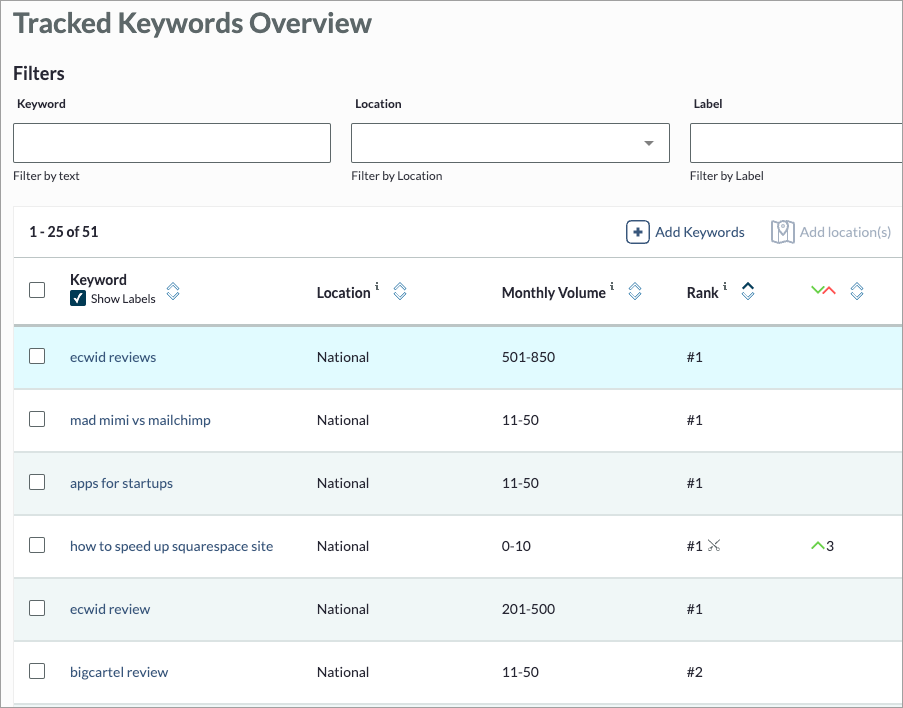
(More on campaigns shortly.)
The regular tracker is easy to use — if I had one criticism of it, it would be that it only provides rank tracking data on a weekly basis, and doesn’t let you get email notifications detailing serious drops or increases in rankings (you’ll get a weekly summary of key changes, but that’s it). On the plus side, it lets you track keywords not just at a national level, but at a city one too — this is helpful for managing local SEO campaigns.
As for Moz’s ‘on-demand’ rank checker, this is designed to give you a ‘snapshot’ view of how a particular keyword (rather than an entire website) is currently ranking. But it can be accessed without using up a project slot, which is really helpful — and you can use it up to 200 times per day on Moz’s ‘Standard’ and ‘Medium’ plans, and 500 times on the ‘Large’ plan.
What search engines does Moz provide data for?
The main search engine that Moz works with is Google — all its key features display data relating to that search engine only. Interestingly, however, its ‘on-demand’ rank tracker also lets you get some Bing and Yahoo data — you can use it to enter a keyword and a URL and see how well that URL is performing for your chosen keyword in Bing, Yahoo, Google or Google Mobile.

Backlink analysis
How well a site performs in search results depends heavily on how many backlinks — external sites linking to it — exist for the site in question. Generally speaking, the more backlinks that point to your content, the better it will perform in search results (so long as they are high-quality ones).
So, let’s take a look at the sort of data Moz gives you about these.
Backlink database size
The first thing that has to be said about Moz’s link database is that — unlike its keyword database — it is considerably larger than those of its rivals. At time of writing, it contains 44.8 trillion links.
This is nearly 2 trillion links more than you’ll find in the Semrush database, and 10 trillion more than the Ahrefs one.
| Tool | Links in database |
| Ahrefs | 35 trillion |
| Moz | 44.8 trillion |
| Semrush | 43 trillion |
To see how Moz’s link database performed against key competing products, I ran a series of domains through it, Ahrefs and Semrush — to see how many referring domains each database surfaced.
The results were as follows:
| Website | Ahrefs | Moz | Semrush |
|---|---|---|---|
| Amazon | 2.3m | 5.6m | 4.5m |
| BigCommerce | 84k | 315k | 263k |
| Canva | 310k | 512k | 634k |
| Ecwid | 70k | 72k | 39k |
| GoDaddy | 3.1m | 8.5m | 9.4m |
| Jimdo | 241k | 3.7k | 611k |
| Shopify | 2.5m | 6.4m | 4.8m |
| Squarespace | 639k | 49k | 407k |
| Webflow | 108k | 203k | 278k |
| Wix | 1.1m | 1.3m | 3.6m |
As you can see, Moz ‘won’ in 40% of cases; Semrush, with its similarly sized link database, won 50% of the contests. Ahrefs was comprehensively beaten by Moz in most cases, though.
Now, this was a small test and running other types of domains through the three platforms would no doubt have yielded different sorts of results. But based on this and other tests that I’ve run, I think it’s fair to say that Moz generally performs well on the backlink-surfacing front, and that its large backlink database definitely provides very competitive and comprehensive results.
Backlink reports
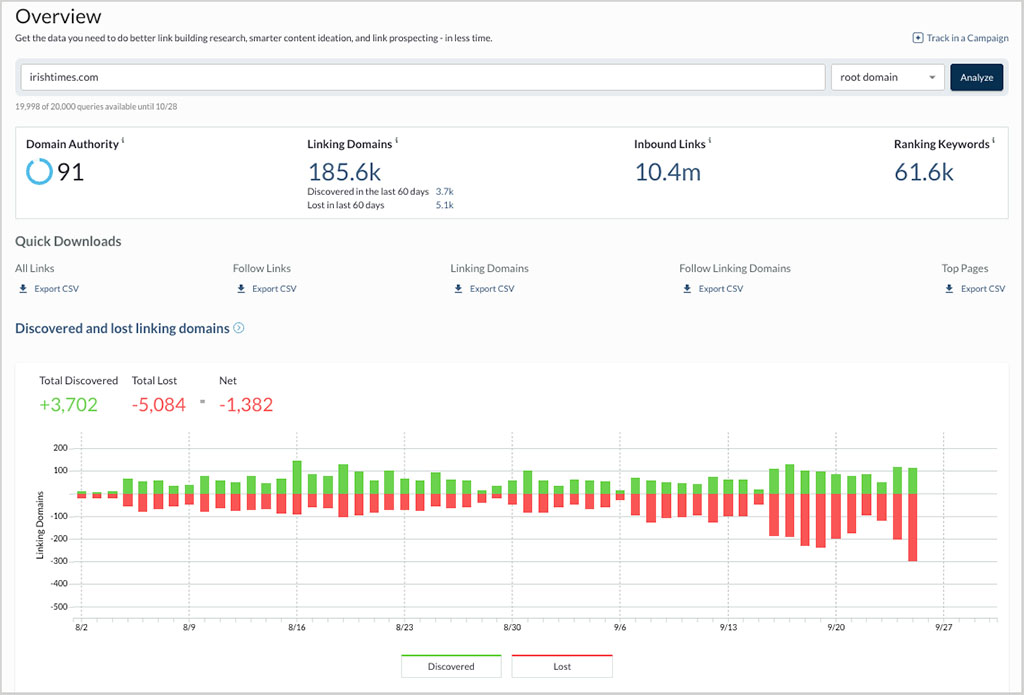
In terms of the backlink analysis data that you can pull in Moz, it’s pretty comprehensive. When you enter a domain into its link research tool, you’ll get a snapshot of:
- the number of domains linking to it
- the number of inbound links to it
- top followed links to it
- its most linked-to pages
- the anchor text most frequently used when linking to it
- the distribution of domain authority for the sites linking to it.
You can then drill down into the data in more depth — doing so will allow you to access (and download) all the links to the domain you’re researching, anchor text and so on.
You can also access a ‘spam score’ that shows you the percentage of sites with similar features that have been penalized by Google.
This differs from ‘toxic link’ metrics provided by some competing tools (notably Semrush) in that it is not based on the quality of backlinks pointing to a site, but rather its overall characteristics. And for me this approach to identifying ‘spamminess’ is better than a link-based approach (given that Google now recommends against using the disavow tool to exclude dodgy links from your link profile and may in fact remove it at some point soon).
Overall, there’s a lot to like about the quantity and quality of Moz’s backlink analysis data — the reporting is comprehensive and the amount of data that you can surface is significant.
Link intersect features
As with competing solutions, Moz provides you with a link intersect tool. You can enter a URL from your site into this alongside relevant ones from your competitors; you’ll then get an exportable list of websites that are currently linking to your competitors’ content, but not to yours.
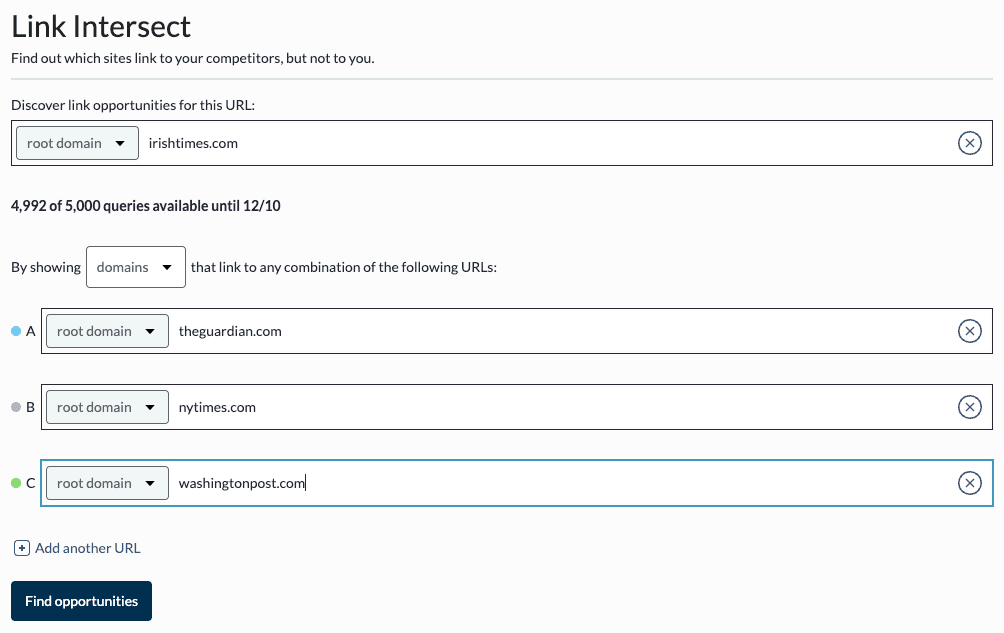
With this information in hand you can then reach out to the ‘linking’ website owners, asking for a backlink — and in doing so, make your backlink profile stronger than or more consistent with those of your competitors.
Moz’s link intersect tool is easy to use and the results it outputs are easy to understand — in terms of the number of sites you can compare at once, it facilitates checking one domain against five others. This is less than Ahrefs (which lets you check a domain against 10) but more than Semrush (which lets you check against four).
Broken link identification
Being able to identify broken links is important for two reasons.
First, it lets you engage in broken link building (an important SEO tactic, which I discuss below).
Second, it lets you correct broken outbound links, which can undermine search engines’ trust in a website.
Broken link building with Moz
Broken link building involves finding a broken link (i.e., one that no longer leads anywhere), recreating the ‘dead’ content that it used to point to, and then asking site owners currently linking to the dead content to link to your content instead. This approach helps you to build up new backlinks to your site — but of course in order to make it work, you need to be able to identify the broken links in question.
This is doable in Moz, but the process involved is a bit clunky — you’ll have to pull an inbound report, export it to CSV and then use the ‘status code’ column in your exported file to identify the 404 errors that indicate broken links.

(There is an easier option, which involves going to the Top Pages section in a campaign and using a status code menu to show the broken inbound links — this obviously requires you to use up a campaign slot, however, and also only lets you spot broken inbound links to top pages.)
For context, some competing tools — with Ahrefs being a good example — let you get at this data much more easily, via dedicated broken link building tools that are easily accessible in the main dashboard (and display the broken links without any exports being needed).
Finding broken outbound links in Moz
If your site contains a lot of broken outbound links (i.e., broken links to other websites) this can have a negative impact on SEO, because search engines can view content containing links to non-existent resources as being out of date, or a bit untrustworthy.
Accordingly, it’s important to periodically check your website for broken outbound links and fix or remove them.
And the bad news here is that there doesn’t really seem to be a way to do this with Moz — despite my best efforts, I couldn’t locate any tools in the platform that let me view a list of broken outbound links. This compares negatively with many of its competitors, which do provide this functionality.
Site audits
In addition to providing keyword and link data, Moz lets you perform comprehensive site audits.
During a site audit, Moz checks for technical SEO or on-page SEO issues that might be having a negative effect on your search rankings, including:
- Slow-loading web pages
- Duplicate page titles
- Crawl errors
- Missing headers
- Overuse of keywords
- Broken links
Moz’s auditing tools come in three flavors.
First, you get a full ‘site crawl’ feature, which is limited to use as part of a campaign (i.e., a tracked site — you get a limited number of these per Moz plan). The suggestions for improvements that this feature provides are mainly technical in nature — relating to things like missing metadata, redirect chains and robots.txt files.
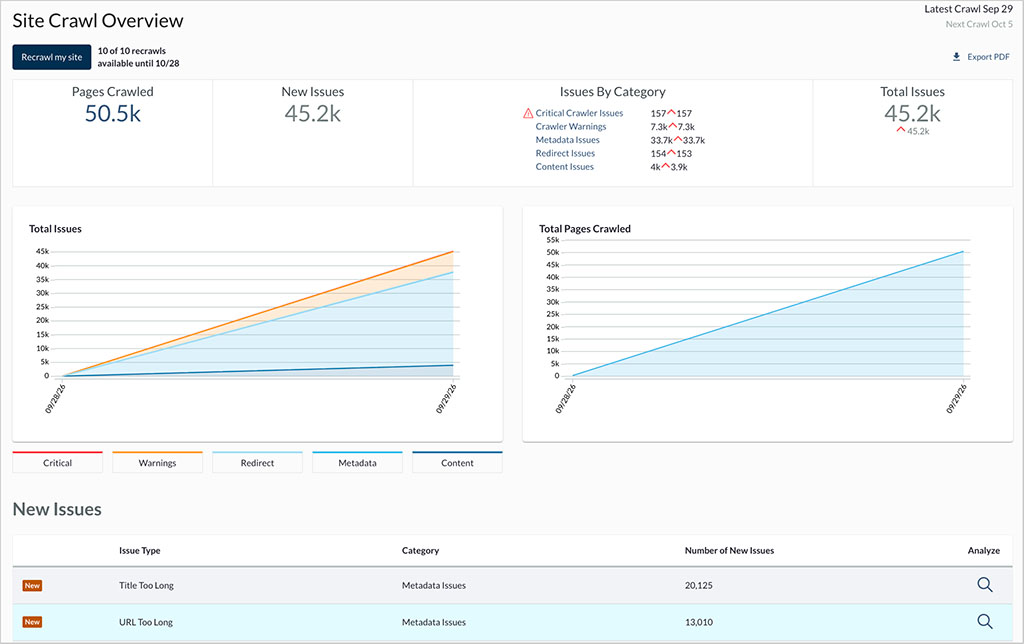
You get really comprehensive, actionable insights from this — the only major omission is an overall health score for your site (other SEO tools typically provide this).
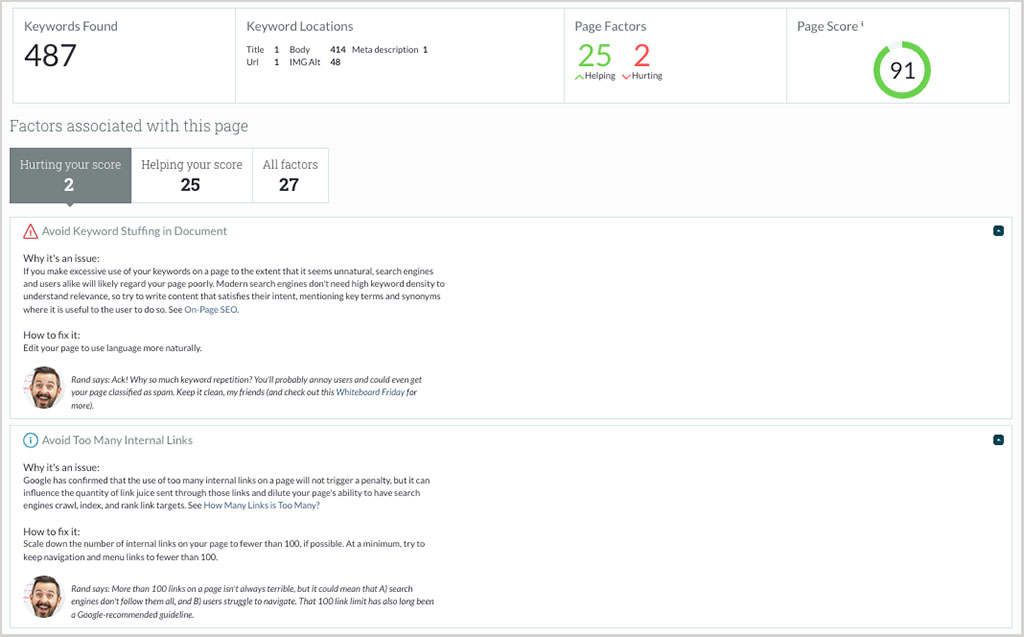
You also have an ‘on-page grader,’ which can be used outside of a Moz campaign slot. This looks more at the content on individual pages rather than the technical side of it, and gives you suggestions regarding the sort of keywords you’re using, content length, headings, number of internal links and so on. These suggestions are presented in a very beginner-friendly way — any problems discovered are explained very clearly, and accompanied by easy-to-understand information on how to fix them.
And finally there’s Moz’s ‘On-Demand Crawl’ tool. This is quite similar to its main site crawl feature, but like the page grader can be used outside of a campaign. This is generous — with all the other SEO tools I’ve tested to date, site auditing is only available as part of a project or campaign (meaning that you can generally do a lot less of it with competing solutions).
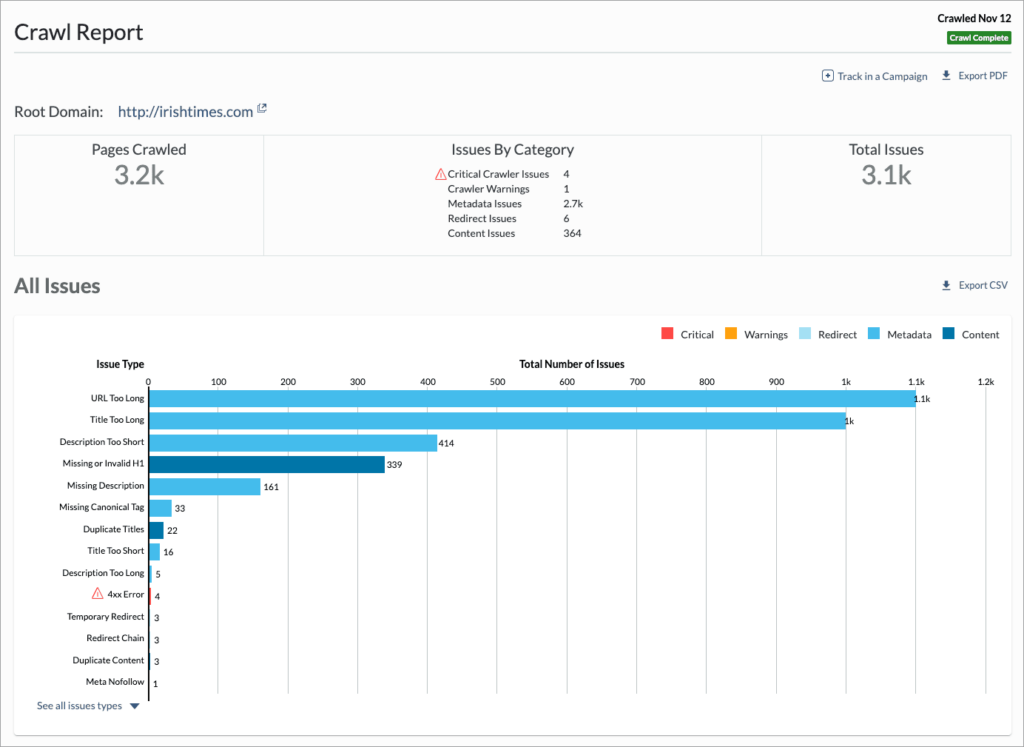
The one restriction you have to bear in mind with the ‘On Demand Crawl’ feature is that it caps the number of pages per site you can crawl at 3,000. This will be plenty for a lot of sites, though.
Overall, I really like Moz’s site auditing features. They are comprehensive and generous, and come with great contextual help.
There is a little bit of room for improvement though: first, and as discussed above, Moz’s site crawls don’t surface any broken outbound links. And second, I think they’d benefit from a more ‘holistic’ approach — there is scope, I think, to integrate the technical SEO suggestions and the more content-focused, on-page ones into one single report (and one that contained an overall ‘site health score’).
But overall, it’s a thumbs up for Moz here. Its site auditing tools are robust, comprehensive and generous.
API access — cheaper with Moz?
An API (Application Programming Interface) lets you pass data between different apps and systems — and typically, SEO tools charge a lot of money to let you use them.
Moz offers a much more affordable API than its competitors, however — its API plans start at just $20 per month (for 3,000 rows of data). For context, Ahrefs only permits full API access on its $1,499 per month plan and Semrush on its $549 per month ‘Business’Advanced’ plan and higher.
This cheap API access explains why you’ll find Moz data present in so many other SEO tools, including direct competitors to Moz — Raven Tools, Ubersuggest and Growthbar all make use of Moz’s databases in various ways.
If you are a developer and need to incorporate SEO data into an app you’re building, you may find that Moz’s low API costs provide one of the most compelling arguments for investing in the platform.
Interface and ease of use
SEO tools like Moz can take a while to get used to: they’re very ‘technical’ pieces of software that give you a lot of data to wade through.
But overall, Moz doesn’t make this process feel too overwhelming. Its interface works in a similar way to a lot of web-based software interfaces — vertical menu on the left, main content on the right. Data visualizations help you make sense of a lot of the information presented — they aren’t quite as slick as those in Ahrefs, Semrush or SE Ranking, but they’re pretty good.
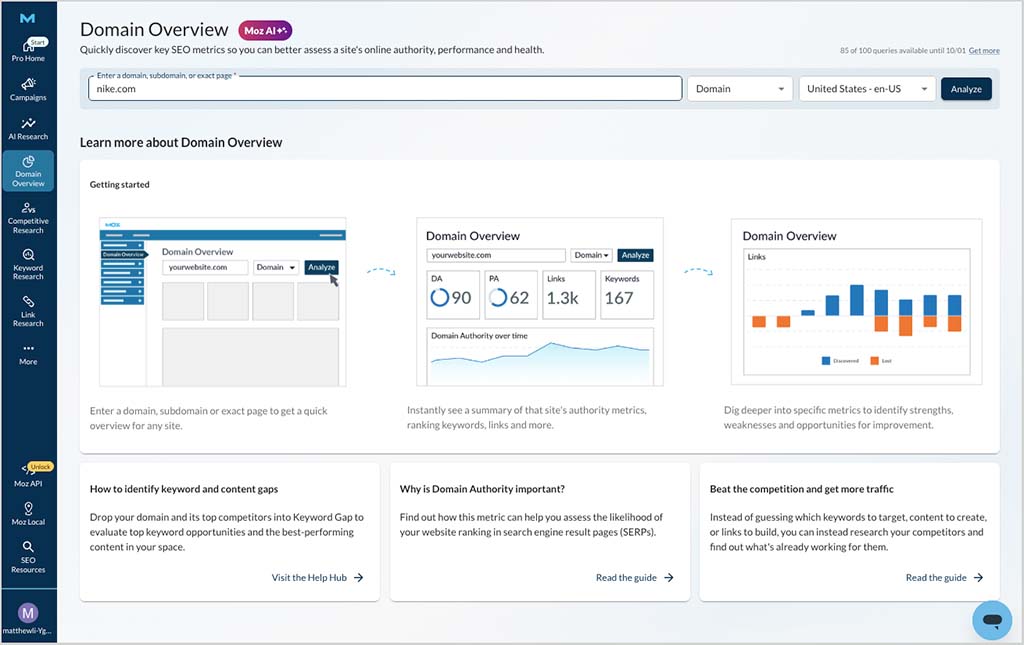
And compared to some of its rivals, I found that Moz always returns its data pretty fast.
If there was an area that I think could be improved from a UX point of view, I’d say it’s the site auditing section. As discussed above, it would be good if Moz provided site auditing features that didn’t involve multiple clicks between technical auditing and on-page auditing features.
It would also be great to see a more mobile-friendly version of the platform introduced — as things stand, you can only really use Moz Pro on a desktop device, because its interface isn’t fully responsive (i.e., it doesn’t resize appropriately to suit mobile devices). To be fair to Moz, this is also true of a lot of similar tools, but not all — Semrush and Ubersuggest both give you some options to work on a mobile device for example (via a mobile app in the case of Semrush, and a responsive interface in the case of Ubersuggest).
Overall though, the Moz interface is pleasant to use, and its learning curve a relatively gentle one.
Don’t miss out on our free SEO toolkit
For a limited time only we’re offering our readers some excellent free SEO tools and resources. Sign up now to immediately receive:
- our downloadable cheatsheet containing the 20 key steps to ranking highly in search results
- extended free trials and discounts for leading SEO tools
- our downloadable cheatsheet on how to grow organic traffic to a blog
- 2 in-depth guides to SEO
- ongoing free tips and advice on SEO and growing your business
Customer support
The customer service options available from Moz are on the basic side: you can contact the company via email or live chat.
On the plus side, these support options are easy to find in the platform, thanks to an easy-to-spot help icon that floats at the bottom right-hand corner of your dashboard. When clicked, this gives you access to live chat and email support (note that this is not available 24/7, however).
In addition to providing in-person support, Moz also provides a help portal for accessing ‘self-serve’ customer support. This contains searchable help resources.
Finally, you should note that Moz support is available in English only — unlike key competitor Semrush, you won’t be able to avail of multilingual (or indeed phone) support.
Pricing and value for money
There are five Moz Pro plans available:
- Starter: $49 per month
- Standard: $99 per month
- Medium: $179 per month
- Large: $299 per month
- Moz Enterprise: negotiable
A 20% discount is available if you pay upfront for a year, and a 7-day free trial of Moz is available.
It’s fair to say that Moz’s pricing plans are, on the whole, cheaper than those of key rivals Ahrefs and Semrush. This is particularly the case where Semrush is concerned — Moz’s $49/mo entry-level plan is one quarter the price of the Semrush equivalent (its $199/mo ‘Starter’ plan).
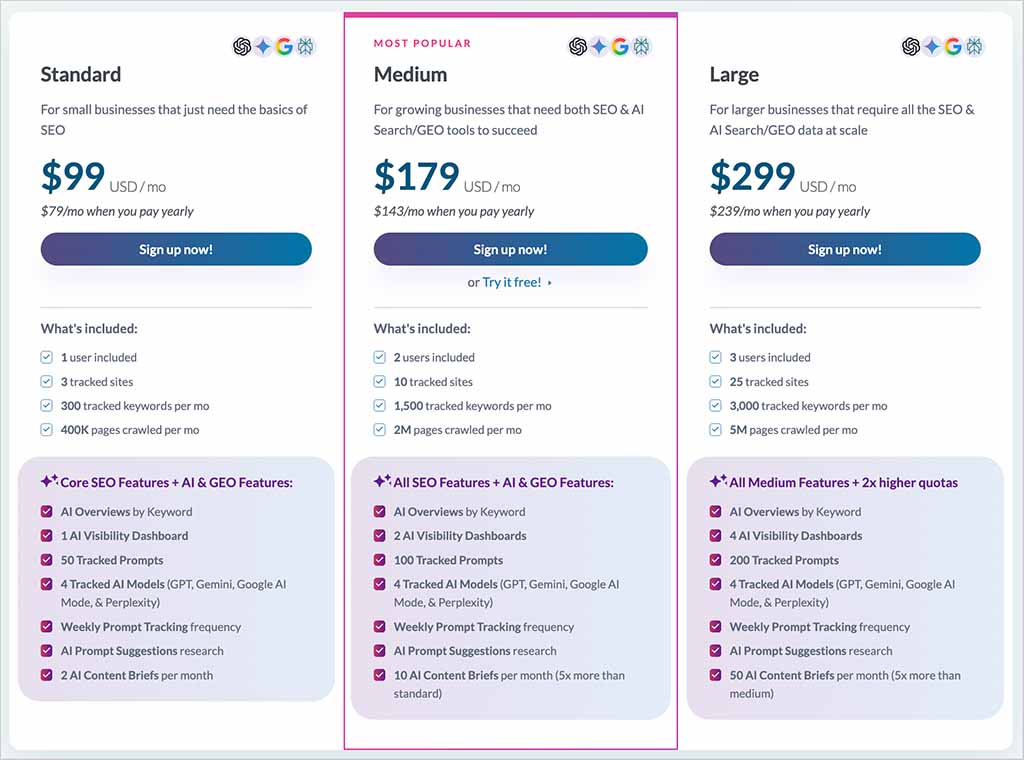
But to understand whether Moz’s cheaper price point actually represents value for money, we need to zoom in on a few key limits that accompany each of its plans.
Let’s do that now.
AI visibility and content limits
AI visibility tracking is available on Moz’s ‘Standard,’ ‘Medium’ and ‘Large’ plans, but not on its entry-level ‘Starter’ plan.
These three plans include 50, 100 and 200 tracked prompts respectively, which is broadly in line with what competing AI visibility tools offer.
Where Moz stands out more is in the number of AI visibility projects you can run. Each AI Visibility dashboard represents one project or campaign for a single website or brand. The ‘Standard’ plan includes one dashboard, while ‘Medium’ and ‘Large’ include two and four respectively. This is more generous than many competing tools, which typically limit you to a single AI visibility project regardless of plan.
The plans also include 2, 10 and 50 AI Content Briefs per month respectively.
Number of users
A lot of similarly-priced SEO tools only come with one seat, and charge you extra — in some cases quite a lot extra — to let additional users access your account.
Moz is more generous than most here, because on its ‘Medium’ and ‘Large’ plans you get two and three seats respectively. If you need more than that, you’ll pay a relatively affordable $49/mo per seat — that’s considerably less than Ahrefs or Semrush will charge you for additional users on their higher-tier plans.
SEO Campaigns
Some Moz features can only be used as part of a ‘campaign’ — these include rank tracking, full site auditing and report generation.
It’s hard to do an exact like-for-like comparison with competing tools, as their pricing tiers are all slightly different, but the table below shows you how it stacks up on the campaign limit front against Ahrefs and Semrush.
(Note that Ahrefs and Semrush use the phrase ‘project’ instead of campaign — hence the slightly different terminology in the table.)
| Plan Name | Ahrefs | Semrush | Moz |
|---|---|---|---|
| Starter | Starter: 1 project at $29/month | N/A | Starter: 1 campaign at $49/month |
| Entry-Level | Lite: 5 projects at $129/month | Starter: 5 projects at $199/month | Standard: 3 campaigns at $99/month |
| Mid-Tier | Standard: 20 projects at $249/month | Pro+: 15 projects at $299/month | Medium: 10 campaigns at $179/month |
| Top-Tier | Advanced: 50 projects at $449/month | Advanced: 40 projects at $549/month | Large: 25 campaigns at $299/month |
As you can see, the Moz campaign limits are broadly consistent with those of its rivals.
It’s important to note, however, that unlike Ahrefs and Semrush, Moz lets you buy additional campaigns — and cheaply too, at just $10/mo per additional campaign. This leads to a lot of flexibility that you won’t necessarily enjoy from its competitors.
Reporting limits
While Moz is arguably more generous than its rivals when it comes to seats and campaign limits, it falls behind them when it comes to the amount of keyword data it lets you access.
On Moz’s $99/mo ‘Standard’ plan, you can run 150 keyword queries per month. This rises to 5,000 per month on its $179/mo ‘Medium’ plan and 15,000 per month on its $299/mo ‘Large’ plan.
By comparison, Semrush’s entry-level paid SEO plans allow up to 3,000 requests per day, while Ahrefs’ $249/mo ‘Standard’ plan lets you run an unlimited number.
I feel there is scope for Moz to be more generous here. Yes, it’s a cheaper tool — but its keyword research limits are considerably more restrictive than those of its rivals.
Rank tracking limits
The number of keywords you can track per plan on Moz is broadly comparable with the limits applied by rival SEO platforms.
However, as discussed earlier, Moz also lets you perform ‘on demand rank tracking,’ which lets you check your rankings for a given keyword on an ad hoc basis. This is a nice little feature and provides a bit of extra value for money.
Moz user reviews
In terms of wider user feedback, Moz is currently rated positively on the major software review sites I checked.
| Review site | Rating |
|---|---|
| Capterra | 4.5 / 5 (350 reviews) |
| G2 | 4.3 / 5 (608 reviews) |
| TrustRadius | 7.9 / 10 (373 reviews) |
| Average (out of 5) | 4.3 |
Taken together, these ratings give Moz an average user score of around 4.3/5. Users frequently praise its ease of use and keyword research tools, while criticisms tend to focus on feature limitations, keyword limits and the depth of some of its reporting.
Moz review conclusion
Overall, Moz is a solid choice as an SEO tool. It’s reasonably priced, relatively easy to use, comes with a wide range of features and has a very large link database. Thanks to its ‘on demand’ features, it is particularly generous when it comes to rank tracking and site auditing.
Its AI visibility tools are another strong point. They let you monitor brand mentions, sentiment, citations, prompt performance and competitors across the main AI platforms, while Moz’s higher-tier plans are particularly generous when it comes to the number of AI visibility projects you can run.
In terms of Moz’s drawbacks, the main thing I’d worry about is the size of its keyword database — it’s considerably smaller than those of its rivals, and this has a knock-on effect on the breadth of keyword research you can perform with the tool. I’d also like to see more generous keyword research limits, traffic estimates added to Domain Overview, and some headline AI visibility metrics surfaced there too.
But taken as a whole, Moz offers a compelling combination of traditional SEO functionality, AI visibility tracking and relatively affordable pricing.
I’ll leave you with a quick pros and cons summary of the platform — and if you have any questions or thoughts of your own about Moz, do leave them in the comments.
Pros and cons summary
Reasons I would use Moz
- Moz has a very large link database — one that’s larger than its key rivals.
- It’s more affordable than competing tools.
- Unlike key competing tools, some of its plans provide multi-user access.
- Its AI visibility tools are strong, covering brand mentions, sentiment, citations, prompt tracking and competitor analysis.
- Higher-tier plans give you multiple AI visibility projects, which is more generous than many competing tools.
- It gives you generous ‘on-demand’ rank tracking.
- It provides good site auditing features, many of which can be used without sacrificing a campaign slot.
- Its Brand Authority score provides a useful additional way to compare the strength of competing brands.
- It provides very affordable access to its API.
- It provides comprehensive keyword gap analysis tools.
Reasons I would avoid Moz
- Its keyword database is very small compared to those of rival products.
- You can only access or export 1,000 keyword suggestions, regardless of plan.
- It doesn’t give you traffic estimates for websites you’re inspecting.
- Its Domain Overview doesn’t surface any AI visibility metrics, making it harder to get an at-a-glance view of how a site or competitor is performing across AI platforms.
- No global search volumes for keywords are provided — only per-country ones.
- You can’t identify broken outbound links using the platform.
- Its reporting limits are ungenerous by comparison to competing SEO solutions, especially on its more affordable plans.
- There’s no phone support for the platform.
Alternatives to Moz
There are a lot of alternatives to Moz available, with key competitors including Ahrefs, Semrush, SE Ranking, Similarweb and Ubersuggest. The reviews and comparisons below may be of use in helping you to decide between them:
Update details
This article was updated on September 30, 2026. The following updates were made:
- Moz’s new AI visibility tools were added and assessed.
- AI visibility project and prompt tracking limits were added to the pricing section.
- Moz’s new keyword topic clustering and Topics Tree Map features were covered.
- Keyword, backlink and pricing data was updated.
- Product screenshots were updated.
- Comparisons with Ahrefs and Semrush were refreshed.
- A user reviews section was added.
- The article was checked throughout for accuracy, consistency and outdated information.

Comments (1)