

We have an honest review policy, but this page contains affiliate links. If you buy through these, we may earn a commission. This helps fund our research at no cost to you.
Semrush vs Similarweb: which is better for your search engine optimization project? In this post you’ll find an in-depth comparison of the two products that explains their features in a friendly, easy-to-understand way.
Quick verdict
If you’re choosing between Semrush and Similarweb specifically as SEO tools, Semrush is the stronger and more practical option for the vast majority of users. It delivers deeper keyword research, far better backlink analysis, full site auditing, rank tracking, and AI visibility tools on all standard plans — without pushing you onto extremely expensive enterprise-level plans.
Similarweb is a superb market intelligence platform, and its traffic analysis, deduplicated audience metrics, and zero-click search data are genuinely impressive. But it locks the key features most users expect from an SEO platform — backlink analysis, site audits, and AI visibility tracking — behind very expensive plans. This makes the platform unusable for many small and medium-sized businesses.
Getting started with Semrush or Similarweb
What are Semrush and Similarweb? And what’s the key difference between them?
Semrush and Similarweb are two popular tools used by SEO and marketing professionals to analyze website traffic, track keyword rankings and gain competitive market insights.
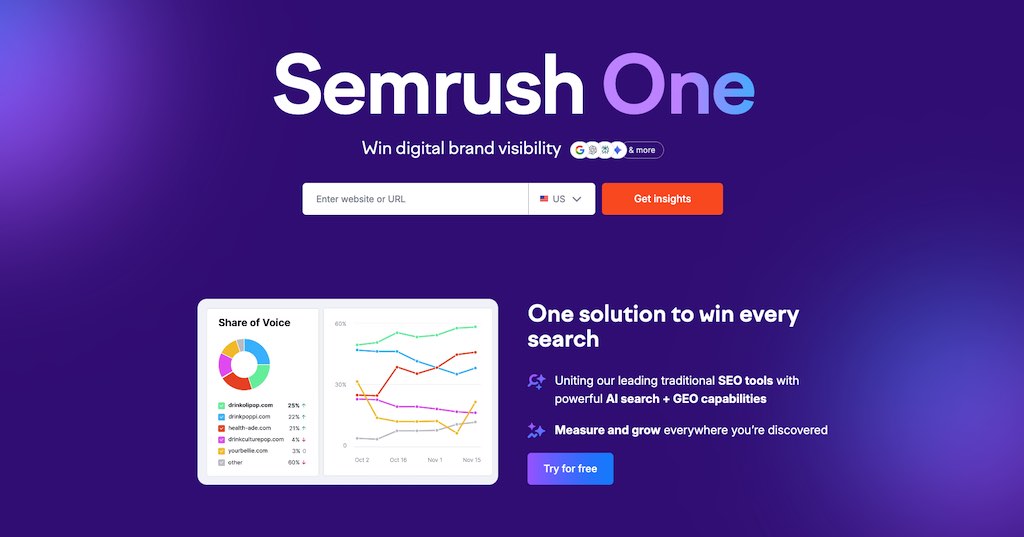
Of the two, Semrush is more of a ‘pure’ SEO and digital marketing platform. Its feature set is designed to give you everything you need to manage on-page and off-page SEO, keyword research, content marketing, technical site audits, advertising research, and — increasingly — AI visibility tracking.
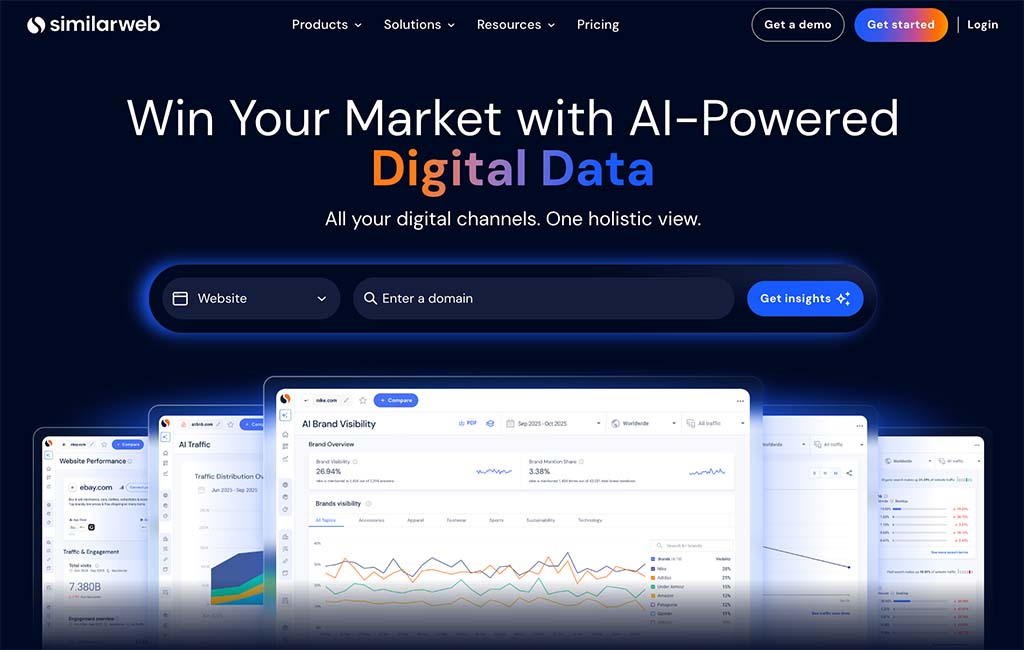
By contrast, Similarweb’s core strength lies in market intelligence and traffic analysis. Its tools focus primarily on website traffic measurement, audience insights, industry benchmarking, and competitive market research — making it particularly popular with analysts, investors, product teams, and large enterprises.
That said, Similarweb has invested heavily in SEO features in recent years. It now provides features for keyword research, PPC data, competitor tracking, rank monitoring, and site auditing.
Now, I want to make it clear that in this post, I’ll be largely looking at how they compare as SEO tools — some of the features in Similarweb, like its stock intelligence tools, will be out of scope of this comparison.
With that out of the way, let’s begin our Semrush vs Similarweb shootout with a look at the two tools’ domain analysis features.
Domain analysis
One of the most useful things you can do with any SEO tool is domain analysis. This means getting a basic overview of how a domain is performing in terms of the traffic to it, and its performance in search results.
You can perform domain analysis on:
- your own website — to find ways to improve its SEO performance
- a competitor’s website — to see how hard it will be to outrank them in search results (and to spot ways to do so).
Accessing the domain analysis sections in both Semrush and Similarweb was super easy — I just had to pop a URL into both tools and click on the ‘Domain Overview’ button in Semrush and the ‘Website Performance’ tab in Similarweb, and the key data was immediately displayed.
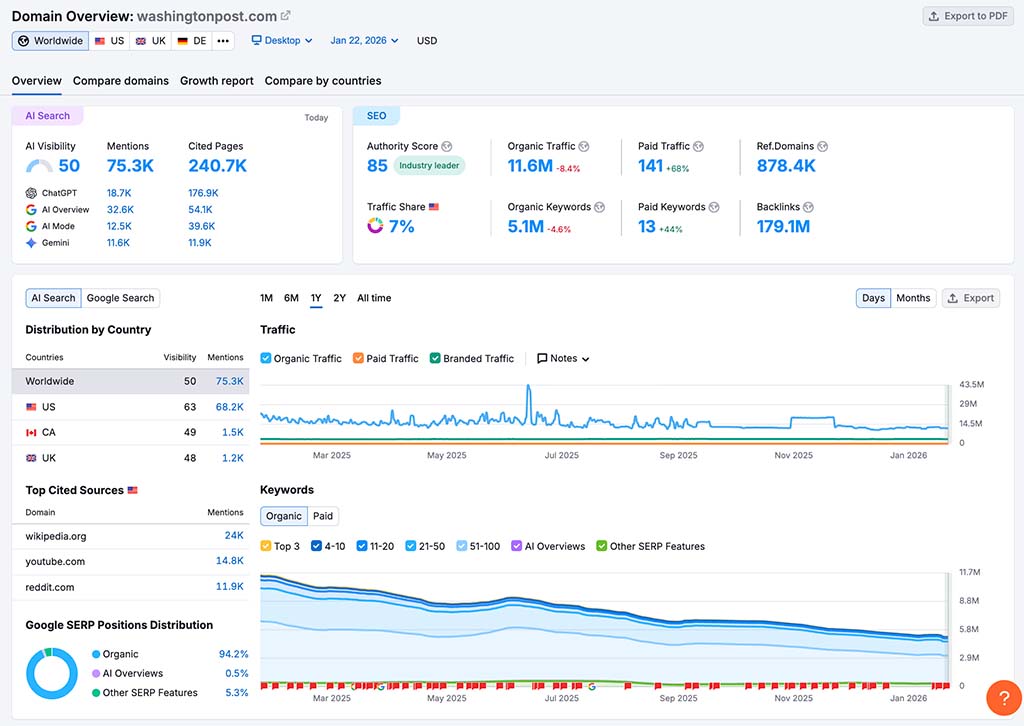
The domain analysis overviews in both platforms show you:
- a domain authority score (or ‘web ranking’ score in Similarweb) — a metric that tells you how ‘powerful’ a particular domain is, and how well content on it is likely to perform in search results
- an estimate of the organic traffic to the website
- a list of the website’s top-ranking keywords
- the main paid-search terms for the website
- where the website’s social traffic is coming from
- the percentage of branded vs non-branded traffic to the website
- a list of referring websites
- data on the website’s search ads campaigns.
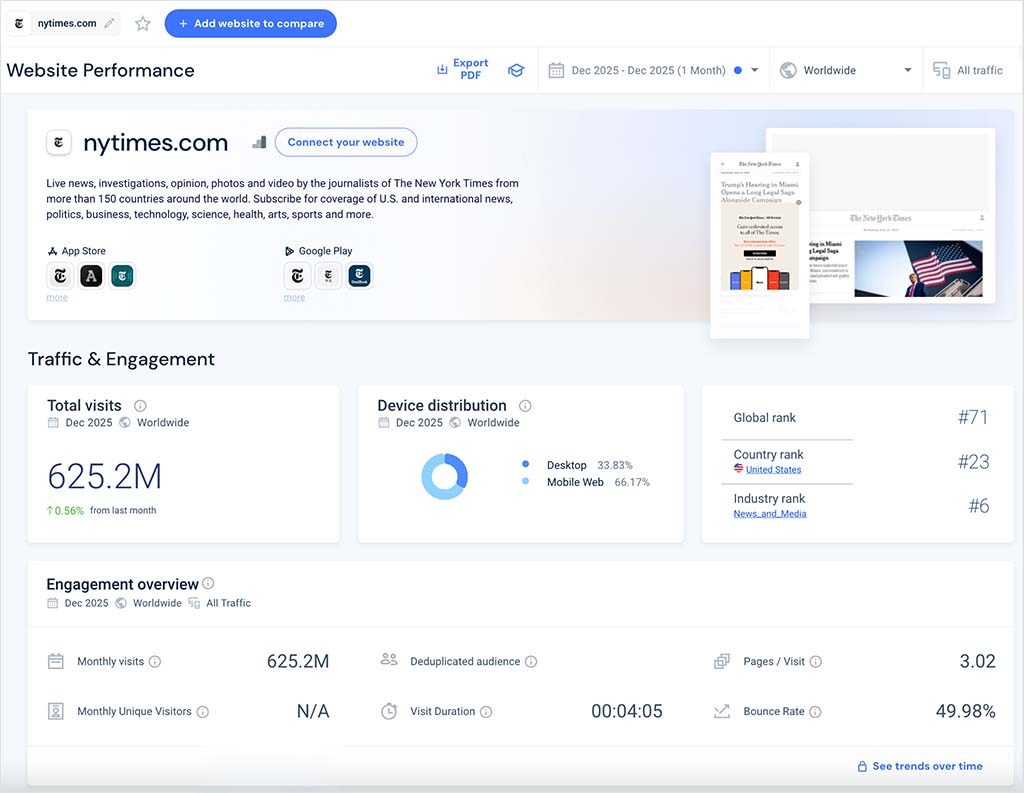
However, as I explored the reports in more detail, I found that Semrush’s domain overview provides considerably more actionable SEO data than Similarweb’s equivalent interface.
For example, as you scroll deeper into Semrush’s domain analysis reports, you gain access to:
- detailed keyword distribution data, including breakdowns by search intent
- comprehensive backlink intelligence, covering referring domains, anchor text, link types, and follow vs nofollow ratios
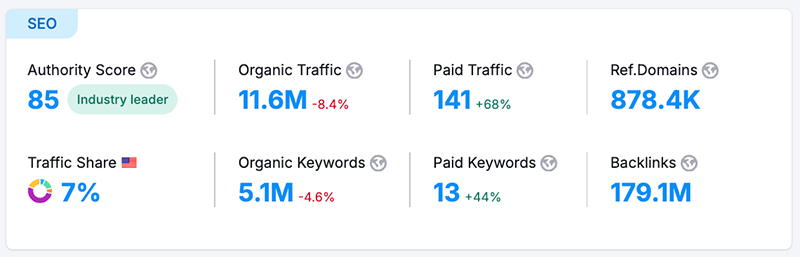
These additional datasets play a crucial role in shaping modern SEO strategies — particularly in areas such as content planning, link building, and keyword gap analysis.
And significantly, Semrush has also recently expanded its domain analysis beyond traditional SEO metrics. Alongside standard search data, its overview now includes AI visibility statistics, showing how often a domain is mentioned and cited by AI-powered platforms — specifically ChatGPT Search, Google’s AI Overviews, Gemini, and AI Mode.
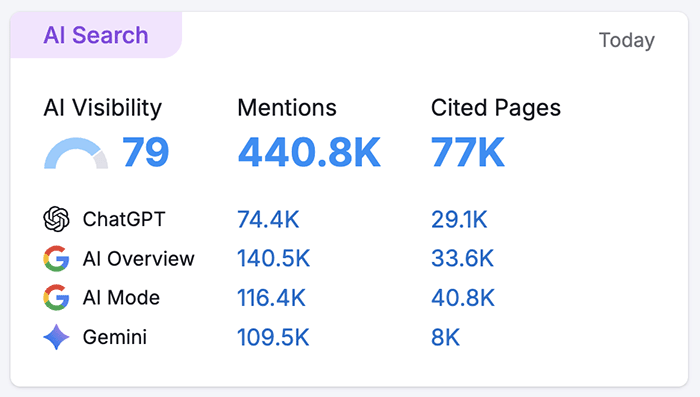
This makes it possible to assess not just where a site ranks in conventional search results, but also how visible it is within AI-generated answers — a form of visibility that’s becoming increasingly important as search engines evolve.
Similarweb does offer AI visibility tracking via its ‘AI Brand Visibility’ feature — but this is only available on its enterprise-level custom plans, and not on the packages designed for small businesses.
Now, it’s worth dwelling for a moment on a different approach taken by Semrush and Similarweb regarding domain authority metrics. Semrush’s ‘authority score’ is based chiefly on the number of external links pointing to a domain, while Similarweb’s ‘website ranking’ data is, according to Similarweb, ‘based on unique visitors and pageviews for [a] site, taking into account the domain’s volume and quality of traffic.’
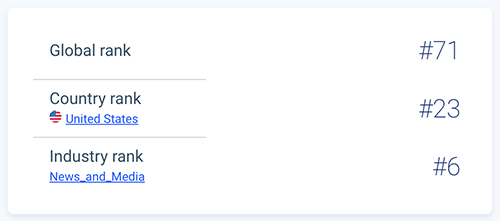
In practice, both metrics will probably tell you how ‘good’ a domain is, and how likely it is that content published on it will perform well in search or not — but given the historical relationship between good rankings and the number of external links pointing to a domain, some SEOs will feel more comfortable with Semrush’s focus on links over traffic here.
And speaking of backlinks, Semrush’s domain overview gives you a wealth of data on them, including the number that point to a site, their category (follow vs nofollow), their type (text, image, etc.) and the ‘anchor text’ involved.
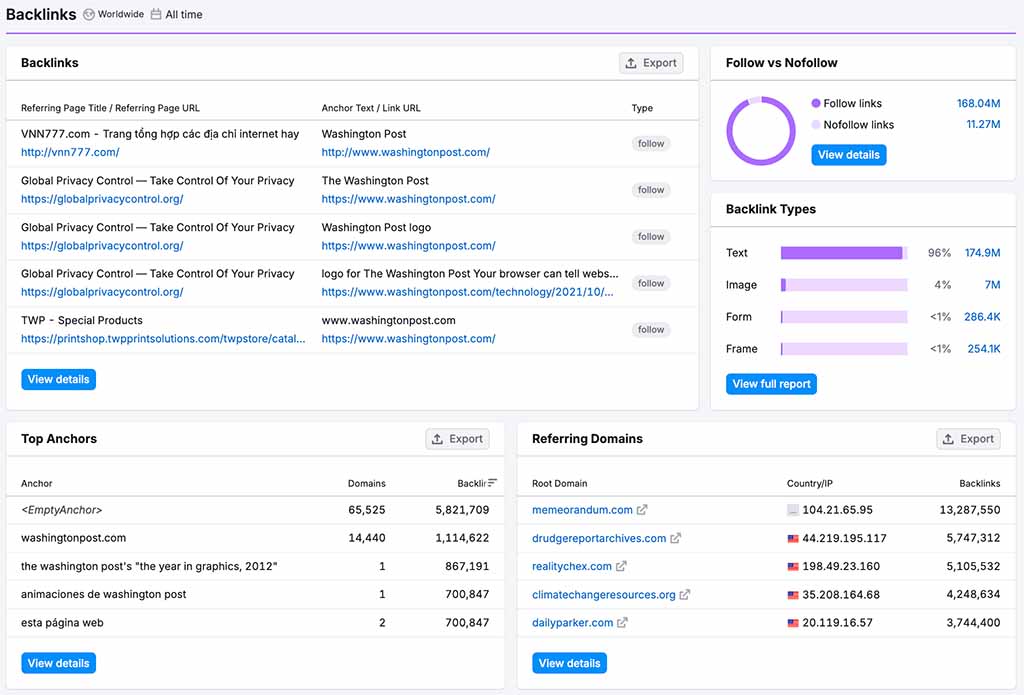
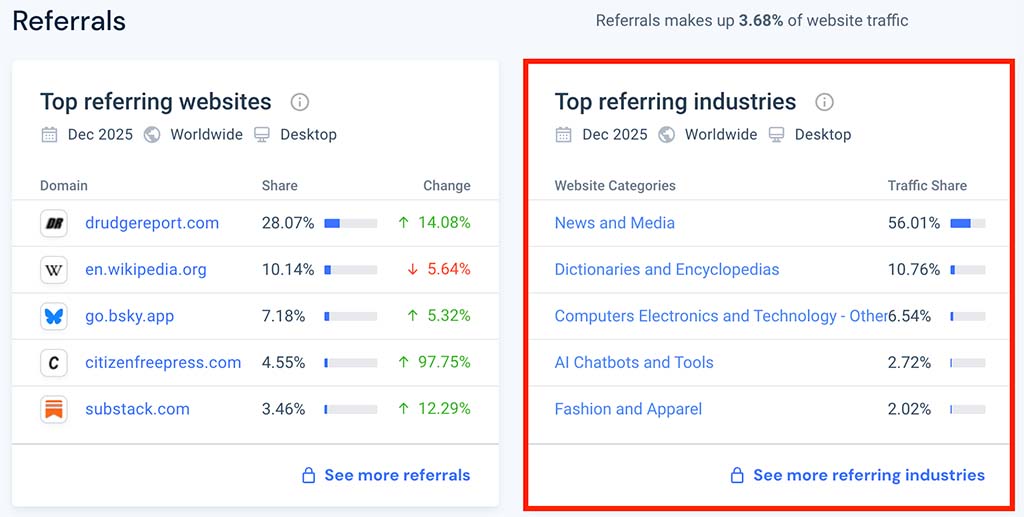
But on its $199 per month entry-level ‘Starter’ plan, there is no comparable backlink data provided by Similarweb. The closest thing you’ll get is a list of the top websites sending referral traffic to your target site.
One thing I do like about Similarweb’s information on referring websites however is that it gives you a good sense of the spread of referring sites by industry sector. This can be useful from a general market research perspective — it lets you immediately understand a website’s audience segmentation, and the type of markets that are engaging with a brand.
Semrush and Similarweb also give you useful data visualization tools that let you quickly see how your site stacks up against its competitors.
In Semrush you use a ‘competitive positioning map,’ and in Similarweb you use a ‘competitive tracker‘ tool.
Semrush’s interactive ‘competitive positioning map’ graph comes pre-populated with competitor data based on the domain you’ve entered. It automatically plots your website against competing sites based on key metrics like traffic and keyword performance (see my screenshot below for an example of this).
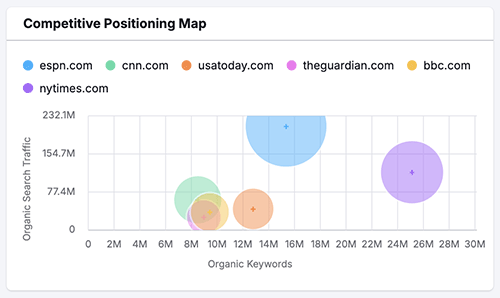
Each competing site is represented as a bubble, with its size indicating traffic volume and its position reflecting the number of keywords it ranks for. Hovering over these bubbles instantly reveals competitor traffic levels, keyword counts, and areas of keyword overlap — making it very easy to identify competitive gaps and growth opportunities.
With Similarweb’s competitive tracker tool, a more manual setup process is involved — you set things up by choosing a list of competitors to add to the graph. Once you’ve done that, you get a basic bar chart showing how your site compares to your chosen competitors, based on monthly traffic share percentages.
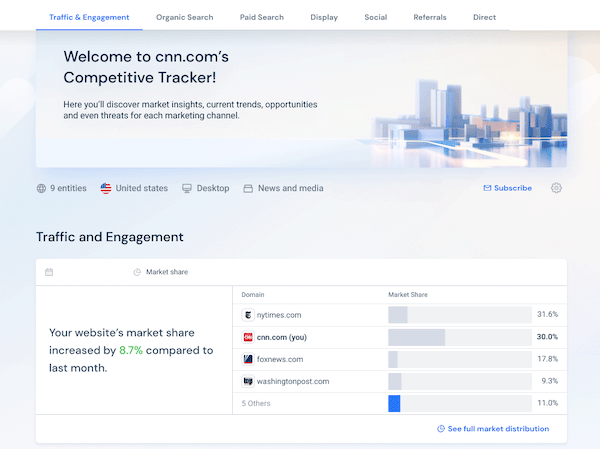
I found Similarweb’s ‘competitive tracker’ fine for getting an overview of how my sites compared to competitors in terms of traffic share, but because it doesn’t provide any competitor keyword data, it wasn’t as useful for in-depth SEO analysis.
This lack of keyword data means that you can’t see which specific keywords (or how many of them!) are driving traffic to your competitors, which in turn makes it harder to spot potential opportunities or threats.
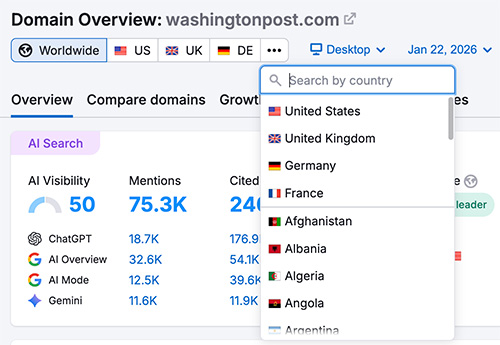
Semrush also scores a win over Similarweb when it comes to letting you see domain analysis data on a per-country basis, because you can opt to view either worldwide or country-level data on all plans.
Similarweb, by contrast, only provides per-country filtering on its $1,000+ per month enterprise plans, with users on its more affordable plans restricted to viewing aggregated worldwide data.
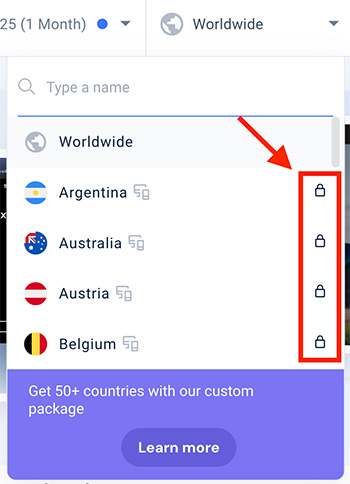
For me, the fact that Semrush lets you filter domain analysis data on a per-country basis gives it a huge advantage over Similarweb, as this allows users to tailor SEO strategies to an individual country’s audience, and properly account for language, cultural differences, and regional search behavior. It also enables more precise competitive analysis, because it highlights regional opportunities where competition is weaker.
So from an overall SEO point of view, domain analysis is a definite win for Semrush, thanks to its more comprehensive provision of important SEO data, and its per-country views.
Now, let’s look at the traffic analysis features in both tools.
Traffic analysis in Semrush and Similarweb
Another key use of tools like Semrush and Similarweb is to get estimates for the traffic your competitors’ websites get each month, along with detailed stats on how visitors engage with the content on them.
This can help you understand your competitors’ content strategies and create your own (and ideally better-quality!) versions of popular content pages. This in turn can help you increase your site’s share of search traffic for topics that competing sites are currently ranking highly for.
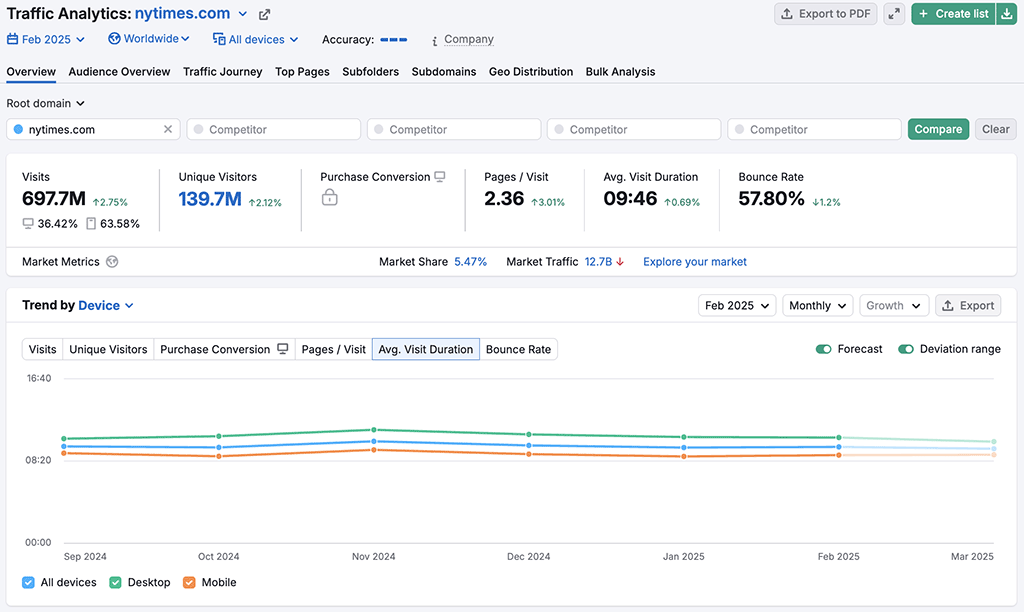
Both Semrush and Similarweb provide extremely comprehensive traffic analysis reports. Some of the key traffic data you can get from both tools includes:
- the number of monthly visits to a site
- the number of unique visitors to a site
- a site’s average visit duration
- the average number of pages per visit
- the site’s bounce rate*
- detailed stats on a site’s traffic channels (direct, referrals, organic, paid search, email, display ads, etc.) to a site.
*Bounce rate is the percentage of visitors to a website who navigate away after viewing only one page.
Now, based on comparing Similarweb and Semrush traffic estimates for domains that I have access to, it has to be said that the picture here was a mixed bag. Sometimes Semrush got closer to the actual traffic figures I was seeing in my analytics tools; sometimes Similarweb did.
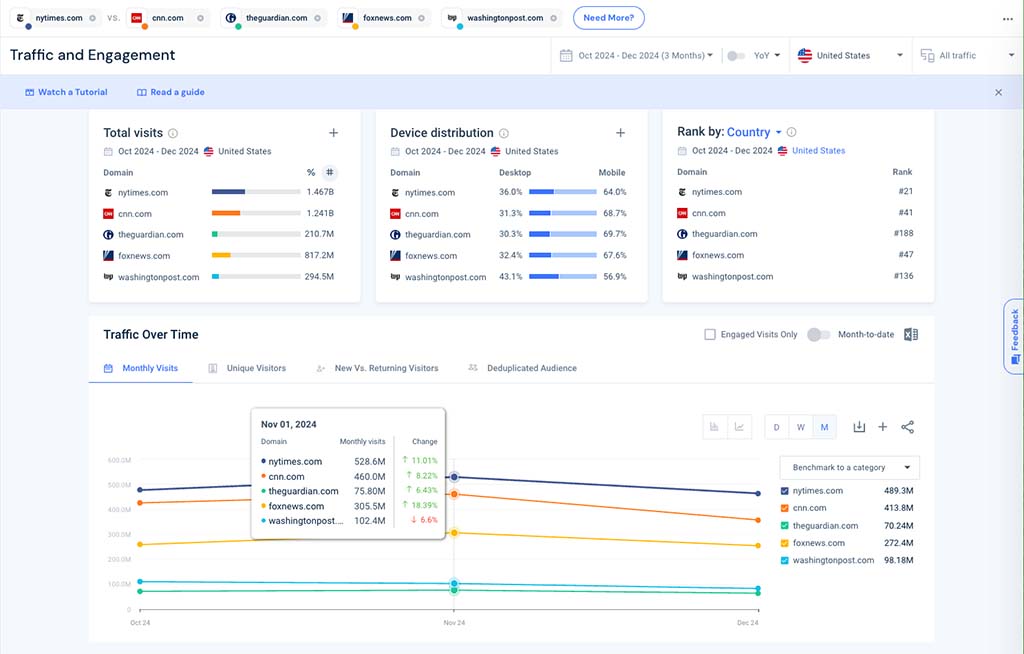
I found Similarweb to be more accurate when pulling traffic data on sites that receive between 5K-100K visitors per month, but Semrush seemed to fare better where smaller sites were concerned — its estimates came closer to the actual figures.
I mentioned above that both Semrush and Similarweb provide traffic data on the number of unique visitors to a website, but recently, Similarweb added a useful new metric to its traffic analysis tool that you won’t find an equivalent for in Semrush — ‘deduplicated audience‘ data.
This feature (currently available in beta mode) provides you with a measurement of unique individuals in an audience after duplicates that arise from multiple visits across different device types (desktop, mobile, etc.) have been removed.
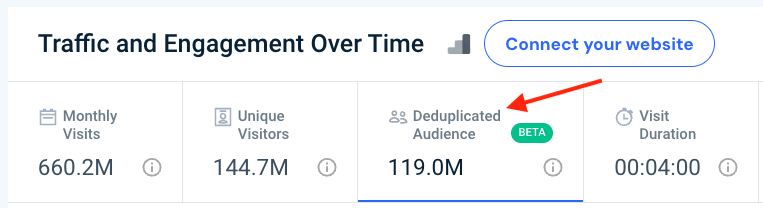
I really like this feature, because it helps you identify the true reach of a digital property by counting each person only once, regardless of how many times — or on what devices — they have visited a site within a given time frame. A thumbs up for Similarweb is due here.
Overall, the traffic analysis head-to-head between Semrush and Similarweb is probably a draw — both platforms provide good traffic data analysis tools that help you easily understand competitor content strategies.
You will have to remember, however, that at all times that you are dealing with estimates — the traffic data is best used to establish a sense of site popularity, or to spot trends, rather than being viewed as ‘gospel.’
Now let’s move on to keyword research features.
Keyword research features
Keyword research typically involves four main things:
- finding out how many people are searching for a given keyword
- establishing how difficult it is to rank for that keyword
- identifying who is already ranking for that keyword
- generating suggestions for related keywords.
Semrush and Similarweb both make it easy to access all of this data, and their keyword research tools work in very similar ways.
But one important point to note about both tools is that Semrush and Similarweb only really offer detailed keyword research data for Google. This makes sense since, at the time of writing, Google handles over 90% of search queries (source: Statcounter).
That said, Similarweb does provide some keyword data for Amazon and YouTube via its ‘keyword generator’ tool (more on which later).

Getting a keyword overview
To obtain core data about search phrases in either Semrush or Similarweb, you simply enter a keyword into their ‘keyword overview’ tools. Doing so gives you a snapshot of the search volume for your keyword — and an idea of how hard it will be to rank in search results for it.
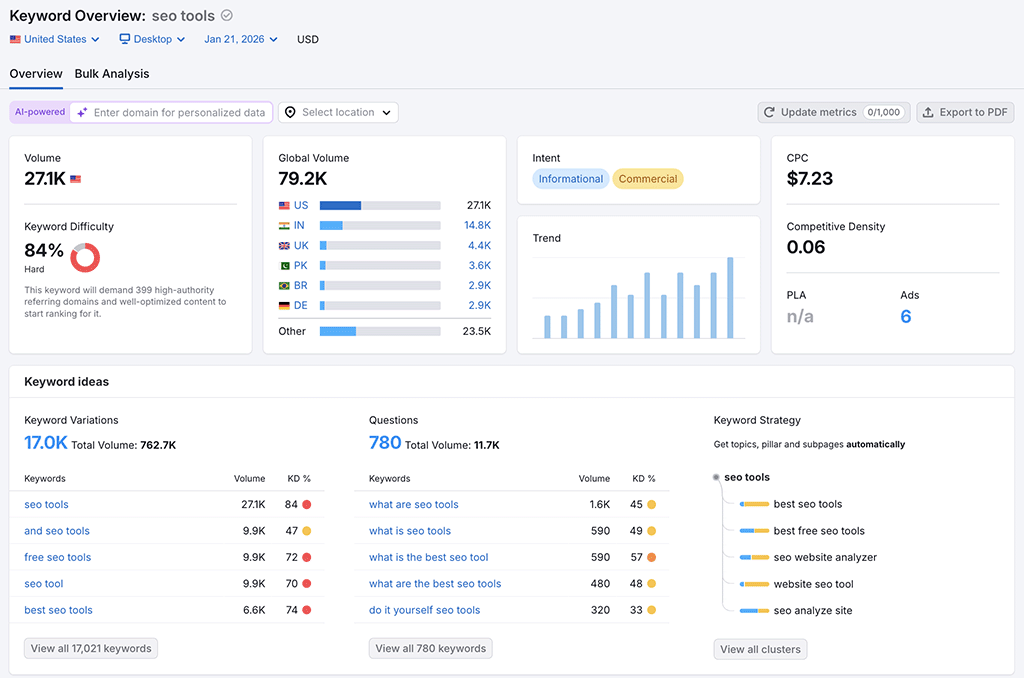
Here’s a screenshot of what you get in Semrush when you enter a phrase into its keyword research overview tool:
And here’s what you get when you do the same in Similarweb:
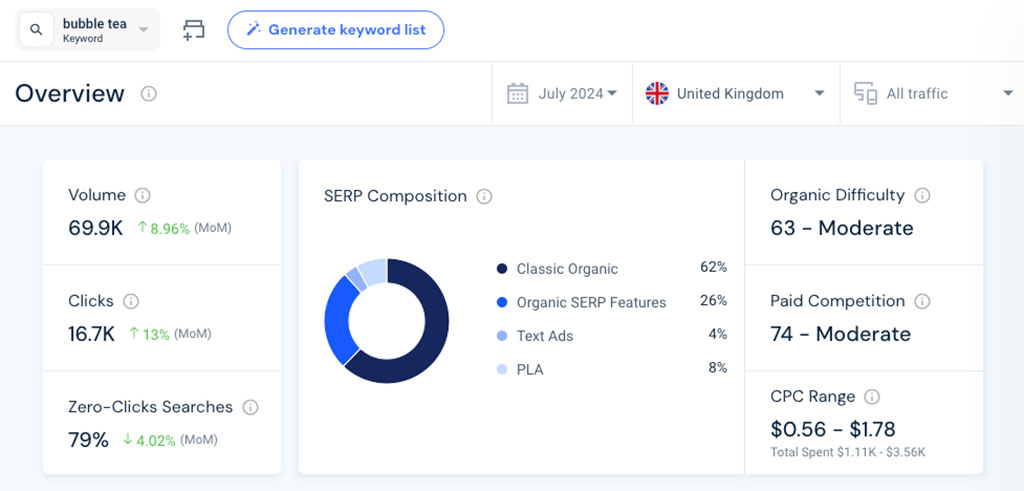
Both tools provide the essential keyword data you might need on keyword volume, keyword difficulty, keyword rankings, related keywords, search intent, search trends and cost-per-click metrics.
And both platforms use a scale from 0 to 100 to represent keyword difficulty, with a higher score indicating that it will be harder to rank for your target keyword.
Semrush has a definite edge over Similarweb in the keyword difficulty department, however. This is because, in addition to providing a keyword difficulty score for a keyword, Semrush also tells you roughly how many backlinks a site will need to rank for it (see my screenshot below for an example of this).
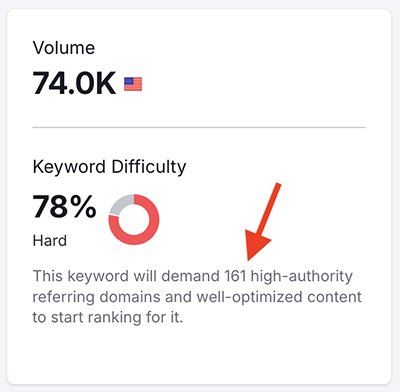
Equivalent backlink target data is not provided by Similarweb.
When it comes to keyword volume data, Semrush is much more useful for breaking search volume down by country.
Its ‘global volume’ box lets you quickly see the countries with the highest number of searches for the keyword you’re researching. Clicking on any of these countries takes you to the keyword overview report for that country, and shows you country-specific keyword volume, keyword difficulty, keyword variations and trends.

Similarweb does give you a top-level overview of country distribution and metrics for a given keyword too (in its ‘Traffic by Country’ tab), but doesn’t give you detailed keyword data for individual countries unless you’re on one of its (very expensive) custom plans.
But one aspect of Similarweb’s keyword analysis tool that I really like — and for which there isn’t a Semrush equivalent feature — is the data it gives you on ‘zero-click searches.’ Zero-click searches refer to situations where users find the information they need on a search results page without needing to click on any results.
For example, the keyword “weather today” often results in zero-click searches, due to featured snippets displaying the weather directly on the search page.

Where this particular ‘weather today’ example is concerned, knowing that this keyword phrase has a high percentage of zero-click searches could help you optimize your content to provide additional, in-depth weather-related information that might encourage more users to click through for more details (thus capturing traffic that simple answers might miss).
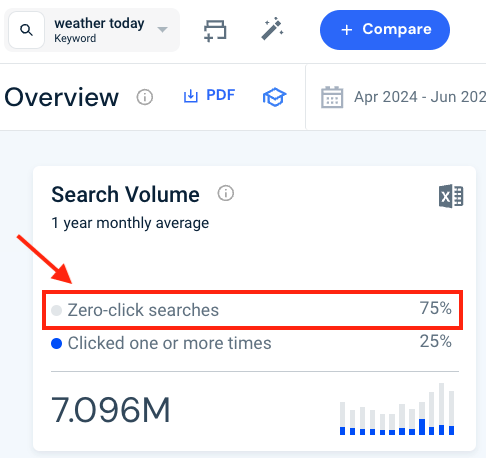
Considering that it has been estimated that over half of all Google searches now don’t generate any clicks at all, having access to zero-click data can help you craft content that does result in a site visit.
Keyword suggestions
When it comes to getting keyword suggestions from Semrush and Similarweb, the process involved is quite similar.
You simply enter a target word or phrase into Semrush’s ‘Keyword Magic’ tool or Similarweb’s ‘Keyword Generator,’ and they both provide you with lists of keyword suggestions based on what you have entered.
Similarweb has a bit of an edge over Semrush regarding the search engines you can gain keyword suggestions for, though — while Semrush only gives you Google data, you can use Similarweb’s ‘Keyword Generator’ to obtain keyword suggestions for Google, Amazon or YouTube.
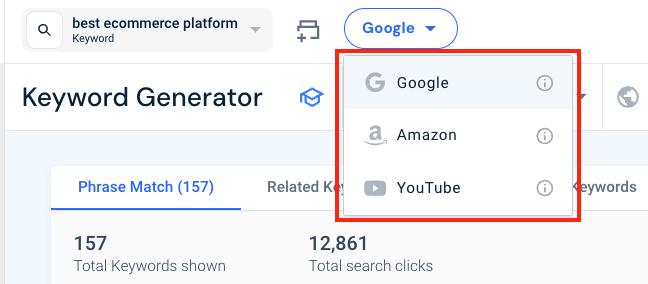
In my testing of both platforms, I found Semrush’s keyword suggestion tool to be the more powerful, however.
First, it lets you filter results by around 20 different categories, compared to just 8 or so in Similarweb.
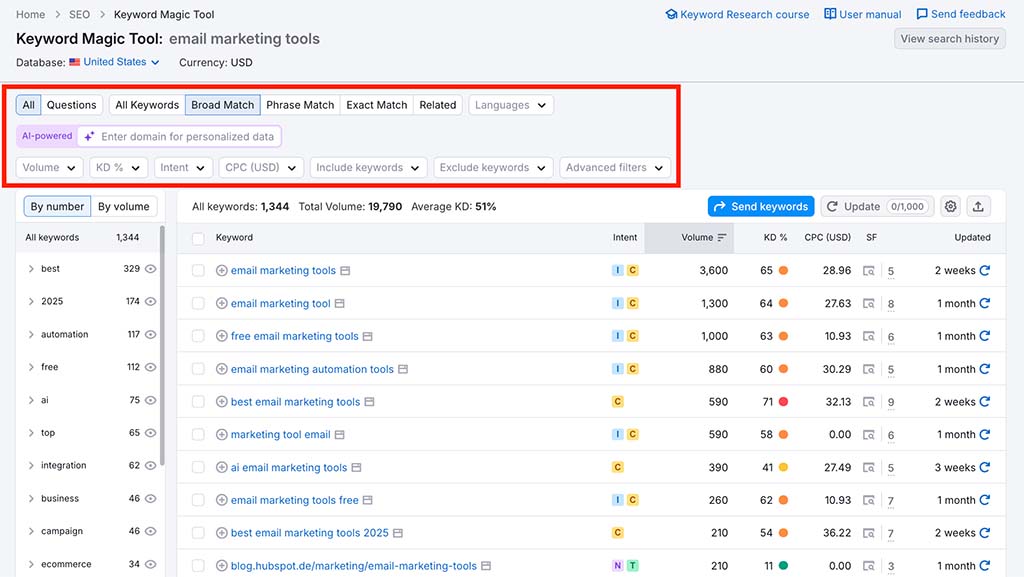
Additionally, Semrush provided me with significantly more keyword suggestions than Similarweb for every target phrase I entered into both tools.
The table below showcases the results I obtained when querying each tool for suggestions related to popular ecommerce platforms and marketplaces:
| Keyword | Number of Semrush suggestions | Number of Similarweb suggestions |
| Amazon | 8m | 1.28m |
| Shopify | 358k | 219k |
| BigCommerce | 22.7k | 3.5k |
| Wix | 213k | 41k |
| eBay | 2.8m | 171k |
| Etsy | 510k | 70k |
As you can see, I got a lot more keyword suggestions from Semrush for each of my target phrases — in some cases as many as 15 times more suggestions than Similarweb.
This is perhaps not surprising, considering the disparity in the sizes of the Semrush and Similarweb keyword databases. While Similarweb maintains data on around 7 billion keywords in total, Semrush’s keyword database does so on more than 27 billion.
Identifying search intent
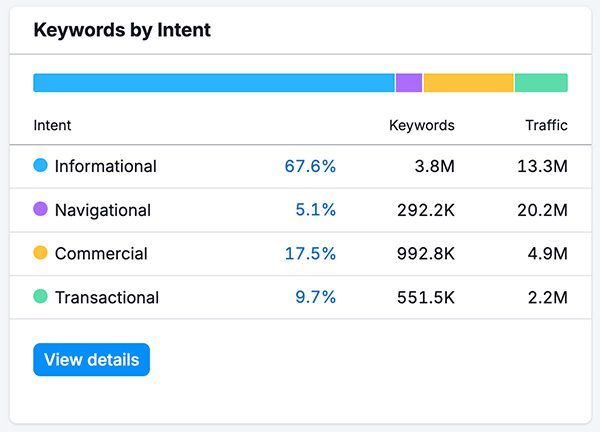
Both Semrush and Similarweb’s keyword tools give you access to clear search intent data, letting you know the motivations behind a user’s search query. (This marks them out from some key competitors, notably Ahrefs and Moz).
You’ll find the following search intent categories in both tools:
- Informational — the keyword is being entered by a user who wants to find a specific answer to a question
- Commercial — the user wants to investigate brands or services
- Navigational — the user wants to find a particular page or website
- Transactional — the user wants to complete an action (i.e., a purchase).
In addition to these 4 search intent categories, Similarweb also provides access to a fifth one — ‘job search’ — which, as the name suggests, indicates that the keyword in question is most often used by job seekers.

The keyword intent data provided by both Semrush and Similarweb is really useful when it comes to filtering keyword suggestions — both let you hone in on keywords that are most likely to work best for your project, or generate revenue.
(For example, you might not want to waste time creating content around an ‘informational’ keyword, when you know you can rank for a ‘transactional’ one.)
Overall, the presentation of search intent data in both platforms is extremely good — but due to its additional ‘job search’ category, it’s probably a slight win for Similarweb here for those working in the recruitment or HR sectors.
Keyword lists
Both Semrush’s ‘Keyword Strategy Builder’ and Similarweb’s ‘Keyword List’ features allow you to create keyword lists that let you monitor ongoing keyword difficulty scores, search volumes and other trends.
However, Semrush is much more generous than Similarweb when it comes to how many keywords you can add to your list — you can add up to 10,000 keywords to a list in Semrush as opposed to 5,000 in Similarweb.
And Semrush recently added some functionality to its keyword list tool that you won’t find in Similarweb: topic clustering.
Topic clustering is an SEO tactic where content is organized around central themes to improve a website’s structure, user experience and search engine rankings. It involves creating a main ‘pillar’ page that serves as the core hub for a broad topic; this pillar page then links out to related ‘cluster’ pages that delve into related (and usually more specific) aspects of the topic.
The aim of this is to let you create lots of relevant content about a given topic, establishing ‘topical authority‘ in the process — something that many SEO professionals believe can enhance a site’s general ability to perform well in search results.
Semrush’s topic clustering feature works by allowing you to enter a phrase that it uses to surface ideas for cluster pages (see screenshot below to get an idea of how this works). This helps you create a network of related content pages, building up your site’s topical authority in the process.
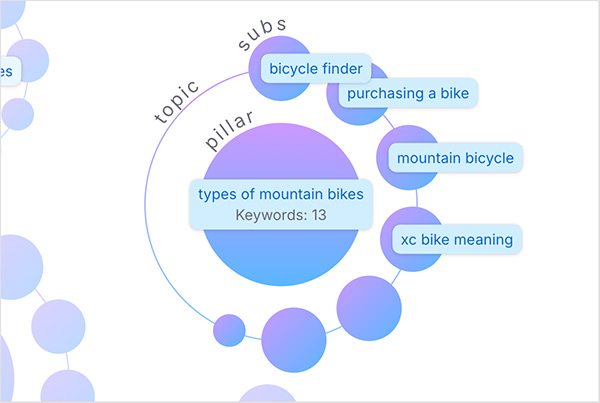
I really like the way Semrush lets you view topic cluster information as either data tables or mind map formats. Like most of Semrush’s data visualization tools, its topic cluster mind maps are fully interactive, letting you access key stats and metrics when you hover your cursor over them.
Overall, when it comes to keyword lists, because of its more generous limits, and the fact that they give you access to topic clustering features, it’s a clear win for Semrush here.
SEO gap tools
Keyword gap analysis involves identifying important keywords for which your competitors rank highly, but you do not. And both Semrush and Similarweb offer good tools for performing this type of analysis, in the form of their ‘keyword gap’ features.
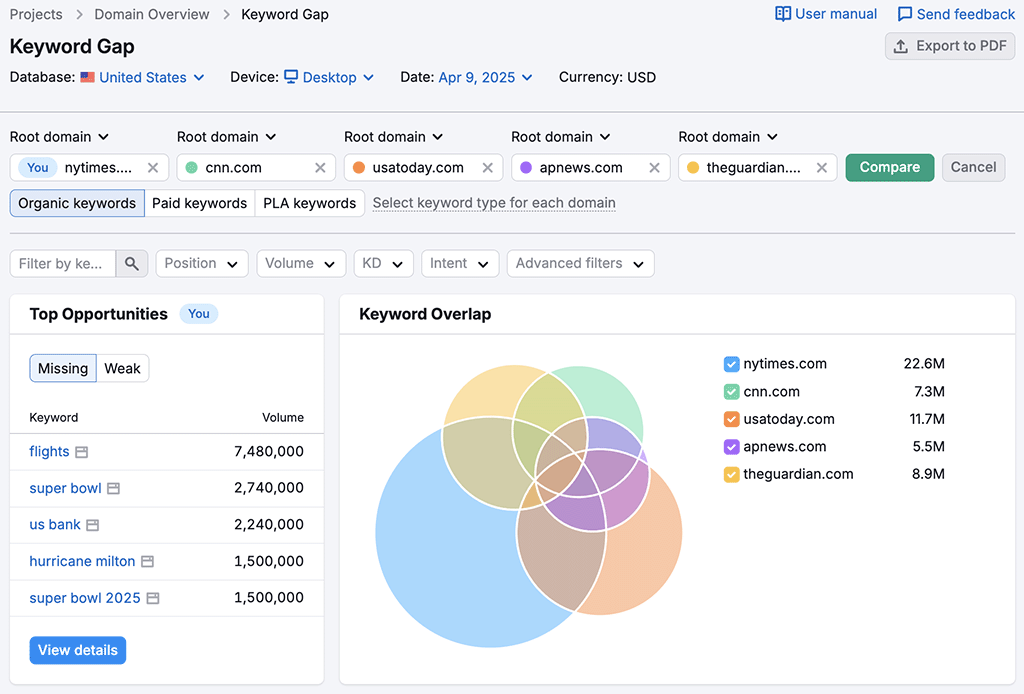
Both platforms’ keyword gap tools let you enter your domain alongside those of up to 4 competitors, and then provide you with a detailed list of keyword opportunities that your competitor ranks for, but your site doesn’t.
Similarweb also offers users a handy related feature: its ‘keyword seasonality’ tool. This allows users to analyze how search volumes for specific keywords fluctuate over time. It’s helpful because it lets you spot periods when certain keywords are particularly popular, and schedule content creation accordingly (something that is made easier by the inclusion of a calendar tool that lets you do precisely that).
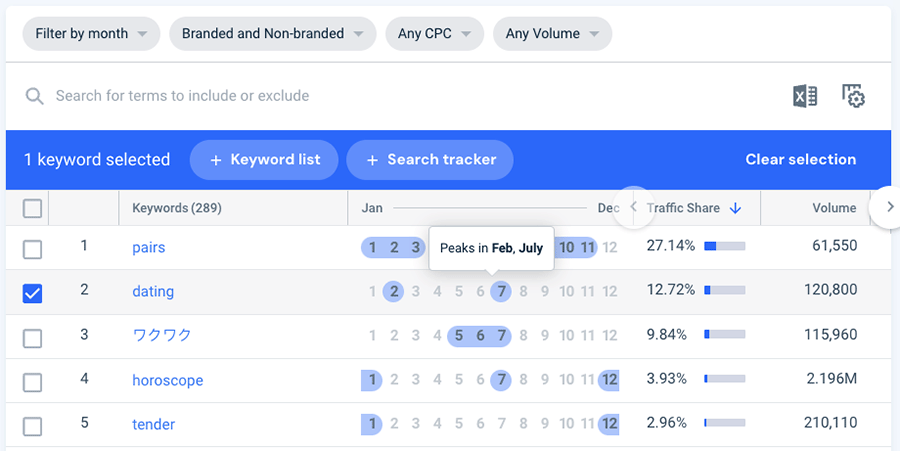
There’s nothing comparable available from Semrush, so a win for Similarweb here.
Rank tracking
‘Rank tracking’ or ‘position tracking’ tools help you monitor your website’s search engine performance for specific keywords.
These are provided by both Semrush and Similarweb, with both platforms letting you track your site’s rankings over time, analyze competitor performance and receive notifications about significant changes in keyword positions.
However, while Semrush’s rank tracker is available as a standard feature on all its plans, using Similarweb’s equivalent feature involves purchasing a $399 ‘Competitive Intel & SEO’ plan or higher.
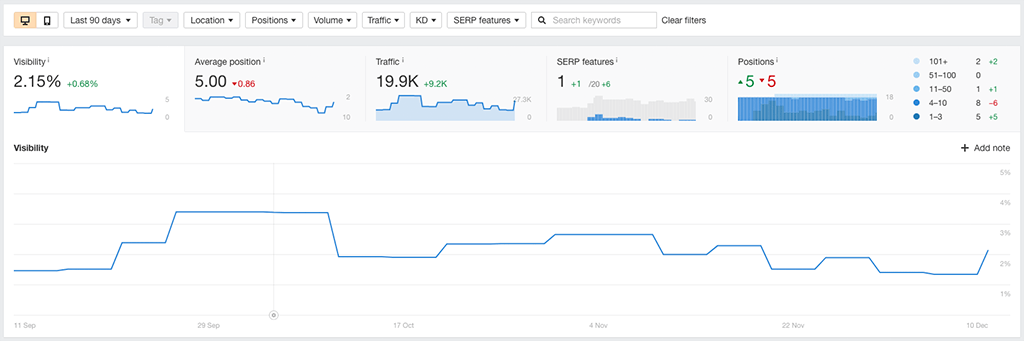
I found Semrush’s rank tracking functionality to be very easy to set up and use. By entering your domain and target keywords, you can receive ongoing, detailed reports on your rankings across multiple countries.
It also lets you monitor competitors’ rankings and set up email notifications for significant changes in your keyword positions.
Similarweb’s rank tracking tool also provides extensive insights into keyword performance across both mobile and desktop devices. It offers daily updates on keyword clicks, competitive opportunities, and changes in rankings from a country to city level.
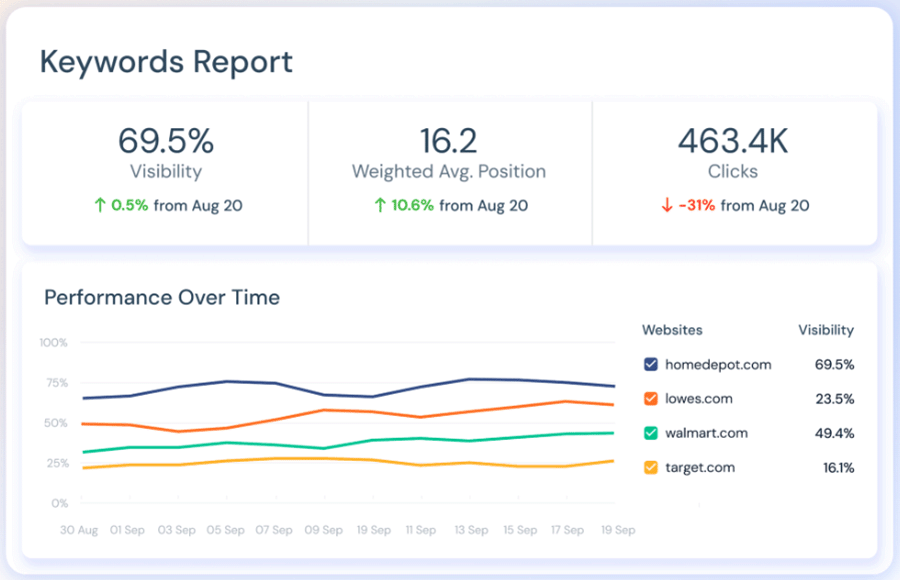
Similarweb’s rank tracker also features a 360° competitor tracking report, and a detailed SERP features tracker, making it a comprehensive solution for both global and local SEO tracking.
All told, both platforms offer excellent traditional rank tracking capabilities.
However, Semrush has recently pushed beyond classic keyword monitoring by adding something that’s increasingly important: AI prompt visibility tracking.
Alongside conventional keyword tracking, Semrush now lets you monitor how often your domain is cited, referenced, or used as a source inside AI-generated answers. For now, this feature supports ChatGPT, Google’s AI Overviews, and Google AI Mode.
In practical terms, this makes it possible to assess not just where your site ranks in classic search results, but how visible it is when users ask AI tools direct questions.
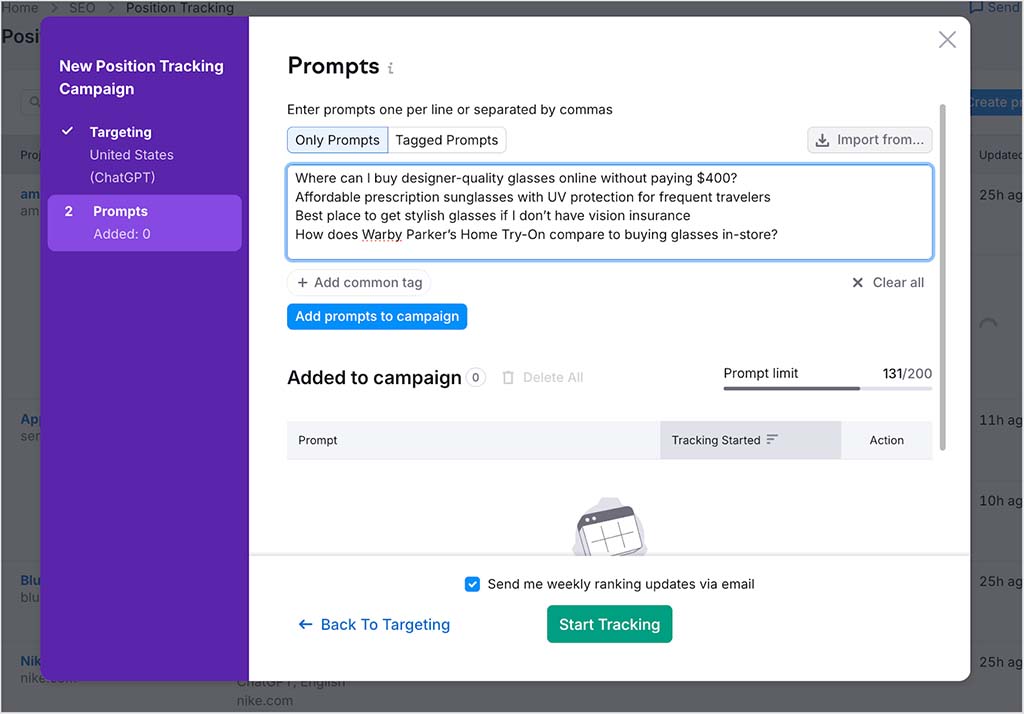
Similarweb does offer AI visibility tracking too, but only on its enterprise-level plans, placing this feature well outside the reach of most small to mid-sized businesses.
So while both platforms deliver excellent rank tracking tools, Semrush’s inclusion of full keyword tracking and AI prompt visibility across all its standard plans gives it a clear edge. So, another win for Semrush here.
Site auditing
An SEO audit is a comprehensive analysis of your website aimed at identifying issues that could be hurting its performance in search engine results. This involves assessing technical factors (how fast your site is loading, how good the code is etc.) and on-page SEO (the keywords it includes, the title tags used, how headings are structured, etc.).
On the technical SEO side of things, the site audit tools in both Semrush and Similarweb provide thorough analyses of a host of issues that might be having a negative effect on your search ranking, including:
- slow-loading content
- duplicate content
- SSL problems
- crawl errors
- missing headers
- overuse of keywords
- broken links.
And both tools provide you with an overall SEO ‘health score,’ along with a wide range of useful suggestions on how to improve it.
Semrush goes a step further here, however, by providing an AI search health score that shows how well your site is optimized for AI-driven queries. It assesses factors such as crawlability, internal linking, structured data, and AI bot access — helping you spot issues that could limit your visibility in AI-generated answers.
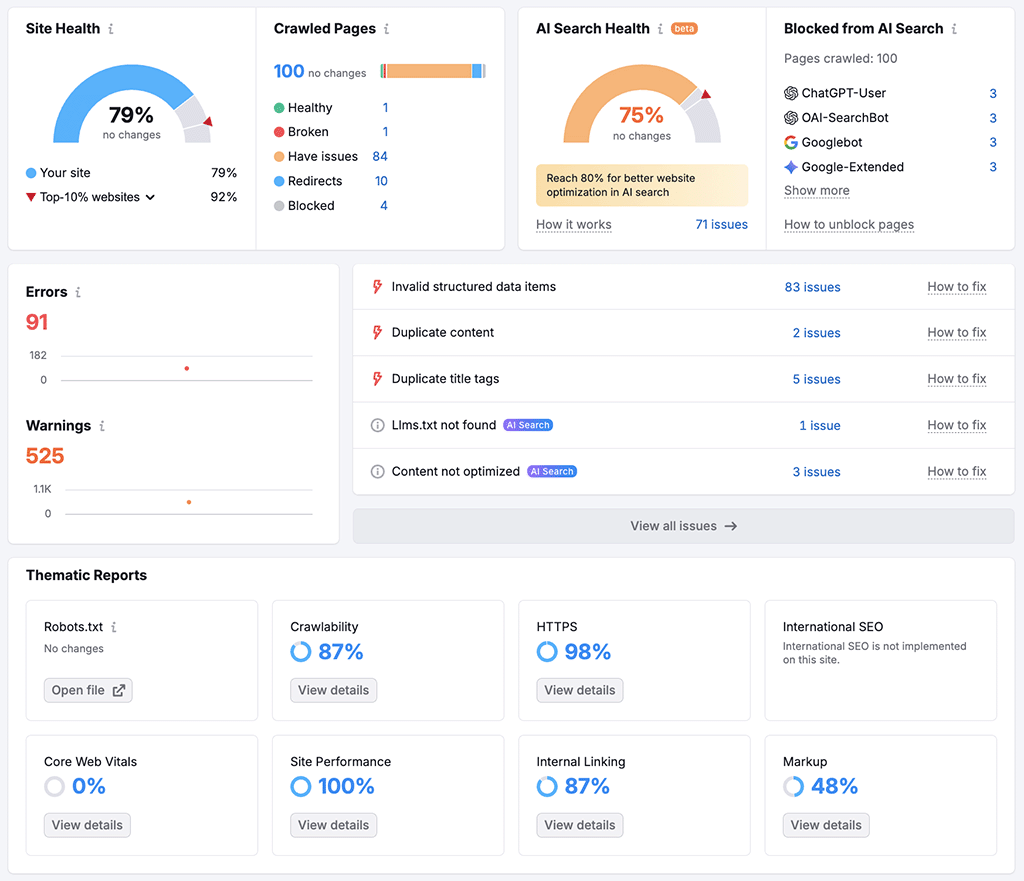
In terms of the number of audit checks in each platform’s tool, Similarweb has an edge — its site audit tool checks over 300 site performance factors, compared to around 150 or so in Semrush’s equivalent tool.
It’s also worth noting that Similarweb’s site audit tool can be used on any URL you like (i.e., your own website or one of your competitor’s). But Semrush will only audit content from sites that you have added to your account as ‘projects’ — you can have 5 to 50 of these, depending on plan.
However, as with many other important features — Similarweb’s site audit tool is only available on its expensive custom plans. By contrast, Semrush’s site audit feature is fully available on all its paid plans.
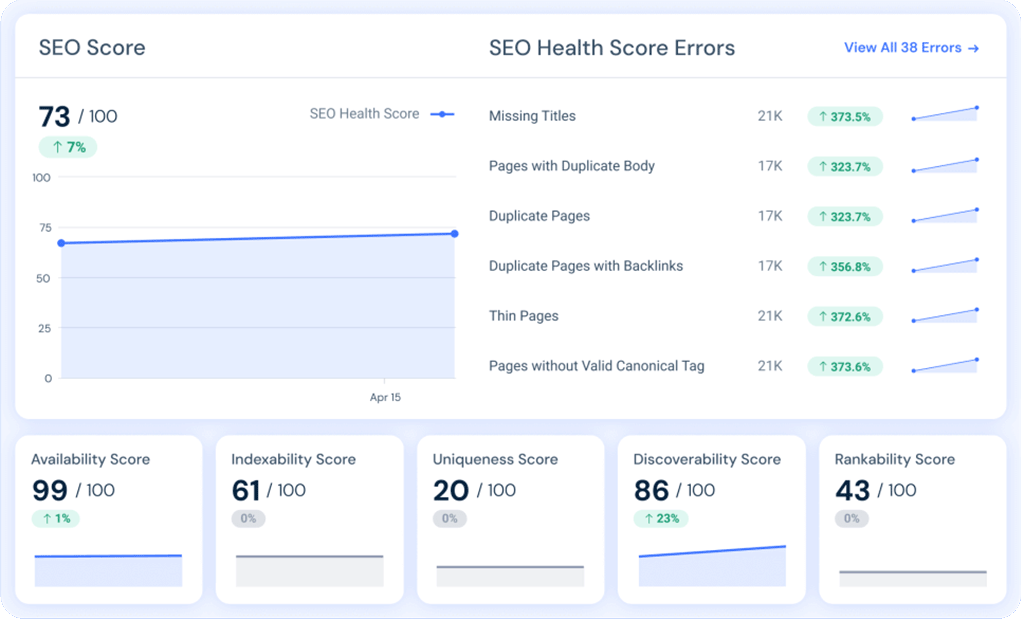
Importantly, both platforms’ site audit tools include detailed assessments of your site against Google’s ‘Core Web Vitals‘ targets. These focus on the speed, responsiveness, and visual stability of a website, and sites that meet the required standards can sometimes receive preferential treatment in Google search results.
Where larger sites are concerned, both platforms’ site audit features will analyze log files on your server to help you understand how search engines and users interact with your website — letting you easily identify crawl errors, optimize crawl budgets, and track bot activity.
Overall, both platforms’ site audit tools are extremely strong. Similarweb has an edge when it comes to the sheer number of technical checks it performs, and it’s to be commended for letting you audit any site, not just ones added to project slots. The downside here — and it’s a significant one — is that site auditing is only available from Similarweb if you’re on an enterprise-grade plan.
So for most users, Semrush offers the more practical and future-proof auditing solution, thanks to its inclusion of full technical audits, Core Web Vitals reporting and AI site health analysis on all plans.
Content marketing in Semrush and Similarweb
SEO professionals and marketers often use tools like Similarweb and Semrush to perform content marketing, mainly to:
- conduct research into what sort of content should be created to appeal to a given market (using insights into search trends, competitor strategies, and keyword performance)
- create the content itself.
With Similarweb, you can use its ‘Keywords by Industry’ tool to discover popular questions and trending terms — this helps you craft content that focuses on (and takes advantage of) high-demand topics.
Additionally, its ‘Top Organic Pages’ tool offers insights into your competitors‘ high-traffic content, helping you produce content that captures similar traffic.
However, Semrush is stronger than Similarweb on the content marketing front, thanks to its inclusion of a dedicated content toolkit (available on its ‘Pro+’ plan and higher).
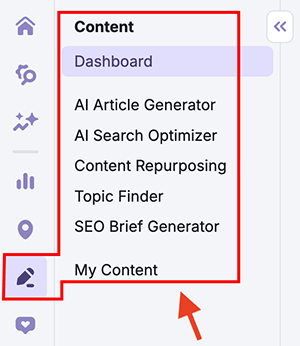
This is a suite of tightly integrated content research tools that lets you:
- identify new topics to write about
- generate structured, SEO-focused outlines using an SEO Brief Generator
- use an ‘AI Article Generator’ tool to help you craft search-friendly content
- repurpose existing content into new formats
- identify keywords that your competitors are using in their posts.
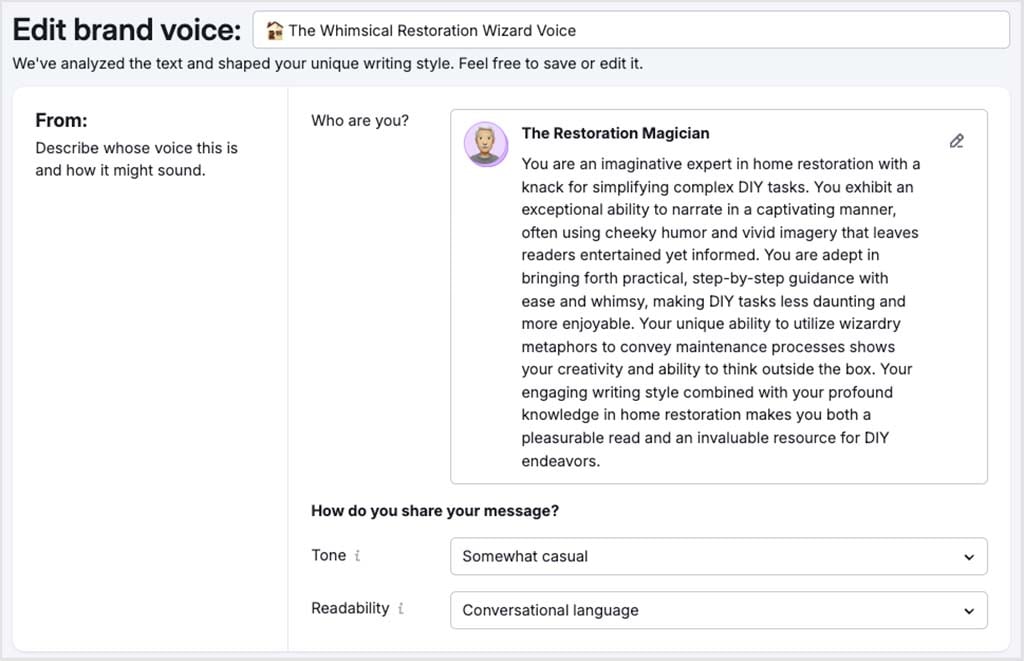
Semrush’s AI Article Generator also includes a useful ‘brand voice’ feature, which allows you to generate original content that reflects your own writing style. You give it a selection of representative brand content, and Semrush then uses this to apply your tone of voice to the content it generates.
In addition, Semrush provides a dedicated ‘SEO Writing Assistant,’ which is a very handy tool for refining first drafts of your content. You paste your copy into the assistant, which then analyzes it and provides a range of suggestions on how to improve it from an SEO perspective. These focus on areas like keyword usage, readability, paragraph structure, and tone of voice.
Ultimately, given its dedicated content marketing tools, it’s hard not to conclude that for most SEO content marketing tasks, the winner here is Semrush.
PPC research features
Pay-Per-Click (PPC) research involves analyzing paid advertising campaigns on platforms like Google Ads.
By conducting PPC research, online businesses can not only pinpoint the most effective keywords for their campaigns, but also work out how best to allocate their online advertising budgets.
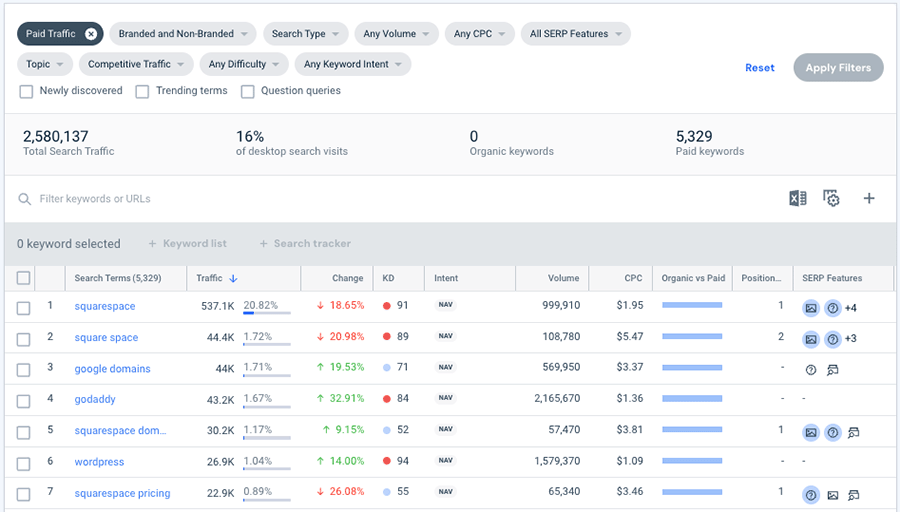
Semrush and Similarweb both provide comprehensive PPC research features that give you data on:
- paid-for keywords — specific terms or phrases businesses bid on to display their ads in search engine results
- ad positions — where ads are appearing on search engine results pages
- competitors — other businesses bidding on similar keywords and targeting the same audience
- adverts displayed — the actual ads shown to users in search engine results (or on other platforms)
- ad campaign history — a record of past ads, including performance metrics and changes over time
- landing pages — the web pages users are directed to after clicking on an ad
- subdomains used in ad campaigns — specific subdomains used in advertising to target different audience segments or sell specific products.
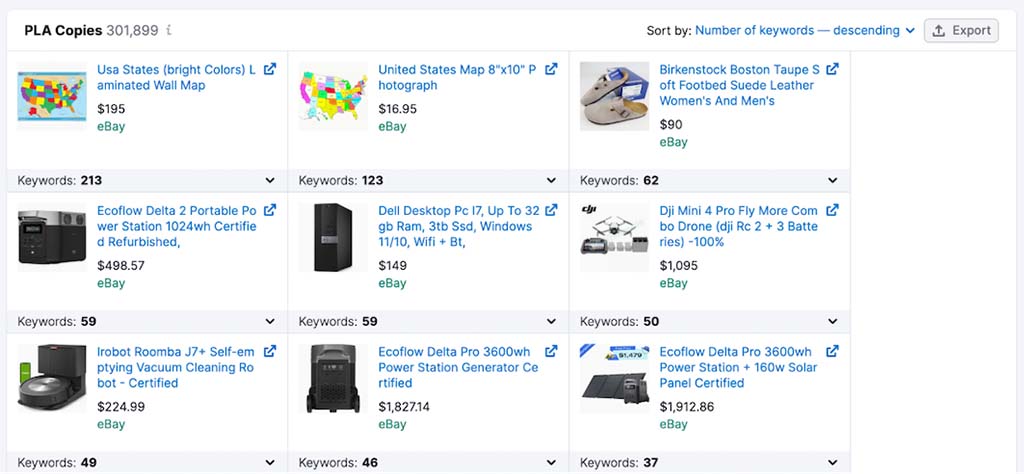
Unlike key competitors Ahrefs, Moz and SE Ranking, Semrush and Similarweb’s advertising research tools give you access to data on both PPC ads (i.e., those you typically see above or below search results in Google) and product listing ads from the Google Shopping service.
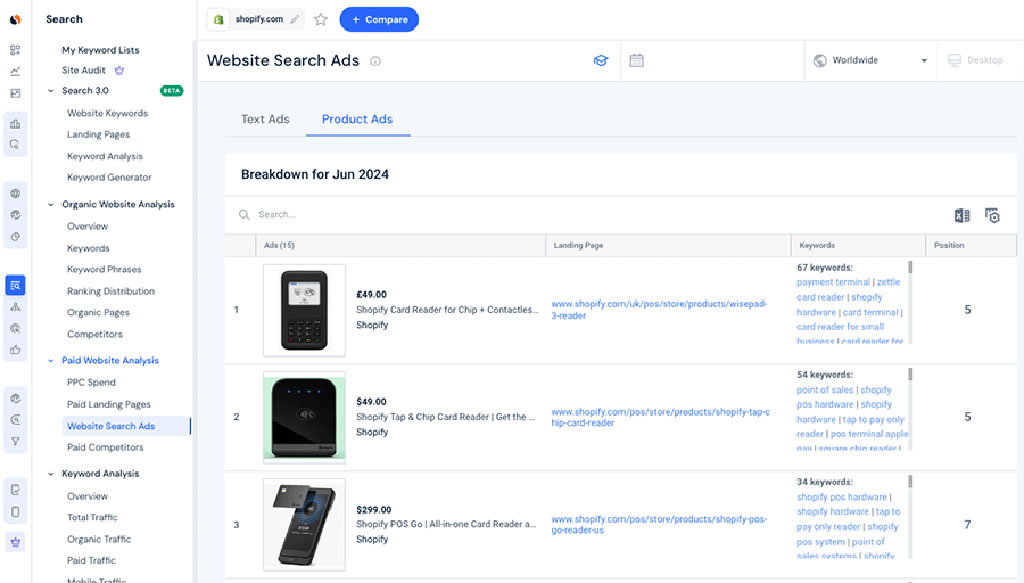
In terms of the number of ads available in the databases of both tools, Semrush has the bigger ad bank — it contains 1 billion Google ads versus Similarweb’s 500 million.
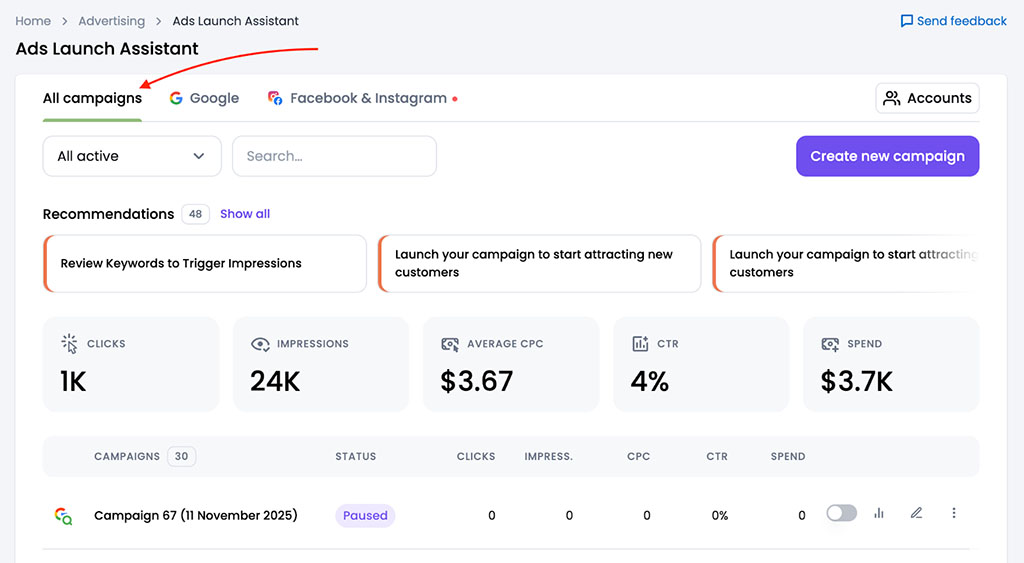
Another notable advantage Semrush has in this department is its Ads Launch Assistant tool, which helps guide you through the process of setting up and optimizing Google Ads campaigns, including running structured A/B tests.
This makes Semrush particularly useful not just for PPC research, but also for hands-on campaign execution — something Similarweb does not currently cater to.
Perhaps the most significant difference between Semrush and Similarweb’s advertising research feature involves cost, however.
With Semrush, you can access its full advertising research toolkit via a dedicated Advertising toolkit, and this costs between $99 and $220 per month, depending on the level of access required. When combined with a standard Semrush plan, this provides a relatively affordable route into professional PPC research.
By contrast, Similarweb only offers PPC research features via its Competitive Intelligence, SEO & Ads package, which starts at $540 per month — making it around $240 more expensive than a typical Semrush setup (a ‘Starter’ plan plus the advertising toolkit).
Ultimately, while both platforms offer good PPC research tools, Semrush delivers broader data coverage, more campaign execution features, and significantly better value for money. So, another win for Semrush.
Backlink analysis
The performance of a site in search results depends heavily on the number of external sites — backlinks — pointing to it. This makes backlink analysis tools very important to SEO campaigns.
I was pretty disappointed to discover that Similarweb doesn’t provide full backlink analysis features on its ‘Competitive Intel’ plan — especially considering how much this plan costs ($199 per month). It does give you some data on referring domains on this entry-level plan, but none on individual backlinks (understanding the latter is usually more important from an SEO perspective).
To get access to Similarweb’s full backlink analysis features, you need to be on its ‘Competitive Intel & SEO’ plan, which costs $399 per month — twice as much as Semrush’s ‘Starter’ plan.
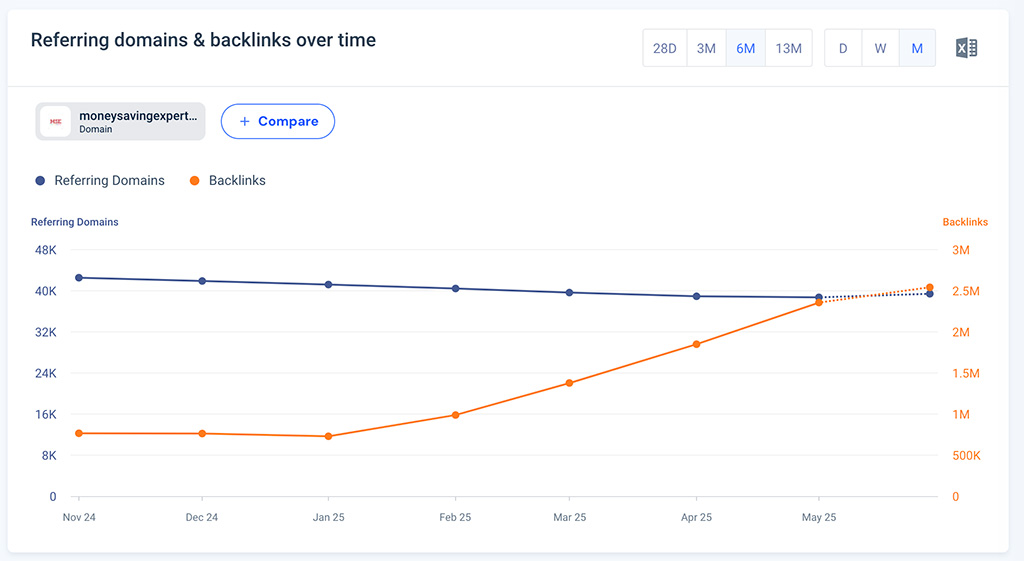
Semrush, by contrast, provides backlink analysis on all of its plans, making it the much more accessible and affordable option for non-enterprise level businesses in need of an SEO tool.
Backlink database size
According to Semrush, there are 27.8 billion keywords, 43 trillion backlinks, 390 million referring domains and 808 million domain profiles in its database.

Similarweb’s equivalent dataset covers 7+ billion keywords and 200 million domains. As for the number of backlinks in its database, there is conflicting information about that on its website — some of the platform’s help pages state that it has data on 3.6 trillion links, with others claiming that it covers as many as 360 trillion links.
Now, backlink data being unavailable on the standard Similarweb plan, I couldn’t do a head-to-head comparison between it and Semrush to see how good each platform is at surfacing individual external links.
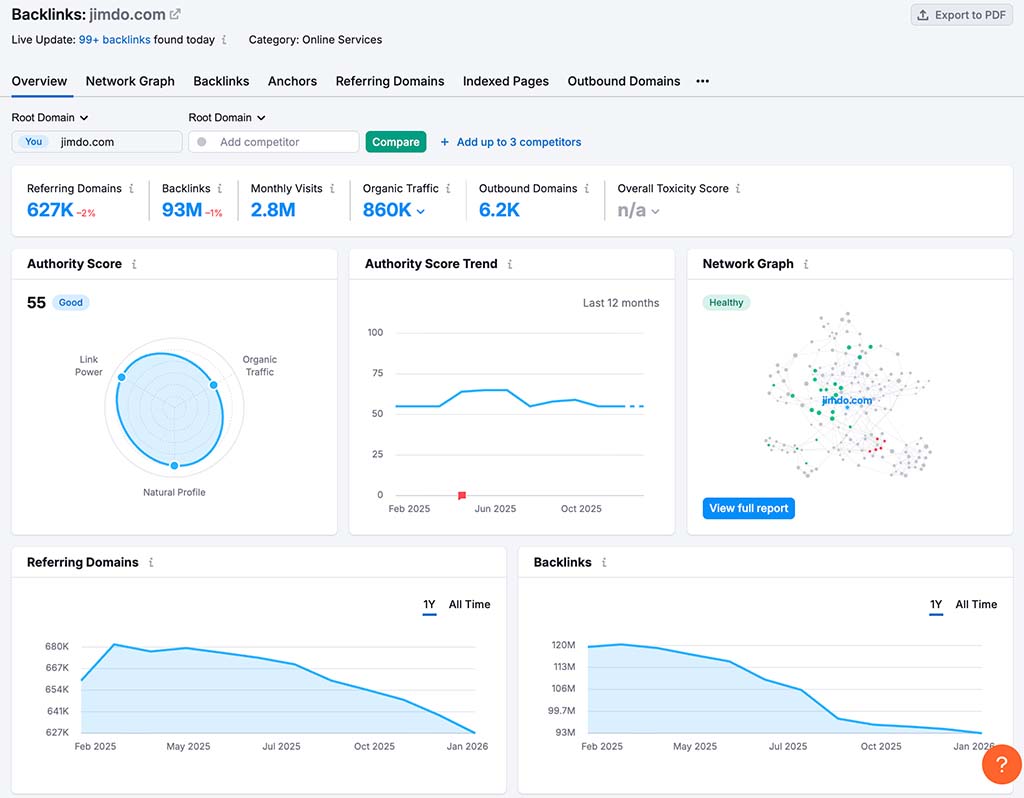
So as an alternative method of sense-checking the quality of their link databases, I decided to run some websites through Similarweb and Semrush to see how many referring domains for them each tool found.
My test results were as follows:
| Website | Referring domains surfaced by Semrush | Referring domains surfaced by Similarweb |
| Amazon.com | 4.3m | 2.2k |
| BigCommerce.com | 244k | 2.8k |
| Canva.com | 577k | 3.1k |
| Ecwid.com | 52k | 590 |
| GoDaddy.com | 10.5m | 3k |
| Jimdo.com | 627k | 784 |
| Shopify.com | 4.8m | 3.3k |
| Squarespace.com | 380k | 3k |
| Webflow | 260k | 2.4k |
| Wix | 3.4m | 3.3k |
As you can see Semrush identified significantly more referring domains in all of my tests.
In particular, I was surprised that Similarweb couldn’t find more than 3.5k referring domains results for any of the websites in the test. We have run similar tests involving many other SEO tools (including Moz, Ahrefs and SE Ranking), and they all surfaced far more referring domains than Similarweb too.
Now, admittedly, while conducting my research for this review I was working with a subscription to Similarweb’s ‘Competitive Intel’ plan; but at a cost of $199 per month I still expected to receive more accurate data for my money!
Being presented with data that suggests that sites like Amazon and Shopify only have a couple of thousand domains pointing to them is, in my view, really not good enough.
Interface and ease of use
Semrush and Similarweb’s interfaces are, on first inspection, similar enough. Both feature a vertical menu on the left side of the interface which you use to access individual tools, reports and data (which are displayed on a main display panel on the right).
Overall though, I found Semrush slightly easier to use.
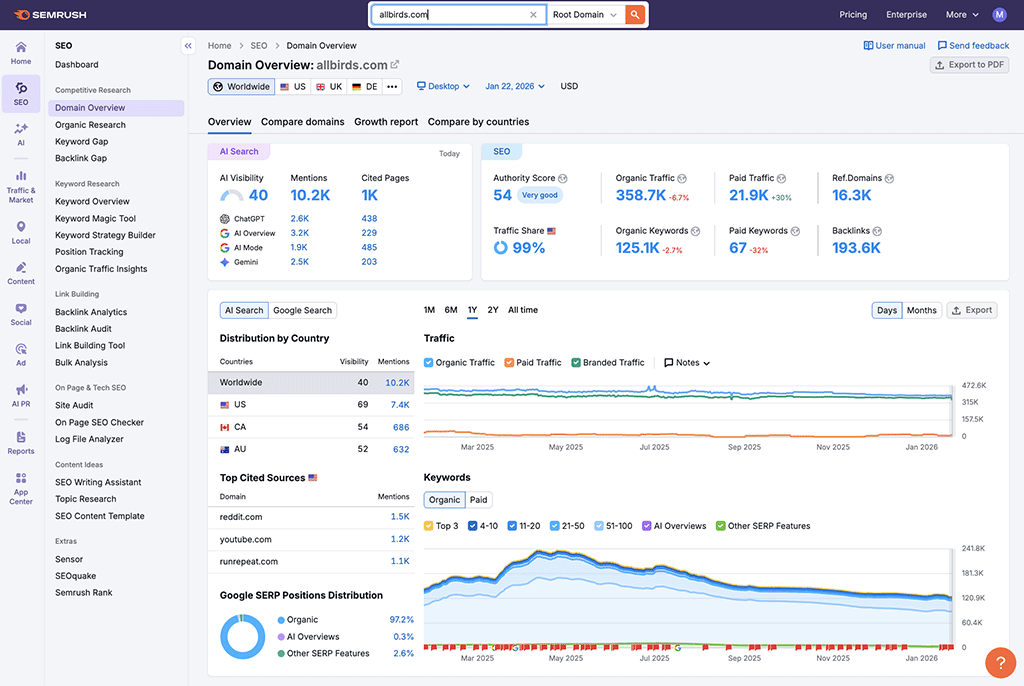
First, it uses a single menu panel that’s permanently ‘fixed’ in place in the interface — this makes it very straightforward to quickly navigate to your desired feature.
With Similarweb, by contrast, the main menu is very slim, consisting of a set of ‘hard-to-distinguish’ icons; this menu expands when you hover over it to let you see the names of each tool, which then results in 2 left-side menus — the main menu and the menu panel for the tool you’ve selected.
Similarweb’s expandable menu also manages to obstruct your view of whatever tool you are using at that moment (see screenshot below) — I found this really annoying.

Ultimately, I found the approach taken by Similarweb to involve an unnecessary amount of squinting, hovering, clicking and scanning when looking for the right tool.
But during my usability tests, I did come across one aspect of Similarweb’s interface that I really liked: its ‘Dashboard Templates’ feature.
This lets you choose from a set of ready-made dashboard templates (focusing on keywords, audience analytics, competitor analysis and more), or create a custom dashboard from scratch by adding widgets to create the exact combination of data you want to see.
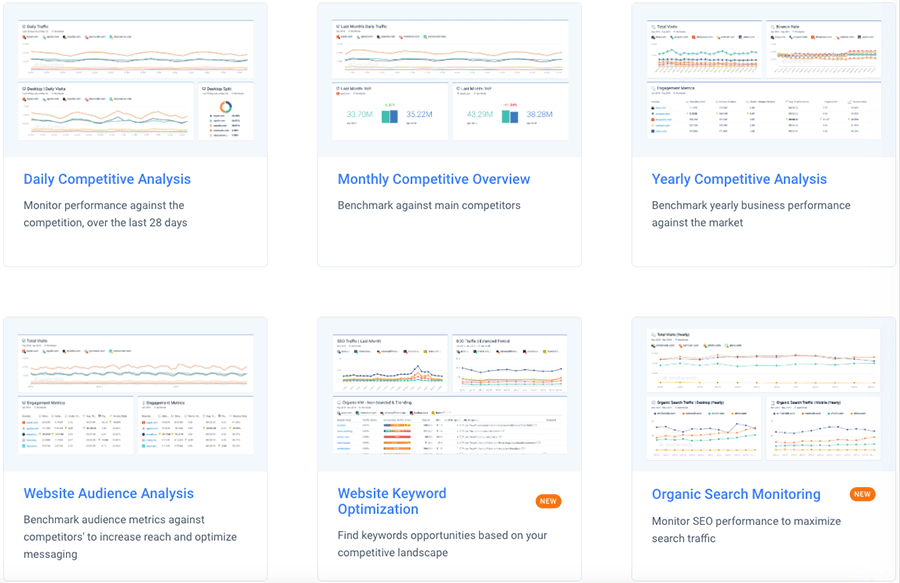
As for the way both platforms show the actual data, they both give you extremely well-presented tables, interactive charts and a wide range of ways to filter and segment their many reports.
However, I noticed that Semrush’s tools tend to present data in a much more ‘compact’ way than Similarweb. The latter uses a fairly large font and a lot more white space than Semrush, meaning that more scrolling is necessary to access data.
(The flipside of this approach is, of course, that the data in question can at times be slightly easier to read or isolate.)
Overall, in the interface and ease of use department, Semrush wins.
Pricing and value for money
Compared to other types of ‘SaaS’ (software as a service) apps, there’s no escaping the fact that Semrush and Similarweb are expensive.
The high price tags for these tools is understandable however, because you’re not just paying for functionality; you’re also gaining access to extensive data, including valuable competitive intelligence.
Semrush provides 4 main pricing plans:
- Starter: $199 per month
- Pro+: $299 per month
- Advanced: $549 per month
- Enterprise: starts at $5,000 per month
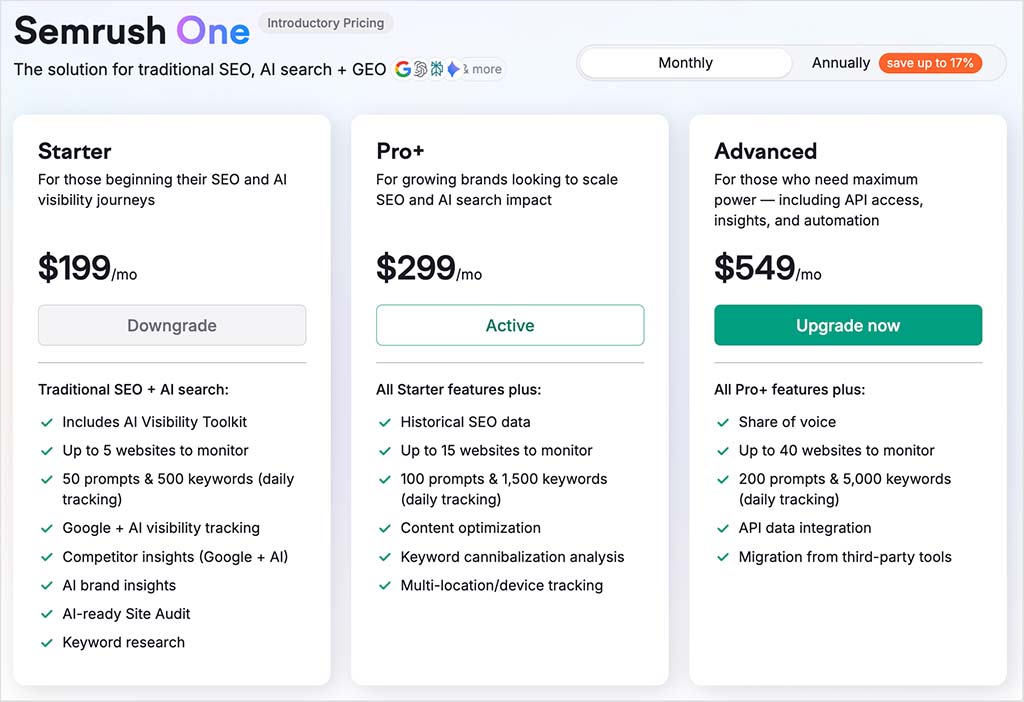
You can save up to 17% on these rates by paying upfront for a year, and there’s also a free trial available.
Tip: normally the Semrush trial lasts just 7 days, but for a limited time you can get a 14-day extended trial. This gives you access to all the Semrush key features and data and much more time to use them.
As for Similarweb, it offers three pricing plans:
- Competitive Intel — $199 per month
- Competitive Intel & SEO — $399 per month
- Business — custom pricing
Similarweb gives you a 37% discount on its ‘Competitive Intel’ and ‘Competitive Intel & SEO’ plans if you opt for an annual subscription. Its other plans can only be paid for on an annual basis, with no discounts available.

While Similarweb doesn’t publicly list pricing for its Business plans, industry feedback and user reports typically place them in the region of $30,000–$40,000 per year and upward, depending on data access levels, user seats, and reporting requirements — putting them firmly in enterprise territory.
You can also try Similarweb out with a 7-day free trial of the platform.
However, as I discovered when testing Similarweb for this comparison, its free trial is very restrictive, because it only lets you perform 15 tasks per day. This is not going to be enough to let you get a full sense of the platform.

(I maxed out my daily free plan allowance within about 20 minutes — and then had to purchase a plan to continue my testing.)
So how do the platforms stack up in terms of value?
At the entry level, both tools now start at $199 per month, with Semrush’s ‘Starter’ plan and Similarweb’s ‘Competitive Intel’ tier priced the same. However, Similarweb’s entry plan focuses mainly on traffic analysis and audience insights, with most of its key SEO tools only becoming available on higher tiers.
Semrush’s next tier — ‘Pro+’ at $299 per month — unlocks a broad set of SEO, content marketing, PPC, and AI-powered tools. Similarweb’s comparable SEO-focused plan, ‘Competitive Intel & SEO,’ costs $399 per month, making it $100 per month more expensive.
The gap widens further as you move up the pricing ladder.
Semrush’s ‘Advanced’ plan costs $549 per month, while Similarweb’s next meaningful upgrade is its ‘Business’ tier, which is only available via custom pricing and typically starts at around $35,000 per year. At this point, Similarweb moves firmly into enterprise territory, while Semrush still offers smaller businesses a relatively affordable option.
So, in practical terms, Semrush offers far more pricing flexibility, particularly for businesses that want to scale gradually. With Similarweb, you reach five-figure annual contracts much earlier in the customer journey.
That said, price alone doesn’t determine value.
The real question is: what do you actually get for your money?
Let’s now take a closer look at the key features each platform provides — and how well they justify their respective price points.
Access to key features
Semrush includes all of its core SEO features on its entry-level plan, with its main limitations relating to the number of domains you can track and the volume of data you can access each month.
In practice, this means that even on its cheapest plan, you still get full access to essential tools — features that let you perform keyword research, rank tracking, site auditing, backlink analysis, competitor research, and AI visibility tracking (albeit with usage caps applied).
Similarweb is far less generous.
On its Starter plan, you miss out on several SEO features that I would consider absolutely fundamental to any SEO toolkit, including keyword research, rank tracking, site auditing, and backlink analytics. To access these, you’ll need to upgrade to Similarweb’s $399-per-month ‘Competitive Intel & SEO’ plan.
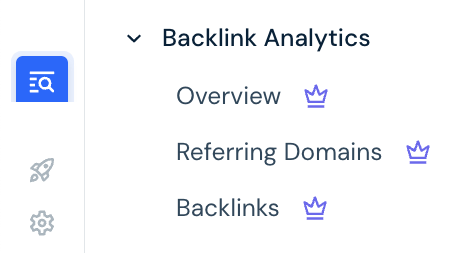
(It should be said that these key features are available not only in all of Semrush’s standard plans, but also in those of most competing SEO tools too — Ahrefs, Moz, SE Ranking, etc.)
This pricing and feature-access model makes Similarweb’s entry-level offering difficult to justify from an SEO perspective. While its Starter plan is priced in line with competing SEO tools, it withholds many of the features users typically expect at this level — and only unlocks them at a much higher price point.
For businesses and marketers primarily focused on SEO, this means Semrush provides far more practical functionality from day one, while Similarweb requires a substantially higher investment before it begins to resemble a full-featured SEO platform.
Historical data
Historical data helps you understand how a website’s rankings, traffic, and visibility have evolved over time — making it much easier to identify long-term SEO trends and assess the real impact of your optimization efforts.
Semrush is particularly strong here. On its ‘Pro+’ plan and higher, you get access to over 14 years of historical SEO data, allowing you to track long-term changes in keyword rankings, traffic patterns, backlink growth, and competitive positioning.
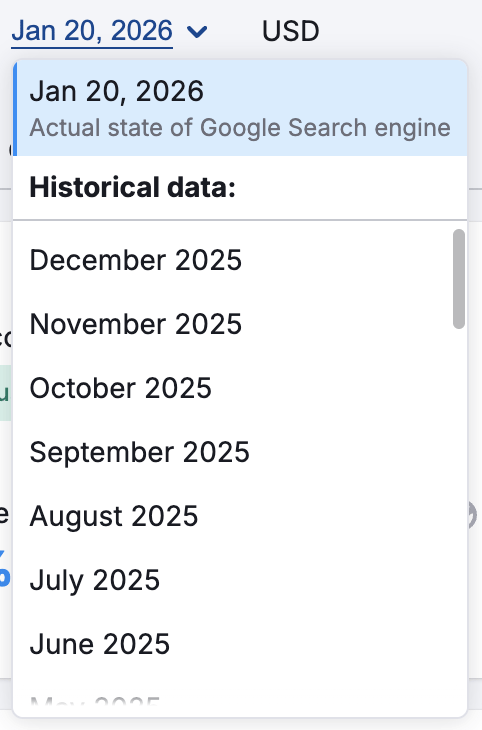
Similarweb’s approach is far more restrictive. Although its dataset goes back around 37 months, full access to this data is only available on its enterprise-level plans. On its standard subscriptions, historical data access is tightly capped — with users on both the ‘Competitive Intel’ and ‘Competitive Intel & SEO’ plans limited to just three months of history.
To unlock deeper historical insights with Similarweb, you’ll have to pay for very expensive add-ons — these typically cost $279 per month for 12 months of data, and $449 per month for 15 months.
The option to filter SEO data by country
For many users involved in SEO research, the ability to filter data by specific regions and countries is crucial. Doing so enables businesses to create SEO campaigns that target local markets effectively.
On Similarweb’s ‘Competitive Intel’ and ‘Competitive Intel & SEO’ plans, you only get access to worldwide results for any queries you make on the platform. Remarkably, the option to filter data by specific countries is only available on its custom-priced business plans.
By contrast, Semrush lets users specify countries and regions of interest on all plans, even its entry-level $199 per month ‘Starter’ plan.
The number of results you get per report
Semrush gives you access to between 10,000 and 50,000 results per report across all its standard (non-enterprise) plans — a generous allowance that scales as you move up the tiers.
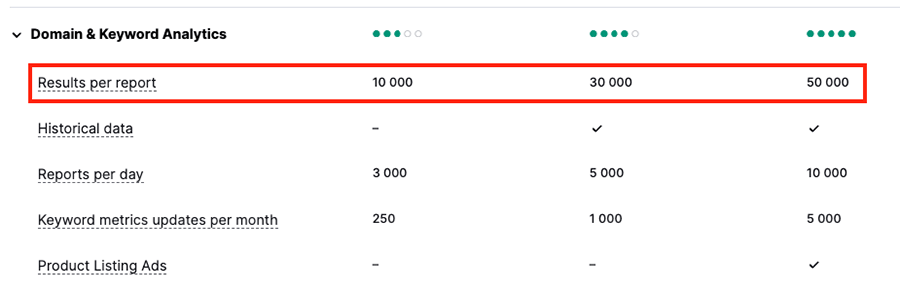
By contrast, Similarweb’s more affordable ‘Competitive Intel’ plan caps you at just 1,000 keyword results per report. To unlock 50,000 keyword results — the same volume you get with Semrush’s ‘Advanced’ plan — you’ll need to be on a custom Similarweb plan.
Database size
Similarweb’s database boasts information on 7 billion keywords and 200 million websites; it also contains data on 250 million ads.
But Semrush’s database contains much more data than this: 28.7 billion keywords, 808 million domain profiles and 1 billion Google ads.
So it’s pretty clear that in terms of the quantity of data (and based on my tests, its quality too!), the better-value tool of the two is Semrush.
Adding users to your account
Although all Semrush plans are for a single user only, the platform allows you to add additional users to your account for a per-user fee.
Fees for adding additional users in Semrush are as follows:
- Semrush Starter: +$45/mo per user
- Semrush Pro+: +$80/mo per user
- Semrush Advanced: +$100/mo per user
This makes scaling team access relatively affordable. For example, a five-user Semrush ‘Pro+’ account costs $619 per month, while even on the Advanced plan, a five-user setup comes in at $949 per month.
Similarweb lets you add additional users to your account too — but at a much higher cost.
On its ‘Competitive Intel’ plan ($199/month), adding users costs $174 per person, pushing a five-user account to $895 per month. On its ‘Competitive Intel & SEO’ plan ($399/month), extra users cost $349 each, bringing the total monthly cost for five users to a steep $1,795.
In short, team access becomes expensive very quickly on Similarweb, particularly if you need its SEO features.
So, for teams and agencies, the more practical and cost-effective choice overall is Semrush.
Free trial limitations
As I mentioned earlier, Similarweb’s free trial comes with very ungenerous limits of just 15 ‘actions’ per day.
And I found this to be completely inadequate when trying to put the tool through its paces. As I mentioned previously, the allowance lasted about 20 minutes while I was experimenting with Similarweb’s various tools and reports while researching this article.
By contrast, Semrush’s free trial gives you access to the full allowances of your chosen trial plan, which means that, unlike Similarweb, you can use all of its tools without running into daily use restrictions.
In terms of length, by default both Semrush and Similarweb’s trials last 7 days. However, from time to time Semrush makes an extended trial available, which doubles the trial period to 14 days.
Customer support
Semrush has a clear advantage over Similarweb when it comes to customer support channels, because it offers three channels of support: phone, chat, and email.
Similarweb, by contrast, only offers email and live chat support.
In terms of my experience with both customer service teams, I found Similarweb’s live chat support to be generally very prompt, and when I emailed a query to the Similarweb team, I received a response within about 24 hours.
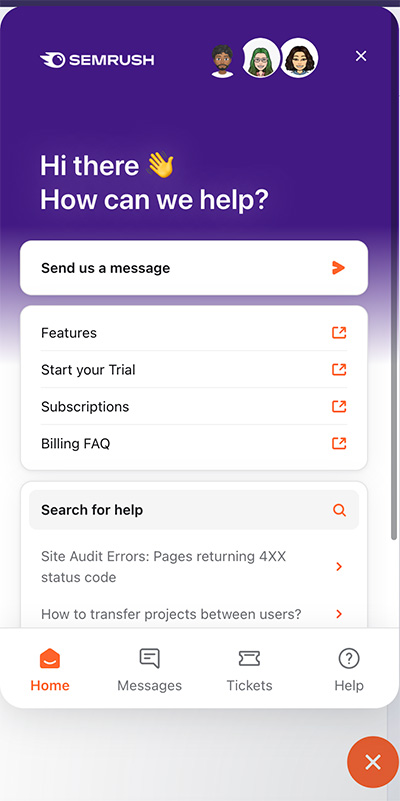
I found that Semrush makes it a bit easier (and quicker) to contact its support team, however — there’s an easily accessible support icon at the bottom right corner of the Semrush interface that, when clicked, opens up the platform’s support portal.
By contrast, accessing help in Similarweb requires a slightly annoying 3-click process before you get to the ‘Contact Support’ button.
Both platforms also provide customer knowledge centers with plenty of articles on using the main tools on offer.
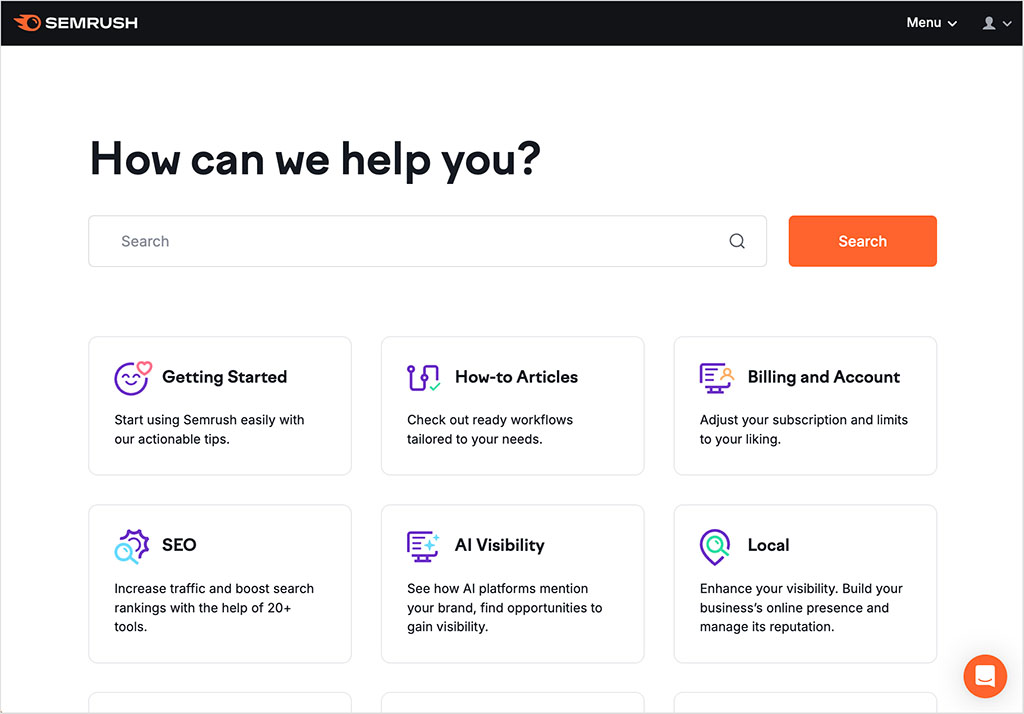
However, for me, the detail provided in Semrush’s articles is much more thorough than Similarweb’s, with lots of step-by-step guides available on getting the most out of every aspect of the platform’s features.
By contrast, I found the Similarweb help articles to be a bit basic — they didn’t give me as much of an understanding on how to really get the most out of the platform’s features as I would have liked.
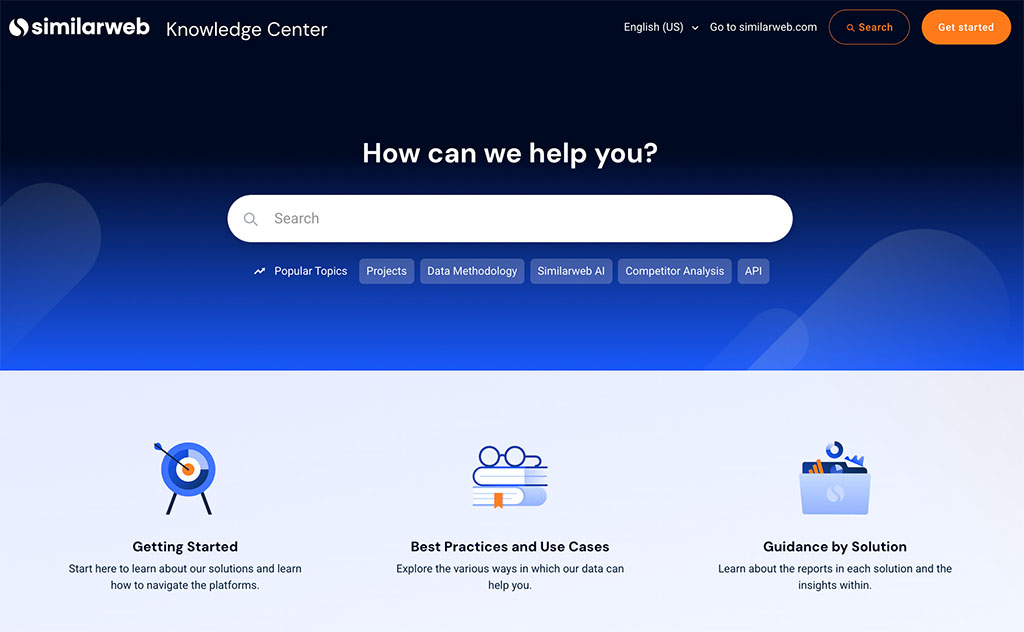
Additionally, I found that Similarweb’s help center contained several slightly confusing statements that left me scratching my head more than once.
For example, when I tried to ascertain whether or not Similarweb applies a limit to the number of keywords that can be tracked with its ‘Rank Tracker’ tool, I encountered the following statement:
There’s no limit to the amount of keywords a campaign is able to track. However, there may be a limit to how many keywords you can track based on your subscription. Reach out to your account manager to check or to add more keywords to your account.
For me, this type of equivocal language really doesn’t help the user grasp what their entitlements are when they pay for a subscription for the tool.
Semrush takes a much more transparent approach to giving you the information you need — both in terms of using the tool and key allowances on each plan.
User reviews
So far, I’ve focused on how Semrush and Similarweb compare in terms of features, pricing, and overall usability — but I also wanted to take a quick look at what real users think of both platforms.
The table below highlights feedback from Semrush and Similarweb users across three major software review platforms: Capterra, G2, and TrustRadius (figures are correct at the time of writing — January 2026).
| User review site | Semrush | Similarweb |
| Capterra | 4.6 /5 (2,312 reviews) | 4.6/5 (251 reviews) |
| G2 | 4.5/5 (3,353 reviews) | 4.5/5 (1,376 reviews) |
| TrustRadius* | 4.3/5 (769 reviews) | 4.3/5 (216 reviews) |
| Average score out of 5 | 4.5 | 4.5 |
* Ratings recalculated from an out-of-ten score
As you can see, both tools are rated very highly by their users — when it comes to user satisfaction, it’s effectively a draw.
That said, it’s worth noting that Semrush’s score is based on over 6,400 user reviews, compared to around 1,800 for Similarweb — giving its rating a significantly broader statistical base.
Semrush vs Similarweb: the verdict
Overall, it’s hard not to conclude that Semrush is the better SEO tool for most users. Unlike Similarweb, its feature set is fully focused on essential SEO tasks; it provides much more affordable access to its core tools; and it ultimately delivers a broader and more powerful SEO toolkit — particularly when it comes to technical SEO, keyword research, rank tracking, backlink analysis, and AI visibility.
For me, Semrush is also the more efficient tool to use, thanks to its cleaner interface, clearer workflows, and more intuitive reporting.
That said, Similarweb is probably as strong as Semrush when it comes to general website traffic analysis, with its deduplicated audience metric in particular standing out. It also provides data from more platforms, notably Amazon and YouTube, which can be useful for ecommerce merchants and content-led businesses.
And, if you can afford one of Similarweb’s expensive plans (a big if!), you’ll enjoy access to a more powerful site audit tool — one that performs twice as many SEO checks as the Semrush equivalent.
I’ll leave you with a summary of the main pros and cons of each tool below — and please feel free to leave any questions in the comments section below. We read them all and will do our best to help.
And remember — the best way to get a sense of which tool is right for you is to try them out yourself! You’ll find links to both platforms’ free trials below:
Pros and cons summary
Reasons I’d use Semrush over Similarweb
- Its keyword research database is much larger than Similarweb’s.
- Its backlink checker tool is available on all plans.
- Its interface is easier to use.
- It lets you access data on a per-country level on all plans.
- It includes powerful AI visibility features on all plans.
- Its customer support offering is more comprehensive.
- It lets you create topic clusters.
- You can perform site audits on all Semrush plans.
- It provides dedicated content marketing tools.
- Its PPC research data and features are more comprehensive than Similarweb’s.
- It’s much cheaper to add additional users to your account in Semrush.
- Its free trial gives you more access to tools and data than the Similarweb equivalent.
Reasons I’d use Similarweb over Semrush
- It gives you a useful ‘deduplicated audience’ metric that helps you work out the ‘real’ number of unique visitors to a site.
- It lets you see the number of ‘zero-click’ searches for a given keyword.
- It provides keyword suggestions for Amazon and YouTube (Semrush only provides them for Google).
- It gives you useful keyword data based on industry sectors.
- Its site auditing feature is more powerful (but isn’t available unless you’re on a very expensive enterprise-level plan).
Alternatives to Semrush and Similarweb
Semrush and Similarweb are only two of many options when it comes to SEO tools. Some key alternatives include:
- Ahrefs
- SpyFu
- Growthbar
- SE Ranking
- Moz
- Serpstat
- Mangools
- SEO Power Suite
- Majestic
- Ubersuggest
We have reviews and comparisons of some of these available on our site — just follow the links below to access them:
You might also like to read our full Semrush review here, or our full Similarweb review here. And you can check out our three-way comparison of Ahrefs, Moz and Semrush in the video below.
You may also find the SEO playlist on the Style Factory YouTube channel a very useful resource when it comes to understanding basic SEO topics like increasing website visibility, carrying out keyword research and local SEO.
Frequently asked questions about Semrush vs Similarweb
Is Semrush or Similarweb better for SEO?
If you’re choosing between the two specifically as SEO tools, Semrush is the better option for most users. This is because unlike Similarweb, it provides features for keyword research, rank tracking, backlink analysis, site audits, and AI visibility tracking on all standard plans. Similarweb offers some impressive SEO features too, but most of these are locked behind very expensive plans aimed at enterprise users only.
What’s the main difference between Semrush and Similarweb?
The key difference is focus. Semrush is a dedicated SEO and digital marketing platform designed for hands-on optimization work, while Similarweb is primarily a market intelligence and traffic analysis tool. Similarweb excels at high-level audience insights, but Semrush is far more practical for day-to-day SEO tasks.
Does Similarweb include backlink analysis?
Yes — but only on higher-tier plans. Similarweb’s entry-level subscriptions provide little to no individual backlink data, which limits their usefulness for SEO campaigns. Semrush, by contrast, includes comprehensive backlink analysis on all its plans.
Which tool has better keyword research features?
Semrush does. It has a much larger keyword database, more advanced filtering options, better country-level data, and clearer keyword difficulty metrics — including estimates of how many backlinks you’ll need to rank. Similarweb offers some unique insights, such as zero-click search data, but its keyword research toolkit is less comprehensive overall.
Which platform offers better value for money, Semrush or Similarweb?
Semrush offers significantly better value for money for SEO-focused users. It provides access to essential SEO tools on all plans, supports per-country data filtering, and includes AI visibility features without forcing users onto enterprise-level plans. Similarweb becomes expensive much earlier, and before it delivers a complete SEO feature set.
Update details
This article was updated on January 28, 2026. The following updates were made:
- Product screenshots were updated.
- A user reviews section was added.
- Pricing information for both platforms was updated.
- The referring domains test data was updated.
- Information was added on AI visibility features in both tools.
- A new FAQs section was added.
- A new ‘quick verdict’ section was added.

No comments