


If you want more traffic and sales from your online store, SEO is one of the best ways to get them. But a lot of ecommerce SEO advice focuses on the obvious stuff — adding keywords, writing a few blog posts, and hoping Google sends you customers.
When working on ecommerce stores for clients, I’ve found that some of the biggest wins come from things store owners overlook — like improving category pages, using internal links properly, and creating separate pages for high-value product variants.
(That last one can be a real game changer — I’ll explain why shortly.)
So in this post I thought I’d share twelve ecommerce SEO tips that can absolutely transform your online store’s visibility in search. If you have any questions, do leave them in the comments.
1. Perform keyword research
Before you write product titles, category copy, or blog posts, you need to know what people are actually searching for.
Keyword research is your friend here. It lets you find out:
- the phrases that people are entering into search engines when searching for products like yours
- the volume of searches for those keywords
- how hard it will be to rank for each keyword (keyword difficulty).
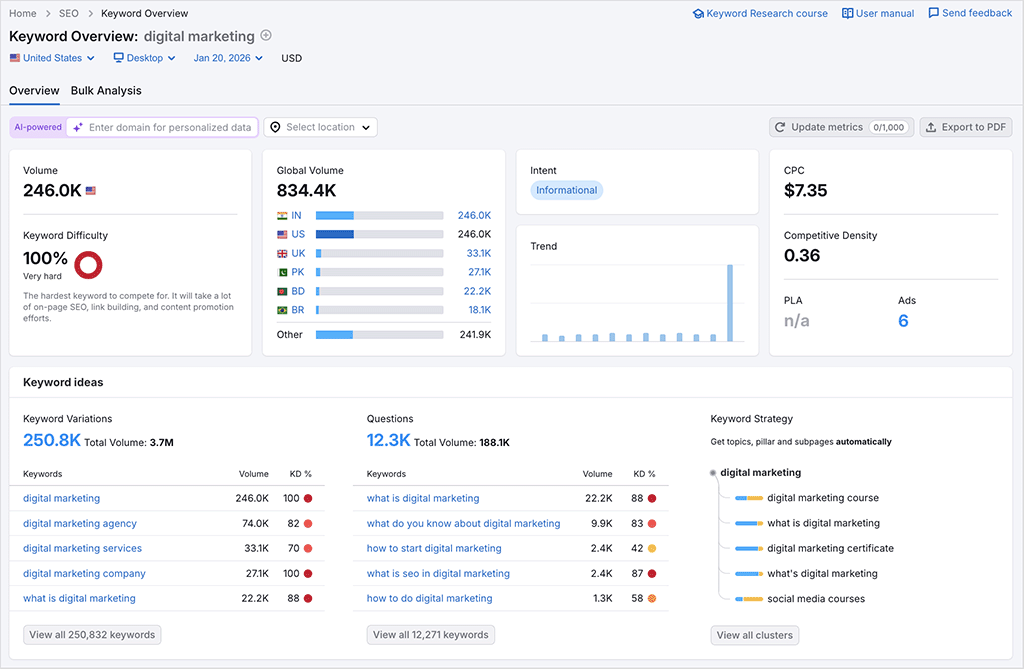
You can use SEO tools like Ahrefs or Semrush to do ecommerce keyword research, and incorporate the terms they suggest into your product names, descriptions, category pages, and blog content.
For more details on how to do keyword research, just watch our video guide to the topic below.
Advanced tip: create the right type of content for the keywords you’re targeting
Keyword research for an ecommerce store is not simply about finding popular phrases and adding them to product descriptions. You also need to work out which type of page should target each keyword.
As a general rule:
- broad product terms usually belong on category pages (e.g. “coffee grinders”)
- specific model or product terms belong on product pages (“Baratza Encore coffee grinder”)
- comparison and question-based terms are best deployed on buying guides or blog posts (“best coffee grinder for espresso”)
- high-demand product variants may justify dedicated product pages of their own (“white Baratza Encore”).
When we’re unsure what type of page to use to target a particular keyword, we look at the type of content that Google is currently ranking for it.
If the search results are dominated by category pages, this indicates that trying to rank a short blog post for the term may be difficult. If Google is displaying detailed buying guides for a particular query, this is a clue that a basic product page is unlikely to satisfy the search intent.
2. Create a crawl-friendly site structure
A clear site architecture helps Google crawl your store and understand which pages matter most. So:
- group products into logical categories and subcategories
- ensure every important product can be reached in just a couple of clicks from your homepage.
Advanced tip: watch out for orphan pages
A good site structure is not just about keeping pages close to the homepage. You also need to make sure that every important product and category page has at least one meaningful internal link pointing to it.
Pages with no internal links are known as orphan pages, and search engines may struggle to discover or prioritize them.
3. Improve your category pages
Category pages often target valuable commercial keywords — things like “men’s leather jackets,” “organic skincare products,” or “electric guitars.”
But many store owners just leave them as plain, text-free product grids.
To improve them,
- add helpful introductory copy
- include relevant keywords naturally
- consider adding a short buying guide or FAQs section at the bottom.
4. Optimize your product pages
Make sure your main product keyword appears naturally in your product titles, product descriptions, meta descriptions, and URLs.
And don’t just copy manufacturer descriptions. Instead, use original copy that explains the product’s benefits, use cases, sizing, materials, and key selling points.
Advanced tip: answer the questions that stop people buying
A product page should usually do more than just describe an item. It should answer the questions shoppers are likely to have before purchasing — like whether it is compatible with another product, how sizing works, what is included, how it compares with similar models, and how quickly it can be delivered. Including this information can help the page rank for more specific searches while also improving conversion rates.
You can use customer support queries, product reviews, and Search Console data to identify the questions worth answering.
5. Build backlinks
Backlinks are links from other websites to yours, and getting more of them remains one of the most important ways to improve your search rankings.
For ecommerce stores, good links can come from suppliers, stockist pages, product roundups, review sites, bloggers, and useful resources you create yourself.
Avoid buying spammy links, however — low-quality link building can damage your rankings.
Advanced tip: create assets that are genuinely worth linking to
Product pages rarely attract backlinks naturally. But useful resources related to the products you sell — such as buying guides, calculators, statistics, and comparison tools — often do.
(Statistics posts in particular can be great for generating backlinks — so long as they contain original research.)
6. Build internal links intelligently
Backlinks help bring authority to your site. Internal links help move that authority around it.
So link from blog posts to relevant products and categories. Link from category pages to important subcategories. And link between related products where it genuinely helps shoppers.
All this can push newer or less popular pages higher up the search rankings.
Advanced tip: prioritize pages that are close to ranking well
Use Google Search Console to identify important product or category pages that are already appearing near the top of the search results — for example, in positions 10 to 15. Then look for relevant, authoritative pages on your site that you can link to them from.
We’ve seen this smart distribution of ‘link juice’ deliver significant improvements in rankings to multiple pages on ecommerce sites we manage.
7. Create dedicated pages for important product variants
Many merchants put all versions of a product — ones involving things like colors, sizes, or materials — on one page, letting users choose their preferred version using a drop-down menu.
That’s often fine.
But sometimes, a specific variant — like a “black Stratocaster guitar” or “red leather shoes” — may be generating a lot of searches, while being easier to rank for than a more generic product name (like “guitar” or “shoes”).
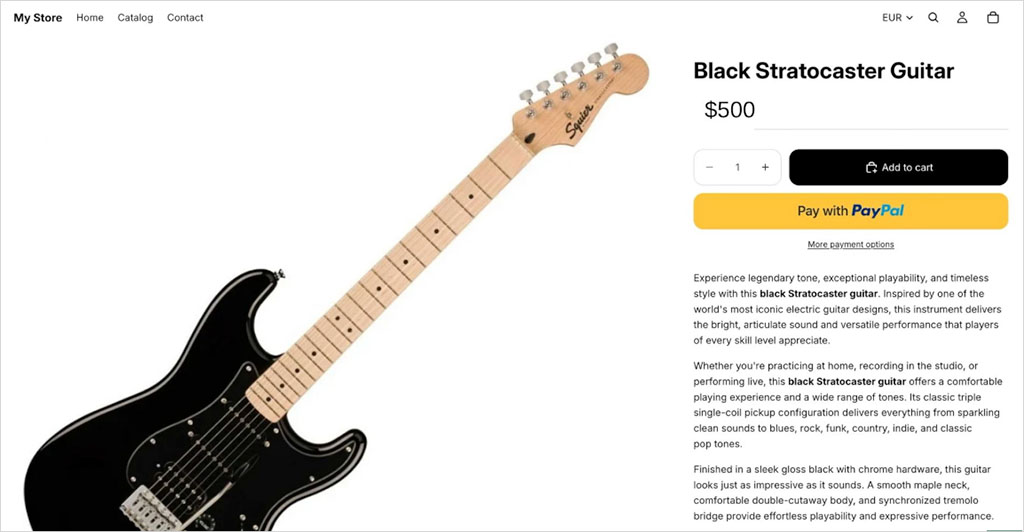
If keyword research shows that lots of people are searching for a specific product variant, consider creating a dedicated page for it. This can help you capture significantly more traffic than relying on a generic product page.
Advanced tip: make every variant page genuinely distinct
Changing only the color name in the title is not enough. If you decide to create an individual product page for a variant, it should contain its own images, availability details, descriptive copy, metadata, and other information relevant to that version of your product.
And only create a separate page for a product variant when it has meaningful search demand.
8. Strengthen trust signals
When ranking websites, Google places a big emphasis on trust signals (E-E-A-T: “experience, expertise, authoritativeness, and trustworthiness”). Its algorithms want to see evidence that your business is credible, and that real people buy from it.
So make sure your store contains genuine product photos, contact details, shipping information, returns policies, support information, and a strong “About Us” page.
And encourage happy customers to review your products — both on your store and on platforms like Trustpilot and Google Reviews.
Advanced tip: self-assess your content for reliability
After you’ve created a piece of content, assess it against Google’s ‘helpful content’ criteria. You can do this by answering the questions in Google’s “creating reliable content” resource.
9. Add product schema
Schema markup helps search engines understand your products.
It can also help Google show richer information in search results, including colors, prices, availability, ratings, and review details. (See my screenshot below for an example of this in action).
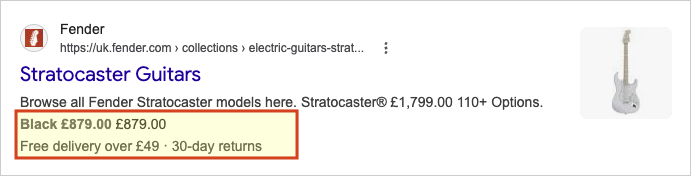
Many ecommerce platforms add basic product schema automatically, but there are times when you might want to add your own.
⚠️ Important: after adding schema, test your pages with Google’s Rich Results Test tool and monitor Google Search Console for structured-data errors.
10. Publish buying guides and blog content
Product and category pages are important — but blog content can help you reach shoppers earlier in the buying journey. Posts like “how to choose a coffee grinder” or “best running shoes for beginners” can attract people who aren’t ready to buy yet, but are getting close.
So, consider writing blog posts that are genuinely helpful to your audience — and then link from them to relevant products in your store.
For an in-depth guide on how to use content to attract visits to your site, check out our content marketing video below.
Advanced tip: prioritize content that can lead to sales
Don’t choose blog topics purely because they have high search volumes. Prioritize subjects that relate closely to products you sell (and ones that have healthy profit margins).
A guide attracting 500 well-qualified visitors searching for “best coffee grinder for espresso” may be more valuable than a general coffee article attracting thousands of readers with little intention to buy.
And once you’ve published your content, use internal links and product recommendations to connect it to the most relevant product pages on your store.
11. Register with Google Search Console
Search Console lets you submit your sitemap, check whether your pages have been indexed by Google, and see which keywords are bringing people to your site.
This tool can help Google discover your content, and gives you lots of ways to spot SEO issues.
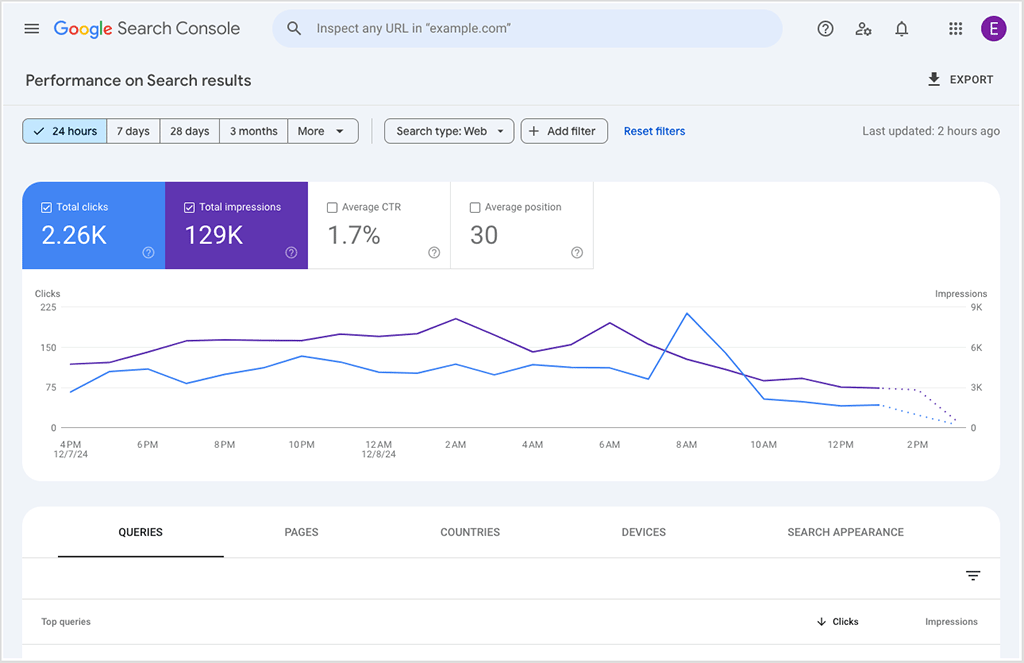
Google Search Console also lets you keep tabs on some technical SEO issues — like Core Web Vitals.
(Core Web Vitals are metrics Google uses to measure the speed and stability of your site — if your ecommerce site loads quickly and doesn’t overwhelm your users with multiple popups, it’s more likely to score highly here, and perform better in search.)
Bonus tip: if you sell in person, register with Google Business too
If you sell products in a physical location (for example, a showroom, market stall, or retail outlet), create a Google Business profile too.
This can help your business appear in local search results and Google Maps, where you can display details such as your address, opening hours, photos, reviews, and website.
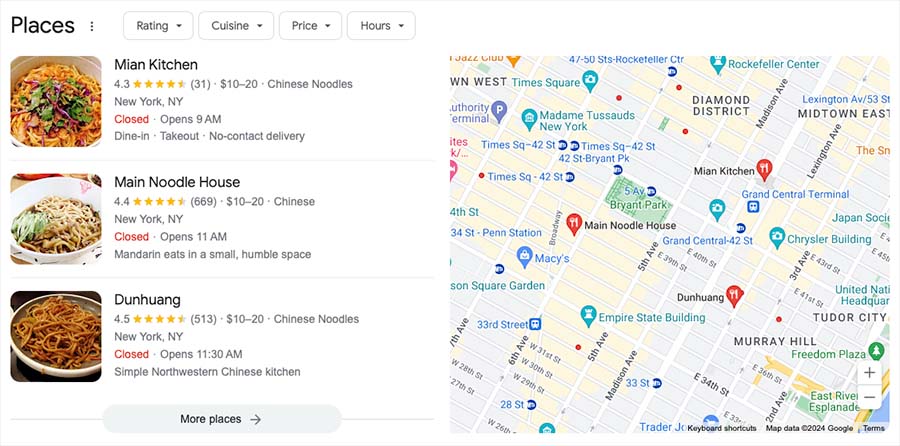
So long as it’s up to date and contains reviews from genuine customers, it can boost trust signals too.
12. Monitor performance and refine
SEO isn’t something you do once and forget about. You need to keep tabs on how your site is performing in search, and constantly strive to improve its rankings.
Use Google Search Console and analytics tools to see which pages are getting impressions, clicks, traffic, and sales. And run regular site audits to catch broken links, missing metadata, slow pages, or indexing issues.
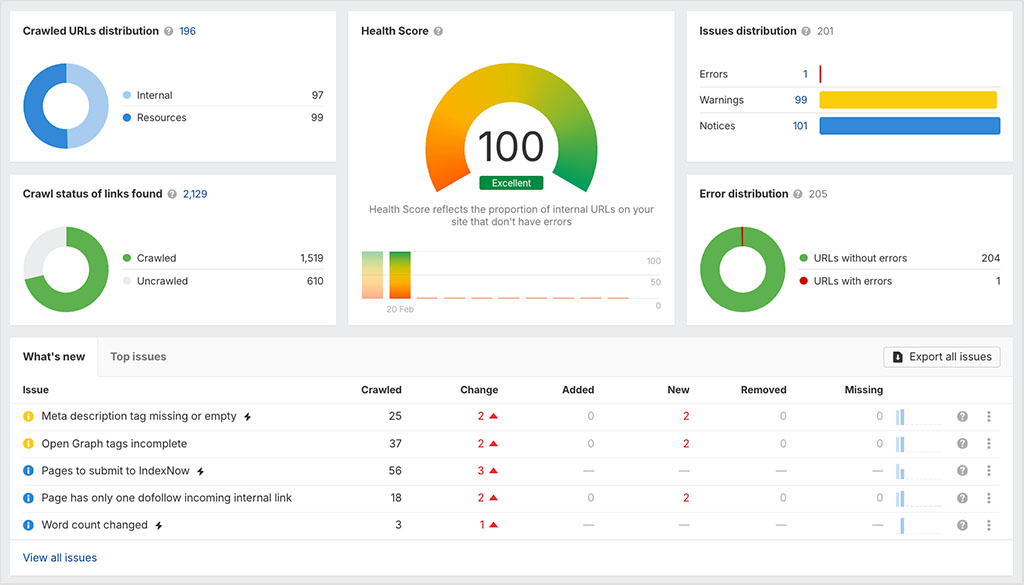
(You can watch our video below for a full guide to doing a site audit).
So there you have it — 12 practical ecommerce SEO tips that can help your store attract more traffic and sales.
For more help with SEO, just download our free SEO toolkit using the form below.
Don’t miss out on our free SEO toolkit
For a limited time only we’re offering our readers some excellent free SEO tools and resources. Sign up now to immediately receive:
- our downloadable cheatsheet containing the 20 key steps to ranking highly in search results
- extended free trials and discounts for leading SEO tools
- our downloadable cheatsheet on how to grow organic traffic to a blog
- 2 in-depth guides to SEO
- ongoing free tips and advice on SEO and growing your business
And if you have any questions about ecommerce SEO, leave them in the comments. We read them all and will do our best to help.

No comments